Several Questions About Macrium Backup and Restore

utahperson

New member
Local time
2:47 PM
Messages
4
I use Windows 7 64 Bit. 1 TB HD. 8 GB Ram.


I recently used Macrium to make a image of my hard drive. I put the image I made onto my external hard drive from my desktop. Before I did this I made a rescue disk on a DVD. I have several questions:

If I have problems with my computer what should I do first?

Do I try the rescue DVD I made?

Do I try and restore the image I made?

What is the purpose of making a Bootable Windows PE USB Stick? And if I make one
when would I use it?


If I have to restore my system and use the image to restore will it just overwrite
the original partitions and operating system files?


Thank you.
 

My Computer My Computer

At a glance

Windows 7 64 bitAMD Phenom 2 Quad Core8 GB HDDATI Radeon 3200
Computer type
PC/Desktop
Computer Manufacturer/Model Number
Gateway
OS
Windows 7 64 bit
CPU
AMD Phenom 2 Quad Core
Memory
8 GB HDD
Graphics Card(s)
ATI Radeon 3200
Hard Drives
1 TB HDD
Antivirus
Avast
Browser
Firefox
Do I try the rescue DVD I made?

Do I try and restore the image I made?
That is the same thing. You need to boot the PC with the rescue CD, navigate to the image and restore it. Here is a recovery video tutorial by our friend Keith.

Macrium Reflect - Restore With WinRE - YouTube


What is the purpose of making a Bootable Windows PE USB Stick? And if I make one
when would I use it?
The stick does the same as the CD. It is mainly used for systems that have no CD reader, but may be handy otherwise too. If you have the CD, you don't need it.


If I have to restore my system and use the image to restore will it just overwrite
the original partitions and operating system files?
Yes, that's exactly what happens.

Important: Do not forget to image the System Partition (the little 100MB partition). The day your bootmgr is corrupted you will need to restore that. - It happens sometimes.
 

My Computer My Computer

At a glance

Vista, Windows7, Mint Mate, Zorin, Windows 8from 1.6GHz Duo to i7
Computer Manufacturer/Model Number
HP, Dell, Gateway, Toshiba - 4 laptops and 2 desktops
OS
Vista, Windows7, Mint Mate, Zorin, Windows 8
CPU
from 1.6GHz Duo to i7
Monitor(s) Displays
2x HP w2207
Hard Drives
5x HDD, 7x SSD, 12x Externals
Keyboard
with trackball - no mices
Mouse
Trackball mice
Internet Speed
DSL 6000
Thank You

I will try your suggestions. But please explain this:

You stated: Important: Do not forget to image the System Partition (the little 100MB partition). The day your bootmgr is corrupted you will need to restore that. - It happens sometimes.


I just clicked on Image Backup. When I did this did this also include the System Partition? I did not
see System Partition anywhere.
 

My Computer My Computer

At a glance

Windows 7 64 bitAMD Phenom 2 Quad Core8 GB HDDATI Radeon 3200
Computer type
PC/Desktop
Computer Manufacturer/Model Number
Gateway
OS
Windows 7 64 bit
CPU
AMD Phenom 2 Quad Core
Memory
8 GB HDD
Graphics Card(s)
ATI Radeon 3200
Hard Drives
1 TB HDD
Antivirus
Avast
Browser
Firefox
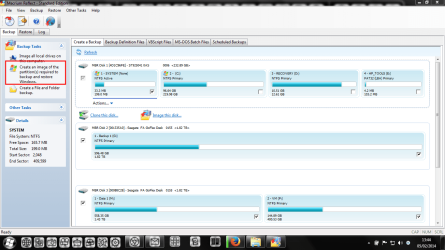
Welcome to Seven Forums utahperson.If you are not sure what partitions to backup let Macrium decide and press the button to back up partitions needed to restore Windows.

screenshot295_2014-02-05.png
 

My Computer My Computer

At a glance

Microsoft Windows 7 Home Premium 64-bit Servi...Intel(R) Core(TM) i3 CPU M 330 @ 2.13GHz8 GB DDR3Intel(R) HD Graphics
Computer type
Laptop
Computer Manufacturer/Model Number
Hewlett-Packard/G62-107SA Notebook
OS
Microsoft Windows 7 Home Premium 64-bit Service Pack 1
CPU
Intel(R) Core(TM) i3 CPU M 330 @ 2.13GHz
Motherboard
Hewlett-Packard 1425
Memory
8 GB DDR3
Graphics Card(s)
Intel(R) HD Graphics
Sound Card
Realtek High Definition Audio
Monitor(s) Displays
Builtin
Screen Resolution
1366 x 768 x 32 bits (4294967296 colors) @ 60 Hz
Hard Drives
250 GB SATA Hard Disk Drive 7200 rpm
2TB Seagate GoFlex USB 2 Drive
1TB Iomega Prestige USB 2 Drive
1.5TB Iomega Prestige USB 2 Drive (Samsung)
2TB WD MyBook Live NAS.
Mouse
Logitech Anywhere MX
Internet Speed
152 Mbs download 10 Mbs upload
Antivirus
Norton 360
Browser
Chrome
Back
Top