
hi...
i always got this problem since i bought dell studio 1737.and i searched on web,and noticed that this is more common with dell laptops...
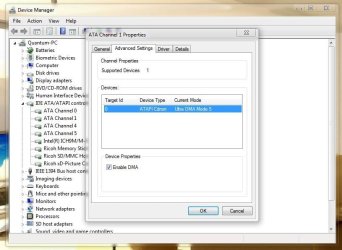
i have windows 7 ultimate x64 and when i try to burn windows 7 image on dvd using ultra iso to make a bootable disk,it says DVD R/RW requires settings to use DAO mode,i contacted dell and got to know that my DVD writer is in PIO mode and must be changed to DAO or DMA....i dun know which is right,ultra iso says,DAO mode andweb search says,DMA mode...
1..i contacted dell and they gave a little utility to install,i did...but it didnt work and my drive is still in PIO mode.
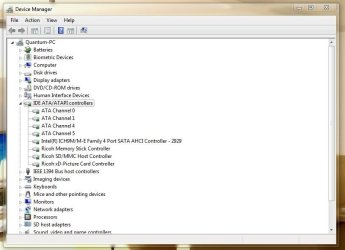
2..then i searched web and they told me that i go in device manager and uninstall driver for primary and secondary IDE drives and reboot and it shall go to DMA mode itself,but i dun see primary and secondary IDE in device manager (i have attached pix)
url: (DMA reverts to PIO | Windows Problem Solver) and (Enable DMA mode in Windows XP)
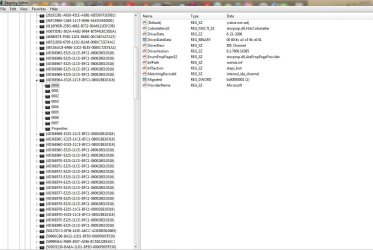
3..i got some registry solution on web too,but again same,they say to delete MasterIdDataChecksum
SlaveIdDataChecksum but i dun find in my regedit path (HKEY_LOCAL_MACHINE\SYSTEM\CurrentControlSet\Control\
Class\{4D36E96A-E325-11CE-BFC1-08002BE10318}\000x)
pic attached
url (Getting back to DMA mode in WindowsXP | Sniptools | Miscellaneous)
now tell me what i do....
i always got this problem since i bought dell studio 1737.and i searched on web,and noticed that this is more common with dell laptops...
i have windows 7 ultimate x64 and when i try to burn windows 7 image on dvd using ultra iso to make a bootable disk,it says DVD R/RW requires settings to use DAO mode,i contacted dell and got to know that my DVD writer is in PIO mode and must be changed to DAO or DMA....i dun know which is right,ultra iso says,DAO mode andweb search says,DMA mode...
1..i contacted dell and they gave a little utility to install,i did...but it didnt work and my drive is still in PIO mode.
2..then i searched web and they told me that i go in device manager and uninstall driver for primary and secondary IDE drives and reboot and it shall go to DMA mode itself,but i dun see primary and secondary IDE in device manager (i have attached pix)
url: (DMA reverts to PIO | Windows Problem Solver) and (Enable DMA mode in Windows XP)
3..i got some registry solution on web too,but again same,they say to delete MasterIdDataChecksum
SlaveIdDataChecksum but i dun find in my regedit path (HKEY_LOCAL_MACHINE\SYSTEM\CurrentControlSet\Control\
Class\{4D36E96A-E325-11CE-BFC1-08002BE10318}\000x)
pic attached
url (Getting back to DMA mode in WindowsXP | Sniptools | Miscellaneous)
now tell me what i do....
Attachments
My Computer
- Computer Manufacturer/Model Number
- Dell Studio 1737
- OS
- windows 7 ultimate x64
- CPU
- 2.18ghz DC
- Memory
- 4GB
- Graphics Card(s)
- 1674MB
- Monitor(s) Displays
- 1440*900
- Hard Drives
- 320+500

