

Hi everyone,
I recently got a disturbing problem on my studio workstation - I was stupid enough to install iTunes, realized the havoc it made to services and general resources so I uninstalled it. Unfortunately my 4-port USB-Hub ceased to serve me afterwards, had to reset and move it to the first USB-port on my mainboard to get it working. All seemed fine, however after abt. 30 min uptime it gets saggy, a DPC latency check reveals nasty 1000+ms glitches every 3-4 sec. This ofcourse makes the machine totally unusable for audio/video production.
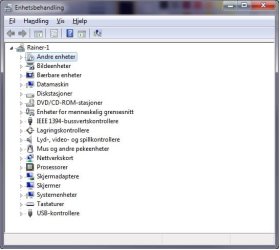
I check the Devices panel and find a new "other devices" subsection, filled with OVER 200(!!) "Unknown Devices". I've NEVER ever seen something remotely similar (see attachments)... these are ofcourse the culprits to my W7 sag so they need to go.
Why do these appear without hardware or services/software demanding hardware, and how can remove these?? Preferrably all at once (not possible in device manager), but stopping them from reappearing after I uninstall them one by one would do by far.
What I already have checked so far:
- that nothing starts on boot that shouldn't (user, all users and registry)
- that no unfamiliar services are running
- that there are definately NOT 250 hardware peripherals connected.
- that all drivers are installed correctly - the unknowns are all ghosts in addition to these..
If anyone has some tricks, tips or things to try I would be insanely grateful, I need my studio working longer than 30-40min, it's hopeless...
I recently got a disturbing problem on my studio workstation - I was stupid enough to install iTunes, realized the havoc it made to services and general resources so I uninstalled it. Unfortunately my 4-port USB-Hub ceased to serve me afterwards, had to reset and move it to the first USB-port on my mainboard to get it working. All seemed fine, however after abt. 30 min uptime it gets saggy, a DPC latency check reveals nasty 1000+ms glitches every 3-4 sec. This ofcourse makes the machine totally unusable for audio/video production.
I check the Devices panel and find a new "other devices" subsection, filled with OVER 200(!!) "Unknown Devices". I've NEVER ever seen something remotely similar (see attachments)... these are ofcourse the culprits to my W7 sag so they need to go.
Why do these appear without hardware or services/software demanding hardware, and how can remove these?? Preferrably all at once (not possible in device manager), but stopping them from reappearing after I uninstall them one by one would do by far.
What I already have checked so far:
- that nothing starts on boot that shouldn't (user, all users and registry)
- that no unfamiliar services are running
- that there are definately NOT 250 hardware peripherals connected.
- that all drivers are installed correctly - the unknowns are all ghosts in addition to these..
If anyone has some tricks, tips or things to try I would be insanely grateful, I need my studio working longer than 30-40min, it's hopeless...
Attachments

My Computer
- Computer Manufacturer/Model Number
- -
- OS
- Windows 7 Ultimate x64
- CPU
- Intel Core i7 960
- Motherboard
- Gigabyte X58A-UD3R r13
- Memory
- 12GB Mushkin DDR3 Triple Channel
- Graphics Card(s)
- ZOTAC GeForce GTX 560Ti 1GB PhysX CUDA
- Sound Card
- M-Audio ProFire 610
- Monitor(s) Displays
- Samsung SyncMaster 226BW + Benq FP222Wa
- Screen Resolution
- 3360x1024
- Hard Drives
- RAID 2x OCZ 120GB SSD S-ATA III (System)
RAID 2x Seagate 1TB S-ATA III (Recording)
1x WD Black Edition 7200 2TB
2x WD Black Edition 7200 1TB (Sample archive)
2x WD Caviar 7200 500GB
1x Cavalry Caum 7200 2TB
- PSU
- Thermaltake Toughpower XT
- Case
- CoolerMaster Stacker v2.0
- Cooling
- Antec KÜHLER H2O 620
- Keyboard
- Logitech diNivo Laser Desktop
- Mouse
- Logitech MX-900
- Internet Speed
- VDSL 40/10
- Other Info
- It is a DAW. Mostly.
