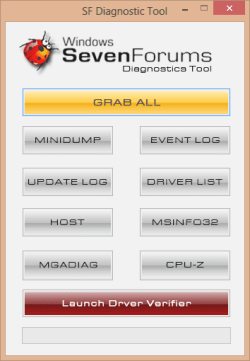
SF Diagnostic Tool - Using for Troubleshooting

Using SF Diagnostic Tool v5 For Troubleshooting

   Information
The SF Diagnostic Tool and SF Debug Tool is used to collect diagnostic information from your computer required to analysis Blue Screen of Death (BSOD) and other troubleshooting purposes for Vista, Windows 7, and Windows 8.

You must be logged in as an administrator to be able to use either tool.

   Note
SF Diagnostic Tool created by Shyam (Capt.Jack Sparrow).

Changelog for 5.0.0.6
  • Fixed typo in button
  • Added DXDIAG log
  • Added System Info Log - Log will also contain product ID, I was told with product ID we could find if Windows is genuine or not.
  • Minor bug fixes
   Warning
Some antivirus or firewall programs may detect SF Diagnostic Tool as a Trojan. It's just a False positive because the publisher is unknown.

There is nothing to worry about as the SF Diagnostic Tool is 100% safe and will not harm your computer.


Here's How:

1. Click/tap on the Download button below to download SF Diagnostic Tool.
Download


2. Save the ZIP file to your desktop, open it, and extract (drag and drop) the SF_Diagnostic_Tool.exe file to your desktop.

3. Right click on or press and hold the extracted SF_Diagnostic_Tool.exe file, and click/tap on Run as administrator.

4. If prompted by UAC, then click/tap on Yes.

5. Click/tap on the Grab All button, and click/tap on OK for each notice dialog until it's finished.screenshot.png
Success.jpg
6. You will now have a folder saved on your Desktop with the name of SF_DD_MM_YYYY (SF_day_month_year) that includes the information from each button in the tool.

7. ZIP the SF_DD_MM_YYYY folder, then rename the ZIP folder to your user name here at Vista Forums, Seven Forums, or Eight Forums.

8. When you are finished, you can close the SF Diagnostic Tool.


FAQ

1, If you're getting this error below, then instead of clicking on Grab All, click the buttons one by one in order to see which one is giving you the error.

Code:
************* Exception Text **************
System.IO.DirectoryNotFoundException: Could not find a part of the path '\\Desktop\SF_19-04-2013'.
at System.IO.__Error.WinIOError(Int32 errorCode, String maybeFullPath)
at System.IO.Directory.InternalCreateDirectory(String fullPath, String path, DirectorySecurity dirSecurity)
at System.IO.Directory.CreateDirectory(String path, DirectorySecurity directorySecurity)
at System.IO.Directory.CreateDirectory(String path)
at SF_Diagnostic_Tool.Form1.Button1_Click(Object sender, EventArgs e)
at System.Windows.Forms.Control.OnClick(EventArgs e)
at System.Windows.Forms.Button.OnClick(EventArgs e)
at System.Windows.Forms.Button.OnMouseUp(MouseEventArgs mevent)
at System.Windows.Forms.Control.WmMouseUp(Message& m, MouseButtons button, Int32 clicks)
at System.Windows.Forms.Control.WndProc(Message& m)
at System.Windows.Forms.ButtonBase.WndProc(Message& m)
at System.Windows.Forms.Button.WndProc(Message& m)
at System.Windows.Forms.Control.ControlNativeWindow.OnMessage(Message& m)
at System.Windows.Forms.Control.ControlNativeWindow.WndProc(Message& m)
at System.Windows.Forms.NativeWindow.Callback(IntPtr hWnd, Int32 msg, IntPtr wparam, IntPtr lparam)
 
 
************** Loaded Assemblies **************
mscorlib
Assembly Version: 2.0.0.0
Win32 Version: 2.0.50727.5466 (Win7SP1GDR.050727-5400)
CodeBase: file:///C:/Windows/Microsoft.NET/Framework/v2.0.50727/mscorlib.dll
----------------------------------------
SF Diagnostic Tool
Assembly Version: 5.0.0.6
Win32 Version: 5.0.0.6
CodeBase: file:///C:/Users/dagbel/Desktop/SF_Diagnostic_Tool.exe
----------------------------------------
Microsoft.VisualBasic
Assembly Version: 8.0.0.0
Win32 Version: 8.0.50727.5420 (Win7SP1.050727-5400)
CodeBase: file:///C:/Windows/assembly/GAC_MSIL/Microsoft.VisualBasic/8.0.0.0__b03f5f7f11d50a3a/Microsoft.VisualBasic.dll
----------------------------------------
System.Windows.Forms
Assembly Version: 2.0.0.0
Win32 Version: 2.0.50727.5468 (Win7SP1GDR.050727-5400)
CodeBase: file:///C:/Windows/assembly/GAC_MSIL/System.Windows.Forms/2.0.0.0__b77a5c561934e089/System.Windows.Forms.dll
----------------------------------------
System
Assembly Version: 2.0.0.0
Win32 Version: 2.0.50727.5467 (Win7SP1GDR.050727-5400)
CodeBase: file:///C:/Windows/assembly/GAC_MSIL/System/2.0.0.0__b77a5c561934e089/System.dll
----------------------------------------
System.Drawing
Assembly Version: 2.0.0.0
Win32 Version: 2.0.50727.5467 (Win7SP1GDR.050727-5400)
CodeBase: file:///C:/Windows/assembly/GAC_MSIL/System.Drawing/2.0.0.0__b03f5f7f11d50a3a/System.Drawing.dll
----------------------------------------
System.Runtime.Remoting
Assembly Version: 2.0.0.0
Win32 Version: 2.0.50727.5420 (Win7SP1.050727-5400)
CodeBase: file:///C:/Windows/assembly/GAC_MSIL/System.Runtime.Remoting/2.0.0.0__b77a5c561934e089/System.Runtime.Remoting.dll
----------------------------------------
 
************** JIT Debugging **************
To enable just-in-time (JIT) debugging, the .config file for this
application or computer (machine.config) must have the
jitDebugging value set in the system.windows.forms section.
The application must also be compiled with debugging
enabled.
 
For example:
 
<configuration>
<system.windows.forms jitDebugging="true" />
</configuration>
 
When JIT debugging is enabled, any unhandled exception
will be sent to the JIT debugger registered on the computer
rather than be handled by this dialog box.
2, I have given the default location %userprofile%\Desktop as the default location. If it's not accessible then the tool will not work. If it's not getting created that means the default locations in the registry is messed up.


Attachments

Last edited by a moderator:
Hello
Can i run this in safe mode?

I have a severely BSODing system here, not sure i can keep it running long enough to run the tools.
 

My Computer My Computer

OS
Windows 7 Professional 32bit
CPU
Athlon 64 3800+
Motherboard
ABIT KN8 SLI
Memory
2GB
Graphics Card(s)
Geforce7900
Hello
Can i run this in safe mode?

I have a severely BSODing system here, not sure i can keep it running long enough to run the tools.

It should work unless some system service is stopped. In that case go to C:\Windows\Minidump and copy the files from there and create a new thread and upload it. Someone should assist you shortly

Cheers,
Captain
 

My Computer My Computer

Computer Manufacturer/Model Number
Samsung NP550P5C-S02IN
OS
Windows 7 Ultimate - 64-bit | Windows 8 Pro - 64-bit
CPU
Intel® Core™ i7 Processor 3,610QM (2.30Hz, 6MB L3 Cach
Memory
8 GB
Graphics Card(s)
NVIDIA® GeForce® GT 650M 2GB Graphics, Optimus™ techno
Sound Card
SoundAlive™ JBL 3 Speakers (With sub-Woofer)
Monitor(s) Displays
39.62cm (15.6) SuperBright 300nit HD+ LED Display
Screen Resolution
1,600 x 900, Anti-Reflective
Hard Drives
1TB S-ATA II Hard Drive (5,400RPM)
Excellant! Why didn't i find this earlier? llol:D

Little question Capt. I can't find MiniDump at all and some threads say minidump not working.What do i do?
 

My Computer My Computer

Computer Manufacturer/Model Number
Samsung RV520
OS
Win7 64bit Premium
CPU
Intel Core i5-2410M
Motherboard
KSWAE
Memory
6.00 GB
Graphics Card(s)
NVIDIA GeForce G520M
Sound Card
Realtech High Definition Audio
Hard Drives
WDC WD7500BPVT-35HXZTI

My Computer My Computer

Computer type
PC/Desktop
Computer Manufacturer/Model Number
Self Built
OS
Win 10 Pro x64
CPU
Intel I5-2500K @3.3GHz
Motherboard
Asrock P67 Extreme4
Memory
16GB G.Skill Ripjaws X (4x4GB)
Graphics Card(s)
EVGA GeForce 750 Ti SC 2GB
Sound Card
ASUS Xonar DG 5.1 Channels 24-bit 96KHz PCI Interface Sound
Monitor(s) Displays
auria eq2367
Screen Resolution
1920 x 1080
Hard Drives
250GB Samsung 850 EVO SSD
1TB WD Blue
1TB Hitachi
PSU
SeaSonic X 650W 80 Plus Gold
Case
Corsair Obsidian 750D
Cooling
Corsair H60, Three 140mm case fans
Keyboard
Logitech Wireless Keyboard K520
Mouse
Logitech Wireless Mouse M310
Internet Speed
Wave Broadband ~ 100 dn 5 up
Antivirus
Windows Defender, Malwarebytes Premium
Browser
Edge, IE11, Chrome
Other Info
Laptop specs: HP g7-1365dx /
CPU: AMD A6-3420M APU with Radeon(tm) HD Graphics /
RAM: Crucial 8Gb (2x4Gb) /
SSD: Crucial M4-CT128M4SSD2 ATA Device/ FW 000F /
GFX: AMD Radeon HD 6520G /
OS: Windows 10 Pro x64
From the opening post:
Capt. Jack Sparrow said:
6. Once you ran all the four Diagnosis then you would find a folder under your Desktop called "Seven Forums"

Umm, which four of the eight are considered Diagnosis? I'm sure it pretty obvious but sometimes I cannot see the obvious. :o :confused:
 

My Computer My Computer

Computer Manufacturer/Model Number
Dell XPS Desktop 435MT
OS
Win 7 Home Premium SP1, 64 bit
CPU
Intel (R) Core (TM) i7 CPU 920 @ 2.67 GHz
Memory
8 GB
Graphics Card(s)
ATI Radeon HD 4600
Hard Drives
ST31000528 ATA
From the opening post:
Capt. Jack Sparrow said:
6. Once you ran all the four Diagnosis then you would find a folder under your Desktop called "Seven Forums"

Umm, which four of the eight are considered Diagnosis? I'm sure it pretty obvious but sometimes I cannot see the obvious. :o :confused:

I'm sorry I updated the Tool forgot to update the instructions. You have to run all 8 options
 

My Computer My Computer

Computer Manufacturer/Model Number
Samsung NP550P5C-S02IN
OS
Windows 7 Ultimate - 64-bit | Windows 8 Pro - 64-bit
CPU
Intel® Core™ i7 Processor 3,610QM (2.30Hz, 6MB L3 Cach
Memory
8 GB
Graphics Card(s)
NVIDIA® GeForce® GT 650M 2GB Graphics, Optimus™ techno
Sound Card
SoundAlive™ JBL 3 Speakers (With sub-Woofer)
Monitor(s) Displays
39.62cm (15.6) SuperBright 300nit HD+ LED Display
Screen Resolution
1,600 x 900, Anti-Reflective
Hard Drives
1TB S-ATA II Hard Drive (5,400RPM)
your tool is really good. ;)
 

My Computer My Computer

Computer Manufacturer/Model Number
Hewlett packard/p6512uk
OS
Microsoft Windows 7 Home Premium 64-bit 7600
CPU
IIx4 amd athelon 635 processor
Motherboard
FOXCONN 2AA9
Memory
2x2gb
Graphics Card(s)
ati radeon HD 5450
Sound Card
(1) Realtek High Definition Audio (2) AMD High Definition
Monitor(s) Displays
samsung lcd tv 32"
Screen Resolution
1360x 768
Hard Drives
(1) WDC WD10 01FAES-60Z2A0 SATA Disk Device (2) Maxtor OneTouch USB Device (3) ST310003 33AS USB Device (4) WD My Book 1111 USB Device
PSU
?
Cooling
air!
Keyboard
wireless hp
Mouse
wireless Hp,optical
Internet Speed
1.10mb/s
Antivirus
MSE
Browser
Firefox

My Computer My Computer

Computer Manufacturer/Model Number
Samsung NP550P5C-S02IN
OS
Windows 7 Ultimate - 64-bit | Windows 8 Pro - 64-bit
CPU
Intel® Core™ i7 Processor 3,610QM (2.30Hz, 6MB L3 Cach
Memory
8 GB
Graphics Card(s)
NVIDIA® GeForce® GT 650M 2GB Graphics, Optimus™ techno
Sound Card
SoundAlive™ JBL 3 Speakers (With sub-Woofer)
Monitor(s) Displays
39.62cm (15.6) SuperBright 300nit HD+ LED Display
Screen Resolution
1,600 x 900, Anti-Reflective
Hard Drives
1TB S-ATA II Hard Drive (5,400RPM)
Very cute and useful tool. It will save me many headaches from now on. Thank you Captain, for making it! :)
 

My Computer My Computer

Computer type
PC/Desktop
OS
Windows 7 Professional x64 sp1
CPU
Intel® Core™ i7-4790К@4600MHz/1.26V
Motherboard
ASRock Z97 PRO 4
Memory
16GB ADATA@1800Mhz
Graphics Card(s)
Gigabyte GTX 660 WF OC
Sound Card
Realtek ALC892
Monitor(s) Displays
Toshiba 32HL833 [32" S-IPS FULL LED]
Screen Resolution
1920x1080
Hard Drives
Samsung 840 Pro 128GB; 0,5TB WD + 2TB WD; 3TB SG|
PSU
Seasonic X-650 SS-650KM3 Gold
Case
Fractal Design 3000 USB3
Cooling
Noctua NH-D14
Keyboard
CM Storm QuickFire Ultimate
Mouse
Mionix Naos 7000
Internet Speed
100Mbps
Antivirus
Eset NOD32
Browser
Firefox
Other Info
+ ASUS DRW-1814BLT
+ Trust Dual Stick Gamepad (GM-1520)
+ Repotec 1000VA Line interactive UPS

My Computer My Computer

Computer Manufacturer/Model Number
Samsung NP550P5C-S02IN
OS
Windows 7 Ultimate - 64-bit | Windows 8 Pro - 64-bit
CPU
Intel® Core™ i7 Processor 3,610QM (2.30Hz, 6MB L3 Cach
Memory
8 GB
Graphics Card(s)
NVIDIA® GeForce® GT 650M 2GB Graphics, Optimus™ techno
Sound Card
SoundAlive™ JBL 3 Speakers (With sub-Woofer)
Monitor(s) Displays
39.62cm (15.6) SuperBright 300nit HD+ LED Display
Screen Resolution
1,600 x 900, Anti-Reflective
Hard Drives
1TB S-ATA II Hard Drive (5,400RPM)
Mini dump moved

Hi,My first post ever!
the Minidump button can't find any dump, I have redirect the mini dump file (in start and recovery) to E:\DUMPS..(Reason:System on small SSD) ;if this is the reason why can it be found,there is one there...how can i tell the tool where to look?
Thank you in advance
 

My Computer My Computer

OS
Windows 7 Professional x64
CPU
Intel i5 2500k
Motherboard
GA-Z68X-UD3R-B3
Memory
Corsair 8G ddr3 1600C7 XMS3
Graphics Card(s)
Gigabyte GTX 560 TI
Sound Card
Creative PCIe Sound blaster XFi
Monitor(s) Displays
BENQ GL2440
Hard Drives
Vertex4 64G (system)
Vertex4 128G (FSX)
WD Velocity Raptor 150G
1002FAE(?) WD 1T
PSU
CORSAIR 850 AX
Case
ANTEC DF 85 DArk Fleet
Cooling
Antec 920 H2O Khuler
Hello Amadeo, and welcome to Seven Forums.

You will only have a mini dump available after you have set it for them in "Startup and Recovery", and when you get a BSOD afterwards.
 

My Computer My Computer

Computer type
PC/Desktop
Computer Manufacturer/Model Number
Self built custom
OS
64-bit Windows 11 Pro for Workstations
CPU
Intel i7-8700K OC'd to 5 GHz
Motherboard
ASUS ROG Maximus XI Formula Z390
Memory
64 GB (4x16GB) G.SKILL TridentZ RGB DDR4 3600 MHz
Graphics Card(s)
ASUS ROG-STRIX-GTX1080TI-O11G-GAMING
Sound Card
Integrated
Monitor(s) Displays
2 x Samsung Odyssey G7 27"
Screen Resolution
2560x1440
Hard Drives
1TB Samsung 990 PRO M.2,
4TB Samsung 990 PRO PRO M.2,
TerraMaster F8 SSD Plus NAS
PSU
Seasonic Prime Titanium 850W
Case
Thermaltake Core P3
Cooling
Corsair Hydro H115i
Keyboard
Logitech wireless K800
Mouse
Logitech MX Master 4
Internet Speed
2 Gb/s Download and 100 Mb/s Upload
Antivirus
Malwarebyte Anti-Malware Premium
Browser
Google Chrome
Other Info
Logitech Z625 speaker system,
Logitech BRIO 4K Pro webcam,
HP Color LaserJet Pro MFP M477fdn,
APC SMART-UPS RT 1000 XL - SURT1000XLI,
Galaxy S23 Plus phone
Thank you Brink for your welcome;I had been reading this forum for the last 7 years and printed close to half reem of paper but i finally decided to ask for help about an bsod ( that will came later in another post).
Regarding this post:
I have a mini dump file in :"E:\DUMPS" not in "%SystemRoot%\MEMORY.dmp.. I mean the default directory.
Is this the reason why SF Diagnostic Tool ,can't find the minidump?
I moved to there because "C:" is installed in a small 64G SSD and "E:" has plenty of room for .dmp that i WISH NOT TO COLLECT!...but just in case.
Hope my question make sense
Thank you again, mate
 

My Computer My Computer

OS
Windows 7 Professional x64
CPU
Intel i5 2500k
Motherboard
GA-Z68X-UD3R-B3
Memory
Corsair 8G ddr3 1600C7 XMS3
Graphics Card(s)
Gigabyte GTX 560 TI
Sound Card
Creative PCIe Sound blaster XFi
Monitor(s) Displays
BENQ GL2440
Hard Drives
Vertex4 64G (system)
Vertex4 128G (FSX)
WD Velocity Raptor 150G
1002FAE(?) WD 1T
PSU
CORSAIR 850 AX
Case
ANTEC DF 85 DArk Fleet
Cooling
Antec 920 H2O Khuler
Amadeo,

Yes, that would be why then. The tool looks for minidumps in the default location. If you like, you could just manually copy and paste the minidumps into the Seven Forums folder on your desktop created by the tool from the other items. :)
 

My Computer My Computer

Computer type
PC/Desktop
Computer Manufacturer/Model Number
Self built custom
OS
64-bit Windows 11 Pro for Workstations
CPU
Intel i7-8700K OC'd to 5 GHz
Motherboard
ASUS ROG Maximus XI Formula Z390
Memory
64 GB (4x16GB) G.SKILL TridentZ RGB DDR4 3600 MHz
Graphics Card(s)
ASUS ROG-STRIX-GTX1080TI-O11G-GAMING
Sound Card
Integrated
Monitor(s) Displays
2 x Samsung Odyssey G7 27"
Screen Resolution
2560x1440
Hard Drives
1TB Samsung 990 PRO M.2,
4TB Samsung 990 PRO PRO M.2,
TerraMaster F8 SSD Plus NAS
PSU
Seasonic Prime Titanium 850W
Case
Thermaltake Core P3
Cooling
Corsair Hydro H115i
Keyboard
Logitech wireless K800
Mouse
Logitech MX Master 4
Internet Speed
2 Gb/s Download and 100 Mb/s Upload
Antivirus
Malwarebyte Anti-Malware Premium
Browser
Google Chrome
Other Info
Logitech Z625 speaker system,
Logitech BRIO 4K Pro webcam,
HP Color LaserJet Pro MFP M477fdn,
APC SMART-UPS RT 1000 XL - SURT1000XLI,
Galaxy S23 Plus phone
Wow this is great. I am new here & this is a great tool that gives all info. Thank you
 

My Computer My Computer

OS
Windows 7 Premium Home Edition ‎(X64)‎ Service Pack 1
CPU
AMD Phenom II X4 955 clocked at 3.20 GHz
Motherboard
Gigabyte Technology Co., Ltd. GA-770T-USB3
Memory
8 GB total memory type DDR3 to 670.40 MHz
Graphics Card(s)
Radeon HD 4670 (Direct X 11)
Sound Card
Realtek on board
Monitor(s) Displays
HP w2207 22 inch LCD Monitor
Hard Drives
Harddrive WDC WD5000AAKS-00A7B2 from 465.76 GB SATA II
Harddrive HDS72251 6VLAT20 USB Device from 153.38 GB
Harddrive WD 5000AAJ External USB Device from 465.76 GB
Harddrive WD 5000AAV External USB Device from 465.76 GB
Harddrive WD Ext HDD 1021
I have downloaded this tool and ran as admin and after running (3x's now) I can't find this Seven Forums folder anywhere..I even searched my computer. and when I ran it again, I got a message to copy or replace the files..so it's here somewhere, but not on my desktop or C: drive...that I can see..any ideas?

I'm going to restart and see what happens..
 

My Computer My Computer

Computer type
PC/Desktop
Computer Manufacturer/Model Number
ASUS-Self Built
OS
Windows 10 Anniversary, Linux & still Windows 7 Professional x64
CPU
Intel i7-920 2.67 GHz
Motherboard
ASUS-Rampage II Extreme Mobo
Memory
12 GB
Graphics Card(s)
EVGA Nvidia 970 GTX
Sound Card
Supreme FX X-fi-Audigy
Monitor(s) Displays
BenQ XL2730Z,Samsung SyncMaster PX2370 LED,Samsung 226BW LCD
Screen Resolution
2560 x 1440, LED-1920x1080, LCD-1680x1050
Hard Drives
4 internal :
1x TB SSD Samsung Evo
1x 1 TB
1x 3 TB
1x 4 TB
3 TB External
PSU
Coolermaster 750 watt PSU
Case
Thermaltake-Spedo case
Cooling
8 Cooling Fans on case and inside case
Keyboard
Logitech G-15 and G-13
Mouse
Logitech G-9 Optical and Logitech Mx-Revolutiom
Internet Speed
DSL
Hello Homeuser66,

The program places the Seven Forums folder on your desktop by default. Double check to see if you may have mistakenly unchecked the Show desktop icons option when you right click on the desktop and click on "View".

Hope this helps,
Shawn
 

My Computer My Computer

Computer type
PC/Desktop
Computer Manufacturer/Model Number
Self built custom
OS
64-bit Windows 11 Pro for Workstations
CPU
Intel i7-8700K OC'd to 5 GHz
Motherboard
ASUS ROG Maximus XI Formula Z390
Memory
64 GB (4x16GB) G.SKILL TridentZ RGB DDR4 3600 MHz
Graphics Card(s)
ASUS ROG-STRIX-GTX1080TI-O11G-GAMING
Sound Card
Integrated
Monitor(s) Displays
2 x Samsung Odyssey G7 27"
Screen Resolution
2560x1440
Hard Drives
1TB Samsung 990 PRO M.2,
4TB Samsung 990 PRO PRO M.2,
TerraMaster F8 SSD Plus NAS
PSU
Seasonic Prime Titanium 850W
Case
Thermaltake Core P3
Cooling
Corsair Hydro H115i
Keyboard
Logitech wireless K800
Mouse
Logitech MX Master 4
Internet Speed
2 Gb/s Download and 100 Mb/s Upload
Antivirus
Malwarebyte Anti-Malware Premium
Browser
Google Chrome
Other Info
Logitech Z625 speaker system,
Logitech BRIO 4K Pro webcam,
HP Color LaserJet Pro MFP M477fdn,
APC SMART-UPS RT 1000 XL - SURT1000XLI,
Galaxy S23 Plus phone
Hi Brink,

Thanks for the reply. I didn't check or unchecked anything, and I had a fresh install of Windows 7...I'm not sure what happened, but I reformatted again to get rid of these BSOD since I just did it last night, I wasn't going to lose anything but time..so I redid it. In the meantime, I found it on another drive on my computer...of which I now can't find again...it just disappeared... But for now, I haven't had a BSOD..I'll try to download and run it again...

Thanks!
 

My Computer My Computer

Computer type
PC/Desktop
Computer Manufacturer/Model Number
ASUS-Self Built
OS
Windows 10 Anniversary, Linux & still Windows 7 Professional x64
CPU
Intel i7-920 2.67 GHz
Motherboard
ASUS-Rampage II Extreme Mobo
Memory
12 GB
Graphics Card(s)
EVGA Nvidia 970 GTX
Sound Card
Supreme FX X-fi-Audigy
Monitor(s) Displays
BenQ XL2730Z,Samsung SyncMaster PX2370 LED,Samsung 226BW LCD
Screen Resolution
2560 x 1440, LED-1920x1080, LCD-1680x1050
Hard Drives
4 internal :
1x TB SSD Samsung Evo
1x 1 TB
1x 3 TB
1x 4 TB
3 TB External
PSU
Coolermaster 750 watt PSU
Case
Thermaltake-Spedo case
Cooling
8 Cooling Fans on case and inside case
Keyboard
Logitech G-15 and G-13
Mouse
Logitech G-9 Optical and Logitech Mx-Revolutiom
Internet Speed
DSL
Back
Top