
Using SF Diagnostic Tool v5 For Troubleshooting
Information
The SF Diagnostic Tool and SF Debug Tool is used to collect diagnostic information from your computer required to analysis Blue Screen of Death (BSOD) and other troubleshooting purposes for Vista, Windows 7, and Windows 8.
You must be logged in as an administrator to be able to use either tool.
You must be logged in as an administrator to be able to use either tool.
Note
SF Diagnostic Tool created by Shyam (Capt.Jack Sparrow).
Changelog for 5.0.0.6
Changelog for 5.0.0.6
- Fixed typo in button
- Added DXDIAG log
- Added System Info Log - Log will also contain product ID, I was told with product ID we could find if Windows is genuine or not.
- Minor bug fixes
Warning
Some antivirus or firewall programs may detect SF Diagnostic Tool as a Trojan. It's just a False positive because the publisher is unknown.
There is nothing to worry about as the SF Diagnostic Tool is 100% safe and will not harm your computer.
There is nothing to worry about as the SF Diagnostic Tool is 100% safe and will not harm your computer.
Here's How:
1. Click/tap on the Download button below to download SF Diagnostic Tool.
Download
2. Save the ZIP file to your desktop, open it, and extract (drag and drop) the SF_Diagnostic_Tool.exe file to your desktop.
3. Right click on or press and hold the extracted SF_Diagnostic_Tool.exe file, and click/tap on Run as administrator.
4. If prompted by UAC, then click/tap on Yes.
5. Click/tap on the Grab All button, and click/tap on OK for each notice dialog until it's finished.
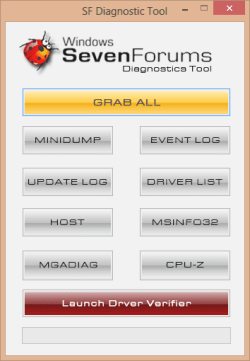

6. You will now have a folder saved on your Desktop with the name of SF_DD_MM_YYYY (SF_day_month_year) that includes the information from each button in the tool.
7. ZIP the SF_DD_MM_YYYY folder, then rename the ZIP folder to your user name here at Vista Forums, Seven Forums, or Eight Forums.
8. When you are finished, you can close the SF Diagnostic Tool.
FAQ
1, If you're getting this error below, then instead of clicking on Grab All, click the buttons one by one in order to see which one is giving you the error.
Code:
************* Exception Text **************
System.IO.DirectoryNotFoundException: Could not find a part of the path '\\Desktop\SF_19-04-2013'.
at System.IO.__Error.WinIOError(Int32 errorCode, String maybeFullPath)
at System.IO.Directory.InternalCreateDirectory(String fullPath, String path, DirectorySecurity dirSecurity)
at System.IO.Directory.CreateDirectory(String path, DirectorySecurity directorySecurity)
at System.IO.Directory.CreateDirectory(String path)
at SF_Diagnostic_Tool.Form1.Button1_Click(Object sender, EventArgs e)
at System.Windows.Forms.Control.OnClick(EventArgs e)
at System.Windows.Forms.Button.OnClick(EventArgs e)
at System.Windows.Forms.Button.OnMouseUp(MouseEventArgs mevent)
at System.Windows.Forms.Control.WmMouseUp(Message& m, MouseButtons button, Int32 clicks)
at System.Windows.Forms.Control.WndProc(Message& m)
at System.Windows.Forms.ButtonBase.WndProc(Message& m)
at System.Windows.Forms.Button.WndProc(Message& m)
at System.Windows.Forms.Control.ControlNativeWindow.OnMessage(Message& m)
at System.Windows.Forms.Control.ControlNativeWindow.WndProc(Message& m)
at System.Windows.Forms.NativeWindow.Callback(IntPtr hWnd, Int32 msg, IntPtr wparam, IntPtr lparam)


************** Loaded Assemblies **************
mscorlib
Assembly Version: 2.0.0.0
Win32 Version: 2.0.50727.5466 (Win7SP1GDR.050727-5400)
CodeBase: file:///C:/Windows/Microsoft.NET/Framework/v2.0.50727/mscorlib.dll
----------------------------------------
SF Diagnostic Tool
Assembly Version: 5.0.0.6
Win32 Version: 5.0.0.6
CodeBase: file:///C:/Users/dagbel/Desktop/SF_Diagnostic_Tool.exe
----------------------------------------
Microsoft.VisualBasic
Assembly Version: 8.0.0.0
Win32 Version: 8.0.50727.5420 (Win7SP1.050727-5400)
CodeBase: file:///C:/Windows/assembly/GAC_MSIL/Microsoft.VisualBasic/8.0.0.0__b03f5f7f11d50a3a/Microsoft.VisualBasic.dll
----------------------------------------
System.Windows.Forms
Assembly Version: 2.0.0.0
Win32 Version: 2.0.50727.5468 (Win7SP1GDR.050727-5400)
CodeBase: file:///C:/Windows/assembly/GAC_MSIL/System.Windows.Forms/2.0.0.0__b77a5c561934e089/System.Windows.Forms.dll
----------------------------------------
System
Assembly Version: 2.0.0.0
Win32 Version: 2.0.50727.5467 (Win7SP1GDR.050727-5400)
CodeBase: file:///C:/Windows/assembly/GAC_MSIL/System/2.0.0.0__b77a5c561934e089/System.dll
----------------------------------------
System.Drawing
Assembly Version: 2.0.0.0
Win32 Version: 2.0.50727.5467 (Win7SP1GDR.050727-5400)
CodeBase: file:///C:/Windows/assembly/GAC_MSIL/System.Drawing/2.0.0.0__b03f5f7f11d50a3a/System.Drawing.dll
----------------------------------------
System.Runtime.Remoting
Assembly Version: 2.0.0.0
Win32 Version: 2.0.50727.5420 (Win7SP1.050727-5400)
CodeBase: file:///C:/Windows/assembly/GAC_MSIL/System.Runtime.Remoting/2.0.0.0__b77a5c561934e089/System.Runtime.Remoting.dll
----------------------------------------

************** JIT Debugging **************
To enable just-in-time (JIT) debugging, the .config file for this
application or computer (machine.config) must have the
jitDebugging value set in the system.windows.forms section.
The application must also be compiled with debugging
enabled.

For example:

<configuration>
<system.windows.forms jitDebugging="true" />
</configuration>

When JIT debugging is enabled, any unhandled exception
will be sent to the JIT debugger registered on the computer
rather than be handled by this dialog box.Attachments
Last edited by a moderator:


