Solved sfc cannot repair faults

clearing CBS.log and trying again as the file is definitely gone so should not be pointing to it as corrupted now..mmm
 

My Computer

Computer type
PC/Desktop
OS
Microsoft Windows 7 Ultimate 64-bit 7601 Multiprocessor Free Service Pack 1
CPU
Intel(R) Core(TM) i5-2400 CPU @ 3.10GHz
Motherboard
ASRock P67 Pro
Memory
8.00 GB
Graphics Card(s)
AMD Radeon HD 5670
Sound Card
(1) ASUS Xonar DX Audio Device (2) AMD High Definition Aud
Screen Resolution
1920 x 1080 x 32 bits (4294967296 colors) @ 60 Hz
Hard Drives
(1) Crucial_CT500MX200SSD1 ATA Device (2) WDC WD10EZEX-08WN4A0 ATA Device (3) WDC WD20EARS-60MVWB0 ATA Device (4) Seagate Backup+ Desk USB Device
I removed another dll and now get this

SFCFix version 3.0.0.0 by niemiro.
Start time: 2016-08-11 11:25:14.502
Microsoft Windows 7 Service Pack 1 - amd64
Not using a script file.


AutoAnalysis::
SUMMARY: Some corruptions could not be fixed automatically. Seek advice from helper or sysnative.com.
CBS & SFC total detected corruption count: 2
CBS & SFC total unimportant corruption count: 0
CBS & SFC total fixed corruption count: 0
SURT total detected corruption count: 0
SURT total unimportant corruption count: 0
SURT total fixed corruption count: 0
AutoAnalysis:: directive completed successfully.


Successfully processed all directives.
SFCFix version 3.0.0.0 by niemiro has completed.
Currently storing 0 datablocks.
Finish time: 2016-08-11 11:25:39.546
----------------------EOF-----------------------

So am going to now try repair/upgrade again with windows disc and hope it doesn't hang like before
 

My Computer

Computer type
PC/Desktop
OS
Microsoft Windows 7 Ultimate 64-bit 7601 Multiprocessor Free Service Pack 1
CPU
Intel(R) Core(TM) i5-2400 CPU @ 3.10GHz
Motherboard
ASRock P67 Pro
Memory
8.00 GB
Graphics Card(s)
AMD Radeon HD 5670
Sound Card
(1) ASUS Xonar DX Audio Device (2) AMD High Definition Aud
Screen Resolution
1920 x 1080 x 32 bits (4294967296 colors) @ 60 Hz
Hard Drives
(1) Crucial_CT500MX200SSD1 ATA Device (2) WDC WD10EZEX-08WN4A0 ATA Device (3) WDC WD20EARS-60MVWB0 ATA Device (4) Seagate Backup+ Desk USB Device
well I did a reformat but it would have taken me weeks to reset all my programs to what they should be so I gave up and went back with a Ghost backup.
I'm out of ideas and am just going to live with it. Hopefully it won't cause any issues down the line. As I say the PC works fine.
 

My Computer

Computer type
PC/Desktop
OS
Microsoft Windows 7 Ultimate 64-bit 7601 Multiprocessor Free Service Pack 1
CPU
Intel(R) Core(TM) i5-2400 CPU @ 3.10GHz
Motherboard
ASRock P67 Pro
Memory
8.00 GB
Graphics Card(s)
AMD Radeon HD 5670
Sound Card
(1) ASUS Xonar DX Audio Device (2) AMD High Definition Aud
Screen Resolution
1920 x 1080 x 32 bits (4294967296 colors) @ 60 Hz
Hard Drives
(1) Crucial_CT500MX200SSD1 ATA Device (2) WDC WD10EZEX-08WN4A0 ATA Device (3) WDC WD20EARS-60MVWB0 ATA Device (4) Seagate Backup+ Desk USB Device
so i remove that file.
Do a search and the file is not there. (To be sure)
Make a new empty CBS.log file reboot and rescan and it still shows the same as if the file is there..

SFCFix version 3.0.0.0 by niemiro.
Start time: 2016-08-11 20:48:52.853
Microsoft Windows 7 Service Pack 1 - amd64
Not using a script file.


AutoAnalysis::
CORRUPT: C:\Windows\winsxs\x86_microsoft-windows-speechengine_31bf3856ad364e35_6.1.7600.16385_none_ee947359fb35d641\spsrx.dll


SUMMARY: Some corruptions could not be fixed automatically. Seek advice from helper or sysnative.com.
CBS & SFC total detected corruption count: 1
CBS & SFC total unimportant corruption count: 0
CBS & SFC total fixed corruption count: 0
SURT total detected corruption count: 0
SURT total unimportant corruption count: 0
SURT total fixed corruption count: 0
AutoAnalysis:: directive completed successfully.


Successfully processed all directives.
SFCFix version 3.0.0.0 by niemiro has completed.
Currently storing 0 datablocks.
Finish time: 2016-08-11 20:54:01.028
----------------------EOF-----------------------
 

My Computer

Computer type
PC/Desktop
OS
Microsoft Windows 7 Ultimate 64-bit 7601 Multiprocessor Free Service Pack 1
CPU
Intel(R) Core(TM) i5-2400 CPU @ 3.10GHz
Motherboard
ASRock P67 Pro
Memory
8.00 GB
Graphics Card(s)
AMD Radeon HD 5670
Sound Card
(1) ASUS Xonar DX Audio Device (2) AMD High Definition Aud
Screen Resolution
1920 x 1080 x 32 bits (4294967296 colors) @ 60 Hz
Hard Drives
(1) Crucial_CT500MX200SSD1 ATA Device (2) WDC WD10EZEX-08WN4A0 ATA Device (3) WDC WD20EARS-60MVWB0 ATA Device (4) Seagate Backup+ Desk USB Device
Hello djpete.

I sourced the file that SFC needs to replace. (Deleting won't help, because your system needs the file)

SFCFix Fix
This fix is very specific for djpete's computer. Trying this fix on your own computer might damage your computer. If you are after assistance, create a new thread, and you will be assisted shortly.

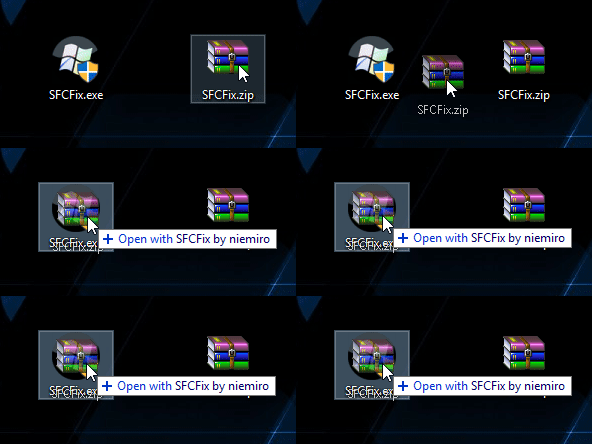
Download SFCFix.exe (by niemiro) and move the executable on your Desktop.
Download the attached SFCFix.zip and move the archive to your Desktop
Note: Make sure that the file is named SFCFix.zip, do not rename it.
Save any work you have open, and close every programs
Drag the SFCFix.zip file over the SFCFix.exe executable and release it
mMabJGT.gif
SFCFix will launch, let it complete
Once done, a file will appear on your Desktop, called SFCFix.txt
Open the file, then copy and paste its content in your next reply

Now, we run SFC again to verify:

SFC Scan
1. Click on Start
startorb.gif
and type cmd. When Command Prompt appears, right-click on it, and click Run as Administrator
2. When command prompt opens, Copy (Ctrl+C) and Paste (Right-click > Paste) the following command into it, then press Enter
Code:
sfc /scannow
3. Once it finishes, copy and paste the following into the command-prompt window and press Enter.
Code:
copy %windir%\logs\cbs\cbs.log "%userprofile%\Desktop\cbs.txt"
4. Once this has completed please go to your Desktop and you will find CBS.txt => Right-click on this file and choose Send To...Compressed (zipped folder). Please upload this zipped file CBS.zip to this thread
Please Note:: if the file is too big to upload to your next post please upload via a service such as Dropbox or One Drive or SendSpace and just provide the link.

-CKing

 

Attachments

My Computer

Computer type
Laptop
Computer Manufacturer/Model Number
HP Pavilion TS 14 Notebook PC
OS
Windows 10 x64
CPU
AMD A4-5000 APU
Motherboard
N/A
Memory
6GB DDR3 RAM
Graphics Card(s)
Integrated Radeon HD 8330 (in the APU)
Hard Drives
600GB Hard Disk
Antivirus
Windows Defender
Browser
Google Chrome
Appreciate the help..


SFCFix version 3.0.0.0 by niemiro.
Start time: 2016-08-12 08:38:04.462
Microsoft Windows 7 Service Pack 1 - amd64
Using .zip script file at D:\Downloaded\SFCFix.zip [0]


PowerCopy::
Successfully took permissions for file or folder C:\Windows\WinSxS

Failed to copy file C:\Users\Pete\AppData\Local\niemiro\Archive to C:\Windows\WinSxS\x86_microsoft-windows-speechengine_31bf3856ad364e35_6.1.7600.16385_none_ee947359fb35d641 with error code ERROR_ACCESS_DENIED.

Successfully restored ownership for C:\Windows\WinSxS
Successfully restored permissions on C:\Windows\WinSxS
PowerCopy:: directive failed to complete successfully.


Failed to process all directives successfully.
SFCFix version 3.0.0.0 by niemiro has completed.
Currently storing 1 datablocks.
Finish time: 2016-08-12 08:38:12.328
Script hash: OMgHUz802ICCiwR7gnUD+Vk1N2GzD4bfhhIfxTzYPt8=
----------------------EOF-----------------------


Doing another sfc now...
 

My Computer

Computer type
PC/Desktop
OS
Microsoft Windows 7 Ultimate 64-bit 7601 Multiprocessor Free Service Pack 1
CPU
Intel(R) Core(TM) i5-2400 CPU @ 3.10GHz
Motherboard
ASRock P67 Pro
Memory
8.00 GB
Graphics Card(s)
AMD Radeon HD 5670
Sound Card
(1) ASUS Xonar DX Audio Device (2) AMD High Definition Aud
Screen Resolution
1920 x 1080 x 32 bits (4294967296 colors) @ 60 Hz
Hard Drives
(1) Crucial_CT500MX200SSD1 ATA Device (2) WDC WD10EZEX-08WN4A0 ATA Device (3) WDC WD20EARS-60MVWB0 ATA Device (4) Seagate Backup+ Desk USB Device

My Computer

Computer type
PC/Desktop
OS
Microsoft Windows 7 Ultimate 64-bit 7601 Multiprocessor Free Service Pack 1
CPU
Intel(R) Core(TM) i5-2400 CPU @ 3.10GHz
Motherboard
ASRock P67 Pro
Memory
8.00 GB
Graphics Card(s)
AMD Radeon HD 5670
Sound Card
(1) ASUS Xonar DX Audio Device (2) AMD High Definition Aud
Screen Resolution
1920 x 1080 x 32 bits (4294967296 colors) @ 60 Hz
Hard Drives
(1) Crucial_CT500MX200SSD1 ATA Device (2) WDC WD10EZEX-08WN4A0 ATA Device (3) WDC WD20EARS-60MVWB0 ATA Device (4) Seagate Backup+ Desk USB Device
Not really, my script was bad :( I fixed the mistake, here is the new one:

Hello djpete.

I sourced the file that SFC needs to replace. (Deleting won't help, because your system needs the file)

SFCFix Fix
This fix is very specific for djpete's computer. Trying this fix on your own computer might damage your computer. If you are after assistance, create a new thread, and you will be assisted shortly.

Download SFCFix.exe (by niemiro) and move the executable on your Desktop.
Download the attached SFCFix.zip and move the archive to your Desktop
Note: Make sure that the file is named SFCFix.zip, do not rename it.
Save any work you have open, and close every programs
Drag the SFCFix.zip file over the SFCFix.exe executable and release it
mMabJGT.gif
SFCFix will launch, let it complete
Once done, a file will appear on your Desktop, called SFCFix.txt
Open the file, then copy and paste its content in your next reply

Now, we run SFC again to verify:

SFC Scan
1. Click on Start
startorb.gif
and type cmd. When Command Prompt appears, right-click on it, and click Run as Administrator
2. When command prompt opens, Copy (Ctrl+C) and Paste (Right-click > Paste) the following command into it, then press Enter
Code:
sfc /scannow
3. Once it finishes, copy and paste the following into the command-prompt window and press Enter.
Code:
copy %windir%\logs\cbs\cbs.log "%userprofile%\Desktop\cbs.txt"
4. Once this has completed please go to your Desktop and you will find CBS.txt => Right-click on this file and choose Send To...Compressed (zipped folder). Please upload this zipped file CBS.zip to this thread
Please Note:: if the file is too big to upload to your next post please upload via a service such as Dropbox or One Drive or SendSpace and just provide the link.

-CKing
 

Attachments

My Computer

Computer type
Laptop
Computer Manufacturer/Model Number
HP Pavilion TS 14 Notebook PC
OS
Windows 10 x64
CPU
AMD A4-5000 APU
Motherboard
N/A
Memory
6GB DDR3 RAM
Graphics Card(s)
Integrated Radeon HD 8330 (in the APU)
Hard Drives
600GB Hard Disk
Antivirus
Windows Defender
Browser
Google Chrome
in any case I replaced that dll. Did another scan.
THIS TIME sfc said it fixed an error.
Rebooted.
Did another sfc and all clean.
I repeat
ALL CLEAN.

You...CKing123 are my hero.
What an awesome forum too.

I thank you all for persisting.
I could have reformatted but I''m a power user and it would have literally taken me weeks to customise everything again.

CKing123 THANK YOU SOOOOOOOOO MUCH.

I'm doing a Ghost backup right now.


Whoohoooooooooooooooooooooooooooooooooooooooooooooooooooooooooooooooooooooooooooooooooooooooo.
 

My Computer

Computer type
PC/Desktop
OS
Microsoft Windows 7 Ultimate 64-bit 7601 Multiprocessor Free Service Pack 1
CPU
Intel(R) Core(TM) i5-2400 CPU @ 3.10GHz
Motherboard
ASRock P67 Pro
Memory
8.00 GB
Graphics Card(s)
AMD Radeon HD 5670
Sound Card
(1) ASUS Xonar DX Audio Device (2) AMD High Definition Aud
Screen Resolution
1920 x 1080 x 32 bits (4294967296 colors) @ 60 Hz
Hard Drives
(1) Crucial_CT500MX200SSD1 ATA Device (2) WDC WD10EZEX-08WN4A0 ATA Device (3) WDC WD20EARS-60MVWB0 ATA Device (4) Seagate Backup+ Desk USB Device
No problem :) Glad to help!
 

My Computer

Computer type
Laptop
Computer Manufacturer/Model Number
HP Pavilion TS 14 Notebook PC
OS
Windows 10 x64
CPU
AMD A4-5000 APU
Motherboard
N/A
Memory
6GB DDR3 RAM
Graphics Card(s)
Integrated Radeon HD 8330 (in the APU)
Hard Drives
600GB Hard Disk
Antivirus
Windows Defender
Browser
Google Chrome
Thanks again man. I have been trying to solve this for weeks.
You're a legend
 

My Computer

Computer type
PC/Desktop
OS
Microsoft Windows 7 Ultimate 64-bit 7601 Multiprocessor Free Service Pack 1
CPU
Intel(R) Core(TM) i5-2400 CPU @ 3.10GHz
Motherboard
ASRock P67 Pro
Memory
8.00 GB
Graphics Card(s)
AMD Radeon HD 5670
Sound Card
(1) ASUS Xonar DX Audio Device (2) AMD High Definition Aud
Screen Resolution
1920 x 1080 x 32 bits (4294967296 colors) @ 60 Hz
Hard Drives
(1) Crucial_CT500MX200SSD1 ATA Device (2) WDC WD10EZEX-08WN4A0 ATA Device (3) WDC WD20EARS-60MVWB0 ATA Device (4) Seagate Backup+ Desk USB Device
Back
Top