
sfc scan stuck at 96%

Solid Purity

New member
Member
Local time
8:55 AM
Messages
43
My laptop has been getting various BSOD's.
Page in Unpage Area & PFL list corrupt; but sometimes it just crashes into BSOD without a heading.

I should perhaps avoid having ccleaner being run; as this clears the mini dumps.

But; despite that; I've added cbs / sfc / malwarebytes logs atm & now properly running DM Log.
 

Attachments

Last edited:

My Computer

Computer type
Laptop
Computer Manufacturer/Model Number
Acer
OS
Windows 7 64-bit
Memory
6 GB (5.85 available)
Graphics Card(s)
Intel Graphics Family/3000
Other Info
Revert to factory reset as I was troubleshooting Intel Graphics.
What was the initial reason for running an SFC scan in the first place?
 

My Computer

Computer type
PC/Desktop
Computer Manufacturer/Model Number
Custom
OS
Dual Boot: Windows 8.1 & Server 2012r2 VMs: Kali Linux, Backbox, Matriux, Windows 8.1
CPU
A10 7700 Kavari SteamRoller
Motherboard
ASUS A88XM-PLUS (FM2+ )
Memory
8GB DDR3 SDRAM PC3-8500
Graphics Card(s)
1024MB ATI AMD Radeon R7 Graphics
Sound Card
Realtek High Definition Audio
Monitor(s) Displays
Samsung
Hard Drives
SSD Crucial 120gb
WD VelociRaptor 1tb
PSU
Rosewill Gaming 650w
Case
Rosewill Galaxy 2
Internet Speed
55/12
Antivirus
Malwarebytes, MSE, SAS
Browser
FireFox, Chrome
I've attached DM file below.
 

Attachments

My Computer

Computer type
Laptop
Computer Manufacturer/Model Number
Acer
OS
Windows 7 64-bit
Memory
6 GB (5.85 available)
Graphics Card(s)
Intel Graphics Family/3000
Other Info
Revert to factory reset as I was troubleshooting Intel Graphics.
What was the initial reason for running an SFC scan in the first place?

I'm only aware of PFL list corrupt & page in unpage area atm; otherwise; the laptop just freezes.
 

My Computer

Computer type
Laptop
Computer Manufacturer/Model Number
Acer
OS
Windows 7 64-bit
Memory
6 GB (5.85 available)
Graphics Card(s)
Intel Graphics Family/3000
Other Info
Revert to factory reset as I was troubleshooting Intel Graphics.
My Computer

Computer type
PC/Desktop
Computer Manufacturer/Model Number
Custom
OS
Dual Boot: Windows 8.1 & Server 2012r2 VMs: Kali Linux, Backbox, Matriux, Windows 8.1
CPU
A10 7700 Kavari SteamRoller
Motherboard
ASUS A88XM-PLUS (FM2+ )
Memory
8GB DDR3 SDRAM PC3-8500
Graphics Card(s)
1024MB ATI AMD Radeon R7 Graphics
Sound Card
Realtek High Definition Audio
Monitor(s) Displays
Samsung
Hard Drives
SSD Crucial 120gb
WD VelociRaptor 1tb
PSU
Rosewill Gaming 650w
Case
Rosewill Galaxy 2
Internet Speed
55/12
Antivirus
Malwarebytes, MSE, SAS
Browser
FireFox, Chrome
The CBS.log reveals the real problem - to some extent, at least...
Code:
2014-09-29 01:10:59, Error                 CSI    00000313 (F) STATUS_FILE_CORRUPT_ERROR #6779333# from Windows::Rtl::SystemImplementation::DirectFileSystemProvider::SysCreateFile(flags = (AllowFileNotFound|AllowSharingViolation|AllowAccessDenied), handle = {provider=NULL, handle=0}, da = (SYNCHRONIZE|FILE_READ_ATTRIBUTES|FILE_READ_DATA), oa = @0x95cf70->OBJECT_ATTRIBUTES {s:48; rd:NULL; on:[108]"\SystemRoot\WinSxS\x86_microsoft.vc80.openmp_1fc8b3b9a1e18e3b_8.0.50727.4053_none_3b0e32bdc9afe437\vcomp.dll"; a:(OBJ_CASE_INSENSITIVE)}, iosb = @0x95d020, as = (null), fa = 0, sa = (FILE_SHARE_READ|FILE_SHARE_WRITE|FILE_SHARE_DELETE), cd = FILE_OPEN, co = (FILE_NON_DIRECTORY_FILE|FILE_SYNCHRONOUS_IO_NONALERT), eab = NULL, eal = 0, disp = Invalid)
[gle=0xd0000102]
2014-09-29 01:10:59, Error                 CSI    [EMAIL="00000314@2014/9/29:05:10:59.137"]00000314@2014/9/29:05:10:59.137[/EMAIL] (F) d:\win7sp1_gdr\base\wcp\sil\merged\ntu\ntsystem.cpp(2057): Error STATUS_FILE_CORRUPT_ERROR originated in function Windows::Rtl::SystemImplementation::DirectFileSystemProvider::SysCreateFile expression: (null)
[gle=0x80004005]
2014-09-29 01:11:01, Error                 CSI    00000315 (F) STATUS_FILE_CORRUPT_ERROR #6779332# from Windows::Rtl::SystemImplementation::CDirectory::OpenExistingFile(...)[gle=0xd0000102]
2014-09-29 01:11:01, Error                 CSI    00000316 (F) STATUS_FILE_CORRUPT_ERROR #6779331# from Windows::Rtl::SystemImplementation::CDirectory_IRtlDirectoryTearoff::OpenExistingFile(flags = (MissingFileIsOk|SharingViolationIsOk|AccessDeniedIsOk), da = (SYNCHRONIZE|FILE_READ_DATA), oa = @0x95d618->SIL_OBJECT_ATTRIBUTES {s:40; on:"vcomp.dll"; a:(OBJ_CASE_INSENSITIVE)}, sa = (FILE_SHARE_READ|FILE_SHARE_WRITE|FILE_SHARE_DELETE), oo = (FILE_SYNCHRONOUS_IO_NONALERT|FILE_NON_DIRECTORY_FILE), file = NULL, disp = Invalid)
[gle=0xd0000102]
2014-09-29 01:21:04, Info                  CBS    Reboot mark refs incremented to: 1

The SFC scan crashed before completion - so (rather stupidly) gave a 'no problem' response.

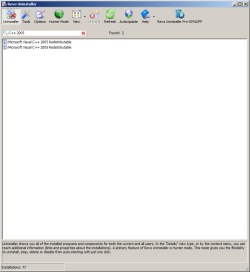
I would not be at all surprised if the best way to deal with this is to uninstall Visual C++ 2005 completely, and then reinstall it (carefully!).

Having said that, I need to do some research... and my time is severely limited at present.
If you haven't heard within 48hours, please SHOUT!
 

My Computer

Computer type
Laptop
Computer Manufacturer/Model Number
Asus K52F or Lenovo B51-80
OS
Win 7 x64 Home Premium (and x86 VirtualBox VM)/Win10
CPU
i3 370M/i7 6500U
Motherboard
Asus/Lenovo
Memory
8GB - finally :)/8GB
Graphics Card(s)
it's an i3, dude!/dual Intel&nVidia
Sound Card
onboard
Monitor(s) Displays
15.6" built-in
Screen Resolution
1366x768/1920x1080
Hard Drives
750GB Seagate internal
Sundry external drives attached to other computers on the local network
1TB SSD on the Lenovo
PSU
n/a
Internet Speed
as much as I can get - usually on a dongle/phone, so <1MB/s
Antivirus
MSE/Defender
Browser
IE11/12/Edge/Chrome/FF(if I must)
Okay; thanks for your help.

I will attempt to uninstall & re-install
 
Last edited:

My Computer

Computer type
Laptop
Computer Manufacturer/Model Number
Acer
OS
Windows 7 64-bit
Memory
6 GB (5.85 available)
Graphics Card(s)
Intel Graphics Family/3000
Other Info
Revert to factory reset as I was troubleshooting Intel Graphics.

Attachments

  • 2 Visual C++ 2005 .png
    2 Visual C++ 2005 .png
    16.8 KB · Views: 2
Last edited:

My Computer

Computer type
Laptop
Computer Manufacturer/Model Number
Acer
OS
Windows 7 64-bit
Memory
6 GB (5.85 available)
Graphics Card(s)
Intel Graphics Family/3000
Other Info
Revert to factory reset as I was troubleshooting Intel Graphics.
OK - please run a new Check for Updates, and see if the updates found install properly.
 

My Computer

Computer type
Laptop
Computer Manufacturer/Model Number
Asus K52F or Lenovo B51-80
OS
Win 7 x64 Home Premium (and x86 VirtualBox VM)/Win10
CPU
i3 370M/i7 6500U
Motherboard
Asus/Lenovo
Memory
8GB - finally :)/8GB
Graphics Card(s)
it's an i3, dude!/dual Intel&nVidia
Sound Card
onboard
Monitor(s) Displays
15.6" built-in
Screen Resolution
1366x768/1920x1080
Hard Drives
750GB Seagate internal
Sundry external drives attached to other computers on the local network
1TB SSD on the Lenovo
PSU
n/a
Internet Speed
as much as I can get - usually on a dongle/phone, so <1MB/s
Antivirus
MSE/Defender
Browser
IE11/12/Edge/Chrome/FF(if I must)
yup they got installed properly; updated it
 

My Computer

Computer type
Laptop
Computer Manufacturer/Model Number
Acer
OS
Windows 7 64-bit
Memory
6 GB (5.85 available)
Graphics Card(s)
Intel Graphics Family/3000
Other Info
Revert to factory reset as I was troubleshooting Intel Graphics.
Great!

Good luck
 

My Computer

Computer type
Laptop
Computer Manufacturer/Model Number
Asus K52F or Lenovo B51-80
OS
Win 7 x64 Home Premium (and x86 VirtualBox VM)/Win10
CPU
i3 370M/i7 6500U
Motherboard
Asus/Lenovo
Memory
8GB - finally :)/8GB
Graphics Card(s)
it's an i3, dude!/dual Intel&nVidia
Sound Card
onboard
Monitor(s) Displays
15.6" built-in
Screen Resolution
1366x768/1920x1080
Hard Drives
750GB Seagate internal
Sundry external drives attached to other computers on the local network
1TB SSD on the Lenovo
PSU
n/a
Internet Speed
as much as I can get - usually on a dongle/phone, so <1MB/s
Antivirus
MSE/Defender
Browser
IE11/12/Edge/Chrome/FF(if I must)
Sadly this is still stuck at 96% in safe mode on 1st scan.
I'll run a few for more and let you know

Do you need another cbs log if all else fails?

edit: Just finished 2nd scan; same thing
I'll do the last 3 before heading to work tomorrow
 

My Computer

Computer type
Laptop
Computer Manufacturer/Model Number
Acer
OS
Windows 7 64-bit
Memory
6 GB (5.85 available)
Graphics Card(s)
Intel Graphics Family/3000
Other Info
Revert to factory reset as I was troubleshooting Intel Graphics.
OK - just post the new CBS log - it should give us a clue what's killing it - also post your Event logs...

Open Event Viewer
click on the Windows logs entry in the left pane to expand it.
Now click on the Application entry - wait while it loads.
Click on 'File' in the menu bar and select Save...
Save the file as Appevt.evtx
Repeat for the System log
then zip both, and upload them.
 

My Computer

Computer type
Laptop
Computer Manufacturer/Model Number
Asus K52F or Lenovo B51-80
OS
Win 7 x64 Home Premium (and x86 VirtualBox VM)/Win10
CPU
i3 370M/i7 6500U
Motherboard
Asus/Lenovo
Memory
8GB - finally :)/8GB
Graphics Card(s)
it's an i3, dude!/dual Intel&nVidia
Sound Card
onboard
Monitor(s) Displays
15.6" built-in
Screen Resolution
1366x768/1920x1080
Hard Drives
750GB Seagate internal
Sundry external drives attached to other computers on the local network
1TB SSD on the Lenovo
PSU
n/a
Internet Speed
as much as I can get - usually on a dongle/phone, so <1MB/s
Antivirus
MSE/Defender
Browser
IE11/12/Edge/Chrome/FF(if I must)
Great!
Hopefully, you won't have any more problems with it.
 

My Computer

Computer type
Laptop
Computer Manufacturer/Model Number
Asus K52F or Lenovo B51-80
OS
Win 7 x64 Home Premium (and x86 VirtualBox VM)/Win10
CPU
i3 370M/i7 6500U
Motherboard
Asus/Lenovo
Memory
8GB - finally :)/8GB
Graphics Card(s)
it's an i3, dude!/dual Intel&nVidia
Sound Card
onboard
Monitor(s) Displays
15.6" built-in
Screen Resolution
1366x768/1920x1080
Hard Drives
750GB Seagate internal
Sundry external drives attached to other computers on the local network
1TB SSD on the Lenovo
PSU
n/a
Internet Speed
as much as I can get - usually on a dongle/phone, so <1MB/s
Antivirus
MSE/Defender
Browser
IE11/12/Edge/Chrome/FF(if I must)
I've uploaded cbs.

Click on 'File' in the menu bar and select Save...

What do I use for Display Information for saving?
 

My Computer

Computer type
Laptop
Computer Manufacturer/Model Number
Acer
OS
Windows 7 64-bit
Memory
6 GB (5.85 available)
Graphics Card(s)
Intel Graphics Family/3000
Other Info
Revert to factory reset as I was troubleshooting Intel Graphics.
Back
Top