
SFC /SCANNOW Command - System File Checker

How to Repair Windows 7 System Files with System File Checker


   Information
The sfc /scannow command (System File Checker) scans the integrity of all protected Windows 7 system files and replaces incorrect corrupted, changed/modified, or damaged versions with the correct versions if possible.

   Tip
If you get the Windows Resource Protection Could Not Start the Repair Service error when trying to run SFC, then make sure that the Windows Modules Installer service is enabled, click on Start, and set to Manual.

Services - Start or Disable

OR

Copy and paste the command below in the elevated command prompt, and press Enter. After the Windows Modules Installer service has started, try running the SFC command again

net start trustedinstaller

   Note
The KB3022345, KB3035583, and KB3068708 updates will cause SFC to give you a false mismatch message in SFC for files related to these updates.

You can safely ignore these results in your SFC details since it will not affect SFC from being able to repair other system files.

   Warning
Be aware that if you have modified your system files as in theming explorer/system files, running sfc /scannow will revert the system files such as explorer.exe back to it's default state. Make the appropriate backups of your system files that you have modified for theming if you wish to save them before running sfc /scannow.


:note: For the updated Windows 10 tutorial, please see - SFC Command - Run in Windows 10 - Windows 10 Tutorials

CONTENTS:
  • Option One: To Run the SFC /SCANNOW Command at Boot
  • Option Two: To Run the SFC /SCANNOW Command in Windows 7
  • Option Three: How to See and Read Only the "SFC" Scan Results from the CBS.LOG


OPTION ONE

To Run the SFC /SCANNOW Command at Boot


1. For how, see METHOD TWO at this link: SFC /SCANNOW : Run in Command Prompt at Boot

   Note
Using OPTION TWO below is recommended if able.

If you would like to get help with your SFC issue, then be sure to upload and attach your sfcdetails.txt file from OPTION THREE below in your post.


OPTION TWO

To Run the SFC /SCANNOW Command in Windows 7


1. Open an elevated command prompt or an elevated PowerShell, and do step 2 or 3 below for what type of scan you would like to run.


2. To Scan and Repair System Files
NOTE: Scans the integrity of all protected system files and repairs the system files if needed. Please see red WARNING box at the top of this tutorial.
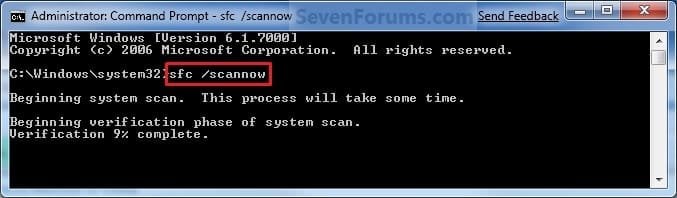
A) In the elevated command prompt, type sfc /scannow, press Enter, and go to step 4 below. (see screenshot below)
NOTE: This may take a little bit to finish.
Command-1.jpg
3. To Only Verify if the System Files are Corrupted
NOTE: Scans and only verifies the integrity of all proteced system files only. This command will not change your system files as in the red WARNING box at the top of this tutorial.
A) In the elevated command prompt, type sfc /verifyonly, press Enter, and go to step 4 below.
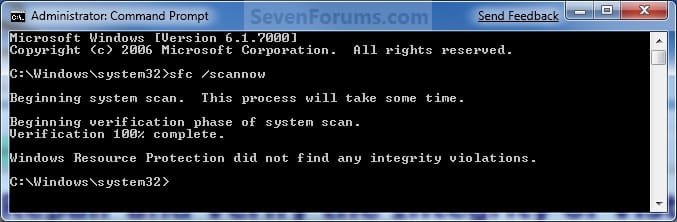
4. When the scan is complete, hopefully you will see all is ok like the screenshot below.

   Note

  • If SFC could not fix something, then run the command again to see if it may be able to the next time. Sometimes it may take running the sfc /scannow command 3 or more times to completely fix everything that it's able to.
  • If not, then download and run the 32-bit (x86) or 64-bit (x64) System Update Readiness Tool for your same installed 32-bit or 64-bit Windows 7, restart the PC afterwards, and try the sfc /scannow command again.
  • If still not, then try using OPTION ONE above to run the sfc /scannow command at boot.
  • If still not, then you can attempt to run a System Restore using a restore point dated before the bad file occured to fix it. You may need to repeat doing a System Restore until you find a older restore point that may work.
  • If still not, then you can use the steps in the TIP box in the OPTION THREE section below to manually replace the files that SFC could not fix if there are not to many fix.
  • If there are to many files to manually fix, or you prefer not to use OPTION THREE below, then you could do a repair install without losing anything.
If you would like to get help with your SFC issue, then be sure to upload and attach your sfcdetails.txt file from OPTION THREE below in your post.


Finished.jpg
5. When done, close the elevated command prompt.


OPTION THREE

How to See and Read Only the "SFC" Scan Results from the CBS.LOG


   Note
When SFC runs, it logs it's actions into the C:\Windows\Logs\CBS\CBS.log. The steps in this option will show you how to see only the specific SFC entries with the [SR] tags in this CBS.log. This can be helpful to show you what files SFC could not fix automatically if you wanted to try and manually replace them.

1. Open an "elevated command prompt" (right click -> Run as administrator).

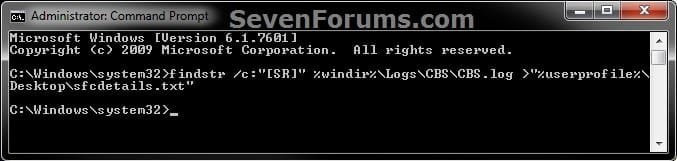
2. In the elevated command prompt, copy and paste the command below, and press Enter. (See screenshot below)
NOTE: This will place a sfcdetails.txt file on your desktop with only the SFC scan result details from the CBS.LOG in it.
Code:
findstr /c:"[SR]" %windir%\Logs\CBS\CBS.log >"%userprofile%\Desktop\sfcdetails.txt"
sfcdetails.jpg
3. Close the elevated command prompt.

4. Open the sfcdetails.txt file on your desktop to see the SFC scan details in the CBS.LOG.

5. You can safely delete the sfcdetails.txt file afterwards if you like.
   Tip
If you need to replace a corrupted system file that SFC cannot fix, then this will show you how to by extracting a new copy directly from your Windows 7 installation DVD.

Extract Files from Windows 7 Installation DVD


That's it,
Shawn


Last edited:
Thanks Brink!
Hadn't heard of this. lol
 

My Computer My Computer

At a glance

Win7 64bit PremiumIntel Core i5-2410M6.00 GBNVIDIA GeForce G520M
Computer Manufacturer/Model Number
Samsung RV520
OS
Win7 64bit Premium
CPU
Intel Core i5-2410M
Motherboard
KSWAE
Memory
6.00 GB
Graphics Card(s)
NVIDIA GeForce G520M
Sound Card
Realtech High Definition Audio
Hard Drives
WDC WD7500BPVT-35HXZTI
You're most welcome Marshallslion, and welcome to Seven Forums. :)
 

My Computer My Computer

At a glance

64-bit Windows 11 Pro for WorkstationsIntel i7-8700K OC'd to 5 GHz64 GB (4x16GB) G.SKILL TridentZ RGB DDR4 3600...ASUS ROG-STRIX-GTX1080TI-O11G-GAMING
Computer type
PC/Desktop
Computer Manufacturer/Model Number
Self built custom
OS
64-bit Windows 11 Pro for Workstations
CPU
Intel i7-8700K OC'd to 5 GHz
Motherboard
ASUS ROG Maximus XI Formula Z390
Memory
64 GB (4x16GB) G.SKILL TridentZ RGB DDR4 3600 MHz
Graphics Card(s)
ASUS ROG-STRIX-GTX1080TI-O11G-GAMING
Sound Card
Integrated
Monitor(s) Displays
2 x Samsung Odyssey G7 27"
Screen Resolution
2560x1440
Hard Drives
1TB Samsung 990 PRO M.2,
4TB Samsung 990 PRO PRO M.2,
TerraMaster F8 SSD Plus NAS
PSU
Seasonic Prime Titanium 850W
Case
Thermaltake Core P3
Cooling
Corsair Hydro H115i
Keyboard
Logitech wireless K800
Mouse
Logitech MX Master 4
Internet Speed
2 Gb/s Download and 100 Mb/s Upload
Antivirus
Malwarebyte Anti-Malware Premium
Browser
Google Chrome
Other Info
Logitech Z625 speaker system,
Logitech BRIO 4K Pro webcam,
HP Color LaserJet Pro MFP M477fdn,
APC SMART-UPS RT 1000 XL - SURT1000XLI,
Galaxy S23 Plus phone
I tried sfc /verifyonly but it said "YOU MUST BE AN ADMINISTRATOR RUNNING A CONSOLE SESSION IN ORDER TO USE THE SFC UTILITY"

but i am the admin. help?

+rep
 

My Computer My Computer

At a glance

Windows 7 Home Premium 64bitAMD Phenom II X6 Black Edition (6 core)16GB (2x8GB) Corsair DDR3 Vengeance Pro Serie...Sapphire Nitro+ Radeon RX480 8GB
Computer type
PC/Desktop
Computer Manufacturer/Model Number
Custom Build by me :D
OS
Windows 7 Home Premium 64bit
CPU
AMD Phenom II X6 Black Edition (6 core)
Motherboard
Asus M4A88TD-V EVO/USB3
Memory
16GB (2x8GB) Corsair DDR3 Vengeance Pro Series Gold (2400)
Graphics Card(s)
Sapphire Nitro+ Radeon RX480 8GB
Monitor(s) Displays
LG IPS LED 23EA63 HDMI (Primary), NEC 17inch (Secondary)
Screen Resolution
1920 X 1080 (Primary), 1280 X 1024 (Secondary)
Hard Drives
- Seagate ST500DM002 Barracuda (500GB) =System=
- Seagate ST3500418AS Barracuda (500GB) =Backup=
- Seagate ST2000DM001 Barracuda (2TB) =steam games=
PSU
MODXSTREAM-PRO 600W
Case
Novatech Galaxy III Case
Cooling
1xCPU FAN, 3xCASE FANS (1 side, 1 back, 1 front)
Keyboard
cyborg v7 gaming keyboard
Mouse
logitech M205 wireless
Browser
Google Chrome
Hello Gamer dude,

It just means that you will have to right click on the cmd shortcut and click on "Run as administrator" first, then type in the command. ;)

1. Open a elevated command prompt (right click -> Run as administrator).
 

My Computer My Computer

At a glance

64-bit Windows 11 Pro for WorkstationsIntel i7-8700K OC'd to 5 GHz64 GB (4x16GB) G.SKILL TridentZ RGB DDR4 3600...ASUS ROG-STRIX-GTX1080TI-O11G-GAMING
Computer type
PC/Desktop
Computer Manufacturer/Model Number
Self built custom
OS
64-bit Windows 11 Pro for Workstations
CPU
Intel i7-8700K OC'd to 5 GHz
Motherboard
ASUS ROG Maximus XI Formula Z390
Memory
64 GB (4x16GB) G.SKILL TridentZ RGB DDR4 3600 MHz
Graphics Card(s)
ASUS ROG-STRIX-GTX1080TI-O11G-GAMING
Sound Card
Integrated
Monitor(s) Displays
2 x Samsung Odyssey G7 27"
Screen Resolution
2560x1440
Hard Drives
1TB Samsung 990 PRO M.2,
4TB Samsung 990 PRO PRO M.2,
TerraMaster F8 SSD Plus NAS
PSU
Seasonic Prime Titanium 850W
Case
Thermaltake Core P3
Cooling
Corsair Hydro H115i
Keyboard
Logitech wireless K800
Mouse
Logitech MX Master 4
Internet Speed
2 Gb/s Download and 100 Mb/s Upload
Antivirus
Malwarebyte Anti-Malware Premium
Browser
Google Chrome
Other Info
Logitech Z625 speaker system,
Logitech BRIO 4K Pro webcam,
HP Color LaserJet Pro MFP M477fdn,
APC SMART-UPS RT 1000 XL - SURT1000XLI,
Galaxy S23 Plus phone
Thanks for the quick reply Brink :D
 

My Computer My Computer

At a glance

Windows 7 Home Premium 64bitAMD Phenom II X6 Black Edition (6 core)16GB (2x8GB) Corsair DDR3 Vengeance Pro Serie...Sapphire Nitro+ Radeon RX480 8GB
Computer type
PC/Desktop
Computer Manufacturer/Model Number
Custom Build by me :D
OS
Windows 7 Home Premium 64bit
CPU
AMD Phenom II X6 Black Edition (6 core)
Motherboard
Asus M4A88TD-V EVO/USB3
Memory
16GB (2x8GB) Corsair DDR3 Vengeance Pro Series Gold (2400)
Graphics Card(s)
Sapphire Nitro+ Radeon RX480 8GB
Monitor(s) Displays
LG IPS LED 23EA63 HDMI (Primary), NEC 17inch (Secondary)
Screen Resolution
1920 X 1080 (Primary), 1280 X 1024 (Secondary)
Hard Drives
- Seagate ST500DM002 Barracuda (500GB) =System=
- Seagate ST3500418AS Barracuda (500GB) =Backup=
- Seagate ST2000DM001 Barracuda (2TB) =steam games=
PSU
MODXSTREAM-PRO 600W
Case
Novatech Galaxy III Case
Cooling
1xCPU FAN, 3xCASE FANS (1 side, 1 back, 1 front)
Keyboard
cyborg v7 gaming keyboard
Mouse
logitech M205 wireless
Browser
Google Chrome
You're welcome mate. :)
 

My Computer My Computer

At a glance

64-bit Windows 11 Pro for WorkstationsIntel i7-8700K OC'd to 5 GHz64 GB (4x16GB) G.SKILL TridentZ RGB DDR4 3600...ASUS ROG-STRIX-GTX1080TI-O11G-GAMING
Computer type
PC/Desktop
Computer Manufacturer/Model Number
Self built custom
OS
64-bit Windows 11 Pro for Workstations
CPU
Intel i7-8700K OC'd to 5 GHz
Motherboard
ASUS ROG Maximus XI Formula Z390
Memory
64 GB (4x16GB) G.SKILL TridentZ RGB DDR4 3600 MHz
Graphics Card(s)
ASUS ROG-STRIX-GTX1080TI-O11G-GAMING
Sound Card
Integrated
Monitor(s) Displays
2 x Samsung Odyssey G7 27"
Screen Resolution
2560x1440
Hard Drives
1TB Samsung 990 PRO M.2,
4TB Samsung 990 PRO PRO M.2,
TerraMaster F8 SSD Plus NAS
PSU
Seasonic Prime Titanium 850W
Case
Thermaltake Core P3
Cooling
Corsair Hydro H115i
Keyboard
Logitech wireless K800
Mouse
Logitech MX Master 4
Internet Speed
2 Gb/s Download and 100 Mb/s Upload
Antivirus
Malwarebyte Anti-Malware Premium
Browser
Google Chrome
Other Info
Logitech Z625 speaker system,
Logitech BRIO 4K Pro webcam,
HP Color LaserJet Pro MFP M477fdn,
APC SMART-UPS RT 1000 XL - SURT1000XLI,
Galaxy S23 Plus phone
after running /scannow now i found out that they cant repair my Ati and Nvidia files but funny thing is at the end of the log, it says "All files and registry keys listed in this transaction have been successfully repaired"

i have no problem with the files and my gpu is working fine.

i have attached the sfcdetails file. please have a look and maybe you guys can shed a light on this.

tanx !!
 

Attachments

My Computer My Computer

At a glance

Windows 7 Home 64bitI7 3770KCorsair Vengeance CL9 8GBMSI Lightnining 7970 & Sapphire Dual X 7970
Computer type
PC/Desktop
Computer Manufacturer/Model Number
Custom built
OS
Windows 7 Home 64bit
CPU
I7 3770K
Motherboard
Asus Sabertooth Z77
Memory
Corsair Vengeance CL9 8GB
Graphics Card(s)
MSI Lightnining 7970 & Sapphire Dual X 7970
Sound Card
Onboard
Monitor(s) Displays
Samsung 22inches
Screen Resolution
1050p
Hard Drives
Wester Digital 2TB Green
Sandisk 128 SSD
Samsung Evo 250 SSD
PSU
Corsair HX 1000W
Case
DangerDen Double Wide
Cooling
Custom Watercooling
Keyboard
Microsoft
Mouse
Microsoft
Antivirus
Microsoft
Browser
Chrome
after running /scannow now i found out that they cant repair my Ati and Nvidia files but funny thing is at the end of the log, it says "All files and registry keys listed in this transaction have been successfully repaired"

i have no problem with the files and my gpu is working fine.

i have attached the sfcdetails file. please have a look and maybe you guys can shed a light on this.

tanx !!

Hello enrell and welcome to Seven Forums.

As the information section at the beginning of the tutorial says, "The sfc /scannow command (System File Checker) scans the integrity of all protected Windows 7 system files and replaces incorrect corrupted, changed, or damaged versions with the correct versions if possible." I might be mistaken but I don't believe SFC will check the hardware that might be installed on a given computer. You might have to go to Device Manager. Device Manager can be used for changing hardware configuration options, managing drivers, disabling and enabling hardware, identifying conflicts between hardware devices, etc.

Open Device Manager
 

My Computer My Computer

At a glance

Win 7 Pro 64-bitIntel i5 2.4 Ghz8GB DDR3Intel HD 3000
Computer type
Laptop
Computer Manufacturer/Model Number
Sony Vaio VPCEB47GM Laptop
OS
Win 7 Pro 64-bit
CPU
Intel i5 2.4 Ghz
Memory
8GB DDR3
Graphics Card(s)
Intel HD 3000
Sound Card
IDT High Definition
Monitor(s) Displays
15.6 WGXA Anti-Glare LED
Screen Resolution
1280x800
Hard Drives
640Gb 7200rpm
Antivirus
MSE
Browser
Opera (primary) with IE9 backup
after running /scannow now i found out that they cant repair my Ati and Nvidia files but funny thing is at the end of the log, it says "All files and registry keys listed in this transaction have been successfully repaired"

i have no problem with the files and my gpu is working fine.

i have attached the sfcdetails file. please have a look and maybe you guys can shed a light on this.

tanx !!

Hello enrell and welcome to Seven Forums.

As the information section at the beginning of the tutorial says, "The sfc /scannow command (System File Checker) scans the integrity of all protected Windows 7 system files and replaces incorrect corrupted, changed, or damaged versions with the correct versions if possible." I might be mistaken but I don't believe SFC will check the hardware that might be installed on a given computer. You might have to go to Device Manager. Device Manager can be used for changing hardware configuration options, managing drivers, disabling and enabling hardware, identifying conflicts between hardware devices, etc.

Open Device Manager

hi there

what i meant the errors are graphic drivers..ati and nvidia drivers..but funny thing is i dont have any error when using my gpu..
 

My Computer My Computer

At a glance

Windows 7 Home 64bitI7 3770KCorsair Vengeance CL9 8GBMSI Lightnining 7970 & Sapphire Dual X 7970
Computer type
PC/Desktop
Computer Manufacturer/Model Number
Custom built
OS
Windows 7 Home 64bit
CPU
I7 3770K
Motherboard
Asus Sabertooth Z77
Memory
Corsair Vengeance CL9 8GB
Graphics Card(s)
MSI Lightnining 7970 & Sapphire Dual X 7970
Sound Card
Onboard
Monitor(s) Displays
Samsung 22inches
Screen Resolution
1050p
Hard Drives
Wester Digital 2TB Green
Sandisk 128 SSD
Samsung Evo 250 SSD
PSU
Corsair HX 1000W
Case
DangerDen Double Wide
Cooling
Custom Watercooling
Keyboard
Microsoft
Mouse
Microsoft
Antivirus
Microsoft
Browser
Chrome
after running /scannow now i found out that they cant repair my Ati and Nvidia files but funny thing is at the end of the log, it says "All files and registry keys listed in this transaction have been successfully repaired"

i have no problem with the files and my gpu is working fine.

i have attached the sfcdetails file. please have a look and maybe you guys can shed a light on this.

tanx !!

Hello enrell and welcome to Seven Forums.

As the information section at the beginning of the tutorial says, "The sfc /scannow command (System File Checker) scans the integrity of all protected Windows 7 system files and replaces incorrect corrupted, changed, or damaged versions with the correct versions if possible." I might be mistaken but I don't believe SFC will check the hardware that might be installed on a given computer. You might have to go to Device Manager. Device Manager can be used for changing hardware configuration options, managing drivers, disabling and enabling hardware, identifying conflicts between hardware devices, etc.

Open Device Manager

hi there

what i meant the errors are graphic drivers..ati and nvidia drivers..but funny thing is i dont have any error when using my gpu..

Hello!

Have you ever used Driver Sweeper? There was a bug in Driver Sweeper which caused this problem. Do you still have it installed? Are these files in the backup directory?

Thanks a lot!
 

My Computer My Computer

At a glance

Vista Home Premium x86 SP2Intel Core 2 Quad Q9300 2.50GHz4 gb (DDR2 800) 400MHzATI Radeon HD 3870 (512 MBytes)
Computer Manufacturer/Model Number
Dell XPS 420
OS
Vista Home Premium x86 SP2
CPU
Intel Core 2 Quad Q9300 2.50GHz
Motherboard
Stock Dell 0TP406
Memory
4 gb (DDR2 800) 400MHz
Graphics Card(s)
ATI Radeon HD 3870 (512 MBytes)
Monitor(s) Displays
1 x Dell 2007FP and 1 x (old) Sonic flat screen
Screen Resolution
1600 x 1200 and 1280 x 1204
Hard Drives
1 x 640Gb (SATA 300) Western Digital: WDC WD6400AAKS-75A7B0 1 x 1Tb (SATA 600) Western Digital: Caviar Black, SATA 6GB/S, 64Mb cache, 8ms Western Digital: WDC WD1002FAEX-00Z3A0 ATA Device
Case
Dell XPS 420
Cooling
Stock Fan
Keyboard
Dell Bluetooth
Mouse
Advent Optical ADE-WG01 (colour change light up)
Internet Speed
Varies from 10kb/s to 170kb/s. So unreliable it is not funny
Other Info
ASUS USB 3.0 5Gbps/SATA 6Gbps - PCI-Express Combo Controller Card (U3S6)
Hello enrell and welcome to Seven Forums.

As the information section at the beginning of the tutorial says, "The sfc /scannow command (System File Checker) scans the integrity of all protected Windows 7 system files and replaces incorrect corrupted, changed, or damaged versions with the correct versions if possible." I might be mistaken but I don't believe SFC will check the hardware that might be installed on a given computer. You might have to go to Device Manager. Device Manager can be used for changing hardware configuration options, managing drivers, disabling and enabling hardware, identifying conflicts between hardware devices, etc.

Open Device Manager

hi there

what i meant the errors are graphic drivers..ati and nvidia drivers..but funny thing is i dont have any error when using my gpu..

Hello!

Have you ever used Driver Sweeper? There was a bug in Driver Sweeper which caused this problem. Do you still have it installed? Are these files in the backup directory?

Thanks a lot!

yeah..there were an issue when previous version of the DS accidentally removed ati files which are needed for the SP1. I have since upgraded to the latest version.

mmmm...so if i can find those files, i just copy and paste to the specific directory?
 

My Computer My Computer

At a glance

Windows 7 Home 64bitI7 3770KCorsair Vengeance CL9 8GBMSI Lightnining 7970 & Sapphire Dual X 7970
Computer type
PC/Desktop
Computer Manufacturer/Model Number
Custom built
OS
Windows 7 Home 64bit
CPU
I7 3770K
Motherboard
Asus Sabertooth Z77
Memory
Corsair Vengeance CL9 8GB
Graphics Card(s)
MSI Lightnining 7970 & Sapphire Dual X 7970
Sound Card
Onboard
Monitor(s) Displays
Samsung 22inches
Screen Resolution
1050p
Hard Drives
Wester Digital 2TB Green
Sandisk 128 SSD
Samsung Evo 250 SSD
PSU
Corsair HX 1000W
Case
DangerDen Double Wide
Cooling
Custom Watercooling
Keyboard
Microsoft
Mouse
Microsoft
Antivirus
Microsoft
Browser
Chrome
Hello Enroll, and welcome to Seven Forums.

Reinstalling or installing the latest ATI/AMD drivers should have replaced and fixed the damaged/missing files. :)
 

My Computer My Computer

At a glance

64-bit Windows 11 Pro for WorkstationsIntel i7-8700K OC'd to 5 GHz64 GB (4x16GB) G.SKILL TridentZ RGB DDR4 3600...ASUS ROG-STRIX-GTX1080TI-O11G-GAMING
Computer type
PC/Desktop
Computer Manufacturer/Model Number
Self built custom
OS
64-bit Windows 11 Pro for Workstations
CPU
Intel i7-8700K OC'd to 5 GHz
Motherboard
ASUS ROG Maximus XI Formula Z390
Memory
64 GB (4x16GB) G.SKILL TridentZ RGB DDR4 3600 MHz
Graphics Card(s)
ASUS ROG-STRIX-GTX1080TI-O11G-GAMING
Sound Card
Integrated
Monitor(s) Displays
2 x Samsung Odyssey G7 27"
Screen Resolution
2560x1440
Hard Drives
1TB Samsung 990 PRO M.2,
4TB Samsung 990 PRO PRO M.2,
TerraMaster F8 SSD Plus NAS
PSU
Seasonic Prime Titanium 850W
Case
Thermaltake Core P3
Cooling
Corsair Hydro H115i
Keyboard
Logitech wireless K800
Mouse
Logitech MX Master 4
Internet Speed
2 Gb/s Download and 100 Mb/s Upload
Antivirus
Malwarebyte Anti-Malware Premium
Browser
Google Chrome
Other Info
Logitech Z625 speaker system,
Logitech BRIO 4K Pro webcam,
HP Color LaserJet Pro MFP M477fdn,
APC SMART-UPS RT 1000 XL - SURT1000XLI,
Galaxy S23 Plus phone

My Computer My Computer

At a glance

MS Windows 7 Ultimate SP1 64-bitAMD A10-4600M6.00 GB Dual-Channel DDR3 @ 798MHz (11-11-12-28)AMD Radeon HD 7660G
Computer Manufacturer/Model Number
Toshiba Satellite S875D-S7239 laptop
OS
MS Windows 7 Ultimate SP1 64-bit
CPU
AMD A10-4600M
Motherboard
AMD Pumori (Socket FT1)
Memory
6.00 GB Dual-Channel DDR3 @ 798MHz (11-11-12-28)
Graphics Card(s)
AMD Radeon HD 7660G
Sound Card
High Definition Audio Device
Monitor(s) Displays
Generic PnP Monitor (1600x900@60Hz)
Screen Resolution
1600x900@60Hz
Hard Drives
SSD 119GB Corsair CSSD-V128GB2 ATA Device
Keyboard
Standard PS/2 Keyboard
Mouse
HP Wireless Optical Mobile Mouse Model FHA-3410
Internet Speed
What the local pub, local coffee shop offers.
Other Info
Optical Drive:MATSHITA BD-CMB UJ160B ATA Device


Also have an Asus ha1002xp netbook with Win 7 Ultimate installed.
Thank you Karl, but the tutorial already covered everything in it and more. ;)
 

My Computer My Computer

At a glance

64-bit Windows 11 Pro for WorkstationsIntel i7-8700K OC'd to 5 GHz64 GB (4x16GB) G.SKILL TridentZ RGB DDR4 3600...ASUS ROG-STRIX-GTX1080TI-O11G-GAMING
Computer type
PC/Desktop
Computer Manufacturer/Model Number
Self built custom
OS
64-bit Windows 11 Pro for Workstations
CPU
Intel i7-8700K OC'd to 5 GHz
Motherboard
ASUS ROG Maximus XI Formula Z390
Memory
64 GB (4x16GB) G.SKILL TridentZ RGB DDR4 3600 MHz
Graphics Card(s)
ASUS ROG-STRIX-GTX1080TI-O11G-GAMING
Sound Card
Integrated
Monitor(s) Displays
2 x Samsung Odyssey G7 27"
Screen Resolution
2560x1440
Hard Drives
1TB Samsung 990 PRO M.2,
4TB Samsung 990 PRO PRO M.2,
TerraMaster F8 SSD Plus NAS
PSU
Seasonic Prime Titanium 850W
Case
Thermaltake Core P3
Cooling
Corsair Hydro H115i
Keyboard
Logitech wireless K800
Mouse
Logitech MX Master 4
Internet Speed
2 Gb/s Download and 100 Mb/s Upload
Antivirus
Malwarebyte Anti-Malware Premium
Browser
Google Chrome
Other Info
Logitech Z625 speaker system,
Logitech BRIO 4K Pro webcam,
HP Color LaserJet Pro MFP M477fdn,
APC SMART-UPS RT 1000 XL - SURT1000XLI,
Galaxy S23 Plus phone
Shawn,
I didn't remember seeing the part in the tutorial regarding taking ownership, setting access rights and then replacing the bad file.
karl
 

My Computer My Computer

At a glance

MS Windows 7 Ultimate SP1 64-bitAMD A10-4600M6.00 GB Dual-Channel DDR3 @ 798MHz (11-11-12-28)AMD Radeon HD 7660G
Computer Manufacturer/Model Number
Toshiba Satellite S875D-S7239 laptop
OS
MS Windows 7 Ultimate SP1 64-bit
CPU
AMD A10-4600M
Motherboard
AMD Pumori (Socket FT1)
Memory
6.00 GB Dual-Channel DDR3 @ 798MHz (11-11-12-28)
Graphics Card(s)
AMD Radeon HD 7660G
Sound Card
High Definition Audio Device
Monitor(s) Displays
Generic PnP Monitor (1600x900@60Hz)
Screen Resolution
1600x900@60Hz
Hard Drives
SSD 119GB Corsair CSSD-V128GB2 ATA Device
Keyboard
Standard PS/2 Keyboard
Mouse
HP Wireless Optical Mobile Mouse Model FHA-3410
Internet Speed
What the local pub, local coffee shop offers.
Other Info
Optical Drive:MATSHITA BD-CMB UJ160B ATA Device


Also have an Asus ha1002xp netbook with Win 7 Ultimate installed.
The yellow TIP box is for that with more details on how at the link in it. :p
 

My Computer My Computer

At a glance

64-bit Windows 11 Pro for WorkstationsIntel i7-8700K OC'd to 5 GHz64 GB (4x16GB) G.SKILL TridentZ RGB DDR4 3600...ASUS ROG-STRIX-GTX1080TI-O11G-GAMING
Computer type
PC/Desktop
Computer Manufacturer/Model Number
Self built custom
OS
64-bit Windows 11 Pro for Workstations
CPU
Intel i7-8700K OC'd to 5 GHz
Motherboard
ASUS ROG Maximus XI Formula Z390
Memory
64 GB (4x16GB) G.SKILL TridentZ RGB DDR4 3600 MHz
Graphics Card(s)
ASUS ROG-STRIX-GTX1080TI-O11G-GAMING
Sound Card
Integrated
Monitor(s) Displays
2 x Samsung Odyssey G7 27"
Screen Resolution
2560x1440
Hard Drives
1TB Samsung 990 PRO M.2,
4TB Samsung 990 PRO PRO M.2,
TerraMaster F8 SSD Plus NAS
PSU
Seasonic Prime Titanium 850W
Case
Thermaltake Core P3
Cooling
Corsair Hydro H115i
Keyboard
Logitech wireless K800
Mouse
Logitech MX Master 4
Internet Speed
2 Gb/s Download and 100 Mb/s Upload
Antivirus
Malwarebyte Anti-Malware Premium
Browser
Google Chrome
Other Info
Logitech Z625 speaker system,
Logitech BRIO 4K Pro webcam,
HP Color LaserJet Pro MFP M477fdn,
APC SMART-UPS RT 1000 XL - SURT1000XLI,
Galaxy S23 Plus phone
The yellow TIP box is for that with more details on how at the link in it. :p

My error. I overlooked the TIP box. Thanks for point it out.
karl
 

My Computer My Computer

At a glance

MS Windows 7 Ultimate SP1 64-bitAMD A10-4600M6.00 GB Dual-Channel DDR3 @ 798MHz (11-11-12-28)AMD Radeon HD 7660G
Computer Manufacturer/Model Number
Toshiba Satellite S875D-S7239 laptop
OS
MS Windows 7 Ultimate SP1 64-bit
CPU
AMD A10-4600M
Motherboard
AMD Pumori (Socket FT1)
Memory
6.00 GB Dual-Channel DDR3 @ 798MHz (11-11-12-28)
Graphics Card(s)
AMD Radeon HD 7660G
Sound Card
High Definition Audio Device
Monitor(s) Displays
Generic PnP Monitor (1600x900@60Hz)
Screen Resolution
1600x900@60Hz
Hard Drives
SSD 119GB Corsair CSSD-V128GB2 ATA Device
Keyboard
Standard PS/2 Keyboard
Mouse
HP Wireless Optical Mobile Mouse Model FHA-3410
Internet Speed
What the local pub, local coffee shop offers.
Other Info
Optical Drive:MATSHITA BD-CMB UJ160B ATA Device


Also have an Asus ha1002xp netbook with Win 7 Ultimate installed.
It's no problem Karl. Thank you again. :)
 

My Computer My Computer

At a glance

64-bit Windows 11 Pro for WorkstationsIntel i7-8700K OC'd to 5 GHz64 GB (4x16GB) G.SKILL TridentZ RGB DDR4 3600...ASUS ROG-STRIX-GTX1080TI-O11G-GAMING
Computer type
PC/Desktop
Computer Manufacturer/Model Number
Self built custom
OS
64-bit Windows 11 Pro for Workstations
CPU
Intel i7-8700K OC'd to 5 GHz
Motherboard
ASUS ROG Maximus XI Formula Z390
Memory
64 GB (4x16GB) G.SKILL TridentZ RGB DDR4 3600 MHz
Graphics Card(s)
ASUS ROG-STRIX-GTX1080TI-O11G-GAMING
Sound Card
Integrated
Monitor(s) Displays
2 x Samsung Odyssey G7 27"
Screen Resolution
2560x1440
Hard Drives
1TB Samsung 990 PRO M.2,
4TB Samsung 990 PRO PRO M.2,
TerraMaster F8 SSD Plus NAS
PSU
Seasonic Prime Titanium 850W
Case
Thermaltake Core P3
Cooling
Corsair Hydro H115i
Keyboard
Logitech wireless K800
Mouse
Logitech MX Master 4
Internet Speed
2 Gb/s Download and 100 Mb/s Upload
Antivirus
Malwarebyte Anti-Malware Premium
Browser
Google Chrome
Other Info
Logitech Z625 speaker system,
Logitech BRIO 4K Pro webcam,
HP Color LaserJet Pro MFP M477fdn,
APC SMART-UPS RT 1000 XL - SURT1000XLI,
Galaxy S23 Plus phone
Shawn,

What do you think of using DISM to determine the index into the Wim file?

Code:
 [B][U]USE DISM TO DETERMINE INDEX INTO WIM FILE[/U][/B]


  [B][U]32 BIT WIN 7[/U][/B]

  C:\Windows\system32>dism /get-wiminfo /wimfile:e:\sources\install.wim
   
  Deployment Image Servicing and Management tool
  Version: 6.1.7600.16385
   
  Details for image : e:\sources\install.wim
   
  Index : 1
  Name : Windows 7 STARTER
  Description : Windows 7 STARTER
  Size : 8,072,604,598 bytes
   
  Index : 2
  Name : Windows 7 HOMEBASIC
  Description : Windows 7 HOMEBASIC
  Size : 8,125,226,573 bytes
   
  Index : 3
  Name : Windows 7 HOMEPREMIUM
  Description : Windows 7 HOMEPREMIUM
  Size : 8,566,642,846 bytes
   
  Index : 4
  Name : Windows 7 PROFESSIONAL
  Description : Windows 7 PROFESSIONAL
  Size : 8,447,825,392 bytes
   
  Index : 5
  Name : Windows 7 ULTIMATE
  Description : Windows 7 ULTIMATE
  Size : 8,607,765,255 bytes
   
  The operation completed successfully.
   
   
  [B][U]64 bit Win 7[/U][/B]

   
  C:\Windows\system32>dism /get-wiminfo /wimfile:e:\sources\install.wim
   
  Deployment Image Servicing and Management tool
  Version: 6.1.7600.16385
   
  Details for image : e:\sources\install.wim
   
  Index : 1
  Name : Windows 7 HOMEBASIC
  Description : Windows 7 HOMEBASIC
  Size : 11,710,161,360 bytes
   
  Index : 2
  Name : Windows 7 HOMEPREMIUM
  Description : Windows 7 HOMEPREMIUM
  Size : 12,222,587,449 bytes
   
  Index : 3
  Name : Windows 7 PROFESSIONAL
  Description : Windows 7 PROFESSIONAL
  Size : 12,122,886,417 bytes
   
  Index : 4
  Name : Windows 7 ULTIMATE
  Description : Windows 7 ULTIMATE
  Size : 12,285,492,779 bytes
   
  The operation completed successfully.
 

My Computer My Computer

At a glance

MS Windows 7 Ultimate SP1 64-bitAMD A10-4600M6.00 GB Dual-Channel DDR3 @ 798MHz (11-11-12-28)AMD Radeon HD 7660G
Computer Manufacturer/Model Number
Toshiba Satellite S875D-S7239 laptop
OS
MS Windows 7 Ultimate SP1 64-bit
CPU
AMD A10-4600M
Motherboard
AMD Pumori (Socket FT1)
Memory
6.00 GB Dual-Channel DDR3 @ 798MHz (11-11-12-28)
Graphics Card(s)
AMD Radeon HD 7660G
Sound Card
High Definition Audio Device
Monitor(s) Displays
Generic PnP Monitor (1600x900@60Hz)
Screen Resolution
1600x900@60Hz
Hard Drives
SSD 119GB Corsair CSSD-V128GB2 ATA Device
Keyboard
Standard PS/2 Keyboard
Mouse
HP Wireless Optical Mobile Mouse Model FHA-3410
Internet Speed
What the local pub, local coffee shop offers.
Other Info
Optical Drive:MATSHITA BD-CMB UJ160B ATA Device


Also have an Asus ha1002xp netbook with Win 7 Ultimate installed.
Karl,

It's another good option. I only used what I had at steps 8-10 here since they already had the WIM opened in 7-Zip ready for extraction.
 

My Computer My Computer

At a glance

64-bit Windows 11 Pro for WorkstationsIntel i7-8700K OC'd to 5 GHz64 GB (4x16GB) G.SKILL TridentZ RGB DDR4 3600...ASUS ROG-STRIX-GTX1080TI-O11G-GAMING
Computer type
PC/Desktop
Computer Manufacturer/Model Number
Self built custom
OS
64-bit Windows 11 Pro for Workstations
CPU
Intel i7-8700K OC'd to 5 GHz
Motherboard
ASUS ROG Maximus XI Formula Z390
Memory
64 GB (4x16GB) G.SKILL TridentZ RGB DDR4 3600 MHz
Graphics Card(s)
ASUS ROG-STRIX-GTX1080TI-O11G-GAMING
Sound Card
Integrated
Monitor(s) Displays
2 x Samsung Odyssey G7 27"
Screen Resolution
2560x1440
Hard Drives
1TB Samsung 990 PRO M.2,
4TB Samsung 990 PRO PRO M.2,
TerraMaster F8 SSD Plus NAS
PSU
Seasonic Prime Titanium 850W
Case
Thermaltake Core P3
Cooling
Corsair Hydro H115i
Keyboard
Logitech wireless K800
Mouse
Logitech MX Master 4
Internet Speed
2 Gb/s Download and 100 Mb/s Upload
Antivirus
Malwarebyte Anti-Malware Premium
Browser
Google Chrome
Other Info
Logitech Z625 speaker system,
Logitech BRIO 4K Pro webcam,
HP Color LaserJet Pro MFP M477fdn,
APC SMART-UPS RT 1000 XL - SURT1000XLI,
Galaxy S23 Plus phone
Back
Top