
SFC /SCANNOW Command - System File Checker

How to Repair Windows 7 System Files with System File Checker


   Information
The sfc /scannow command (System File Checker) scans the integrity of all protected Windows 7 system files and replaces incorrect corrupted, changed/modified, or damaged versions with the correct versions if possible.

   Tip
If you get the Windows Resource Protection Could Not Start the Repair Service error when trying to run SFC, then make sure that the Windows Modules Installer service is enabled, click on Start, and set to Manual.

Services - Start or Disable

OR

Copy and paste the command below in the elevated command prompt, and press Enter. After the Windows Modules Installer service has started, try running the SFC command again

net start trustedinstaller

   Note
The KB3022345, KB3035583, and KB3068708 updates will cause SFC to give you a false mismatch message in SFC for files related to these updates.

You can safely ignore these results in your SFC details since it will not affect SFC from being able to repair other system files.

   Warning
Be aware that if you have modified your system files as in theming explorer/system files, running sfc /scannow will revert the system files such as explorer.exe back to it's default state. Make the appropriate backups of your system files that you have modified for theming if you wish to save them before running sfc /scannow.


:note: For the updated Windows 10 tutorial, please see - SFC Command - Run in Windows 10 - Windows 10 Tutorials

CONTENTS:
  • Option One: To Run the SFC /SCANNOW Command at Boot
  • Option Two: To Run the SFC /SCANNOW Command in Windows 7
  • Option Three: How to See and Read Only the "SFC" Scan Results from the CBS.LOG


OPTION ONE

To Run the SFC /SCANNOW Command at Boot


1. For how, see METHOD TWO at this link: SFC /SCANNOW : Run in Command Prompt at Boot

   Note
Using OPTION TWO below is recommended if able.

If you would like to get help with your SFC issue, then be sure to upload and attach your sfcdetails.txt file from OPTION THREE below in your post.


OPTION TWO

To Run the SFC /SCANNOW Command in Windows 7


1. Open an elevated command prompt or an elevated PowerShell, and do step 2 or 3 below for what type of scan you would like to run.


2. To Scan and Repair System Files
NOTE: Scans the integrity of all protected system files and repairs the system files if needed. Please see red WARNING box at the top of this tutorial.
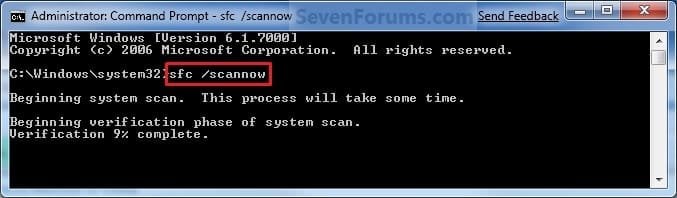
A) In the elevated command prompt, type sfc /scannow, press Enter, and go to step 4 below. (see screenshot below)
NOTE: This may take a little bit to finish.
Command-1.jpg
3. To Only Verify if the System Files are Corrupted
NOTE: Scans and only verifies the integrity of all proteced system files only. This command will not change your system files as in the red WARNING box at the top of this tutorial.
A) In the elevated command prompt, type sfc /verifyonly, press Enter, and go to step 4 below.
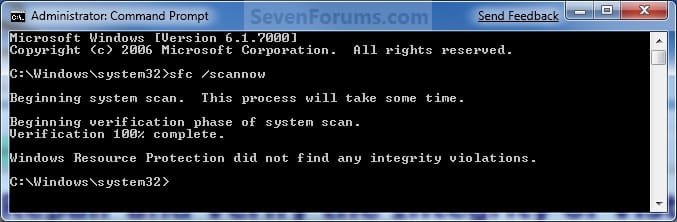
4. When the scan is complete, hopefully you will see all is ok like the screenshot below.

   Note

  • If SFC could not fix something, then run the command again to see if it may be able to the next time. Sometimes it may take running the sfc /scannow command 3 or more times to completely fix everything that it's able to.
  • If not, then download and run the 32-bit (x86) or 64-bit (x64) System Update Readiness Tool for your same installed 32-bit or 64-bit Windows 7, restart the PC afterwards, and try the sfc /scannow command again.
  • If still not, then try using OPTION ONE above to run the sfc /scannow command at boot.
  • If still not, then you can attempt to run a System Restore using a restore point dated before the bad file occured to fix it. You may need to repeat doing a System Restore until you find a older restore point that may work.
  • If still not, then you can use the steps in the TIP box in the OPTION THREE section below to manually replace the files that SFC could not fix if there are not to many fix.
  • If there are to many files to manually fix, or you prefer not to use OPTION THREE below, then you could do a repair install without losing anything.
If you would like to get help with your SFC issue, then be sure to upload and attach your sfcdetails.txt file from OPTION THREE below in your post.


Finished.jpg
5. When done, close the elevated command prompt.


OPTION THREE

How to See and Read Only the "SFC" Scan Results from the CBS.LOG


   Note
When SFC runs, it logs it's actions into the C:\Windows\Logs\CBS\CBS.log. The steps in this option will show you how to see only the specific SFC entries with the [SR] tags in this CBS.log. This can be helpful to show you what files SFC could not fix automatically if you wanted to try and manually replace them.

1. Open an "elevated command prompt" (right click -> Run as administrator).

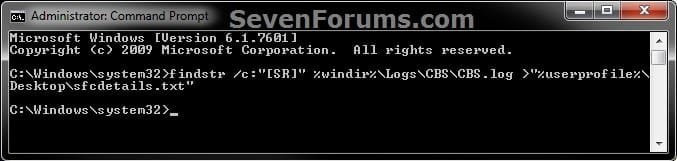
2. In the elevated command prompt, copy and paste the command below, and press Enter. (See screenshot below)
NOTE: This will place a sfcdetails.txt file on your desktop with only the SFC scan result details from the CBS.LOG in it.
Code:
findstr /c:"[SR]" %windir%\Logs\CBS\CBS.log >"%userprofile%\Desktop\sfcdetails.txt"
sfcdetails.jpg
3. Close the elevated command prompt.

4. Open the sfcdetails.txt file on your desktop to see the SFC scan details in the CBS.LOG.

5. You can safely delete the sfcdetails.txt file afterwards if you like.
   Tip
If you need to replace a corrupted system file that SFC cannot fix, then this will show you how to by extracting a new copy directly from your Windows 7 installation DVD.

Extract Files from Windows 7 Installation DVD


That's it,
Shawn


Last edited:
Hi, I am sorry of my primitive question.
After run "sfc /scannow" have problem with my "Window Colorization". Does not work what kind of Aero Themes I can choose. Always I get typical Window Color and Appearance not list of colors.
Will appreciate help.


Hello Stasioau,

What edition of Windows 7 do you have installed?

Did you modify any system files for the theme you had before running SFC?
 
Last edited:

My Computer My Computer

At a glance

64-bit Windows 11 Pro for WorkstationsIntel i7-8700K OC'd to 5 GHz64 GB (4x16GB) G.SKILL TridentZ RGB DDR4 3600...ASUS ROG-STRIX-GTX1080TI-O11G-GAMING
Computer type
PC/Desktop
Computer Manufacturer/Model Number
Self built custom
OS
64-bit Windows 11 Pro for Workstations
CPU
Intel i7-8700K OC'd to 5 GHz
Motherboard
ASUS ROG Maximus XI Formula Z390
Memory
64 GB (4x16GB) G.SKILL TridentZ RGB DDR4 3600 MHz
Graphics Card(s)
ASUS ROG-STRIX-GTX1080TI-O11G-GAMING
Sound Card
Integrated
Monitor(s) Displays
2 x Samsung Odyssey G7 27"
Screen Resolution
2560x1440
Hard Drives
1TB Samsung 990 PRO M.2,
4TB Samsung 990 PRO PRO M.2,
TerraMaster F8 SSD Plus NAS
PSU
Seasonic Prime Titanium 850W
Case
Thermaltake Core P3
Cooling
Corsair Hydro H115i
Keyboard
Logitech wireless K800
Mouse
Logitech MX Master 4
Internet Speed
2 Gb/s Download and 100 Mb/s Upload
Antivirus
Malwarebyte Anti-Malware Premium
Browser
Google Chrome
Other Info
Logitech Z625 speaker system,
Logitech BRIO 4K Pro webcam,
HP Color LaserJet Pro MFP M477fdn,
APC SMART-UPS RT 1000 XL - SURT1000XLI,
Galaxy S23 Plus phone
Hi Brink,
Thank you so much for your answer.
I do have Windows 7, 64-bit operating system, RAM = 16GB
I do not modify any system for theme before SFC.
With my best regards,
stasioau
 

My Computer My Computer

At a glance

Windows 7
OS
Windows 7
For edition, would that be say Windows 7 Starter, Home Basic, Home Premium, Ultimate, etc.....? :)
 

My Computer My Computer

At a glance

64-bit Windows 11 Pro for WorkstationsIntel i7-8700K OC'd to 5 GHz64 GB (4x16GB) G.SKILL TridentZ RGB DDR4 3600...ASUS ROG-STRIX-GTX1080TI-O11G-GAMING
Computer type
PC/Desktop
Computer Manufacturer/Model Number
Self built custom
OS
64-bit Windows 11 Pro for Workstations
CPU
Intel i7-8700K OC'd to 5 GHz
Motherboard
ASUS ROG Maximus XI Formula Z390
Memory
64 GB (4x16GB) G.SKILL TridentZ RGB DDR4 3600 MHz
Graphics Card(s)
ASUS ROG-STRIX-GTX1080TI-O11G-GAMING
Sound Card
Integrated
Monitor(s) Displays
2 x Samsung Odyssey G7 27"
Screen Resolution
2560x1440
Hard Drives
1TB Samsung 990 PRO M.2,
4TB Samsung 990 PRO PRO M.2,
TerraMaster F8 SSD Plus NAS
PSU
Seasonic Prime Titanium 850W
Case
Thermaltake Core P3
Cooling
Corsair Hydro H115i
Keyboard
Logitech wireless K800
Mouse
Logitech MX Master 4
Internet Speed
2 Gb/s Download and 100 Mb/s Upload
Antivirus
Malwarebyte Anti-Malware Premium
Browser
Google Chrome
Other Info
Logitech Z625 speaker system,
Logitech BRIO 4K Pro webcam,
HP Color LaserJet Pro MFP M477fdn,
APC SMART-UPS RT 1000 XL - SURT1000XLI,
Galaxy S23 Plus phone
Ok, for now, double check to make sure that you have the latest video driver installed, and see if updating your WEI score may help.

If that doesn't help, then check the items in the red warning box at the top of the tutorial below to see if one of them may be the issue. http://www.sevenforums.com/tutorials/282-window-color-appearance-change.html
Is still not, then please go ahead and post a screenshot of what you are seeing to see if it may help to ID the issue. :)
 
Last edited:

My Computer My Computer

At a glance

64-bit Windows 11 Pro for WorkstationsIntel i7-8700K OC'd to 5 GHz64 GB (4x16GB) G.SKILL TridentZ RGB DDR4 3600...ASUS ROG-STRIX-GTX1080TI-O11G-GAMING
Computer type
PC/Desktop
Computer Manufacturer/Model Number
Self built custom
OS
64-bit Windows 11 Pro for Workstations
CPU
Intel i7-8700K OC'd to 5 GHz
Motherboard
ASUS ROG Maximus XI Formula Z390
Memory
64 GB (4x16GB) G.SKILL TridentZ RGB DDR4 3600 MHz
Graphics Card(s)
ASUS ROG-STRIX-GTX1080TI-O11G-GAMING
Sound Card
Integrated
Monitor(s) Displays
2 x Samsung Odyssey G7 27"
Screen Resolution
2560x1440
Hard Drives
1TB Samsung 990 PRO M.2,
4TB Samsung 990 PRO PRO M.2,
TerraMaster F8 SSD Plus NAS
PSU
Seasonic Prime Titanium 850W
Case
Thermaltake Core P3
Cooling
Corsair Hydro H115i
Keyboard
Logitech wireless K800
Mouse
Logitech MX Master 4
Internet Speed
2 Gb/s Download and 100 Mb/s Upload
Antivirus
Malwarebyte Anti-Malware Premium
Browser
Google Chrome
Other Info
Logitech Z625 speaker system,
Logitech BRIO 4K Pro webcam,
HP Color LaserJet Pro MFP M477fdn,
APC SMART-UPS RT 1000 XL - SURT1000XLI,
Galaxy S23 Plus phone
You're most welcome. :)
 

My Computer My Computer

At a glance

64-bit Windows 11 Pro for WorkstationsIntel i7-8700K OC'd to 5 GHz64 GB (4x16GB) G.SKILL TridentZ RGB DDR4 3600...ASUS ROG-STRIX-GTX1080TI-O11G-GAMING
Computer type
PC/Desktop
Computer Manufacturer/Model Number
Self built custom
OS
64-bit Windows 11 Pro for Workstations
CPU
Intel i7-8700K OC'd to 5 GHz
Motherboard
ASUS ROG Maximus XI Formula Z390
Memory
64 GB (4x16GB) G.SKILL TridentZ RGB DDR4 3600 MHz
Graphics Card(s)
ASUS ROG-STRIX-GTX1080TI-O11G-GAMING
Sound Card
Integrated
Monitor(s) Displays
2 x Samsung Odyssey G7 27"
Screen Resolution
2560x1440
Hard Drives
1TB Samsung 990 PRO M.2,
4TB Samsung 990 PRO PRO M.2,
TerraMaster F8 SSD Plus NAS
PSU
Seasonic Prime Titanium 850W
Case
Thermaltake Core P3
Cooling
Corsair Hydro H115i
Keyboard
Logitech wireless K800
Mouse
Logitech MX Master 4
Internet Speed
2 Gb/s Download and 100 Mb/s Upload
Antivirus
Malwarebyte Anti-Malware Premium
Browser
Google Chrome
Other Info
Logitech Z625 speaker system,
Logitech BRIO 4K Pro webcam,
HP Color LaserJet Pro MFP M477fdn,
APC SMART-UPS RT 1000 XL - SURT1000XLI,
Galaxy S23 Plus phone
With "Window Color and Appearance - Change" do not solve my question.
"Screenshot" gave me some ideas and colors to my computer come back.
Thanks Brink very much.
Best regards
stasioau
 

My Computer My Computer

At a glance

Windows 7
OS
Windows 7
I'm happy to hear that you got it sorted. What turned out to be the issue?
 

My Computer My Computer

At a glance

64-bit Windows 11 Pro for WorkstationsIntel i7-8700K OC'd to 5 GHz64 GB (4x16GB) G.SKILL TridentZ RGB DDR4 3600...ASUS ROG-STRIX-GTX1080TI-O11G-GAMING
Computer type
PC/Desktop
Computer Manufacturer/Model Number
Self built custom
OS
64-bit Windows 11 Pro for Workstations
CPU
Intel i7-8700K OC'd to 5 GHz
Motherboard
ASUS ROG Maximus XI Formula Z390
Memory
64 GB (4x16GB) G.SKILL TridentZ RGB DDR4 3600 MHz
Graphics Card(s)
ASUS ROG-STRIX-GTX1080TI-O11G-GAMING
Sound Card
Integrated
Monitor(s) Displays
2 x Samsung Odyssey G7 27"
Screen Resolution
2560x1440
Hard Drives
1TB Samsung 990 PRO M.2,
4TB Samsung 990 PRO PRO M.2,
TerraMaster F8 SSD Plus NAS
PSU
Seasonic Prime Titanium 850W
Case
Thermaltake Core P3
Cooling
Corsair Hydro H115i
Keyboard
Logitech wireless K800
Mouse
Logitech MX Master 4
Internet Speed
2 Gb/s Download and 100 Mb/s Upload
Antivirus
Malwarebyte Anti-Malware Premium
Browser
Google Chrome
Other Info
Logitech Z625 speaker system,
Logitech BRIO 4K Pro webcam,
HP Color LaserJet Pro MFP M477fdn,
APC SMART-UPS RT 1000 XL - SURT1000XLI,
Galaxy S23 Plus phone
SFC and Installer fixed!!

:DWow! you just read my mind. Now I have to fix CHK disc in Read mode. Where is 64 bit System Update
Readiness Tool? SFC had no errors. You give great help as always!! BEST forum on the internet!
Avie
ps Someone logged 16 hours ago as me. There is a return private message for "me". I have not been on for many moons.
 

My Computer My Computer

At a glance

Microsoft Windows 7 Home Premium 64-bit 7601 ...AMD Athlon(tm) 64 X2 Dual Core Processor 4400+4.00 GBNVIDIA GeForce 6150SE nForce 430 (Microsoft C...
Computer Manufacturer/Model Number
HP Pavillon
OS
Microsoft Windows 7 Home Premium 64-bit 7601 Multiprocessor Free Service Pack 1
CPU
AMD Athlon(tm) 64 X2 Dual Core Processor 4400+
Motherboard
ASUSTek Computer INC. NARRA2
Memory
4.00 GB
Graphics Card(s)
NVIDIA GeForce 6150SE nForce 430 (Microsoft Corporation - WD
Sound Card
Realtek High Definition Audio
Monitor(s) Displays
Samsung
Screen Resolution
1280 x 1024 x 32 bits (4294967296 colors) @ 60 Hz
Hard Drives
(1) ST332082 0AS SCSI Disk Device (2) Generic- Compact Flash USB Device (3) Generic- MS/MS-Pro USB Device (4) Generic- SD/MMC USB Device (5) Generic- SM/xD-Picture USB Device
Browser
Firfefox 25
Hello Avie,

Do you have our phone app installed on a smartphone that may have logged you in to the site automatically?

If not, then you might change your password just to be safe.

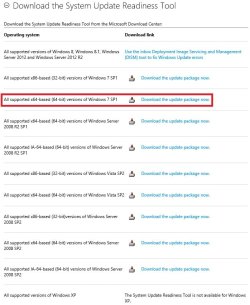
When you go to the System Update Readiness Tool link, you'll see a 64-bit option listed.

SURT_Downloads.jpg

Hope this helps. :)
 

My Computer My Computer

At a glance

64-bit Windows 11 Pro for WorkstationsIntel i7-8700K OC'd to 5 GHz64 GB (4x16GB) G.SKILL TridentZ RGB DDR4 3600...ASUS ROG-STRIX-GTX1080TI-O11G-GAMING
Computer type
PC/Desktop
Computer Manufacturer/Model Number
Self built custom
OS
64-bit Windows 11 Pro for Workstations
CPU
Intel i7-8700K OC'd to 5 GHz
Motherboard
ASUS ROG Maximus XI Formula Z390
Memory
64 GB (4x16GB) G.SKILL TridentZ RGB DDR4 3600 MHz
Graphics Card(s)
ASUS ROG-STRIX-GTX1080TI-O11G-GAMING
Sound Card
Integrated
Monitor(s) Displays
2 x Samsung Odyssey G7 27"
Screen Resolution
2560x1440
Hard Drives
1TB Samsung 990 PRO M.2,
4TB Samsung 990 PRO PRO M.2,
TerraMaster F8 SSD Plus NAS
PSU
Seasonic Prime Titanium 850W
Case
Thermaltake Core P3
Cooling
Corsair Hydro H115i
Keyboard
Logitech wireless K800
Mouse
Logitech MX Master 4
Internet Speed
2 Gb/s Download and 100 Mb/s Upload
Antivirus
Malwarebyte Anti-Malware Premium
Browser
Google Chrome
Other Info
Logitech Z625 speaker system,
Logitech BRIO 4K Pro webcam,
HP Color LaserJet Pro MFP M477fdn,
APC SMART-UPS RT 1000 XL - SURT1000XLI,
Galaxy S23 Plus phone
I just ran sfc /scannow (3 times) as part of a bi-monthly PC checkup routine-- I was having no issues-- and the results indicated that "Windows Resource Protection found corrupt files but was unable to fix some of them" However the SFC log gave no hint of any corrupt files. (log attached)

What to do?
View attachment 295616
 
Last edited:

My Computer My Computer

At a glance

Win 10 Pro x64, Win 7 Pro x64Intel Core i7-6700HQ Skylake16gb Crucial DDR4NVIDIA GeForce GTX 960M 2 GB
Computer type
Laptop
Computer Manufacturer/Model Number
MSI PE60 6QE
OS
Win 10 Pro x64, Win 7 Pro x64
CPU
Intel Core i7-6700HQ Skylake
Motherboard
MSI MS-16J5
Memory
16gb Crucial DDR4
Graphics Card(s)
NVIDIA GeForce GTX 960M 2 GB
Screen Resolution
1920 x 1080
Hard Drives
Samsung 850 EVO 250 GB M.2 SSD (MZ-N5E250BW)
HGST 1TB @7200 RPM HTS721010A9E630
Case
Plastic
Keyboard
Got one...
Mouse
Yep, one of those too.
Internet Speed
FIOS 75/75
Antivirus
Defender
Browser
Chrome/FFox/Ex-PLODE-r/(L)Edge
Other Info
Defender, Custom Hosts, uBlock, regular backups w/ Macrium (Free)
Tried several reboots, ran sfc /scannow again, same result however CBS log shows lots of "activity" although it may as well be written in Swahili for all I can decipher. :huh: Pertinent CBS log parts attached.

View attachment 295622
 
Last edited:

My Computer My Computer

At a glance

Win 10 Pro x64, Win 7 Pro x64Intel Core i7-6700HQ Skylake16gb Crucial DDR4NVIDIA GeForce GTX 960M 2 GB
Computer type
Laptop
Computer Manufacturer/Model Number
MSI PE60 6QE
OS
Win 10 Pro x64, Win 7 Pro x64
CPU
Intel Core i7-6700HQ Skylake
Motherboard
MSI MS-16J5
Memory
16gb Crucial DDR4
Graphics Card(s)
NVIDIA GeForce GTX 960M 2 GB
Screen Resolution
1920 x 1080
Hard Drives
Samsung 850 EVO 250 GB M.2 SSD (MZ-N5E250BW)
HGST 1TB @7200 RPM HTS721010A9E630
Case
Plastic
Keyboard
Got one...
Mouse
Yep, one of those too.
Internet Speed
FIOS 75/75
Antivirus
Defender
Browser
Chrome/FFox/Ex-PLODE-r/(L)Edge
Other Info
Defender, Custom Hosts, uBlock, regular backups w/ Macrium (Free)
Hello Joe,

The SFC log is incomplete, but I agree nothing is wrong with what it is showing so far.

You could run the Update Readiness Tool from the blue Note box under step 4 in Option Two to see if that may allow SFC to repair them afterwards.

Hope this helps, :)
Shawn
 

My Computer My Computer

At a glance

64-bit Windows 11 Pro for WorkstationsIntel i7-8700K OC'd to 5 GHz64 GB (4x16GB) G.SKILL TridentZ RGB DDR4 3600...ASUS ROG-STRIX-GTX1080TI-O11G-GAMING
Computer type
PC/Desktop
Computer Manufacturer/Model Number
Self built custom
OS
64-bit Windows 11 Pro for Workstations
CPU
Intel i7-8700K OC'd to 5 GHz
Motherboard
ASUS ROG Maximus XI Formula Z390
Memory
64 GB (4x16GB) G.SKILL TridentZ RGB DDR4 3600 MHz
Graphics Card(s)
ASUS ROG-STRIX-GTX1080TI-O11G-GAMING
Sound Card
Integrated
Monitor(s) Displays
2 x Samsung Odyssey G7 27"
Screen Resolution
2560x1440
Hard Drives
1TB Samsung 990 PRO M.2,
4TB Samsung 990 PRO PRO M.2,
TerraMaster F8 SSD Plus NAS
PSU
Seasonic Prime Titanium 850W
Case
Thermaltake Core P3
Cooling
Corsair Hydro H115i
Keyboard
Logitech wireless K800
Mouse
Logitech MX Master 4
Internet Speed
2 Gb/s Download and 100 Mb/s Upload
Antivirus
Malwarebyte Anti-Malware Premium
Browser
Google Chrome
Other Info
Logitech Z625 speaker system,
Logitech BRIO 4K Pro webcam,
HP Color LaserJet Pro MFP M477fdn,
APC SMART-UPS RT 1000 XL - SURT1000XLI,
Galaxy S23 Plus phone
Thank you for the reply Shawn, I ran the SURT & re-ran sfc /scannow (yes I did with elevated command) and got same result. :(
 

My Computer My Computer

At a glance

Win 10 Pro x64, Win 7 Pro x64Intel Core i7-6700HQ Skylake16gb Crucial DDR4NVIDIA GeForce GTX 960M 2 GB
Computer type
Laptop
Computer Manufacturer/Model Number
MSI PE60 6QE
OS
Win 10 Pro x64, Win 7 Pro x64
CPU
Intel Core i7-6700HQ Skylake
Motherboard
MSI MS-16J5
Memory
16gb Crucial DDR4
Graphics Card(s)
NVIDIA GeForce GTX 960M 2 GB
Screen Resolution
1920 x 1080
Hard Drives
Samsung 850 EVO 250 GB M.2 SSD (MZ-N5E250BW)
HGST 1TB @7200 RPM HTS721010A9E630
Case
Plastic
Keyboard
Got one...
Mouse
Yep, one of those too.
Internet Speed
FIOS 75/75
Antivirus
Defender
Browser
Chrome/FFox/Ex-PLODE-r/(L)Edge
Other Info
Defender, Custom Hosts, uBlock, regular backups w/ Macrium (Free)
Joe,

If you haven't already, you might see if running SFC at boot (Option One) may work better without Windows being "in use".

Are you having any issues in Windows for why you ran SFC? Perhaps we could tackle those.
 

My Computer My Computer

At a glance

64-bit Windows 11 Pro for WorkstationsIntel i7-8700K OC'd to 5 GHz64 GB (4x16GB) G.SKILL TridentZ RGB DDR4 3600...ASUS ROG-STRIX-GTX1080TI-O11G-GAMING
Computer type
PC/Desktop
Computer Manufacturer/Model Number
Self built custom
OS
64-bit Windows 11 Pro for Workstations
CPU
Intel i7-8700K OC'd to 5 GHz
Motherboard
ASUS ROG Maximus XI Formula Z390
Memory
64 GB (4x16GB) G.SKILL TridentZ RGB DDR4 3600 MHz
Graphics Card(s)
ASUS ROG-STRIX-GTX1080TI-O11G-GAMING
Sound Card
Integrated
Monitor(s) Displays
2 x Samsung Odyssey G7 27"
Screen Resolution
2560x1440
Hard Drives
1TB Samsung 990 PRO M.2,
4TB Samsung 990 PRO PRO M.2,
TerraMaster F8 SSD Plus NAS
PSU
Seasonic Prime Titanium 850W
Case
Thermaltake Core P3
Cooling
Corsair Hydro H115i
Keyboard
Logitech wireless K800
Mouse
Logitech MX Master 4
Internet Speed
2 Gb/s Download and 100 Mb/s Upload
Antivirus
Malwarebyte Anti-Malware Premium
Browser
Google Chrome
Other Info
Logitech Z625 speaker system,
Logitech BRIO 4K Pro webcam,
HP Color LaserJet Pro MFP M477fdn,
APC SMART-UPS RT 1000 XL - SURT1000XLI,
Galaxy S23 Plus phone
Joe,

If you haven't already, you might see if running SFC at boot (Option One) may work better without Windows being "in use".

Are you having any issues in Windows for why you ran SFC? Perhaps we could tackle those.

No issues Shawn, just running SFC as part of a PC checkup routine I do every 2-3 months... the fact that SFC found anything corrupt is surprising to me.

Just finished running sfc at boot as suggested, (posting on another machine) "Windows Protection did not find any integrity violations" :D
 

My Computer My Computer

At a glance

Win 10 Pro x64, Win 7 Pro x64Intel Core i7-6700HQ Skylake16gb Crucial DDR4NVIDIA GeForce GTX 960M 2 GB
Computer type
Laptop
Computer Manufacturer/Model Number
MSI PE60 6QE
OS
Win 10 Pro x64, Win 7 Pro x64
CPU
Intel Core i7-6700HQ Skylake
Motherboard
MSI MS-16J5
Memory
16gb Crucial DDR4
Graphics Card(s)
NVIDIA GeForce GTX 960M 2 GB
Screen Resolution
1920 x 1080
Hard Drives
Samsung 850 EVO 250 GB M.2 SSD (MZ-N5E250BW)
HGST 1TB @7200 RPM HTS721010A9E630
Case
Plastic
Keyboard
Got one...
Mouse
Yep, one of those too.
Internet Speed
FIOS 75/75
Antivirus
Defender
Browser
Chrome/FFox/Ex-PLODE-r/(L)Edge
Other Info
Defender, Custom Hosts, uBlock, regular backups w/ Macrium (Free)
Perfect.

:thumbsup:
 

My Computer My Computer

At a glance

64-bit Windows 11 Pro for WorkstationsIntel i7-8700K OC'd to 5 GHz64 GB (4x16GB) G.SKILL TridentZ RGB DDR4 3600...ASUS ROG-STRIX-GTX1080TI-O11G-GAMING
Computer type
PC/Desktop
Computer Manufacturer/Model Number
Self built custom
OS
64-bit Windows 11 Pro for Workstations
CPU
Intel i7-8700K OC'd to 5 GHz
Motherboard
ASUS ROG Maximus XI Formula Z390
Memory
64 GB (4x16GB) G.SKILL TridentZ RGB DDR4 3600 MHz
Graphics Card(s)
ASUS ROG-STRIX-GTX1080TI-O11G-GAMING
Sound Card
Integrated
Monitor(s) Displays
2 x Samsung Odyssey G7 27"
Screen Resolution
2560x1440
Hard Drives
1TB Samsung 990 PRO M.2,
4TB Samsung 990 PRO PRO M.2,
TerraMaster F8 SSD Plus NAS
PSU
Seasonic Prime Titanium 850W
Case
Thermaltake Core P3
Cooling
Corsair Hydro H115i
Keyboard
Logitech wireless K800
Mouse
Logitech MX Master 4
Internet Speed
2 Gb/s Download and 100 Mb/s Upload
Antivirus
Malwarebyte Anti-Malware Premium
Browser
Google Chrome
Other Info
Logitech Z625 speaker system,
Logitech BRIO 4K Pro webcam,
HP Color LaserJet Pro MFP M477fdn,
APC SMART-UPS RT 1000 XL - SURT1000XLI,
Galaxy S23 Plus phone
After a botched windows update, I restored to a backup (using acronis trueimage)and I ran a SFC /scannow to be on the safe side though everything seems to be running well. The SFC scan reported that there were corrupt files that it could not repair. Attached here is my sfcdetails.txt. It's all Greek to me and I hope one of you gurus can kindly spare some time and decipher it for me. Many thanks in advance.
 

Attachments

My Computer My Computer

At a glance

Windows 7 Home Premium 64bit.
OS
Windows 7 Home Premium 64bit.
Hello Atom,

SFC shows that your ppcRsopUserSchema.mof file cannot be repaired. It is part of your printing spooler.

If you are not having any issues with printing, then I wouldn't worry about it. If you are, then you could try the items in the blue Note box under step 4 in Option Two to see if SFC may be able to repair this file afterwards.


Code:
2013-12-01 23:17:34, Info                  CSI    00000301 [SR] Cannot repair member file [l:42{21}]"[B][COLOR=red]ppcRsopUserSchema.mof[/COLOR][/B]" of Microsoft-Windows-Printing-Spooler-Ppc, Version = 6.1.7601.21730, pA = PROCESSOR_ARCHITECTURE_AMD64 (9), Culture neutral, VersionScope = 1 nonSxS, PublicKeyToken = {l:8 b:31bf3856ad364e35}, Type neutral, TypeName neutral, PublicKey neutral in the store, file is missing

 2013-12-01 23:17:34, Info                  CSI    00000302 [SR] Cannot repair member file [l:42{21}]"[B][COLOR=red]ppcRsopUserSchema.mof[/COLOR][/B]" of Microsoft-Windows-Printing-Spooler-Ppc, Version = 6.1.7601.21730, pA = PROCESSOR_ARCHITECTURE_INTEL (0), Culture neutral, VersionScope = 1 nonSxS, PublicKeyToken = {l:8 b:31bf3856ad364e35}, Type neutral, TypeName neutral, PublicKey neutral in the store, file is missing

 2013-12-01 23:17:34, Info                  CSI    00000303 [SR] Cannot repair member file [l:42{21}]"[B][COLOR=red]ppcRsopUserSchema.mof[/COLOR][/B]" of Microsoft-Windows-Printing-Spooler-Ppc, Version = 6.1.7601.21730, pA = PROCESSOR_ARCHITECTURE_INTEL (0), Culture neutral, VersionScope = 1 nonSxS, PublicKeyToken = {l:8 b:31bf3856ad364e35}, Type neutral, TypeName neutral, PublicKey neutral in the store, file is missing

 2013-12-01 23:17:34, Info                  CSI    00000304 [SR] This component was referenced by [l:154{77}]"Package_3_for_KB2537549~31bf3856ad364e35~amd64~~6.1.1.0.2537549-3_neutral_LDR"

 2013-12-01 23:17:34, Info                  CSI    00000305 [SR] Cannot repair member file [l:42{21}]"[B][COLOR=red]ppcRsopUserSchema.mof[/COLOR][/B]" of Microsoft-Windows-Printing-Spooler-Ppc, Version = 6.1.7601.21730, pA = PROCESSOR_ARCHITECTURE_AMD64 (9), Culture neutral, VersionScope = 1 nonSxS, PublicKeyToken = {l:8 b:31bf3856ad364e35}, Type neutral, TypeName neutral, PublicKey neutral in the store, file is missing

 2013-12-01 23:17:34, Info                  CSI    00000306 [SR] This component was referenced by [l:154{77}]"Package_3_for_KB2537549~31bf3856ad364e35~amd64~~6.1.1.0.2537549-3_neutral_LDR


Hope this helps, :)
Shawn
 

My Computer My Computer

At a glance

64-bit Windows 11 Pro for WorkstationsIntel i7-8700K OC'd to 5 GHz64 GB (4x16GB) G.SKILL TridentZ RGB DDR4 3600...ASUS ROG-STRIX-GTX1080TI-O11G-GAMING
Computer type
PC/Desktop
Computer Manufacturer/Model Number
Self built custom
OS
64-bit Windows 11 Pro for Workstations
CPU
Intel i7-8700K OC'd to 5 GHz
Motherboard
ASUS ROG Maximus XI Formula Z390
Memory
64 GB (4x16GB) G.SKILL TridentZ RGB DDR4 3600 MHz
Graphics Card(s)
ASUS ROG-STRIX-GTX1080TI-O11G-GAMING
Sound Card
Integrated
Monitor(s) Displays
2 x Samsung Odyssey G7 27"
Screen Resolution
2560x1440
Hard Drives
1TB Samsung 990 PRO M.2,
4TB Samsung 990 PRO PRO M.2,
TerraMaster F8 SSD Plus NAS
PSU
Seasonic Prime Titanium 850W
Case
Thermaltake Core P3
Cooling
Corsair Hydro H115i
Keyboard
Logitech wireless K800
Mouse
Logitech MX Master 4
Internet Speed
2 Gb/s Download and 100 Mb/s Upload
Antivirus
Malwarebyte Anti-Malware Premium
Browser
Google Chrome
Other Info
Logitech Z625 speaker system,
Logitech BRIO 4K Pro webcam,
HP Color LaserJet Pro MFP M477fdn,
APC SMART-UPS RT 1000 XL - SURT1000XLI,
Galaxy S23 Plus phone
Back
Top