SFC /SCANNOW Command - System File Checker

How to Repair Windows 7 System Files with System File Checker


   Information
The sfc /scannow command (System File Checker) scans the integrity of all protected Windows 7 system files and replaces incorrect corrupted, changed/modified, or damaged versions with the correct versions if possible.

   Tip
If you get the Windows Resource Protection Could Not Start the Repair Service error when trying to run SFC, then make sure that the Windows Modules Installer service is enabled, click on Start, and set to Manual.

Services - Start or Disable

OR

Copy and paste the command below in the elevated command prompt, and press Enter. After the Windows Modules Installer service has started, try running the SFC command again

net start trustedinstaller

   Note
The KB3022345, KB3035583, and KB3068708 updates will cause SFC to give you a false mismatch message in SFC for files related to these updates.

You can safely ignore these results in your SFC details since it will not affect SFC from being able to repair other system files.

   Warning
Be aware that if you have modified your system files as in theming explorer/system files, running sfc /scannow will revert the system files such as explorer.exe back to it's default state. Make the appropriate backups of your system files that you have modified for theming if you wish to save them before running sfc /scannow.


:note: For the updated Windows 10 tutorial, please see - SFC Command - Run in Windows 10 - Windows 10 Tutorials

CONTENTS:
  • Option One: To Run the SFC /SCANNOW Command at Boot
  • Option Two: To Run the SFC /SCANNOW Command in Windows 7
  • Option Three: How to See and Read Only the "SFC" Scan Results from the CBS.LOG


OPTION ONE

To Run the SFC /SCANNOW Command at Boot


1. For how, see METHOD TWO at this link: SFC /SCANNOW : Run in Command Prompt at Boot

   Note
Using OPTION TWO below is recommended if able.

If you would like to get help with your SFC issue, then be sure to upload and attach your sfcdetails.txt file from OPTION THREE below in your post.


OPTION TWO

To Run the SFC /SCANNOW Command in Windows 7


1. Open an elevated command prompt or an elevated PowerShell, and do step 2 or 3 below for what type of scan you would like to run.


2. To Scan and Repair System Files
NOTE: Scans the integrity of all protected system files and repairs the system files if needed. Please see red WARNING box at the top of this tutorial.
A) In the elevated command prompt, type sfc /scannow, press Enter, and go to step 4 below. (see screenshot below)
NOTE: This may take a little bit to finish.
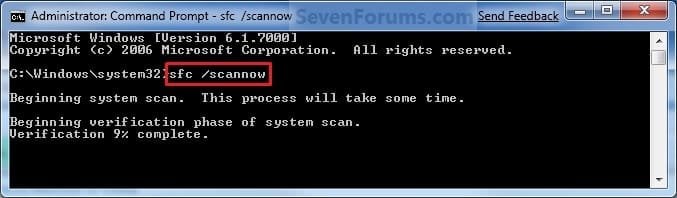
Command-1.jpg
3. To Only Verify if the System Files are Corrupted
NOTE: Scans and only verifies the integrity of all proteced system files only. This command will not change your system files as in the red WARNING box at the top of this tutorial.
A) In the elevated command prompt, type sfc /verifyonly, press Enter, and go to step 4 below.
4. When the scan is complete, hopefully you will see all is ok like the screenshot below.

   Note

  • If SFC could not fix something, then run the command again to see if it may be able to the next time. Sometimes it may take running the sfc /scannow command 3 or more times to completely fix everything that it's able to.
  • If not, then download and run the 32-bit (x86) or 64-bit (x64) System Update Readiness Tool for your same installed 32-bit or 64-bit Windows 7, restart the PC afterwards, and try the sfc /scannow command again.
  • If still not, then try using OPTION ONE above to run the sfc /scannow command at boot.
  • If still not, then you can attempt to run a System Restore using a restore point dated before the bad file occured to fix it. You may need to repeat doing a System Restore until you find a older restore point that may work.
  • If still not, then you can use the steps in the TIP box in the OPTION THREE section below to manually replace the files that SFC could not fix if there are not to many fix.
  • If there are to many files to manually fix, or you prefer not to use OPTION THREE below, then you could do a repair install without losing anything.
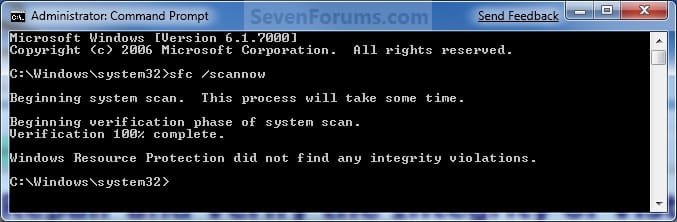
If you would like to get help with your SFC issue, then be sure to upload and attach your sfcdetails.txt file from OPTION THREE below in your post.


Finished.jpg
5. When done, close the elevated command prompt.


OPTION THREE

How to See and Read Only the "SFC" Scan Results from the CBS.LOG


   Note
When SFC runs, it logs it's actions into the C:\Windows\Logs\CBS\CBS.log. The steps in this option will show you how to see only the specific SFC entries with the [SR] tags in this CBS.log. This can be helpful to show you what files SFC could not fix automatically if you wanted to try and manually replace them.

1. Open an "elevated command prompt" (right click -> Run as administrator).

2. In the elevated command prompt, copy and paste the command below, and press Enter. (See screenshot below)
NOTE: This will place a sfcdetails.txt file on your desktop with only the SFC scan result details from the CBS.LOG in it.
Code:
findstr /c:"[SR]" %windir%\Logs\CBS\CBS.log >"%userprofile%\Desktop\sfcdetails.txt"
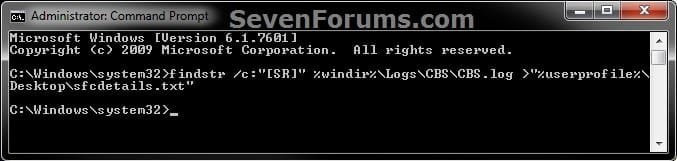
sfcdetails.jpg
3. Close the elevated command prompt.

4. Open the sfcdetails.txt file on your desktop to see the SFC scan details in the CBS.LOG.

5. You can safely delete the sfcdetails.txt file afterwards if you like.
   Tip
If you need to replace a corrupted system file that SFC cannot fix, then this will show you how to by extracting a new copy directly from your Windows 7 installation DVD.

Extract Files from Windows 7 Installation DVD


That's it,
Shawn


Last edited:
Hello Chris, and welcome to Seven Forums.

For now, you might see if doing the items listed in the blue note box under step 4 in Option Two may be able to allow SFC to repair the file afterwards. :)

Hi and thanks!

I tried to install the Readiness tool previously but it almost reached the end and stopped..

Strangely, when I opened the Computer Management, it says that C Partion is healthy, I've no clue what's going on whatsoever :O
 

My Computer My Computer

At a glance

Windows 8.1 (64 bit)Intel(R) Core(TM) i5-5200U CPU @ 2.20GHz (4 C...4096MB RAMNVIDIA Geforce 920M
Computer type
Laptop
Computer Manufacturer/Model Number
Dell Inc.
OS
Windows 8.1 (64 bit)
CPU
Intel(R) Core(TM) i5-5200U CPU @ 2.20GHz (4 CPUs), ~2.2GHz
Memory
4096MB RAM
Graphics Card(s)
NVIDIA Geforce 920M
Monitor(s) Displays
DELL
Screen Resolution
1366 x 768
Keyboard
Standard PS/2 Keyboard
Mouse
A4TECH
Antivirus
Malwarebytes
Browser
Google Chrome
Other Info
Hi
If you're not having any issues, then I wouldn't worry about it.

Otherwise, you may need to either do a repair install or reinstall Windows. :(
 

My Computer My Computer

At a glance

64-bit Windows 11 Pro for WorkstationsIntel i7-8700K OC'd to 5 GHz64 GB (4x16GB) G.SKILL TridentZ RGB DDR4 3600...ASUS ROG-STRIX-GTX1080TI-O11G-GAMING
Computer type
PC/Desktop
Computer Manufacturer/Model Number
Self built custom
OS
64-bit Windows 11 Pro for Workstations
CPU
Intel i7-8700K OC'd to 5 GHz
Motherboard
ASUS ROG Maximus XI Formula Z390
Memory
64 GB (4x16GB) G.SKILL TridentZ RGB DDR4 3600 MHz
Graphics Card(s)
ASUS ROG-STRIX-GTX1080TI-O11G-GAMING
Sound Card
Integrated
Monitor(s) Displays
2 x Samsung Odyssey G7 27"
Screen Resolution
2560x1440
Hard Drives
1TB Samsung 990 PRO M.2,
4TB Samsung 990 PRO PRO M.2,
TerraMaster F8 SSD Plus NAS
PSU
Seasonic Prime Titanium 850W
Case
Thermaltake Core P3
Cooling
Corsair Hydro H115i
Keyboard
Logitech wireless K800
Mouse
Logitech MX Master 4
Internet Speed
2 Gb/s Download and 100 Mb/s Upload
Antivirus
Malwarebyte Anti-Malware Premium
Browser
Google Chrome
Other Info
Logitech Z625 speaker system,
Logitech BRIO 4K Pro webcam,
HP Color LaserJet Pro MFP M477fdn,
APC SMART-UPS RT 1000 XL - SURT1000XLI,
Galaxy S23 Plus phone
If you're not having any issues, then I wouldn't worry about it.

Otherwise, you may need to either do a repair install or reinstall Windows. :(

So far I've been playing games and running programs running yet smoothy but when I try to do the sfc /scannow it shows me the corrupt files, at first I was worried but I started to ask myself if this could this be a false-positive alarm or whatever? xD

Thanks in advance and I appreciate your attempt to help!
 

My Computer My Computer

At a glance

Windows 8.1 (64 bit)Intel(R) Core(TM) i5-5200U CPU @ 2.20GHz (4 C...4096MB RAMNVIDIA Geforce 920M
Computer type
Laptop
Computer Manufacturer/Model Number
Dell Inc.
OS
Windows 8.1 (64 bit)
CPU
Intel(R) Core(TM) i5-5200U CPU @ 2.20GHz (4 CPUs), ~2.2GHz
Memory
4096MB RAM
Graphics Card(s)
NVIDIA Geforce 920M
Monitor(s) Displays
DELL
Screen Resolution
1366 x 768
Keyboard
Standard PS/2 Keyboard
Mouse
A4TECH
Antivirus
Malwarebytes
Browser
Google Chrome
Other Info
Hi
It's definitely a corrupted or modified system file that SFC cannot repair, but it's not a critical file that is normally used.
 

My Computer My Computer

At a glance

64-bit Windows 11 Pro for WorkstationsIntel i7-8700K OC'd to 5 GHz64 GB (4x16GB) G.SKILL TridentZ RGB DDR4 3600...ASUS ROG-STRIX-GTX1080TI-O11G-GAMING
Computer type
PC/Desktop
Computer Manufacturer/Model Number
Self built custom
OS
64-bit Windows 11 Pro for Workstations
CPU
Intel i7-8700K OC'd to 5 GHz
Motherboard
ASUS ROG Maximus XI Formula Z390
Memory
64 GB (4x16GB) G.SKILL TridentZ RGB DDR4 3600 MHz
Graphics Card(s)
ASUS ROG-STRIX-GTX1080TI-O11G-GAMING
Sound Card
Integrated
Monitor(s) Displays
2 x Samsung Odyssey G7 27"
Screen Resolution
2560x1440
Hard Drives
1TB Samsung 990 PRO M.2,
4TB Samsung 990 PRO PRO M.2,
TerraMaster F8 SSD Plus NAS
PSU
Seasonic Prime Titanium 850W
Case
Thermaltake Core P3
Cooling
Corsair Hydro H115i
Keyboard
Logitech wireless K800
Mouse
Logitech MX Master 4
Internet Speed
2 Gb/s Download and 100 Mb/s Upload
Antivirus
Malwarebyte Anti-Malware Premium
Browser
Google Chrome
Other Info
Logitech Z625 speaker system,
Logitech BRIO 4K Pro webcam,
HP Color LaserJet Pro MFP M477fdn,
APC SMART-UPS RT 1000 XL - SURT1000XLI,
Galaxy S23 Plus phone
Okay Gang,

I need help badly! I'm at a total loss! My previous hard drive was going bad, so we had my hard drive cloned. However, I believe it was cloned, along with some system errors. It boots up, but I get a system error every time certain programs are ran.

I get the following message, "The program can't start because .DLL is missing from your computer. Try reinstalling the program to fix this problem."

The problem is that it never lists which DLL file is missing. It must be a DLL file that is being shared or accessed in order to run the program because I get the same message for several different programs: HPDesignjetUtility.exe, JP2Launcher.exe, FlashPlayerPlugin_14_0_0_179.exe, QuickTimePlayer.exe, and several design analysis programs that I use for structural engineering purposes. The programs will eventually open up & run, but I have to click 'OK' between 6 & 25 times, especially if I'm browsing a website like Facebook. It's freaking annoying as you can understand!

I've done the following: CHKDSK, SFC /SCANNOW at the command prompt several times, SFC /SCANNOW at boot command prompt several times, SFC /SCANNOW using the system repair disk, SFC /SCANNOW using the installation disk for both Method One and Method Two (with DISKPART), per the suggestions noted in this thread & forum. I tried uninstalling & reinstalling some of the programs, but that didn't work. Unfortunately, I can't restore to a point prior to this issue. The one thing I haven't done is to replace the file(s) that SFC could not fix. It appears to be one file (I think) according to the CBS.log. I'm about an intermediate-level computer person, but I'm not sure how to replace the file and which file needs to be replaced.

I have included the sfcdetails.txt file. Any and all help is greatly appreciated because I'm going crazy with this and I haven't been very productive work-wise for several days now! Thank you!
 

Attachments

My Computer My Computer

At a glance

Windows 7 Pro 64-bitIntel Core i5 CPU 650 @ 3.20GHz8.0GBNVIDIA GeForce 9800 GT
Computer type
PC/Desktop
Computer Manufacturer/Model Number
custom build
OS
Windows 7 Pro 64-bit
CPU
Intel Core i5 CPU 650 @ 3.20GHz
Motherboard
Asus P7H55-M
Memory
8.0GB
Graphics Card(s)
NVIDIA GeForce 9800 GT
Hard Drives
WDC WD5000AZRX-00L4HB0 ATA
USB-HS SAMSUNG SP2514N USB
Antivirus
Kaspersky Small Office Security
Browser
Firefox
Hello Arboc, and welcome to Seven Forums.

Your SFC details indicate that you need to reinstall your Realtek RTL8187S Wireless LAN PCIE Network Adapter driver since a few files for it are corrupted.

I don't think that will help with your other issue though. For that, reinstall any program that is giving that error to see if it may help.

Another option would be to do a system restore using a restore point dated before this started to undo and fix it.
 

My Computer My Computer

At a glance

64-bit Windows 11 Pro for WorkstationsIntel i7-8700K OC'd to 5 GHz64 GB (4x16GB) G.SKILL TridentZ RGB DDR4 3600...ASUS ROG-STRIX-GTX1080TI-O11G-GAMING
Computer type
PC/Desktop
Computer Manufacturer/Model Number
Self built custom
OS
64-bit Windows 11 Pro for Workstations
CPU
Intel i7-8700K OC'd to 5 GHz
Motherboard
ASUS ROG Maximus XI Formula Z390
Memory
64 GB (4x16GB) G.SKILL TridentZ RGB DDR4 3600 MHz
Graphics Card(s)
ASUS ROG-STRIX-GTX1080TI-O11G-GAMING
Sound Card
Integrated
Monitor(s) Displays
2 x Samsung Odyssey G7 27"
Screen Resolution
2560x1440
Hard Drives
1TB Samsung 990 PRO M.2,
4TB Samsung 990 PRO PRO M.2,
TerraMaster F8 SSD Plus NAS
PSU
Seasonic Prime Titanium 850W
Case
Thermaltake Core P3
Cooling
Corsair Hydro H115i
Keyboard
Logitech wireless K800
Mouse
Logitech MX Master 4
Internet Speed
2 Gb/s Download and 100 Mb/s Upload
Antivirus
Malwarebyte Anti-Malware Premium
Browser
Google Chrome
Other Info
Logitech Z625 speaker system,
Logitech BRIO 4K Pro webcam,
HP Color LaserJet Pro MFP M477fdn,
APC SMART-UPS RT 1000 XL - SURT1000XLI,
Galaxy S23 Plus phone
Hello Arboc, and welcome to Seven Forums.

Your SFC details indicate that you need to reinstall your Realtek RTL8187S Wireless LAN PCIE Network Adapter driver since a few files for it are corrupted.

I don't think that will help with your other issue though. For that, reinstall any program that is giving that error to see if it may help.

Another option would be to do a system restore using a restore point dated before this started to undo and fix it.

Hi Brink,

Thank you for replying! When I opened up the RTL8187Se.sys file in Notepad, I wasn't sure if it was my Realtek Network Adapter or my Realtek HD Audio that it was associated with. Thank you for clarifying that it is indeed my network adapter. In any case, I had tried updating the driver for both of them just in case, but they both stated that I have the most current driver.

When I go to Device Manager and expand Network adapters, it lists Realtek PCIe GBE Family Controller. Is this the same as the Realtek RTL8187S Wireless LAN PCIE Network Adapter you mention? If so, should I uninstall the driver and reinstall it? What is the best way to install the driver? Should I get it from the Realtek website? I don't know which driver I need to download and install. I need you to hold my hand a little on this one.

Unfortunately, I can't do a system restore back that far. I don't know how, but for whatever reason, the feature to create a restore point had been turned off. I actually had to manually turn it back on. I discovered that it was turned off when I tried to do a system restore. Even though my hard drive was cloned, there are no records of any restore points beyond the time I manually turned it back on. It's strange & unfortunate.

Thanks for your help!
 

My Computer My Computer

At a glance

Windows 7 Pro 64-bitIntel Core i5 CPU 650 @ 3.20GHz8.0GBNVIDIA GeForce 9800 GT
Computer type
PC/Desktop
Computer Manufacturer/Model Number
custom build
OS
Windows 7 Pro 64-bit
CPU
Intel Core i5 CPU 650 @ 3.20GHz
Motherboard
Asus P7H55-M
Memory
8.0GB
Graphics Card(s)
NVIDIA GeForce 9800 GT
Hard Drives
WDC WD5000AZRX-00L4HB0 ATA
USB-HS SAMSUNG SP2514N USB
Antivirus
Kaspersky Small Office Security
Browser
Firefox
Yeah, that would be it. The best way would be to uninstall and reinstall the driver.

If you already have the driver installation file, then you could just install that same one.
 

My Computer My Computer

At a glance

64-bit Windows 11 Pro for WorkstationsIntel i7-8700K OC'd to 5 GHz64 GB (4x16GB) G.SKILL TridentZ RGB DDR4 3600...ASUS ROG-STRIX-GTX1080TI-O11G-GAMING
Computer type
PC/Desktop
Computer Manufacturer/Model Number
Self built custom
OS
64-bit Windows 11 Pro for Workstations
CPU
Intel i7-8700K OC'd to 5 GHz
Motherboard
ASUS ROG Maximus XI Formula Z390
Memory
64 GB (4x16GB) G.SKILL TridentZ RGB DDR4 3600 MHz
Graphics Card(s)
ASUS ROG-STRIX-GTX1080TI-O11G-GAMING
Sound Card
Integrated
Monitor(s) Displays
2 x Samsung Odyssey G7 27"
Screen Resolution
2560x1440
Hard Drives
1TB Samsung 990 PRO M.2,
4TB Samsung 990 PRO PRO M.2,
TerraMaster F8 SSD Plus NAS
PSU
Seasonic Prime Titanium 850W
Case
Thermaltake Core P3
Cooling
Corsair Hydro H115i
Keyboard
Logitech wireless K800
Mouse
Logitech MX Master 4
Internet Speed
2 Gb/s Download and 100 Mb/s Upload
Antivirus
Malwarebyte Anti-Malware Premium
Browser
Google Chrome
Other Info
Logitech Z625 speaker system,
Logitech BRIO 4K Pro webcam,
HP Color LaserJet Pro MFP M477fdn,
APC SMART-UPS RT 1000 XL - SURT1000XLI,
Galaxy S23 Plus phone
Yeah, that would be it. The best way would be to uninstall and reinstall the driver.

If you already have the driver installation file, then you could just install that same one.

Hi Brink,

I don't have the driver installation file. It was pre-installed.

I'm still confused as to which driver to install. According to the network adapter details, the Inf section property lists the value as RTL8168E.ndi, so it looks like my Realtek PCIe GBE Family Controller is associated with RTL8168E instead of RTL8187SE. When I google "Realtek PCIe GBE Family Controller driver", the link to the Realtek website also lists RTL8168E, along with several others. If it is for RTL8168E, how do I uninstall the driver for RTL8187SE as well? Here's the link for RTL8168E: Realtek

Here's the link for RTL8187SE, which appears to be a stand-alone: Realtek

Which one do I download - RTL8168E, RTL8187SE, or both? Also, if it should be the one for RTL8168E, which version should I download - "Win7 and Server 2008 R2 Auto Installation Program (SID:1669850)" or "8111DP DASH All-In-One installation kit for WinXP/Vista/Win7"? Or should I download both of them and install them both?

Sorry for all the rudimentary questions, but I just want to make sure I do this right & not create even more issues. Plus, it's the engineer in me to inquire. Thanks for the help!
 

My Computer My Computer

At a glance

Windows 7 Pro 64-bitIntel Core i5 CPU 650 @ 3.20GHz8.0GBNVIDIA GeForce 9800 GT
Computer type
PC/Desktop
Computer Manufacturer/Model Number
custom build
OS
Windows 7 Pro 64-bit
CPU
Intel Core i5 CPU 650 @ 3.20GHz
Motherboard
Asus P7H55-M
Memory
8.0GB
Graphics Card(s)
NVIDIA GeForce 9800 GT
Hard Drives
WDC WD5000AZRX-00L4HB0 ATA
USB-HS SAMSUNG SP2514N USB
Antivirus
Kaspersky Small Office Security
Browser
Firefox
Check in your Device Manager to see what it shows as the model number of your Realtek PCIe GBE Family Controller.

If you are not sure, then what is the brand and model number of your motherboard or computer? I'll see if I may be able to find the latest driver for it. :)
 

My Computer My Computer

At a glance

64-bit Windows 11 Pro for WorkstationsIntel i7-8700K OC'd to 5 GHz64 GB (4x16GB) G.SKILL TridentZ RGB DDR4 3600...ASUS ROG-STRIX-GTX1080TI-O11G-GAMING
Computer type
PC/Desktop
Computer Manufacturer/Model Number
Self built custom
OS
64-bit Windows 11 Pro for Workstations
CPU
Intel i7-8700K OC'd to 5 GHz
Motherboard
ASUS ROG Maximus XI Formula Z390
Memory
64 GB (4x16GB) G.SKILL TridentZ RGB DDR4 3600 MHz
Graphics Card(s)
ASUS ROG-STRIX-GTX1080TI-O11G-GAMING
Sound Card
Integrated
Monitor(s) Displays
2 x Samsung Odyssey G7 27"
Screen Resolution
2560x1440
Hard Drives
1TB Samsung 990 PRO M.2,
4TB Samsung 990 PRO PRO M.2,
TerraMaster F8 SSD Plus NAS
PSU
Seasonic Prime Titanium 850W
Case
Thermaltake Core P3
Cooling
Corsair Hydro H115i
Keyboard
Logitech wireless K800
Mouse
Logitech MX Master 4
Internet Speed
2 Gb/s Download and 100 Mb/s Upload
Antivirus
Malwarebyte Anti-Malware Premium
Browser
Google Chrome
Other Info
Logitech Z625 speaker system,
Logitech BRIO 4K Pro webcam,
HP Color LaserJet Pro MFP M477fdn,
APC SMART-UPS RT 1000 XL - SURT1000XLI,
Galaxy S23 Plus phone
Check in your Device Manager to see what it shows as the model number of your Realtek PCIe GBE Family Controller.

If you are not sure, then what is the brand and model number of your motherboard or computer? I'll see if I may be able to find the latest driver for it. :)

Unfortunately, my Device Manager doesn't show the model number. I have attached a snapshot showing what Device Manager lists and showing details of the driver and its version.

I have an Asus P7H55-M motherboard.
 

Attachments

  • Realtek Network Adapter - Snapshot.JPG
    Realtek Network Adapter - Snapshot.JPG
    176.2 KB · Views: 237

My Computer My Computer

At a glance

Windows 7 Pro 64-bitIntel Core i5 CPU 650 @ 3.20GHz8.0GBNVIDIA GeForce 9800 GT
Computer type
PC/Desktop
Computer Manufacturer/Model Number
custom build
OS
Windows 7 Pro 64-bit
CPU
Intel Core i5 CPU 650 @ 3.20GHz
Motherboard
Asus P7H55-M
Memory
8.0GB
Graphics Card(s)
NVIDIA GeForce 9800 GT
Hard Drives
WDC WD5000AZRX-00L4HB0 ATA
USB-HS SAMSUNG SP2514N USB
Antivirus
Kaspersky Small Office Security
Browser
Firefox

My Computer My Computer

At a glance

64-bit Windows 11 Pro for WorkstationsIntel i7-8700K OC'd to 5 GHz64 GB (4x16GB) G.SKILL TridentZ RGB DDR4 3600...ASUS ROG-STRIX-GTX1080TI-O11G-GAMING
Computer type
PC/Desktop
Computer Manufacturer/Model Number
Self built custom
OS
64-bit Windows 11 Pro for Workstations
CPU
Intel i7-8700K OC'd to 5 GHz
Motherboard
ASUS ROG Maximus XI Formula Z390
Memory
64 GB (4x16GB) G.SKILL TridentZ RGB DDR4 3600 MHz
Graphics Card(s)
ASUS ROG-STRIX-GTX1080TI-O11G-GAMING
Sound Card
Integrated
Monitor(s) Displays
2 x Samsung Odyssey G7 27"
Screen Resolution
2560x1440
Hard Drives
1TB Samsung 990 PRO M.2,
4TB Samsung 990 PRO PRO M.2,
TerraMaster F8 SSD Plus NAS
PSU
Seasonic Prime Titanium 850W
Case
Thermaltake Core P3
Cooling
Corsair Hydro H115i
Keyboard
Logitech wireless K800
Mouse
Logitech MX Master 4
Internet Speed
2 Gb/s Download and 100 Mb/s Upload
Antivirus
Malwarebyte Anti-Malware Premium
Browser
Google Chrome
Other Info
Logitech Z625 speaker system,
Logitech BRIO 4K Pro webcam,
HP Color LaserJet Pro MFP M477fdn,
APC SMART-UPS RT 1000 XL - SURT1000XLI,
Galaxy S23 Plus phone
It's a Realtek RTL8168E network adapter. :)

Latest driver from Realtek:
Realtek

Driver from Asus, but old:
Motherboards - P7H55-M - ASUS

1. If it's a RTL8168E, how do I uninstall the driver for RTL8187SE, which is the damaged file per the SFC CBS.log?

2. For the RTL8168E driver, which version should I download - "Windows 7 and Server 2008 R2 Auto Installation Program (SID:1669850)" or "8111DP DASH All-In-One installation kit for WinXP/Vista/Windows 7"?

3. Or should I install the older Asus drivers first? If so, should I install the oldest one first & then each newer one, and then the newest Realtek driver last?

Thanks for the help!
 

My Computer My Computer

At a glance

Windows 7 Pro 64-bitIntel Core i5 CPU 650 @ 3.20GHz8.0GBNVIDIA GeForce 9800 GT
Computer type
PC/Desktop
Computer Manufacturer/Model Number
custom build
OS
Windows 7 Pro 64-bit
CPU
Intel Core i5 CPU 650 @ 3.20GHz
Motherboard
Asus P7H55-M
Memory
8.0GB
Graphics Card(s)
NVIDIA GeForce 9800 GT
Hard Drives
WDC WD5000AZRX-00L4HB0 ATA
USB-HS SAMSUNG SP2514N USB
Antivirus
Kaspersky Small Office Security
Browser
Firefox
You should be able to just install the new driver, and be fine. :)

Q2) Yes.

Q3) If the one from Realtek has an issue, then you could use this one instead after uninstalling the one from Realtek.
 

My Computer My Computer

At a glance

64-bit Windows 11 Pro for WorkstationsIntel i7-8700K OC'd to 5 GHz64 GB (4x16GB) G.SKILL TridentZ RGB DDR4 3600...ASUS ROG-STRIX-GTX1080TI-O11G-GAMING
Computer type
PC/Desktop
Computer Manufacturer/Model Number
Self built custom
OS
64-bit Windows 11 Pro for Workstations
CPU
Intel i7-8700K OC'd to 5 GHz
Motherboard
ASUS ROG Maximus XI Formula Z390
Memory
64 GB (4x16GB) G.SKILL TridentZ RGB DDR4 3600 MHz
Graphics Card(s)
ASUS ROG-STRIX-GTX1080TI-O11G-GAMING
Sound Card
Integrated
Monitor(s) Displays
2 x Samsung Odyssey G7 27"
Screen Resolution
2560x1440
Hard Drives
1TB Samsung 990 PRO M.2,
4TB Samsung 990 PRO PRO M.2,
TerraMaster F8 SSD Plus NAS
PSU
Seasonic Prime Titanium 850W
Case
Thermaltake Core P3
Cooling
Corsair Hydro H115i
Keyboard
Logitech wireless K800
Mouse
Logitech MX Master 4
Internet Speed
2 Gb/s Download and 100 Mb/s Upload
Antivirus
Malwarebyte Anti-Malware Premium
Browser
Google Chrome
Other Info
Logitech Z625 speaker system,
Logitech BRIO 4K Pro webcam,
HP Color LaserJet Pro MFP M477fdn,
APC SMART-UPS RT 1000 XL - SURT1000XLI,
Galaxy S23 Plus phone
You should be able to just install the new driver, and be fine. :)

Q2) Yes.

Q3) If the one from Realtek has an issue, then you could use this one instead after uninstalling the one from Realtek.

I downloaded & installed the latest Realtek RTL8168E driver successfully. However, I did not uninstall the previous driver beforehand. After the install, I ran SFC /VERIFYONLY, rebooted, & then ran SFC /SCANNOW. Unfortunately, I still get the same message regarding the RTL8187SE file not able to be repaired. Should I have uninstalled the driver first & then install the new driver afterward? Should I uninstall & reinstall the driver now?

Also, I'm still getting the messages regarding the missing DLL file. Why doesn't it give me a DLL file name, so I know what to replace? Ugh, this is so frustrating! I tried uninstalling & reinstalling a few of the programs (four to be exact), but that didn't help. I have 12 programs (discovered so far) that I get this error message on, so uninstalling & reinstalling all of them will be a major pain. Any thoughts?
 

My Computer My Computer

At a glance

Windows 7 Pro 64-bitIntel Core i5 CPU 650 @ 3.20GHz8.0GBNVIDIA GeForce 9800 GT
Computer type
PC/Desktop
Computer Manufacturer/Model Number
custom build
OS
Windows 7 Pro 64-bit
CPU
Intel Core i5 CPU 650 @ 3.20GHz
Motherboard
Asus P7H55-M
Memory
8.0GB
Graphics Card(s)
NVIDIA GeForce 9800 GT
Hard Drives
WDC WD5000AZRX-00L4HB0 ATA
USB-HS SAMSUNG SP2514N USB
Antivirus
Kaspersky Small Office Security
Browser
Firefox
If you're not having any issues with your network, then I wouldn't worry about the SFC issue.

For the .dll issue, you'll need to most likely uninstall and reinstall the affected programs.
 

My Computer My Computer

At a glance

64-bit Windows 11 Pro for WorkstationsIntel i7-8700K OC'd to 5 GHz64 GB (4x16GB) G.SKILL TridentZ RGB DDR4 3600...ASUS ROG-STRIX-GTX1080TI-O11G-GAMING
Computer type
PC/Desktop
Computer Manufacturer/Model Number
Self built custom
OS
64-bit Windows 11 Pro for Workstations
CPU
Intel i7-8700K OC'd to 5 GHz
Motherboard
ASUS ROG Maximus XI Formula Z390
Memory
64 GB (4x16GB) G.SKILL TridentZ RGB DDR4 3600 MHz
Graphics Card(s)
ASUS ROG-STRIX-GTX1080TI-O11G-GAMING
Sound Card
Integrated
Monitor(s) Displays
2 x Samsung Odyssey G7 27"
Screen Resolution
2560x1440
Hard Drives
1TB Samsung 990 PRO M.2,
4TB Samsung 990 PRO PRO M.2,
TerraMaster F8 SSD Plus NAS
PSU
Seasonic Prime Titanium 850W
Case
Thermaltake Core P3
Cooling
Corsair Hydro H115i
Keyboard
Logitech wireless K800
Mouse
Logitech MX Master 4
Internet Speed
2 Gb/s Download and 100 Mb/s Upload
Antivirus
Malwarebyte Anti-Malware Premium
Browser
Google Chrome
Other Info
Logitech Z625 speaker system,
Logitech BRIO 4K Pro webcam,
HP Color LaserJet Pro MFP M477fdn,
APC SMART-UPS RT 1000 XL - SURT1000XLI,
Galaxy S23 Plus phone
I ran sfc /scannow and it says that "Windows Resource Protection didnot find any integrity violation". Yes, My Win 7 has a Win 95 like UI. What gives? Do I need to do something else?
 

My Computer My Computer

At a glance

Win 7 Pro x64
Computer type
PC/Desktop
OS
Win 7 Pro x64
Hello yaip, and welcome to Seven Forums.

That indicate that SFC didn't find any issues with your system files.
 

My Computer My Computer

At a glance

64-bit Windows 11 Pro for WorkstationsIntel i7-8700K OC'd to 5 GHz64 GB (4x16GB) G.SKILL TridentZ RGB DDR4 3600...ASUS ROG-STRIX-GTX1080TI-O11G-GAMING
Computer type
PC/Desktop
Computer Manufacturer/Model Number
Self built custom
OS
64-bit Windows 11 Pro for Workstations
CPU
Intel i7-8700K OC'd to 5 GHz
Motherboard
ASUS ROG Maximus XI Formula Z390
Memory
64 GB (4x16GB) G.SKILL TridentZ RGB DDR4 3600 MHz
Graphics Card(s)
ASUS ROG-STRIX-GTX1080TI-O11G-GAMING
Sound Card
Integrated
Monitor(s) Displays
2 x Samsung Odyssey G7 27"
Screen Resolution
2560x1440
Hard Drives
1TB Samsung 990 PRO M.2,
4TB Samsung 990 PRO PRO M.2,
TerraMaster F8 SSD Plus NAS
PSU
Seasonic Prime Titanium 850W
Case
Thermaltake Core P3
Cooling
Corsair Hydro H115i
Keyboard
Logitech wireless K800
Mouse
Logitech MX Master 4
Internet Speed
2 Gb/s Download and 100 Mb/s Upload
Antivirus
Malwarebyte Anti-Malware Premium
Browser
Google Chrome
Other Info
Logitech Z625 speaker system,
Logitech BRIO 4K Pro webcam,
HP Color LaserJet Pro MFP M477fdn,
APC SMART-UPS RT 1000 XL - SURT1000XLI,
Galaxy S23 Plus phone
So how do I get my Win 7 "skin" back?
 

My Computer My Computer

At a glance

Win 7 Pro x64
Computer type
PC/Desktop
OS
Win 7 Pro x64
I assume that it restored a modified system file for the custom skin back to default for the default Windows 7 skin.
 

My Computer My Computer

At a glance

64-bit Windows 11 Pro for WorkstationsIntel i7-8700K OC'd to 5 GHz64 GB (4x16GB) G.SKILL TridentZ RGB DDR4 3600...ASUS ROG-STRIX-GTX1080TI-O11G-GAMING
Computer type
PC/Desktop
Computer Manufacturer/Model Number
Self built custom
OS
64-bit Windows 11 Pro for Workstations
CPU
Intel i7-8700K OC'd to 5 GHz
Motherboard
ASUS ROG Maximus XI Formula Z390
Memory
64 GB (4x16GB) G.SKILL TridentZ RGB DDR4 3600 MHz
Graphics Card(s)
ASUS ROG-STRIX-GTX1080TI-O11G-GAMING
Sound Card
Integrated
Monitor(s) Displays
2 x Samsung Odyssey G7 27"
Screen Resolution
2560x1440
Hard Drives
1TB Samsung 990 PRO M.2,
4TB Samsung 990 PRO PRO M.2,
TerraMaster F8 SSD Plus NAS
PSU
Seasonic Prime Titanium 850W
Case
Thermaltake Core P3
Cooling
Corsair Hydro H115i
Keyboard
Logitech wireless K800
Mouse
Logitech MX Master 4
Internet Speed
2 Gb/s Download and 100 Mb/s Upload
Antivirus
Malwarebyte Anti-Malware Premium
Browser
Google Chrome
Other Info
Logitech Z625 speaker system,
Logitech BRIO 4K Pro webcam,
HP Color LaserJet Pro MFP M477fdn,
APC SMART-UPS RT 1000 XL - SURT1000XLI,
Galaxy S23 Plus phone
Back
Top