
SFC /SCANNOW Command - System File Checker

How to Repair Windows 7 System Files with System File Checker


   Information
The sfc /scannow command (System File Checker) scans the integrity of all protected Windows 7 system files and replaces incorrect corrupted, changed/modified, or damaged versions with the correct versions if possible.

   Tip
If you get the Windows Resource Protection Could Not Start the Repair Service error when trying to run SFC, then make sure that the Windows Modules Installer service is enabled, click on Start, and set to Manual.

Services - Start or Disable

OR

Copy and paste the command below in the elevated command prompt, and press Enter. After the Windows Modules Installer service has started, try running the SFC command again

net start trustedinstaller

   Note
The KB3022345, KB3035583, and KB3068708 updates will cause SFC to give you a false mismatch message in SFC for files related to these updates.

You can safely ignore these results in your SFC details since it will not affect SFC from being able to repair other system files.

   Warning
Be aware that if you have modified your system files as in theming explorer/system files, running sfc /scannow will revert the system files such as explorer.exe back to it's default state. Make the appropriate backups of your system files that you have modified for theming if you wish to save them before running sfc /scannow.


:note: For the updated Windows 10 tutorial, please see - SFC Command - Run in Windows 10 - Windows 10 Tutorials

CONTENTS:
  • Option One: To Run the SFC /SCANNOW Command at Boot
  • Option Two: To Run the SFC /SCANNOW Command in Windows 7
  • Option Three: How to See and Read Only the "SFC" Scan Results from the CBS.LOG


OPTION ONE

To Run the SFC /SCANNOW Command at Boot


1. For how, see METHOD TWO at this link: SFC /SCANNOW : Run in Command Prompt at Boot

   Note
Using OPTION TWO below is recommended if able.

If you would like to get help with your SFC issue, then be sure to upload and attach your sfcdetails.txt file from OPTION THREE below in your post.


OPTION TWO

To Run the SFC /SCANNOW Command in Windows 7


1. Open an elevated command prompt or an elevated PowerShell, and do step 2 or 3 below for what type of scan you would like to run.


2. To Scan and Repair System Files
NOTE: Scans the integrity of all protected system files and repairs the system files if needed. Please see red WARNING box at the top of this tutorial.
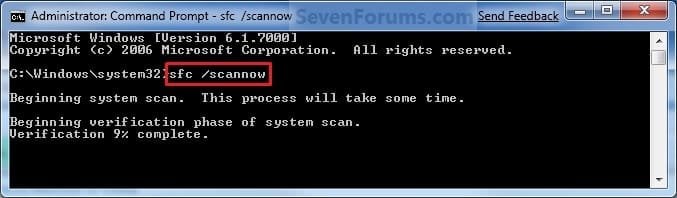
A) In the elevated command prompt, type sfc /scannow, press Enter, and go to step 4 below. (see screenshot below)
NOTE: This may take a little bit to finish.
Command-1.jpg
3. To Only Verify if the System Files are Corrupted
NOTE: Scans and only verifies the integrity of all proteced system files only. This command will not change your system files as in the red WARNING box at the top of this tutorial.
A) In the elevated command prompt, type sfc /verifyonly, press Enter, and go to step 4 below.
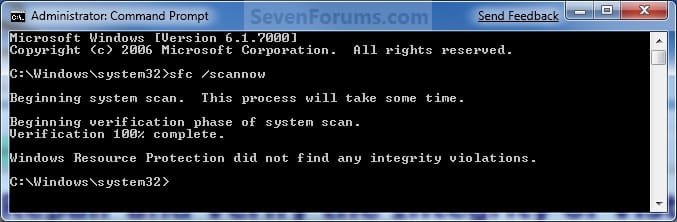
4. When the scan is complete, hopefully you will see all is ok like the screenshot below.

   Note

  • If SFC could not fix something, then run the command again to see if it may be able to the next time. Sometimes it may take running the sfc /scannow command 3 or more times to completely fix everything that it's able to.
  • If not, then download and run the 32-bit (x86) or 64-bit (x64) System Update Readiness Tool for your same installed 32-bit or 64-bit Windows 7, restart the PC afterwards, and try the sfc /scannow command again.
  • If still not, then try using OPTION ONE above to run the sfc /scannow command at boot.
  • If still not, then you can attempt to run a System Restore using a restore point dated before the bad file occured to fix it. You may need to repeat doing a System Restore until you find a older restore point that may work.
  • If still not, then you can use the steps in the TIP box in the OPTION THREE section below to manually replace the files that SFC could not fix if there are not to many fix.
  • If there are to many files to manually fix, or you prefer not to use OPTION THREE below, then you could do a repair install without losing anything.
If you would like to get help with your SFC issue, then be sure to upload and attach your sfcdetails.txt file from OPTION THREE below in your post.


Finished.jpg
5. When done, close the elevated command prompt.


OPTION THREE

How to See and Read Only the "SFC" Scan Results from the CBS.LOG


   Note
When SFC runs, it logs it's actions into the C:\Windows\Logs\CBS\CBS.log. The steps in this option will show you how to see only the specific SFC entries with the [SR] tags in this CBS.log. This can be helpful to show you what files SFC could not fix automatically if you wanted to try and manually replace them.

1. Open an "elevated command prompt" (right click -> Run as administrator).

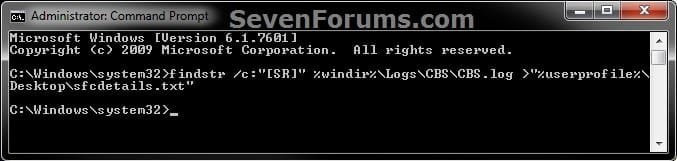
2. In the elevated command prompt, copy and paste the command below, and press Enter. (See screenshot below)
NOTE: This will place a sfcdetails.txt file on your desktop with only the SFC scan result details from the CBS.LOG in it.
Code:
findstr /c:"[SR]" %windir%\Logs\CBS\CBS.log >"%userprofile%\Desktop\sfcdetails.txt"
sfcdetails.jpg
3. Close the elevated command prompt.

4. Open the sfcdetails.txt file on your desktop to see the SFC scan details in the CBS.LOG.

5. You can safely delete the sfcdetails.txt file afterwards if you like.
   Tip
If you need to replace a corrupted system file that SFC cannot fix, then this will show you how to by extracting a new copy directly from your Windows 7 installation DVD.

Extract Files from Windows 7 Installation DVD


That's it,
Shawn


Last edited:

My Computer My Computer

At a glance

Win 7 Pro x64
Computer type
PC/Desktop
OS
Win 7 Pro x64
Ah, ok. Yes, a system restore using a restore point dated before this should sort it for you. :)
 

My Computer My Computer

At a glance

64-bit Windows 11 Pro for WorkstationsIntel i7-8700K OC'd to 5 GHz64 GB (4x16GB) G.SKILL TridentZ RGB DDR4 3600...ASUS ROG-STRIX-GTX1080TI-O11G-GAMING
Computer type
PC/Desktop
Computer Manufacturer/Model Number
Self built custom
OS
64-bit Windows 11 Pro for Workstations
CPU
Intel i7-8700K OC'd to 5 GHz
Motherboard
ASUS ROG Maximus XI Formula Z390
Memory
64 GB (4x16GB) G.SKILL TridentZ RGB DDR4 3600 MHz
Graphics Card(s)
ASUS ROG-STRIX-GTX1080TI-O11G-GAMING
Sound Card
Integrated
Monitor(s) Displays
2 x Samsung Odyssey G7 27"
Screen Resolution
2560x1440
Hard Drives
1TB Samsung 990 PRO M.2,
4TB Samsung 990 PRO PRO M.2,
TerraMaster F8 SSD Plus NAS
PSU
Seasonic Prime Titanium 850W
Case
Thermaltake Core P3
Cooling
Corsair Hydro H115i
Keyboard
Logitech wireless K800
Mouse
Logitech MX Master 4
Internet Speed
2 Gb/s Download and 100 Mb/s Upload
Antivirus
Malwarebyte Anti-Malware Premium
Browser
Google Chrome
Other Info
Logitech Z625 speaker system,
Logitech BRIO 4K Pro webcam,
HP Color LaserJet Pro MFP M477fdn,
APC SMART-UPS RT 1000 XL - SURT1000XLI,
Galaxy S23 Plus phone
Hi I am also having problem with sfc scannow, I am not sure how to read the data, but apparently sfc scannow could not fix some problems. I have attached the reading from my scan, I have scanned quite a few times in the past hour, but still could not resolve the problem. I am beginning to think that i have to do it manually. However I don't know what to re install.

I am having some freezing issues, it could take up to more than 1 minute, usually happens when I am using google chrome, looking for documents, clicking for properties on icon at desktop, pressing the start menu, refreshing, and also when pressing ctrl alt del to bring out the task manager, basically right clicking anything would also takes a long time to open. I researched a bit about it on the internet and it seems that my explorer.exe is having problems. Which leads me to do sfc /scannow, but it is still not fixed. Would it be possible for me to get your help? Further instructions on what need to be done will be great.

ps: For additional details, I am running windows 7 home premium 64 bit.
 

Attachments

My Computer My Computer

At a glance

windows 7 home premium 64bitIntel core I78GB Ram
Computer type
Laptop
Computer Manufacturer/Model Number
lenovo Y470
OS
windows 7 home premium 64bit
CPU
Intel core I7
Memory
8GB Ram
Antivirus
bitdefender
Browser
google chrome
Hello Jonathan, and welcome to Seven Forums.

From your logs, these are the corrupted files below.

Code:
2014-09-30 16:35:27, Info                  CSI    000003a7 [SR] Cannot repair member file [l:24{12}]"[B][COLOR=red]HelpPane.exe[/COLOR][/B]" of Microsoft-Windows-Help-Client, Version = 6.1.7600.16385, pA = PROCESSOR_ARCHITECTURE_AMD64 (9), Culture neutral, VersionScope = 1 nonSxS, PublicKeyToken = {l:8 b:31bf3856ad364e35}, Type neutral, TypeName neutral, PublicKey neutral in the store, hash mismatch
 
 
2014-09-30 16:35:28, Info                  CSI    000003a9 [SR] Cannot repair member file [l:14{7}]"[B][COLOR=red]msi.dll[/COLOR][/B]" of Microsoft-Windows-Installer-Engine, Version = 6.1.7601.18493, pA = PROCESSOR_ARCHITECTURE_AMD64 (9), Culture neutral, VersionScope = 1 nonSxS, PublicKeyToken = {l:8 b:31bf3856ad364e35}, Type neutral, TypeName neutral, PublicKey neutral in the store, hash mismatch
 
 
2014-09-30 16:35:28, Info                  CSI    000003aa [SR] Cannot repair member file [l:28{14}]"[B][COLOR=red]jphone.browser[/COLOR][/B]" of NetFx-ASPNET_REGBROWSER_FILES, Version = 6.1.7600.16385, pA = PROCESSOR_ARCHITECTURE_AMD64 (9), Culture neutral, VersionScope neutral, PublicKeyToken = {l:8 b:b03f5f7f11d50a3a}, Type neutral, TypeName neutral, PublicKey neutral in the store, file is missing
 
 
2014-09-30 16:35:28, Info                  CSI    000003ac [SR] Cannot repair member file [l:22{11}]"[B][COLOR=red]msimain.sdb[/COLOR][/B]" of Microsoft-Windows-Application-Experience-Mitigations-C2, Version = 6.1.7601.17571, pA = PROCESSOR_ARCHITECTURE_IA32_ON_WIN64 (10), Culture neutral, VersionScope = 1 nonSxS, PublicKeyToken = {l:8 b:31bf3856ad364e35}, Type neutral, TypeName neutral, PublicKey neutral in the store, hash mismatch
 
 
2014-09-30 16:35:28, Info                  CSI    000003ae [SR] Cannot repair member file [l:24{12}]"[B][COLOR=red]bthprops.cpl[/COLOR][/B]" of Microsoft-Windows-BTH-USER, Version = 6.1.7601.17514, pA = PROCESSOR_ARCHITECTURE_IA32_ON_WIN64 (10), Culture neutral, VersionScope = 1 nonSxS, PublicKeyToken = {l:8 b:31bf3856ad364e35}, Type neutral, TypeName neutral, PublicKey neutral in the store, hash mismatch
 
 
2014-09-30 16:35:28, Info                  CSI    000003af [SR] Cannot repair member file [l:28{14}]"[B][COLOR=red]jphone.browser[/COLOR][/B]" of NetFx-ASPNET_REGBROWSER_FILES, Version = 6.1.7600.16385, pA = PROCESSOR_ARCHITECTURE_INTEL (0), Culture neutral, VersionScope neutral, PublicKeyToken = {l:8 b:b03f5f7f11d50a3a}, Type neutral, TypeName neutral, PublicKey neutral in the store, file is missing
 
 
2014-09-30 16:35:29, Info                  CSI    000003b1 [SR] Cannot repair member file [l:14{7}]"[B][COLOR=red]msi.dll[/COLOR][/B]" of Microsoft-Windows-Installer-Engine, Version = 6.1.7601.18493, pA = PROCESSOR_ARCHITECTURE_AMD64 (9), Culture neutral, VersionScope = 1 nonSxS, PublicKeyToken = {l:8 b:31bf3856ad364e35}, Type neutral, TypeName neutral, PublicKey neutral in the store, hash mismatch
 
 
2014-09-30 16:35:29, Info                  CSI    000003b2 [SR] This component was referenced by [l:160{80}]"Package_41_for_KB2918614~31bf3856ad364e35~amd64~~6.1.1.4.2918614-119_neutral_GDR"
 
 
2014-09-30 16:35:29, Info                  CSI    000003b5 [SR] Could not reproject corrupted file [ml:520{260},l:46{23}]"\??\C:\windows\System32"\[l:14{7}]"[B][COLOR=red]msi.dll[/COLOR][/B]"; source file in store is also corrupted
 
 
2014-09-30 16:35:29, Info                  CSI    000003b7 [SR] Cannot repair member file [l:22{11}]"[B][COLOR=red]msimain.sdb[/COLOR][/B]" of Microsoft-Windows-Application-Experience-Mitigations-C2, Version = 6.1.7601.17571, pA = PROCESSOR_ARCHITECTURE_IA32_ON_WIN64 (10), Culture neutral, VersionScope = 1 nonSxS, PublicKeyToken = {l:8 b:31bf3856ad364e35}, Type neutral, TypeName neutral, PublicKey neutral in the store, hash mismatch
 
 
2014-09-30 16:35:29, Info                  CSI    000003b8 [SR] This component was referenced by [l:154{77}]"Package_2_for_KB2492386~31bf3856ad364e35~amd64~~6.1.1.0.2492386-4_neutral_GDR"
 
 
2014-09-30 16:35:29, Info                  CSI    000003bb [SR] Could not reproject corrupted file [ml:520{260},l:46{23}]"\??\C:\windows\apppatch"\[l:22{11}]"[B][COLOR=red]msimain.sdb[/COLOR][/B]"; source file in store is also corrupted
 
 
2014-09-30 16:35:29, Info                  CSI    000003bd [SR] Cannot repair member file [l:24{12}]"[B][COLOR=red]bthprops.cpl[/COLOR][/B]" of Microsoft-Windows-BTH-USER, Version = 6.1.7601.17514, pA = PROCESSOR_ARCHITECTURE_IA32_ON_WIN64 (10), Culture neutral, VersionScope = 1 nonSxS, PublicKeyToken = {l:8 b:31bf3856ad364e35}, Type neutral, TypeName neutral, PublicKey neutral in the store, hash mismatch
 
 
2014-09-30 16:35:29, Info                  CSI    000003be [SR] This component was referenced by [l:242{121}]"Microsoft-Windows-Client-Features-Package~31bf3856ad364e35~amd64~~6.1.7601.17514.Microsoft-Windows-Client-Features-Update"
 
 
2014-09-30 16:35:29, Info                  CSI    000003c1 [SR] Could not reproject corrupted file [ml:48{24},l:46{23}]"\??\C:\windows\SysWOW64"\[l:24{12}]"[B][COLOR=red]bthprops.cpl[/COLOR][/B]"; source file in store is also corrupted
 
 
2014-09-30 16:35:29, Info                  CSI    000003c3 [SR] Cannot repair member file [l:24{12}]"HelpPane.exe" of Microsoft-Windows-Help-Client, Version = 6.1.7600.16385, pA = PROCESSOR_ARCHITECTURE_AMD64 (9), Culture neutral, VersionScope = 1 nonSxS, PublicKeyToken = {l:8 b:31bf3856ad364e35}, Type neutral, TypeName neutral, PublicKey neutral in the store, hash mismatch

If you like, you could try doing a system restore using a restore point dated before you had these issues to hopefully undo and fix them.
 

My Computer My Computer

At a glance

64-bit Windows 11 Pro for WorkstationsIntel i7-8700K OC'd to 5 GHz64 GB (4x16GB) G.SKILL TridentZ RGB DDR4 3600...ASUS ROG-STRIX-GTX1080TI-O11G-GAMING
Computer type
PC/Desktop
Computer Manufacturer/Model Number
Self built custom
OS
64-bit Windows 11 Pro for Workstations
CPU
Intel i7-8700K OC'd to 5 GHz
Motherboard
ASUS ROG Maximus XI Formula Z390
Memory
64 GB (4x16GB) G.SKILL TridentZ RGB DDR4 3600 MHz
Graphics Card(s)
ASUS ROG-STRIX-GTX1080TI-O11G-GAMING
Sound Card
Integrated
Monitor(s) Displays
2 x Samsung Odyssey G7 27"
Screen Resolution
2560x1440
Hard Drives
1TB Samsung 990 PRO M.2,
4TB Samsung 990 PRO PRO M.2,
TerraMaster F8 SSD Plus NAS
PSU
Seasonic Prime Titanium 850W
Case
Thermaltake Core P3
Cooling
Corsair Hydro H115i
Keyboard
Logitech wireless K800
Mouse
Logitech MX Master 4
Internet Speed
2 Gb/s Download and 100 Mb/s Upload
Antivirus
Malwarebyte Anti-Malware Premium
Browser
Google Chrome
Other Info
Logitech Z625 speaker system,
Logitech BRIO 4K Pro webcam,
HP Color LaserJet Pro MFP M477fdn,
APC SMART-UPS RT 1000 XL - SURT1000XLI,
Galaxy S23 Plus phone
I don't have the option for system restore as apparently my computer was full of virus before this, and I was not able to save a restore point. It was only after it got worse that I started cleaning up my computer and trying to fix things here and there.

So is there a manual fix to these problems that I could do?
 

My Computer My Computer

At a glance

windows 7 home premium 64bitIntel core I78GB Ram
Computer type
Laptop
Computer Manufacturer/Model Number
lenovo Y470
OS
windows 7 home premium 64bit
CPU
Intel core I7
Memory
8GB Ram
Antivirus
bitdefender
Browser
google chrome
Since viruses are/were involved, it may be best to do a clean install of Windows to be safe.
 

My Computer My Computer

At a glance

64-bit Windows 11 Pro for WorkstationsIntel i7-8700K OC'd to 5 GHz64 GB (4x16GB) G.SKILL TridentZ RGB DDR4 3600...ASUS ROG-STRIX-GTX1080TI-O11G-GAMING
Computer type
PC/Desktop
Computer Manufacturer/Model Number
Self built custom
OS
64-bit Windows 11 Pro for Workstations
CPU
Intel i7-8700K OC'd to 5 GHz
Motherboard
ASUS ROG Maximus XI Formula Z390
Memory
64 GB (4x16GB) G.SKILL TridentZ RGB DDR4 3600 MHz
Graphics Card(s)
ASUS ROG-STRIX-GTX1080TI-O11G-GAMING
Sound Card
Integrated
Monitor(s) Displays
2 x Samsung Odyssey G7 27"
Screen Resolution
2560x1440
Hard Drives
1TB Samsung 990 PRO M.2,
4TB Samsung 990 PRO PRO M.2,
TerraMaster F8 SSD Plus NAS
PSU
Seasonic Prime Titanium 850W
Case
Thermaltake Core P3
Cooling
Corsair Hydro H115i
Keyboard
Logitech wireless K800
Mouse
Logitech MX Master 4
Internet Speed
2 Gb/s Download and 100 Mb/s Upload
Antivirus
Malwarebyte Anti-Malware Premium
Browser
Google Chrome
Other Info
Logitech Z625 speaker system,
Logitech BRIO 4K Pro webcam,
HP Color LaserJet Pro MFP M477fdn,
APC SMART-UPS RT 1000 XL - SURT1000XLI,
Galaxy S23 Plus phone
So all the corrupted files can be replaced by the files from my Windows disk? I just put in my windows disk and re install everything, following step 3 from this guide? Just a question, will I lose my data in the process?
 

My Computer My Computer

At a glance

windows 7 home premium 64bitIntel core I78GB Ram
Computer type
Laptop
Computer Manufacturer/Model Number
lenovo Y470
OS
windows 7 home premium 64bit
CPU
Intel core I7
Memory
8GB Ram
Antivirus
bitdefender
Browser
google chrome
I'd always recommend to back up anything that you do not want to lose to be safe.

You could try and replace them with a copy from an equally updated Windows installation disc, but I'd recommend to do a clean install since you are dealing with viruses. It's about the only way to make sure that you have a clean safe system.
 

My Computer My Computer

At a glance

64-bit Windows 11 Pro for WorkstationsIntel i7-8700K OC'd to 5 GHz64 GB (4x16GB) G.SKILL TridentZ RGB DDR4 3600...ASUS ROG-STRIX-GTX1080TI-O11G-GAMING
Computer type
PC/Desktop
Computer Manufacturer/Model Number
Self built custom
OS
64-bit Windows 11 Pro for Workstations
CPU
Intel i7-8700K OC'd to 5 GHz
Motherboard
ASUS ROG Maximus XI Formula Z390
Memory
64 GB (4x16GB) G.SKILL TridentZ RGB DDR4 3600 MHz
Graphics Card(s)
ASUS ROG-STRIX-GTX1080TI-O11G-GAMING
Sound Card
Integrated
Monitor(s) Displays
2 x Samsung Odyssey G7 27"
Screen Resolution
2560x1440
Hard Drives
1TB Samsung 990 PRO M.2,
4TB Samsung 990 PRO PRO M.2,
TerraMaster F8 SSD Plus NAS
PSU
Seasonic Prime Titanium 850W
Case
Thermaltake Core P3
Cooling
Corsair Hydro H115i
Keyboard
Logitech wireless K800
Mouse
Logitech MX Master 4
Internet Speed
2 Gb/s Download and 100 Mb/s Upload
Antivirus
Malwarebyte Anti-Malware Premium
Browser
Google Chrome
Other Info
Logitech Z625 speaker system,
Logitech BRIO 4K Pro webcam,
HP Color LaserJet Pro MFP M477fdn,
APC SMART-UPS RT 1000 XL - SURT1000XLI,
Galaxy S23 Plus phone
Allright, I will try to back up everything first and see how it goes, probably I will do a clean install like u recommended. Thanks for the help.
 

My Computer My Computer

At a glance

windows 7 home premium 64bitIntel core I78GB Ram
Computer type
Laptop
Computer Manufacturer/Model Number
lenovo Y470
OS
windows 7 home premium 64bit
CPU
Intel core I7
Memory
8GB Ram
Antivirus
bitdefender
Browser
google chrome
You're welcome. Please let us know how it went.
 

My Computer My Computer

At a glance

64-bit Windows 11 Pro for WorkstationsIntel i7-8700K OC'd to 5 GHz64 GB (4x16GB) G.SKILL TridentZ RGB DDR4 3600...ASUS ROG-STRIX-GTX1080TI-O11G-GAMING
Computer type
PC/Desktop
Computer Manufacturer/Model Number
Self built custom
OS
64-bit Windows 11 Pro for Workstations
CPU
Intel i7-8700K OC'd to 5 GHz
Motherboard
ASUS ROG Maximus XI Formula Z390
Memory
64 GB (4x16GB) G.SKILL TridentZ RGB DDR4 3600 MHz
Graphics Card(s)
ASUS ROG-STRIX-GTX1080TI-O11G-GAMING
Sound Card
Integrated
Monitor(s) Displays
2 x Samsung Odyssey G7 27"
Screen Resolution
2560x1440
Hard Drives
1TB Samsung 990 PRO M.2,
4TB Samsung 990 PRO PRO M.2,
TerraMaster F8 SSD Plus NAS
PSU
Seasonic Prime Titanium 850W
Case
Thermaltake Core P3
Cooling
Corsair Hydro H115i
Keyboard
Logitech wireless K800
Mouse
Logitech MX Master 4
Internet Speed
2 Gb/s Download and 100 Mb/s Upload
Antivirus
Malwarebyte Anti-Malware Premium
Browser
Google Chrome
Other Info
Logitech Z625 speaker system,
Logitech BRIO 4K Pro webcam,
HP Color LaserJet Pro MFP M477fdn,
APC SMART-UPS RT 1000 XL - SURT1000XLI,
Galaxy S23 Plus phone
If you're not having any issues with your network, then I wouldn't worry about the SFC issue.

For the .dll issue, you'll need to most likely uninstall and reinstall the affected programs.

Sorry, I've been busy and been away for a while....

My co-worker & I have essentially the same desktop computer. Would it be possible to replace my "RTL8187Se.sys" and/or "net8187se64.inf" files with a copy of these files from her computer?

Here's a snippet from my "sfcdetails.txt" file regarding the SFC issue for a refresher:
2014-09-03 14:43:36, Info CSI 0000033d [SR] Cannot repair member file [l:26{13}]"RTL8187Se.sys" of net8187se64.inf, Version = 6.1.7600.16385, pA = PROCESSOR_ARCHITECTURE_AMD64 (9), Culture neutral, VersionScope = 1 nonSxS, PublicKeyToken = {l:8 b:31bf3856ad364e35}, Type = [l:24{12}]"driverUpdate", TypeName neutral, PublicKey neutral in the store, hash mismatch
2014-09-03 14:43:36, Info CSI 0000033f [SR] Cannot repair member file [l:26{13}]"RTL8187Se.sys" of net8187se64.inf, Version = 6.1.7600.16385, pA = PROCESSOR_ARCHITECTURE_AMD64 (9), Culture neutral, VersionScope = 1 nonSxS, PublicKeyToken = {l:8 b:31bf3856ad364e35}, Type = [l:24{12}]"driverUpdate", TypeName neutral, PublicKey neutral in the store, hash mismatch
2014-09-03 14:43:36, Info CSI 00000340 [SR] This component was referenced by [l:190{95}]"Microsoft-Windows-Client-Drivers-Package~31bf3856ad364e35~amd64~~6.1.7601.17514.INF_net8187se64"

Regarding my .dll issue, I have tried uninstalling & reinstalling a few of the affected programs, but to no avail. One of the problems is that I have approximately 16 of these .exe programs (that I know of so far) where I get the exact same system error message, "The program can't start because .DLL is missing from your computer. Try reinstalling the program to fix this problem." Another problem is that the error message never lists which .dll file is missing, so I assume that there must be several .dll files missing or something. What's odd is that the programs will still work, but I just have to click the 'OK' button each time the error message pops up until they stop, which can range from 6 - 20+ messages at a time. As you can expect, this becomes extremely annoying, especially when a program like "FlashPlayerPlugin_15_0_0_152.exe" is affected & the error message pops up all of the time while browsing Facebook, Youtube, or other websites that use flash, which apparently is a lot of websites.

I can try uninstalling & reinstalling each of the programs, but my fear is that after doing this for 14+ programs that it still doesn't resolve the issue because they're all looking for a file or several files that are being shared by all of them, located somewhere I don't know, like a systems folder or something. This is why I was hoping that the SFC and the Windows Recovery CD might help to resolve this issue. Any thoughts? Is there a way to figure out which .dll files these programs are searching for? Any programs that can help with this?

Thanks for any assistance.
 

My Computer My Computer

At a glance

Windows 7 Pro 64-bitIntel Core i5 CPU 650 @ 3.20GHz8.0GBNVIDIA GeForce 9800 GT
Computer type
PC/Desktop
Computer Manufacturer/Model Number
custom build
OS
Windows 7 Pro 64-bit
CPU
Intel Core i5 CPU 650 @ 3.20GHz
Motherboard
Asus P7H55-M
Memory
8.0GB
Graphics Card(s)
NVIDIA GeForce 9800 GT
Hard Drives
WDC WD5000AZRX-00L4HB0 ATA
USB-HS SAMSUNG SP2514N USB
Antivirus
Kaspersky Small Office Security
Browser
Firefox
Hey Arboc,

It appears that you need to uninstall and reinstall your network drivers.
 

My Computer My Computer

At a glance

64-bit Windows 11 Pro for WorkstationsIntel i7-8700K OC'd to 5 GHz64 GB (4x16GB) G.SKILL TridentZ RGB DDR4 3600...ASUS ROG-STRIX-GTX1080TI-O11G-GAMING
Computer type
PC/Desktop
Computer Manufacturer/Model Number
Self built custom
OS
64-bit Windows 11 Pro for Workstations
CPU
Intel i7-8700K OC'd to 5 GHz
Motherboard
ASUS ROG Maximus XI Formula Z390
Memory
64 GB (4x16GB) G.SKILL TridentZ RGB DDR4 3600 MHz
Graphics Card(s)
ASUS ROG-STRIX-GTX1080TI-O11G-GAMING
Sound Card
Integrated
Monitor(s) Displays
2 x Samsung Odyssey G7 27"
Screen Resolution
2560x1440
Hard Drives
1TB Samsung 990 PRO M.2,
4TB Samsung 990 PRO PRO M.2,
TerraMaster F8 SSD Plus NAS
PSU
Seasonic Prime Titanium 850W
Case
Thermaltake Core P3
Cooling
Corsair Hydro H115i
Keyboard
Logitech wireless K800
Mouse
Logitech MX Master 4
Internet Speed
2 Gb/s Download and 100 Mb/s Upload
Antivirus
Malwarebyte Anti-Malware Premium
Browser
Google Chrome
Other Info
Logitech Z625 speaker system,
Logitech BRIO 4K Pro webcam,
HP Color LaserJet Pro MFP M477fdn,
APC SMART-UPS RT 1000 XL - SURT1000XLI,
Galaxy S23 Plus phone
:huh:
 

Attachments

My Computer My Computer

At a glance

windows 7 Ultimate 32bitpentium dual core
Computer type
PC/Desktop
Computer Manufacturer/Model Number
asrock
OS
windows 7 Ultimate 32bit
CPU
pentium dual core
Hello hackerbian, and welcome to Seven Forums.

Your SFC details log doesn't show any corrupted or modified system files found. :)
 

My Computer My Computer

At a glance

64-bit Windows 11 Pro for WorkstationsIntel i7-8700K OC'd to 5 GHz64 GB (4x16GB) G.SKILL TridentZ RGB DDR4 3600...ASUS ROG-STRIX-GTX1080TI-O11G-GAMING
Computer type
PC/Desktop
Computer Manufacturer/Model Number
Self built custom
OS
64-bit Windows 11 Pro for Workstations
CPU
Intel i7-8700K OC'd to 5 GHz
Motherboard
ASUS ROG Maximus XI Formula Z390
Memory
64 GB (4x16GB) G.SKILL TridentZ RGB DDR4 3600 MHz
Graphics Card(s)
ASUS ROG-STRIX-GTX1080TI-O11G-GAMING
Sound Card
Integrated
Monitor(s) Displays
2 x Samsung Odyssey G7 27"
Screen Resolution
2560x1440
Hard Drives
1TB Samsung 990 PRO M.2,
4TB Samsung 990 PRO PRO M.2,
TerraMaster F8 SSD Plus NAS
PSU
Seasonic Prime Titanium 850W
Case
Thermaltake Core P3
Cooling
Corsair Hydro H115i
Keyboard
Logitech wireless K800
Mouse
Logitech MX Master 4
Internet Speed
2 Gb/s Download and 100 Mb/s Upload
Antivirus
Malwarebyte Anti-Malware Premium
Browser
Google Chrome
Other Info
Logitech Z625 speaker system,
Logitech BRIO 4K Pro webcam,
HP Color LaserJet Pro MFP M477fdn,
APC SMART-UPS RT 1000 XL - SURT1000XLI,
Galaxy S23 Plus phone
Hey Arboc,

It appears that you need to uninstall and reinstall your network drivers.

Hi Brink,

I tried it, but it still didn't fix it. I uninstalled the driver, which was for RTL8168E, rebooted, installed the driver for RTL8187SE, ran SFC /SCANNOW a few times, but I still got the same message that it couldn't repair a few files, so there was no change. However, I did have some issues with my computer lagging & with some network connections, so I installed the latest driver for RTL8186E, which appeared to resolve it. However, I'm still at the same place that I started at.

On a side note, my missing .DLL file issue appears to be a separate issue, so I guess I can let the SFC problem go, but I do need to fix this missing .DLL file issue because it really hampers my computer use.

Regarding my missing .DLL file issue, I found that the system error message pops up when my computer needs to run certain programs, which I believe need to use flash, java, or something. If I go to websites that use flash, like Facebook or Youtube, the error message will pop up for "FlashPlayerPlugin_15_0_0_152.exe" for every video that runs. I found that this was occurring when I'm browsing using Firefox. However, I tested this out using Internet Explorer and for some reason, I'm not getting the error messages. What gives? Is my problem related to Firefox?

As a refresher, the system error message I get is, "The program can't start because .DLL is missing from your computer. Try reinstalling the program to fix this problem." Unfortunately, it never states which .DLL file is missing.

Thanks for any insight!
 

My Computer My Computer

At a glance

Windows 7 Pro 64-bitIntel Core i5 CPU 650 @ 3.20GHz8.0GBNVIDIA GeForce 9800 GT
Computer type
PC/Desktop
Computer Manufacturer/Model Number
custom build
OS
Windows 7 Pro 64-bit
CPU
Intel Core i5 CPU 650 @ 3.20GHz
Motherboard
Asus P7H55-M
Memory
8.0GB
Graphics Card(s)
NVIDIA GeForce 9800 GT
Hard Drives
WDC WD5000AZRX-00L4HB0 ATA
USB-HS SAMSUNG SP2514N USB
Antivirus
Kaspersky Small Office Security
Browser
Firefox
The Flash Player pop-ups in your browser could just be spammy advertising/scam if you already have the latest Adobe Flash Player plug-in installed to the browser.
 

My Computer My Computer

At a glance

64-bit Windows 11 Pro for WorkstationsIntel i7-8700K OC'd to 5 GHz64 GB (4x16GB) G.SKILL TridentZ RGB DDR4 3600...ASUS ROG-STRIX-GTX1080TI-O11G-GAMING
Computer type
PC/Desktop
Computer Manufacturer/Model Number
Self built custom
OS
64-bit Windows 11 Pro for Workstations
CPU
Intel i7-8700K OC'd to 5 GHz
Motherboard
ASUS ROG Maximus XI Formula Z390
Memory
64 GB (4x16GB) G.SKILL TridentZ RGB DDR4 3600 MHz
Graphics Card(s)
ASUS ROG-STRIX-GTX1080TI-O11G-GAMING
Sound Card
Integrated
Monitor(s) Displays
2 x Samsung Odyssey G7 27"
Screen Resolution
2560x1440
Hard Drives
1TB Samsung 990 PRO M.2,
4TB Samsung 990 PRO PRO M.2,
TerraMaster F8 SSD Plus NAS
PSU
Seasonic Prime Titanium 850W
Case
Thermaltake Core P3
Cooling
Corsair Hydro H115i
Keyboard
Logitech wireless K800
Mouse
Logitech MX Master 4
Internet Speed
2 Gb/s Download and 100 Mb/s Upload
Antivirus
Malwarebyte Anti-Malware Premium
Browser
Google Chrome
Other Info
Logitech Z625 speaker system,
Logitech BRIO 4K Pro webcam,
HP Color LaserJet Pro MFP M477fdn,
APC SMART-UPS RT 1000 XL - SURT1000XLI,
Galaxy S23 Plus phone
The Flash Player pop-ups in your browser could just be spammy advertising/scam if you already have the latest Adobe Flash Player plug-in installed to the browser.

The problem is that I get the pop-ups when I'm not browsing as well. I'll get them when my computer is just booting up and tries to run "HPDesignjetUtility.exe". I'll get the message when I try running "QuickTimePlayer.exe", "realplay.exe", and also for "NVBackend.exe", which appears to be related to my NVIDIA GeForce 9800 GT graphics card. I'll also get it when I open several programs that our office uses for structural engineering design & analysis. My only "uneducated" guess is that all of these programs use some form of flash or java technology and/or share DLL files or something. If I uninstall the above programs, like HP Designjet Utility, QuickTime Player, Flash Player, etc., then I don't get the messages for those specific programs, but I still get the messages for the other affected programs though, but as soon as I reinstall these programs, the messages return for them as well.

This issue all came about after my previous hard drive was going bad and we cloned it. However, I believe it was cloned along with some missing or corrupted sectors or with some system errors. I tried CHKDSK, SFC /SCANNOw, and the repair feature on both the Windows 7 Pro x64 installation & repair disks. I tried uninstalling & reinstalling some of the programs as I mentioned above. Nothing has fixed the issue. I also scanned my computer several times with CCleaner, Malwarebytes Anti-Malware, and Kaspersky Small Office Security, but they didn't find anything.
 

My Computer My Computer

At a glance

Windows 7 Pro 64-bitIntel Core i5 CPU 650 @ 3.20GHz8.0GBNVIDIA GeForce 9800 GT
Computer type
PC/Desktop
Computer Manufacturer/Model Number
custom build
OS
Windows 7 Pro 64-bit
CPU
Intel Core i5 CPU 650 @ 3.20GHz
Motherboard
Asus P7H55-M
Memory
8.0GB
Graphics Card(s)
NVIDIA GeForce 9800 GT
Hard Drives
WDC WD5000AZRX-00L4HB0 ATA
USB-HS SAMSUNG SP2514N USB
Antivirus
Kaspersky Small Office Security
Browser
Firefox
In that case, you should go ahead and create a new thread for these separate issues to see what we can do to help. :)
 

My Computer My Computer

At a glance

64-bit Windows 11 Pro for WorkstationsIntel i7-8700K OC'd to 5 GHz64 GB (4x16GB) G.SKILL TridentZ RGB DDR4 3600...ASUS ROG-STRIX-GTX1080TI-O11G-GAMING
Computer type
PC/Desktop
Computer Manufacturer/Model Number
Self built custom
OS
64-bit Windows 11 Pro for Workstations
CPU
Intel i7-8700K OC'd to 5 GHz
Motherboard
ASUS ROG Maximus XI Formula Z390
Memory
64 GB (4x16GB) G.SKILL TridentZ RGB DDR4 3600 MHz
Graphics Card(s)
ASUS ROG-STRIX-GTX1080TI-O11G-GAMING
Sound Card
Integrated
Monitor(s) Displays
2 x Samsung Odyssey G7 27"
Screen Resolution
2560x1440
Hard Drives
1TB Samsung 990 PRO M.2,
4TB Samsung 990 PRO PRO M.2,
TerraMaster F8 SSD Plus NAS
PSU
Seasonic Prime Titanium 850W
Case
Thermaltake Core P3
Cooling
Corsair Hydro H115i
Keyboard
Logitech wireless K800
Mouse
Logitech MX Master 4
Internet Speed
2 Gb/s Download and 100 Mb/s Upload
Antivirus
Malwarebyte Anti-Malware Premium
Browser
Google Chrome
Other Info
Logitech Z625 speaker system,
Logitech BRIO 4K Pro webcam,
HP Color LaserJet Pro MFP M477fdn,
APC SMART-UPS RT 1000 XL - SURT1000XLI,
Galaxy S23 Plus phone
scannow problems

Attached is the sfcdetails.txt file.
I am running Windows 7 Ultimate x64 on a Dell M6400 laptop.
This computer was shipped with Windows Vista Ultimate.
I upgraded to Windows 7 Ultimate some time ago.
Is there a way to fix these errors without having to reinstall windows?
Do I need to fix these errors?

For the most part, the computer seems to operate OK.
It seems to lock up a lot when going into sleep mode.
I have to press and hold the power button to get it to shutdown when that happens.
I have few AutoCAD programs that hang sometimes.

I use Charter F-Secure Business security software.

Thanks for your help.
 

Attachments

My Computer My Computer

At a glance

Windows 7 Ultimate x64
Computer type
PC/Desktop
Computer Manufacturer/Model Number
Dell M6400
OS
Windows 7 Ultimate x64
Hello Cooper, and welcome to Seven Forums.

With that many corrupted system files, it may be best to see if doing a repair install may better help you.
 

My Computer My Computer

At a glance

64-bit Windows 11 Pro for WorkstationsIntel i7-8700K OC'd to 5 GHz64 GB (4x16GB) G.SKILL TridentZ RGB DDR4 3600...ASUS ROG-STRIX-GTX1080TI-O11G-GAMING
Computer type
PC/Desktop
Computer Manufacturer/Model Number
Self built custom
OS
64-bit Windows 11 Pro for Workstations
CPU
Intel i7-8700K OC'd to 5 GHz
Motherboard
ASUS ROG Maximus XI Formula Z390
Memory
64 GB (4x16GB) G.SKILL TridentZ RGB DDR4 3600 MHz
Graphics Card(s)
ASUS ROG-STRIX-GTX1080TI-O11G-GAMING
Sound Card
Integrated
Monitor(s) Displays
2 x Samsung Odyssey G7 27"
Screen Resolution
2560x1440
Hard Drives
1TB Samsung 990 PRO M.2,
4TB Samsung 990 PRO PRO M.2,
TerraMaster F8 SSD Plus NAS
PSU
Seasonic Prime Titanium 850W
Case
Thermaltake Core P3
Cooling
Corsair Hydro H115i
Keyboard
Logitech wireless K800
Mouse
Logitech MX Master 4
Internet Speed
2 Gb/s Download and 100 Mb/s Upload
Antivirus
Malwarebyte Anti-Malware Premium
Browser
Google Chrome
Other Info
Logitech Z625 speaker system,
Logitech BRIO 4K Pro webcam,
HP Color LaserJet Pro MFP M477fdn,
APC SMART-UPS RT 1000 XL - SURT1000XLI,
Galaxy S23 Plus phone
Back
Top