SFC /SCANNOW Command - System File Checker

How to Repair Windows 7 System Files with System File Checker


   Information
The sfc /scannow command (System File Checker) scans the integrity of all protected Windows 7 system files and replaces incorrect corrupted, changed/modified, or damaged versions with the correct versions if possible.

   Tip
If you get the Windows Resource Protection Could Not Start the Repair Service error when trying to run SFC, then make sure that the Windows Modules Installer service is enabled, click on Start, and set to Manual.

Services - Start or Disable

OR

Copy and paste the command below in the elevated command prompt, and press Enter. After the Windows Modules Installer service has started, try running the SFC command again

net start trustedinstaller

   Note
The KB3022345, KB3035583, and KB3068708 updates will cause SFC to give you a false mismatch message in SFC for files related to these updates.

You can safely ignore these results in your SFC details since it will not affect SFC from being able to repair other system files.

   Warning
Be aware that if you have modified your system files as in theming explorer/system files, running sfc /scannow will revert the system files such as explorer.exe back to it's default state. Make the appropriate backups of your system files that you have modified for theming if you wish to save them before running sfc /scannow.


:note: For the updated Windows 10 tutorial, please see - SFC Command - Run in Windows 10 - Windows 10 Tutorials

CONTENTS:
  • Option One: To Run the SFC /SCANNOW Command at Boot
  • Option Two: To Run the SFC /SCANNOW Command in Windows 7
  • Option Three: How to See and Read Only the "SFC" Scan Results from the CBS.LOG


OPTION ONE

To Run the SFC /SCANNOW Command at Boot


1. For how, see METHOD TWO at this link: SFC /SCANNOW : Run in Command Prompt at Boot

   Note
Using OPTION TWO below is recommended if able.

If you would like to get help with your SFC issue, then be sure to upload and attach your sfcdetails.txt file from OPTION THREE below in your post.


OPTION TWO

To Run the SFC /SCANNOW Command in Windows 7


1. Open an elevated command prompt or an elevated PowerShell, and do step 2 or 3 below for what type of scan you would like to run.


2. To Scan and Repair System Files
NOTE: Scans the integrity of all protected system files and repairs the system files if needed. Please see red WARNING box at the top of this tutorial.
A) In the elevated command prompt, type sfc /scannow, press Enter, and go to step 4 below. (see screenshot below)
NOTE: This may take a little bit to finish.
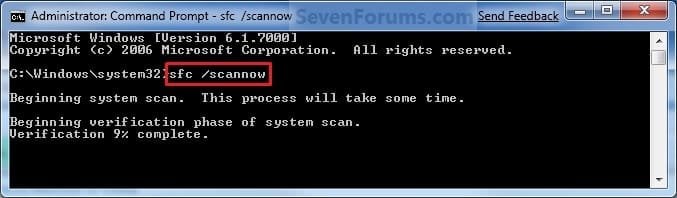
Command-1.jpg
3. To Only Verify if the System Files are Corrupted
NOTE: Scans and only verifies the integrity of all proteced system files only. This command will not change your system files as in the red WARNING box at the top of this tutorial.
A) In the elevated command prompt, type sfc /verifyonly, press Enter, and go to step 4 below.
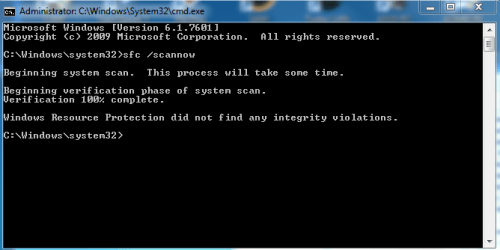
4. When the scan is complete, hopefully you will see all is ok like the screenshot below.

   Note

  • If SFC could not fix something, then run the command again to see if it may be able to the next time. Sometimes it may take running the sfc /scannow command 3 or more times to completely fix everything that it's able to.
  • If not, then download and run the 32-bit (x86) or 64-bit (x64) System Update Readiness Tool for your same installed 32-bit or 64-bit Windows 7, restart the PC afterwards, and try the sfc /scannow command again.
  • If still not, then try using OPTION ONE above to run the sfc /scannow command at boot.
  • If still not, then you can attempt to run a System Restore using a restore point dated before the bad file occured to fix it. You may need to repeat doing a System Restore until you find a older restore point that may work.
  • If still not, then you can use the steps in the TIP box in the OPTION THREE section below to manually replace the files that SFC could not fix if there are not to many fix.
  • If there are to many files to manually fix, or you prefer not to use OPTION THREE below, then you could do a repair install without losing anything.
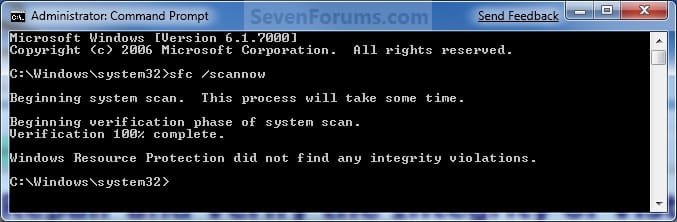
If you would like to get help with your SFC issue, then be sure to upload and attach your sfcdetails.txt file from OPTION THREE below in your post.


Finished.jpg
5. When done, close the elevated command prompt.


OPTION THREE

How to See and Read Only the "SFC" Scan Results from the CBS.LOG


   Note
When SFC runs, it logs it's actions into the C:\Windows\Logs\CBS\CBS.log. The steps in this option will show you how to see only the specific SFC entries with the [SR] tags in this CBS.log. This can be helpful to show you what files SFC could not fix automatically if you wanted to try and manually replace them.

1. Open an "elevated command prompt" (right click -> Run as administrator).

2. In the elevated command prompt, copy and paste the command below, and press Enter. (See screenshot below)
NOTE: This will place a sfcdetails.txt file on your desktop with only the SFC scan result details from the CBS.LOG in it.
Code:
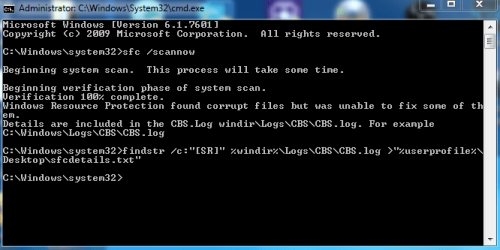
findstr /c:"[SR]" %windir%\Logs\CBS\CBS.log >"%userprofile%\Desktop\sfcdetails.txt"
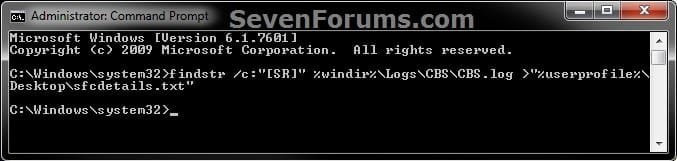
sfcdetails.jpg
3. Close the elevated command prompt.

4. Open the sfcdetails.txt file on your desktop to see the SFC scan details in the CBS.LOG.

5. You can safely delete the sfcdetails.txt file afterwards if you like.
   Tip
If you need to replace a corrupted system file that SFC cannot fix, then this will show you how to by extracting a new copy directly from your Windows 7 installation DVD.

Extract Files from Windows 7 Installation DVD


That's it,
Shawn


Last edited:
Yeah, it'll recreate it.
 

My Computer My Computer

At a glance

64-bit Windows 11 Pro for WorkstationsIntel i7-8700K OC'd to 5 GHz64 GB (4x16GB) G.SKILL TridentZ RGB DDR4 3600...ASUS ROG-STRIX-GTX1080TI-O11G-GAMING
Computer type
PC/Desktop
Computer Manufacturer/Model Number
Self built custom
OS
64-bit Windows 11 Pro for Workstations
CPU
Intel i7-8700K OC'd to 5 GHz
Motherboard
ASUS ROG Maximus XI Formula Z390
Memory
64 GB (4x16GB) G.SKILL TridentZ RGB DDR4 3600 MHz
Graphics Card(s)
ASUS ROG-STRIX-GTX1080TI-O11G-GAMING
Sound Card
Integrated
Monitor(s) Displays
2 x Samsung Odyssey G7 27"
Screen Resolution
2560x1440
Hard Drives
1TB Samsung 990 PRO M.2,
4TB Samsung 990 PRO PRO M.2,
TerraMaster F8 SSD Plus NAS
PSU
Seasonic Prime Titanium 850W
Case
Thermaltake Core P3
Cooling
Corsair Hydro H115i
Keyboard
Logitech wireless K800
Mouse
Logitech MX Master 4
Internet Speed
2 Gb/s Download and 100 Mb/s Upload
Antivirus
Malwarebyte Anti-Malware Premium
Browser
Google Chrome
Other Info
Logitech Z625 speaker system,
Logitech BRIO 4K Pro webcam,
HP Color LaserJet Pro MFP M477fdn,
APC SMART-UPS RT 1000 XL - SURT1000XLI,
Galaxy S23 Plus phone
Yeah, it'll recreate it.

already done that but the new ones just the same. All this is to find out how to cure a propsys.dll error, not sure if thats affecting this as well ..
 

My Computer My Computer

At a glance

windows 7 home premium 64biti7 4790KKingston HyperX 4GB FURY Memory (2x4GB) Modul...Gigabyte GV-R927XOC-2GD ATI R9 270X OC 2GB Gr...
Computer type
PC/Desktop
Computer Manufacturer/Model Number
OEM Custom
OS
windows 7 home premium 64bit
CPU
i7 4790K
Motherboard
Gigabyte GA-Z97X-Gaming 3 Intel Socket 1150
Memory
Kingston HyperX 4GB FURY Memory (2x4GB) Module DDR3 16
Graphics Card(s)
Gigabyte GV-R927XOC-2GD ATI R9 270X OC 2GB Graphics Card
Sound Card
on board
Hard Drives
Seagate ST1000DX001 1TB 3.5" Solid State Hybrid Drive (SSHD) Hybrid 8GB SSD Hard Drive
PSU
Antec VP550F 550W 12cm Black PSU EuP 80+ Certified
Cooling
Akasa K32 Intel High Performance CPU Coole
In that case, you might see if doing a system restore using a restore point dated before this happened may be able to undo and fix this error.
 

My Computer My Computer

At a glance

64-bit Windows 11 Pro for WorkstationsIntel i7-8700K OC'd to 5 GHz64 GB (4x16GB) G.SKILL TridentZ RGB DDR4 3600...ASUS ROG-STRIX-GTX1080TI-O11G-GAMING
Computer type
PC/Desktop
Computer Manufacturer/Model Number
Self built custom
OS
64-bit Windows 11 Pro for Workstations
CPU
Intel i7-8700K OC'd to 5 GHz
Motherboard
ASUS ROG Maximus XI Formula Z390
Memory
64 GB (4x16GB) G.SKILL TridentZ RGB DDR4 3600 MHz
Graphics Card(s)
ASUS ROG-STRIX-GTX1080TI-O11G-GAMING
Sound Card
Integrated
Monitor(s) Displays
2 x Samsung Odyssey G7 27"
Screen Resolution
2560x1440
Hard Drives
1TB Samsung 990 PRO M.2,
4TB Samsung 990 PRO PRO M.2,
TerraMaster F8 SSD Plus NAS
PSU
Seasonic Prime Titanium 850W
Case
Thermaltake Core P3
Cooling
Corsair Hydro H115i
Keyboard
Logitech wireless K800
Mouse
Logitech MX Master 4
Internet Speed
2 Gb/s Download and 100 Mb/s Upload
Antivirus
Malwarebyte Anti-Malware Premium
Browser
Google Chrome
Other Info
Logitech Z625 speaker system,
Logitech BRIO 4K Pro webcam,
HP Color LaserJet Pro MFP M477fdn,
APC SMART-UPS RT 1000 XL - SURT1000XLI,
Galaxy S23 Plus phone
all, sorted now and thanks for the help.
 

My Computer My Computer

At a glance

windows 7 home premium 64biti7 4790KKingston HyperX 4GB FURY Memory (2x4GB) Modul...Gigabyte GV-R927XOC-2GD ATI R9 270X OC 2GB Gr...
Computer type
PC/Desktop
Computer Manufacturer/Model Number
OEM Custom
OS
windows 7 home premium 64bit
CPU
i7 4790K
Motherboard
Gigabyte GA-Z97X-Gaming 3 Intel Socket 1150
Memory
Kingston HyperX 4GB FURY Memory (2x4GB) Module DDR3 16
Graphics Card(s)
Gigabyte GV-R927XOC-2GD ATI R9 270X OC 2GB Graphics Card
Sound Card
on board
Hard Drives
Seagate ST1000DX001 1TB 3.5" Solid State Hybrid Drive (SSHD) Hybrid 8GB SSD Hard Drive
PSU
Antec VP550F 550W 12cm Black PSU EuP 80+ Certified
Cooling
Akasa K32 Intel High Performance CPU Coole
Great news. You're most welcome. :)
 

My Computer My Computer

At a glance

64-bit Windows 11 Pro for WorkstationsIntel i7-8700K OC'd to 5 GHz64 GB (4x16GB) G.SKILL TridentZ RGB DDR4 3600...ASUS ROG-STRIX-GTX1080TI-O11G-GAMING
Computer type
PC/Desktop
Computer Manufacturer/Model Number
Self built custom
OS
64-bit Windows 11 Pro for Workstations
CPU
Intel i7-8700K OC'd to 5 GHz
Motherboard
ASUS ROG Maximus XI Formula Z390
Memory
64 GB (4x16GB) G.SKILL TridentZ RGB DDR4 3600 MHz
Graphics Card(s)
ASUS ROG-STRIX-GTX1080TI-O11G-GAMING
Sound Card
Integrated
Monitor(s) Displays
2 x Samsung Odyssey G7 27"
Screen Resolution
2560x1440
Hard Drives
1TB Samsung 990 PRO M.2,
4TB Samsung 990 PRO PRO M.2,
TerraMaster F8 SSD Plus NAS
PSU
Seasonic Prime Titanium 850W
Case
Thermaltake Core P3
Cooling
Corsair Hydro H115i
Keyboard
Logitech wireless K800
Mouse
Logitech MX Master 4
Internet Speed
2 Gb/s Download and 100 Mb/s Upload
Antivirus
Malwarebyte Anti-Malware Premium
Browser
Google Chrome
Other Info
Logitech Z625 speaker system,
Logitech BRIO 4K Pro webcam,
HP Color LaserJet Pro MFP M477fdn,
APC SMART-UPS RT 1000 XL - SURT1000XLI,
Galaxy S23 Plus phone
What is wrong here? (after cloning from a dying OCZ Vector - which come up as fine - to a Samsung 850 PRO)
 

Attachments

My Computer My Computer

At a glance

Windows 7 Ultimate X64Intel Core i7 5820K16GB Crucial 2133MHz DDR4ASUS GTX 560 Ti with an Arctic Accelero Extreme
Computer type
PC/Desktop
Computer Manufacturer/Model Number
Custom-PC
OS
Windows 7 Ultimate X64
CPU
Intel Core i7 5820K
Motherboard
ASUS X99-S
Memory
16GB Crucial 2133MHz DDR4
Graphics Card(s)
ASUS GTX 560 Ti with an Arctic Accelero Extreme
Sound Card
Built-in
Monitor(s) Displays
Philips 234E
Screen Resolution
1920 X 1080
Hard Drives
Samsung 850 PRO 256GB
SeaGate SV 35.5 1TB
SeaGate 7200.11 1.5TB
SeaGate 7200.7 200GB
PSU
PC Power and Cooling Silencer 750W
Case
NZXT Phantom 410 White
Cooling
I can't remember (Keeps my i7 under 70oC)
Keyboard
Razer Blackwidow Ultimate 2014
Mouse
Razer Abyssus
Internet Speed
50mb down, 12mb up
Antivirus
COMODO Internet Security (Free)
Browser
COMODO Dragon
Hello Ganon,

Your sfcdetails.txt log doesn't show any corrupted files found. :)
 

My Computer My Computer

At a glance

64-bit Windows 11 Pro for WorkstationsIntel i7-8700K OC'd to 5 GHz64 GB (4x16GB) G.SKILL TridentZ RGB DDR4 3600...ASUS ROG-STRIX-GTX1080TI-O11G-GAMING
Computer type
PC/Desktop
Computer Manufacturer/Model Number
Self built custom
OS
64-bit Windows 11 Pro for Workstations
CPU
Intel i7-8700K OC'd to 5 GHz
Motherboard
ASUS ROG Maximus XI Formula Z390
Memory
64 GB (4x16GB) G.SKILL TridentZ RGB DDR4 3600 MHz
Graphics Card(s)
ASUS ROG-STRIX-GTX1080TI-O11G-GAMING
Sound Card
Integrated
Monitor(s) Displays
2 x Samsung Odyssey G7 27"
Screen Resolution
2560x1440
Hard Drives
1TB Samsung 990 PRO M.2,
4TB Samsung 990 PRO PRO M.2,
TerraMaster F8 SSD Plus NAS
PSU
Seasonic Prime Titanium 850W
Case
Thermaltake Core P3
Cooling
Corsair Hydro H115i
Keyboard
Logitech wireless K800
Mouse
Logitech MX Master 4
Internet Speed
2 Gb/s Download and 100 Mb/s Upload
Antivirus
Malwarebyte Anti-Malware Premium
Browser
Google Chrome
Other Info
Logitech Z625 speaker system,
Logitech BRIO 4K Pro webcam,
HP Color LaserJet Pro MFP M477fdn,
APC SMART-UPS RT 1000 XL - SURT1000XLI,
Galaxy S23 Plus phone
Hello Ganon,

Your sfcdetails.txt log doesn't show any corrupted files found. :)

I thought that ... But sfc says corrupted files found? (Is it just a strange anomaly?)
 

My Computer My Computer

At a glance

Windows 7 Ultimate X64Intel Core i7 5820K16GB Crucial 2133MHz DDR4ASUS GTX 560 Ti with an Arctic Accelero Extreme
Computer type
PC/Desktop
Computer Manufacturer/Model Number
Custom-PC
OS
Windows 7 Ultimate X64
CPU
Intel Core i7 5820K
Motherboard
ASUS X99-S
Memory
16GB Crucial 2133MHz DDR4
Graphics Card(s)
ASUS GTX 560 Ti with an Arctic Accelero Extreme
Sound Card
Built-in
Monitor(s) Displays
Philips 234E
Screen Resolution
1920 X 1080
Hard Drives
Samsung 850 PRO 256GB
SeaGate SV 35.5 1TB
SeaGate 7200.11 1.5TB
SeaGate 7200.7 200GB
PSU
PC Power and Cooling Silencer 750W
Case
NZXT Phantom 410 White
Cooling
I can't remember (Keeps my i7 under 70oC)
Keyboard
Razer Blackwidow Ultimate 2014
Mouse
Razer Abyssus
Internet Speed
50mb down, 12mb up
Antivirus
COMODO Internet Security (Free)
Browser
COMODO Dragon
Did you run SFC from within Windows when it said that? It doesn't log if you ran SFC at boot.

If you like, try again, then create a new sfcdetails.txt file to post to see if it may show anything.
 

My Computer My Computer

At a glance

64-bit Windows 11 Pro for WorkstationsIntel i7-8700K OC'd to 5 GHz64 GB (4x16GB) G.SKILL TridentZ RGB DDR4 3600...ASUS ROG-STRIX-GTX1080TI-O11G-GAMING
Computer type
PC/Desktop
Computer Manufacturer/Model Number
Self built custom
OS
64-bit Windows 11 Pro for Workstations
CPU
Intel i7-8700K OC'd to 5 GHz
Motherboard
ASUS ROG Maximus XI Formula Z390
Memory
64 GB (4x16GB) G.SKILL TridentZ RGB DDR4 3600 MHz
Graphics Card(s)
ASUS ROG-STRIX-GTX1080TI-O11G-GAMING
Sound Card
Integrated
Monitor(s) Displays
2 x Samsung Odyssey G7 27"
Screen Resolution
2560x1440
Hard Drives
1TB Samsung 990 PRO M.2,
4TB Samsung 990 PRO PRO M.2,
TerraMaster F8 SSD Plus NAS
PSU
Seasonic Prime Titanium 850W
Case
Thermaltake Core P3
Cooling
Corsair Hydro H115i
Keyboard
Logitech wireless K800
Mouse
Logitech MX Master 4
Internet Speed
2 Gb/s Download and 100 Mb/s Upload
Antivirus
Malwarebyte Anti-Malware Premium
Browser
Google Chrome
Other Info
Logitech Z625 speaker system,
Logitech BRIO 4K Pro webcam,
HP Color LaserJet Pro MFP M477fdn,
APC SMART-UPS RT 1000 XL - SURT1000XLI,
Galaxy S23 Plus phone
Did you run SFC from within Windows when it said that? It doesn't log if you ran SFC at boot.

If you like, try again, then create a new sfcdetails.txt file to post to see if it may show anything.

Just ran it again. Here are the results:
 

Attachments

My Computer My Computer

At a glance

Windows 7 Ultimate X64Intel Core i7 5820K16GB Crucial 2133MHz DDR4ASUS GTX 560 Ti with an Arctic Accelero Extreme
Computer type
PC/Desktop
Computer Manufacturer/Model Number
Custom-PC
OS
Windows 7 Ultimate X64
CPU
Intel Core i7 5820K
Motherboard
ASUS X99-S
Memory
16GB Crucial 2133MHz DDR4
Graphics Card(s)
ASUS GTX 560 Ti with an Arctic Accelero Extreme
Sound Card
Built-in
Monitor(s) Displays
Philips 234E
Screen Resolution
1920 X 1080
Hard Drives
Samsung 850 PRO 256GB
SeaGate SV 35.5 1TB
SeaGate 7200.11 1.5TB
SeaGate 7200.7 200GB
PSU
PC Power and Cooling Silencer 750W
Case
NZXT Phantom 410 White
Cooling
I can't remember (Keeps my i7 under 70oC)
Keyboard
Razer Blackwidow Ultimate 2014
Mouse
Razer Abyssus
Internet Speed
50mb down, 12mb up
Antivirus
COMODO Internet Security (Free)
Browser
COMODO Dragon
Still nothing in the log file. I'm not sure why it would be reporting anything, when there's nothing in the log. :confused:

If you are not having any issues, then I wouldn't worry about it.
 

My Computer My Computer

At a glance

64-bit Windows 11 Pro for WorkstationsIntel i7-8700K OC'd to 5 GHz64 GB (4x16GB) G.SKILL TridentZ RGB DDR4 3600...ASUS ROG-STRIX-GTX1080TI-O11G-GAMING
Computer type
PC/Desktop
Computer Manufacturer/Model Number
Self built custom
OS
64-bit Windows 11 Pro for Workstations
CPU
Intel i7-8700K OC'd to 5 GHz
Motherboard
ASUS ROG Maximus XI Formula Z390
Memory
64 GB (4x16GB) G.SKILL TridentZ RGB DDR4 3600 MHz
Graphics Card(s)
ASUS ROG-STRIX-GTX1080TI-O11G-GAMING
Sound Card
Integrated
Monitor(s) Displays
2 x Samsung Odyssey G7 27"
Screen Resolution
2560x1440
Hard Drives
1TB Samsung 990 PRO M.2,
4TB Samsung 990 PRO PRO M.2,
TerraMaster F8 SSD Plus NAS
PSU
Seasonic Prime Titanium 850W
Case
Thermaltake Core P3
Cooling
Corsair Hydro H115i
Keyboard
Logitech wireless K800
Mouse
Logitech MX Master 4
Internet Speed
2 Gb/s Download and 100 Mb/s Upload
Antivirus
Malwarebyte Anti-Malware Premium
Browser
Google Chrome
Other Info
Logitech Z625 speaker system,
Logitech BRIO 4K Pro webcam,
HP Color LaserJet Pro MFP M477fdn,
APC SMART-UPS RT 1000 XL - SURT1000XLI,
Galaxy S23 Plus phone
Hi guys !

I have a problem with my computer. Yesterday, i restored it to factory settings.
Then, it did a lot of updates from Windows Update, but some of them failed.
I restarted my computer, and he failed at the same point.

After some research, i ended up here, and i ran the System File Checker... Like 5 or 6 times.
It always show me the same result, that it found corrupt files but was unable to fix some of them, as you can see in the image (it's in french, but trust me :p)

But when i look in the sfcdetails.txt, i can't find any corrupt file reported.
And Windows Update still don't work.

So, I tried to use the System Update Readiness Tool. After 2 hours, it wasn't finish and i had to stop my computer. I canceled the installation, and tried it again after, but it never end (actually it don't even start, installation is stuck at 0%)

That's why i came here to ask for some advices from you guys.
Is my only option to try a repair install ?

Thanks, and, yeah, i'm french, so, my english is not that good, sorry for that ^^'
 

Attachments

  • sfc_report.png
    sfc_report.png
    12 KB · Views: 3,391
  • sfcdetails.txt
    sfcdetails.txt
    145 KB · Views: 226

My Computer My Computer

At a glance

Windows 7 Home Premium 64bit SP1Intel Core i7 - 3610QM, 2.3GHz4Go DDR3 800MHzNVIDIA GeForce GTX 660M
Computer type
Laptop
Computer Manufacturer/Model Number
Asus G75V
OS
Windows 7 Home Premium 64bit SP1
CPU
Intel Core i7 - 3610QM, 2.3GHz
Motherboard
ASUSTeK COMPUTER INC. G75VW 1.0
Memory
4Go DDR3 800MHz
Graphics Card(s)
NVIDIA GeForce GTX 660M
Hard Drives
HitachiHTS727575A9E364 698.64 Sata II
Antivirus
Avast
Browser
Google Chrome
Hello NdM, and welcome to Seven Forums.

You're the second person today that had SFC show it could not repair files in the command prompt, but not have anything in the log.

I'm starting to suspect that it has to do with the latest Windows Updates from Tuesday 9th.
 

My Computer My Computer

At a glance

64-bit Windows 11 Pro for WorkstationsIntel i7-8700K OC'd to 5 GHz64 GB (4x16GB) G.SKILL TridentZ RGB DDR4 3600...ASUS ROG-STRIX-GTX1080TI-O11G-GAMING
Computer type
PC/Desktop
Computer Manufacturer/Model Number
Self built custom
OS
64-bit Windows 11 Pro for Workstations
CPU
Intel i7-8700K OC'd to 5 GHz
Motherboard
ASUS ROG Maximus XI Formula Z390
Memory
64 GB (4x16GB) G.SKILL TridentZ RGB DDR4 3600 MHz
Graphics Card(s)
ASUS ROG-STRIX-GTX1080TI-O11G-GAMING
Sound Card
Integrated
Monitor(s) Displays
2 x Samsung Odyssey G7 27"
Screen Resolution
2560x1440
Hard Drives
1TB Samsung 990 PRO M.2,
4TB Samsung 990 PRO PRO M.2,
TerraMaster F8 SSD Plus NAS
PSU
Seasonic Prime Titanium 850W
Case
Thermaltake Core P3
Cooling
Corsair Hydro H115i
Keyboard
Logitech wireless K800
Mouse
Logitech MX Master 4
Internet Speed
2 Gb/s Download and 100 Mb/s Upload
Antivirus
Malwarebyte Anti-Malware Premium
Browser
Google Chrome
Other Info
Logitech Z625 speaker system,
Logitech BRIO 4K Pro webcam,
HP Color LaserJet Pro MFP M477fdn,
APC SMART-UPS RT 1000 XL - SURT1000XLI,
Galaxy S23 Plus phone
Hello NdM, and welcome to Seven Forums.

You're the second person today that had SFC show it could not repair files in the command prompt, but not have anything in the log.

I'm starting to suspect that it has to do with the latest Windows Updates from Tuesday 9th.

That would be the only thing that would make sense.
 

My Computer My Computer

At a glance

Windows 7 Ultimate X64Intel Core i7 5820K16GB Crucial 2133MHz DDR4ASUS GTX 560 Ti with an Arctic Accelero Extreme
Computer type
PC/Desktop
Computer Manufacturer/Model Number
Custom-PC
OS
Windows 7 Ultimate X64
CPU
Intel Core i7 5820K
Motherboard
ASUS X99-S
Memory
16GB Crucial 2133MHz DDR4
Graphics Card(s)
ASUS GTX 560 Ti with an Arctic Accelero Extreme
Sound Card
Built-in
Monitor(s) Displays
Philips 234E
Screen Resolution
1920 X 1080
Hard Drives
Samsung 850 PRO 256GB
SeaGate SV 35.5 1TB
SeaGate 7200.11 1.5TB
SeaGate 7200.7 200GB
PSU
PC Power and Cooling Silencer 750W
Case
NZXT Phantom 410 White
Cooling
I can't remember (Keeps my i7 under 70oC)
Keyboard
Razer Blackwidow Ultimate 2014
Mouse
Razer Abyssus
Internet Speed
50mb down, 12mb up
Antivirus
COMODO Internet Security (Free)
Browser
COMODO Dragon
Well, i will leave my computer working on the System Update Readiness Tool this night, to see if it manage to do somethings.
I'll let you know tomorow.
 

My Computer My Computer

At a glance

Windows 7 Home Premium 64bit SP1Intel Core i7 - 3610QM, 2.3GHz4Go DDR3 800MHzNVIDIA GeForce GTX 660M
Computer type
Laptop
Computer Manufacturer/Model Number
Asus G75V
OS
Windows 7 Home Premium 64bit SP1
CPU
Intel Core i7 - 3610QM, 2.3GHz
Motherboard
ASUSTeK COMPUTER INC. G75VW 1.0
Memory
4Go DDR3 800MHz
Graphics Card(s)
NVIDIA GeForce GTX 660M
Hard Drives
HitachiHTS727575A9E364 698.64 Sata II
Antivirus
Avast
Browser
Google Chrome
I wouldn't rush to do anything to much, windows updates this week had a bad update that is causing varied problems for lots of people and this is probably related to that, its likely MS will issue a fix next Tuesday or you can manually remove the update or choose a system restore to before the updates
The update in question is KB3004394 you can check in your update history to see if it installed as it was pulled my MS sometime yesterday I believe, personally I was unable to uninstall it so I did a system restore and then re-ran WU and everything is back to normal

We have seen a large number of system errors caused by this ranging from windows reporting its not genuine to system tools not functioning its very varied, my machine kept freezing the start menu
 

My Computer My Computer

At a glance

Win7 Ultimate X64Intel i5 3570K8GB DDR3 1600Onboard
Computer type
PC/Desktop
Computer Manufacturer/Model Number
Pauly Special
OS
Win7 Ultimate X64
CPU
Intel i5 3570K
Motherboard
Gigabyte Z77X-DS3H
Memory
8GB DDR3 1600
Graphics Card(s)
Onboard
Sound Card
Onboard
Screen Resolution
1280x1024
Hard Drives
Samsung 840 Evo SSD (OS)
1TB Spinner (Data)
PSU
800W Arctic
Case
Cooler Master
Cooling
3x120mm Fans
Keyboard
MS Wireless
Mouse
MS Wireless
Internet Speed
20M
I wouldn't rush to do anything to much, windows updates this week had a bad update that is causing varied problems for lots of people and this is probably related to that, its likely MS will issue a fix next Tuesday or you can manually remove the update or choose a system restore to before the updates
The update in question is KB3004394 you can check in your update history to see if it installed as it was pulled my MS sometime yesterday I believe, personally I was unable to uninstall it so I did a system restore and then re-ran WU and everything is back to normal

We have seen a large number of system errors caused by this ranging from windows reporting its not genuine to system tools not functioning its very varied, my machine kept freezing the start menu

THANK YOU SOOOOOOOOOOOOOOOOO MUCH!!!! (You fixed my weirdly slow boot and the SFC issue :) )
 

Attachments

  • sfc issue fixed.PNG
    sfc issue fixed.PNG
    12.8 KB · Views: 1,560

My Computer My Computer

At a glance

Windows 7 Ultimate X64Intel Core i7 5820K16GB Crucial 2133MHz DDR4ASUS GTX 560 Ti with an Arctic Accelero Extreme
Computer type
PC/Desktop
Computer Manufacturer/Model Number
Custom-PC
OS
Windows 7 Ultimate X64
CPU
Intel Core i7 5820K
Motherboard
ASUS X99-S
Memory
16GB Crucial 2133MHz DDR4
Graphics Card(s)
ASUS GTX 560 Ti with an Arctic Accelero Extreme
Sound Card
Built-in
Monitor(s) Displays
Philips 234E
Screen Resolution
1920 X 1080
Hard Drives
Samsung 850 PRO 256GB
SeaGate SV 35.5 1TB
SeaGate 7200.11 1.5TB
SeaGate 7200.7 200GB
PSU
PC Power and Cooling Silencer 750W
Case
NZXT Phantom 410 White
Cooling
I can't remember (Keeps my i7 under 70oC)
Keyboard
Razer Blackwidow Ultimate 2014
Mouse
Razer Abyssus
Internet Speed
50mb down, 12mb up
Antivirus
COMODO Internet Security (Free)
Browser
COMODO Dragon
Well, i don't really know why, but now everythings is fine.
I managed to install the System Update Readiness Tool, after what some updates worked, and after a few reboot, the SFC showed no error.
Nervertheless, thanks you guys for your help and advices !
 

My Computer My Computer

At a glance

Windows 7 Home Premium 64bit SP1Intel Core i7 - 3610QM, 2.3GHz4Go DDR3 800MHzNVIDIA GeForce GTX 660M
Computer type
Laptop
Computer Manufacturer/Model Number
Asus G75V
OS
Windows 7 Home Premium 64bit SP1
CPU
Intel Core i7 - 3610QM, 2.3GHz
Motherboard
ASUSTeK COMPUTER INC. G75VW 1.0
Memory
4Go DDR3 800MHz
Graphics Card(s)
NVIDIA GeForce GTX 660M
Hard Drives
HitachiHTS727575A9E364 698.64 Sata II
Antivirus
Avast
Browser
Google Chrome
Great news. Sometimes it takes a few restarts and to run SFC or SURT a few times. :party:
 

My Computer My Computer

At a glance

64-bit Windows 11 Pro for WorkstationsIntel i7-8700K OC'd to 5 GHz64 GB (4x16GB) G.SKILL TridentZ RGB DDR4 3600...ASUS ROG-STRIX-GTX1080TI-O11G-GAMING
Computer type
PC/Desktop
Computer Manufacturer/Model Number
Self built custom
OS
64-bit Windows 11 Pro for Workstations
CPU
Intel i7-8700K OC'd to 5 GHz
Motherboard
ASUS ROG Maximus XI Formula Z390
Memory
64 GB (4x16GB) G.SKILL TridentZ RGB DDR4 3600 MHz
Graphics Card(s)
ASUS ROG-STRIX-GTX1080TI-O11G-GAMING
Sound Card
Integrated
Monitor(s) Displays
2 x Samsung Odyssey G7 27"
Screen Resolution
2560x1440
Hard Drives
1TB Samsung 990 PRO M.2,
4TB Samsung 990 PRO PRO M.2,
TerraMaster F8 SSD Plus NAS
PSU
Seasonic Prime Titanium 850W
Case
Thermaltake Core P3
Cooling
Corsair Hydro H115i
Keyboard
Logitech wireless K800
Mouse
Logitech MX Master 4
Internet Speed
2 Gb/s Download and 100 Mb/s Upload
Antivirus
Malwarebyte Anti-Malware Premium
Browser
Google Chrome
Other Info
Logitech Z625 speaker system,
Logitech BRIO 4K Pro webcam,
HP Color LaserJet Pro MFP M477fdn,
APC SMART-UPS RT 1000 XL - SURT1000XLI,
Galaxy S23 Plus phone
I hope someone can help me with this log.

I run sfc once, and it repaired a lot , but some things were not.
 

Attachments

My Computer My Computer

At a glance

windows 7 home premium SP1 64bitsAMD e350 1.60GHz4,00GB
Computer type
Laptop
Computer Manufacturer/Model Number
Sony vpcel1e1e
OS
windows 7 home premium SP1 64bits
CPU
AMD e350 1.60GHz
Memory
4,00GB
Browser
google chrome, IE
Back
Top