
SFC /SCANNOW Command - System File Checker

How to Repair Windows 7 System Files with System File Checker


   Information
The sfc /scannow command (System File Checker) scans the integrity of all protected Windows 7 system files and replaces incorrect corrupted, changed/modified, or damaged versions with the correct versions if possible.

   Tip
If you get the Windows Resource Protection Could Not Start the Repair Service error when trying to run SFC, then make sure that the Windows Modules Installer service is enabled, click on Start, and set to Manual.

Services - Start or Disable

OR

Copy and paste the command below in the elevated command prompt, and press Enter. After the Windows Modules Installer service has started, try running the SFC command again

net start trustedinstaller

   Note
The KB3022345, KB3035583, and KB3068708 updates will cause SFC to give you a false mismatch message in SFC for files related to these updates.

You can safely ignore these results in your SFC details since it will not affect SFC from being able to repair other system files.

   Warning
Be aware that if you have modified your system files as in theming explorer/system files, running sfc /scannow will revert the system files such as explorer.exe back to it's default state. Make the appropriate backups of your system files that you have modified for theming if you wish to save them before running sfc /scannow.


:note: For the updated Windows 10 tutorial, please see - SFC Command - Run in Windows 10 - Windows 10 Tutorials

CONTENTS:
  • Option One: To Run the SFC /SCANNOW Command at Boot
  • Option Two: To Run the SFC /SCANNOW Command in Windows 7
  • Option Three: How to See and Read Only the "SFC" Scan Results from the CBS.LOG


OPTION ONE

To Run the SFC /SCANNOW Command at Boot


1. For how, see METHOD TWO at this link: SFC /SCANNOW : Run in Command Prompt at Boot

   Note
Using OPTION TWO below is recommended if able.

If you would like to get help with your SFC issue, then be sure to upload and attach your sfcdetails.txt file from OPTION THREE below in your post.


OPTION TWO

To Run the SFC /SCANNOW Command in Windows 7


1. Open an elevated command prompt or an elevated PowerShell, and do step 2 or 3 below for what type of scan you would like to run.


2. To Scan and Repair System Files
NOTE: Scans the integrity of all protected system files and repairs the system files if needed. Please see red WARNING box at the top of this tutorial.
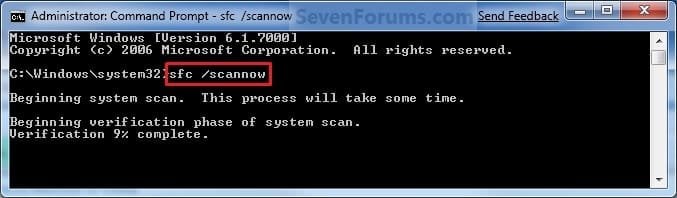
A) In the elevated command prompt, type sfc /scannow, press Enter, and go to step 4 below. (see screenshot below)
NOTE: This may take a little bit to finish.
Command-1.jpg
3. To Only Verify if the System Files are Corrupted
NOTE: Scans and only verifies the integrity of all proteced system files only. This command will not change your system files as in the red WARNING box at the top of this tutorial.
A) In the elevated command prompt, type sfc /verifyonly, press Enter, and go to step 4 below.
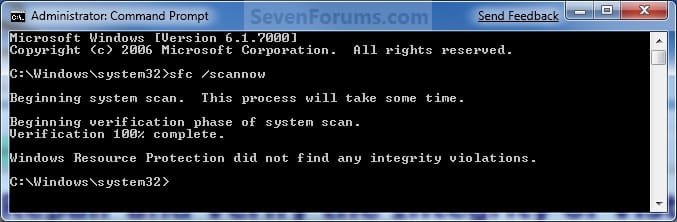
4. When the scan is complete, hopefully you will see all is ok like the screenshot below.

   Note

  • If SFC could not fix something, then run the command again to see if it may be able to the next time. Sometimes it may take running the sfc /scannow command 3 or more times to completely fix everything that it's able to.
  • If not, then download and run the 32-bit (x86) or 64-bit (x64) System Update Readiness Tool for your same installed 32-bit or 64-bit Windows 7, restart the PC afterwards, and try the sfc /scannow command again.
  • If still not, then try using OPTION ONE above to run the sfc /scannow command at boot.
  • If still not, then you can attempt to run a System Restore using a restore point dated before the bad file occured to fix it. You may need to repeat doing a System Restore until you find a older restore point that may work.
  • If still not, then you can use the steps in the TIP box in the OPTION THREE section below to manually replace the files that SFC could not fix if there are not to many fix.
  • If there are to many files to manually fix, or you prefer not to use OPTION THREE below, then you could do a repair install without losing anything.
If you would like to get help with your SFC issue, then be sure to upload and attach your sfcdetails.txt file from OPTION THREE below in your post.


Finished.jpg
5. When done, close the elevated command prompt.


OPTION THREE

How to See and Read Only the "SFC" Scan Results from the CBS.LOG


   Note
When SFC runs, it logs it's actions into the C:\Windows\Logs\CBS\CBS.log. The steps in this option will show you how to see only the specific SFC entries with the [SR] tags in this CBS.log. This can be helpful to show you what files SFC could not fix automatically if you wanted to try and manually replace them.

1. Open an "elevated command prompt" (right click -> Run as administrator).

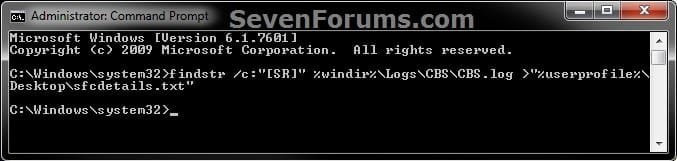
2. In the elevated command prompt, copy and paste the command below, and press Enter. (See screenshot below)
NOTE: This will place a sfcdetails.txt file on your desktop with only the SFC scan result details from the CBS.LOG in it.
Code:
findstr /c:"[SR]" %windir%\Logs\CBS\CBS.log >"%userprofile%\Desktop\sfcdetails.txt"
sfcdetails.jpg
3. Close the elevated command prompt.

4. Open the sfcdetails.txt file on your desktop to see the SFC scan details in the CBS.LOG.

5. You can safely delete the sfcdetails.txt file afterwards if you like.
   Tip
If you need to replace a corrupted system file that SFC cannot fix, then this will show you how to by extracting a new copy directly from your Windows 7 installation DVD.

Extract Files from Windows 7 Installation DVD


That's it,
Shawn


Last edited:

My Computer My Computer

Computer type
PC/Desktop
Computer Manufacturer/Model Number
HP/440f
OS
Windows 7 Professional SP1 64b (with virtualization enabled)
CPU
Intel i5 760 2.8GHz
Memory
8 GB
Hard Drives
WD 1 TB
Antivirus
Kaspersky 2015
Browser
Chrome
The few files that can't be repaired are related to Microsoft-Windows-Unified-Telemetry-Client from the KB3022345 update.

You can uninstall the KB3022345 Windows Update. When finished, check for any new updates and install.

http://www.sevenforums.com/tutorials/24373-windows-update-uninstall-update.html

Are you having any issues from this other than SFC not being able to repair the files?
 

My Computer My Computer

Computer type
PC/Desktop
Computer Manufacturer/Model Number
Self built custom
OS
64-bit Windows 11 Pro for Workstations
CPU
Intel i7-8700K OC'd to 5 GHz
Motherboard
ASUS ROG Maximus XI Formula Z390
Memory
64 GB (4x16GB) G.SKILL TridentZ RGB DDR4 3600 MHz
Graphics Card(s)
ASUS ROG-STRIX-GTX1080TI-O11G-GAMING
Sound Card
Integrated
Monitor(s) Displays
2 x Samsung Odyssey G7 27"
Screen Resolution
2560x1440
Hard Drives
1TB Samsung 990 PRO M.2,
4TB Samsung 990 PRO PRO M.2,
TerraMaster F8 SSD Plus NAS
PSU
Seasonic Prime Titanium 850W
Case
Thermaltake Core P3
Cooling
Corsair Hydro H115i
Keyboard
Logitech wireless K800
Mouse
Logitech MX Master 4
Internet Speed
2 Gb/s Download and 100 Mb/s Upload
Antivirus
Malwarebyte Anti-Malware Premium
Browser
Google Chrome
Other Info
Logitech Z625 speaker system,
Logitech BRIO 4K Pro webcam,
HP Color LaserJet Pro MFP M477fdn,
APC SMART-UPS RT 1000 XL - SURT1000XLI,
Galaxy S23 Plus phone
Mission accomplished

Thanks, that did the trick.
Uninstalled the KB3022345 update and reran sfc /scannow. It now runs with no problems found at all.
I've noticed no other problems, unless the inability to run SURT counts.
I expect to reinstall the KB3022345 update if update tells me it is still needed and rerun scannow. If the problem repeats I'll get back on this thread.

FYI some background. I only ran scannow because Kaspersky told me I had acquired some "unprocessed objects - legal software that can be used to hurt your computer" . Elimination required what Kaspersky called "Advanced Disinfection" multiple times. As I emerged from that, there were messages telling me that several .dll files were " not designed to operate with windows or were corrupted". An HP tutorial had told me about scannow as a recovery from corrupted windows files and so I ran it. It must have fixed most of the problems but left those last two that you have helped me with. Thanks again.
Jerry
 

My Computer My Computer

Computer type
PC/Desktop
Computer Manufacturer/Model Number
HP/440f
OS
Windows 7 Professional SP1 64b (with virtualization enabled)
CPU
Intel i5 760 2.8GHz
Memory
8 GB
Hard Drives
WD 1 TB
Antivirus
Kaspersky 2015
Browser
Chrome
Hi guys,

So I've been experiencing crashes to black or blue screen once or twice a day for the past while. Running a sfc scan 4 or 5 times as you suggest found that there were corrupt files and that not all of them could be repaired. I went through the blue box for option three and tried all the steps (Except the repair install as I do not have a Windows disc and system restore as, for whatever reason, my pc was not making regular restore points as I assumed it would have been). Unfortunately, however, the sfc scan still shows corrupt files and the crashes persist.

I was wondering, then, if anybody wouldn't mind having a look through my sfcdetails.txt and giving me some tips as to how I might go about replacing the corrupt files manually.

Thanks a heap
Tom
 

Attachments

My Computer My Computer

Computer type
PC/Desktop
Computer Manufacturer/Model Number
Acer Emachine
OS
Windows 7 Home Premium 64-bit
CPU
Intel Core i3 550
Memory
4GB DDR3
Graphics Card(s)
ATI Radeon HD 5670
Antivirus
AVG
Browser
Chrome
Did you remove the update Brink listed above ?

The update causes a false corruption reading in sfc, this has been going on for months.
 

My Computer My Computer

Computer type
PC/Desktop
Computer Manufacturer/Model Number
Skylake Special #666
OS
Windows 10 Pro x64
CPU
Intel Core i7 6700K
Motherboard
Asus Sabertooth Z170 Mark 1
Memory
GSkill TridentZ RGB 16GB 3600 16-16-16-36
Graphics Card(s)
EVGA GTX 980 Ti SC x2
Sound Card
Realtek High Definition
Monitor(s) Displays
AOC G2460PG
Screen Resolution
1920 x 1080 144Hz
Hard Drives
Samsung 860 Pro 256GB, Seagate Barracuda 4TB x2
PSU
EVGA 1000 P2, EVGA White Custom Braided Cables
Case
Corsair Vengeance C70 Gunmetal Black
Cooling
Corsair H100i v2, Corsair ML120 x2, Thermal Grizzly Kryonaut
Keyboard
Logitech G910 Orion Spectrum
Mouse
Logitech G700s
Internet Speed
Verizon Fios Quantum Gateway 75/75
Antivirus
Windows Defender, Malwarebytes Free 3.8.3
Browser
Chrome
Other Info
Corsair SP120 x4, LG Blu-ray Drive, Durabrand HT-395 100 Watt Dolby Digital Amp, Corsair H2100 Wireless 7.1 Headset
Yep AddRAM, I noticed those posts just as I posted. Reinstalled the update and just ran an sfc and no more corruption readings. I guess my crashes, then, are unrelated but it's good to have ruled this out.

Thanks again
Tom
 

My Computer My Computer

Computer type
PC/Desktop
Computer Manufacturer/Model Number
Acer Emachine
OS
Windows 7 Home Premium 64-bit
CPU
Intel Core i3 550
Memory
4GB DDR3
Graphics Card(s)
ATI Radeon HD 5670
Antivirus
AVG
Browser
Chrome

My Computer My Computer

Computer type
PC/Desktop
Computer Manufacturer/Model Number
Self Build
OS
Windows 7 64 bit
CPU
Intel 2500K @4.3 GHz
Motherboard
ASUS P8Z68-V PRO
Memory
Corsair 16gb DDR3
Graphics Card(s)
ATI Radeon HD 5670
Monitor(s) Displays
19 inch Asus
Hard Drives
Samsung Evo 850 256gb
Toshiba 2TB
Toshiba 4TB
WD Green 2TB
PSU
Antec 650
Case
NZXT BETA EVO
Cooling
Arctic Freezer 13
Keyboard
Logitech Wireless
Mouse
Logitech Wireless
Internet Speed
120 to 160mbps Virgin Cable
Antivirus
MS Essentials
Browser
Firefox
Hello Fergiet,

You're fine. It just a false positive for the KB3068708 update file mismatch issue. No need to do anything. :)
 

My Computer My Computer

Computer type
PC/Desktop
Computer Manufacturer/Model Number
Self built custom
OS
64-bit Windows 11 Pro for Workstations
CPU
Intel i7-8700K OC'd to 5 GHz
Motherboard
ASUS ROG Maximus XI Formula Z390
Memory
64 GB (4x16GB) G.SKILL TridentZ RGB DDR4 3600 MHz
Graphics Card(s)
ASUS ROG-STRIX-GTX1080TI-O11G-GAMING
Sound Card
Integrated
Monitor(s) Displays
2 x Samsung Odyssey G7 27"
Screen Resolution
2560x1440
Hard Drives
1TB Samsung 990 PRO M.2,
4TB Samsung 990 PRO PRO M.2,
TerraMaster F8 SSD Plus NAS
PSU
Seasonic Prime Titanium 850W
Case
Thermaltake Core P3
Cooling
Corsair Hydro H115i
Keyboard
Logitech wireless K800
Mouse
Logitech MX Master 4
Internet Speed
2 Gb/s Download and 100 Mb/s Upload
Antivirus
Malwarebyte Anti-Malware Premium
Browser
Google Chrome
Other Info
Logitech Z625 speaker system,
Logitech BRIO 4K Pro webcam,
HP Color LaserJet Pro MFP M477fdn,
APC SMART-UPS RT 1000 XL - SURT1000XLI,
Galaxy S23 Plus phone
Thanks for the help. The log files were no help to me. :D:party::D
 

My Computer My Computer

Computer type
PC/Desktop
Computer Manufacturer/Model Number
Self Build
OS
Windows 7 64 bit
CPU
Intel 2500K @4.3 GHz
Motherboard
ASUS P8Z68-V PRO
Memory
Corsair 16gb DDR3
Graphics Card(s)
ATI Radeon HD 5670
Monitor(s) Displays
19 inch Asus
Hard Drives
Samsung Evo 850 256gb
Toshiba 2TB
Toshiba 4TB
WD Green 2TB
PSU
Antec 650
Case
NZXT BETA EVO
Cooling
Arctic Freezer 13
Keyboard
Logitech Wireless
Mouse
Logitech Wireless
Internet Speed
120 to 160mbps Virgin Cable
Antivirus
MS Essentials
Browser
Firefox
How do you know which update is causing corruption?

Brink, Thanks for being such a great and understandable resource. I have run sfc and gotten the attached .txt file. How can you tell which update is causing a corruption or false reading? Do I need to take action on the corruptions sfc has detected. My Windows 7 OS seems to be doing its job. Best regards.
 

Attachments

My Computer My Computer

Computer type
PC/Desktop
Computer Manufacturer/Model Number
Acer AX1420G-U5832
OS
KY, Windows 7 Home Premium, 64 Bit
CPU
AMD Athlon II x4 645 Quad-Core Processor
Memory
4 GB DDR3
Graphics Card(s)
NVIDIA GeForce 6150SE
Hard Drives
1 TB Hard Drive
Antivirus
AVG
Browser
Chrome 43, IE 11
Other Info
Windows 7 Home Premium 64 Bit cam installed. I do not have an installation disk.
Hello Somuch2learn, and welcome to Seven Forums.

From you log file, it's the KB3068708 update for the same false mismatch issue. Nothing needs to be done. :)
 

My Computer My Computer

Computer type
PC/Desktop
Computer Manufacturer/Model Number
Self built custom
OS
64-bit Windows 11 Pro for Workstations
CPU
Intel i7-8700K OC'd to 5 GHz
Motherboard
ASUS ROG Maximus XI Formula Z390
Memory
64 GB (4x16GB) G.SKILL TridentZ RGB DDR4 3600 MHz
Graphics Card(s)
ASUS ROG-STRIX-GTX1080TI-O11G-GAMING
Sound Card
Integrated
Monitor(s) Displays
2 x Samsung Odyssey G7 27"
Screen Resolution
2560x1440
Hard Drives
1TB Samsung 990 PRO M.2,
4TB Samsung 990 PRO PRO M.2,
TerraMaster F8 SSD Plus NAS
PSU
Seasonic Prime Titanium 850W
Case
Thermaltake Core P3
Cooling
Corsair Hydro H115i
Keyboard
Logitech wireless K800
Mouse
Logitech MX Master 4
Internet Speed
2 Gb/s Download and 100 Mb/s Upload
Antivirus
Malwarebyte Anti-Malware Premium
Browser
Google Chrome
Other Info
Logitech Z625 speaker system,
Logitech BRIO 4K Pro webcam,
HP Color LaserJet Pro MFP M477fdn,
APC SMART-UPS RT 1000 XL - SURT1000XLI,
Galaxy S23 Plus phone
Brink, that's reassuring. Thanks for your reply

I noticed that today you addressed the upgrade to Windows 10 in a separate message. Will the W10 OS installation have the effect of debugging my OS, only making even better? I've had some errors (Windows can't update... code: 80070003) while trying to install "optional" updates to W9.

You have a gift for clear and concise communication. Thanks again.
 

My Computer My Computer

Computer type
PC/Desktop
Computer Manufacturer/Model Number
Acer AX1420G-U5832
OS
KY, Windows 7 Home Premium, 64 Bit
CPU
AMD Athlon II x4 645 Quad-Core Processor
Memory
4 GB DDR3
Graphics Card(s)
NVIDIA GeForce 6150SE
Hard Drives
1 TB Hard Drive
Antivirus
AVG
Browser
Chrome 43, IE 11
Other Info
Windows 7 Home Premium 64 Bit cam installed. I do not have an installation disk.
Upgrading to Windows 10 should sort it since you'll be installing a new Windows. :)
 

My Computer My Computer

Computer type
PC/Desktop
Computer Manufacturer/Model Number
Self built custom
OS
64-bit Windows 11 Pro for Workstations
CPU
Intel i7-8700K OC'd to 5 GHz
Motherboard
ASUS ROG Maximus XI Formula Z390
Memory
64 GB (4x16GB) G.SKILL TridentZ RGB DDR4 3600 MHz
Graphics Card(s)
ASUS ROG-STRIX-GTX1080TI-O11G-GAMING
Sound Card
Integrated
Monitor(s) Displays
2 x Samsung Odyssey G7 27"
Screen Resolution
2560x1440
Hard Drives
1TB Samsung 990 PRO M.2,
4TB Samsung 990 PRO PRO M.2,
TerraMaster F8 SSD Plus NAS
PSU
Seasonic Prime Titanium 850W
Case
Thermaltake Core P3
Cooling
Corsair Hydro H115i
Keyboard
Logitech wireless K800
Mouse
Logitech MX Master 4
Internet Speed
2 Gb/s Download and 100 Mb/s Upload
Antivirus
Malwarebyte Anti-Malware Premium
Browser
Google Chrome
Other Info
Logitech Z625 speaker system,
Logitech BRIO 4K Pro webcam,
HP Color LaserJet Pro MFP M477fdn,
APC SMART-UPS RT 1000 XL - SURT1000XLI,
Galaxy S23 Plus phone
MS needs to fix this ...

Hello Somuch2learn, and welcome to Seven Forums.

From you log file, it's the KB3068708 update for the same false mismatch issue. Nothing needs to be done. :)
MS needs to fix this false positive issue.

SFC is a great tool in Windows.
I have no idea how you confirm the validity of system files in Linux.
 

My Computer My Computer

Computer type
PC/Desktop
Computer Manufacturer/Model Number
n/a
OS
W7 Ultimate SP1, LM19.2 MATE, W10 Home 1703, W10 Pro 1703 VM, #All 64 bit
CPU
AMD Phenom II x6 1100T, 3.3 GHz
Motherboard
ASUS M4A88T-M/USB3 (AM3)
Memory
12GB DDR3 1333 G-Skill (4GB x 2), G-Skill (2GB x 2)
Graphics Card(s)
NVIDIA GeForce GTX 660
Sound Card
Realtek?
Monitor(s) Displays
Samsung S23B350
Screen Resolution
1920x1080
Hard Drives
WD Green 2TB (SATA), WD Green 3TB (SATA), WD Blue 4TB (SATA), WD Blue 6TB (SATA)
PSU
Cooler Master
Case
Antec GX300 Tower
Cooling
3x Antec TRICOOL 120mm Fans
Mouse
Wired Optical
Internet Speed
DSL
Antivirus
Avast
Browser
Pale Moon (64 bit)
Other Info
2018-12-27 Upgraded HDDs
2015-12-10 Upgraded case, graphics card, storage
2015-08-15 Upgraded motherboard & RAM
2015-07-15 Upgraded LM17.1 to LM17.2
sfc /scannow vs. Windows Update

Despite Brink's suggestion that I didn't need to do anything about Update KB3068708, I uninstalled it along with KB3022345 (based on a tip from another WSF thread). I then ran sfc /scannow and got a clean bill of health. This morning Windows Update automatically re-installed KB3068708. Just for grins I re-ran sfc /scannow and got the dreaded "Windows Resource Protection found corrupt files but was unable to fix some of them." This time I will follows Brink's suggestion and do nothing abut Windows 7. After all, later this month we can all start a new learning curve with Windows 10. Good luck out there.
 

My Computer My Computer

Computer type
PC/Desktop
Computer Manufacturer/Model Number
Acer AX1420G-U5832
OS
KY, Windows 7 Home Premium, 64 Bit
CPU
AMD Athlon II x4 645 Quad-Core Processor
Memory
4 GB DDR3
Graphics Card(s)
NVIDIA GeForce 6150SE
Hard Drives
1 TB Hard Drive
Antivirus
AVG
Browser
Chrome 43, IE 11
Other Info
Windows 7 Home Premium 64 Bit cam installed. I do not have an installation disk.
You have to tutn off auto update.
 

My Computer My Computer

Computer type
PC/Desktop
Computer Manufacturer/Model Number
Skylake Special #666
OS
Windows 10 Pro x64
CPU
Intel Core i7 6700K
Motherboard
Asus Sabertooth Z170 Mark 1
Memory
GSkill TridentZ RGB 16GB 3600 16-16-16-36
Graphics Card(s)
EVGA GTX 980 Ti SC x2
Sound Card
Realtek High Definition
Monitor(s) Displays
AOC G2460PG
Screen Resolution
1920 x 1080 144Hz
Hard Drives
Samsung 860 Pro 256GB, Seagate Barracuda 4TB x2
PSU
EVGA 1000 P2, EVGA White Custom Braided Cables
Case
Corsair Vengeance C70 Gunmetal Black
Cooling
Corsair H100i v2, Corsair ML120 x2, Thermal Grizzly Kryonaut
Keyboard
Logitech G910 Orion Spectrum
Mouse
Logitech G700s
Internet Speed
Verizon Fios Quantum Gateway 75/75
Antivirus
Windows Defender, Malwarebytes Free 3.8.3
Browser
Chrome
Other Info
Corsair SP120 x4, LG Blu-ray Drive, Durabrand HT-395 100 Watt Dolby Digital Amp, Corsair H2100 Wireless 7.1 Headset
According to MS, these errors are perfectly normal, and can be ignored...
Code:
2015-07-03 16:36:01, Info                  CSI    00000511 [SR] Repairing 1 components
2015-07-03 16:36:01, Info                  CSI    00000512 [SR] Beginning Verify and Repair transaction
2015-07-03 16:36:01, Info                  CSI    00000514 [SR] Cannot repair member file [l:24{12}]"utc.app.json" of Microsoft-Windows-Unified-Telemetry-Client, Version = 6.1.7601.18869, pA = PROCESSOR_ARCHITECTURE_AMD64 (9), Culture neutral, VersionScope = 1 nonSxS, PublicKeyToken = {l:8 b:31bf3856ad364e35}, Type neutral, TypeName neutral, PublicKey neutral in the store, hash mismatch
2015-07-03 16:36:01, Info                  CSI    00000516 [SR] Cannot repair member file [l:66{33}]"telemetry.ASM-WindowsDefault.json" of Microsoft-Windows-Unified-Telemetry-Client, Version = 6.1.7601.18869, pA = PROCESSOR_ARCHITECTURE_AMD64 (9), Culture neutral, VersionScope = 1 nonSxS, PublicKeyToken = {l:8 b:31bf3856ad364e35}, Type neutral, TypeName neutral, PublicKey neutral in the store, hash mismatch
2

They are the result of MS not actually following their own rules, and tagging the relevant files in the update as 'static' rather than 'variable'.

You can either:
1) Uninstall the related update(s) KB3068708 and KB3022345 - and then hide them to prevent reinstall before MS produce a fixed version
or
2) ignore them.

There are no other significant errors in the uploaded file.
 

My Computer My Computer

Computer type
Laptop
Computer Manufacturer/Model Number
Asus K52F or Lenovo B51-80
OS
Win 7 x64 Home Premium (and x86 VirtualBox VM)/Win10
CPU
i3 370M/i7 6500U
Motherboard
Asus/Lenovo
Memory
8GB - finally :)/8GB
Graphics Card(s)
it's an i3, dude!/dual Intel&nVidia
Sound Card
onboard
Monitor(s) Displays
15.6" built-in
Screen Resolution
1366x768/1920x1080
Hard Drives
750GB Seagate internal
Sundry external drives attached to other computers on the local network
1TB SSD on the Lenovo
PSU
n/a
Internet Speed
as much as I can get - usually on a dongle/phone, so <1MB/s
Antivirus
MSE/Defender
Browser
IE11/12/Edge/Chrome/FF(if I must)
According to MS, these errors are perfectly normal, and can be ignored...
They are the result of MS not actually following their own rules, and tagging the relevant files in the update as 'static' rather than 'variable'.

You can either:
1) Uninstall the related update(s) KB3068708 and KB3022345 - and then hide them to prevent reinstall before MS produce a fixed version
or
2) ignore them.

There are no other significant errors in the uploaded file.

Noel, I think your option one is the best course of action. If someone merely ignores the updates, runs SFC and gets the "Windows Resource Protection found corrupt files but was unable to fix some of them" notice, there's no easy way to know if the corrupted files are due to the updates or some other system files being corrupted.

I think Microsoft owes it to consumers who are running Windows 7 to correct this issue.
 

My Computer My Computer

Computer type
Laptop
Computer Manufacturer/Model Number
Sony Vaio VPCEB47GM Laptop
OS
Win 7 Pro 64-bit
CPU
Intel i5 2.4 Ghz
Memory
8GB DDR3
Graphics Card(s)
Intel HD 3000
Sound Card
IDT High Definition
Monitor(s) Displays
15.6 WGXA Anti-Glare LED
Screen Resolution
1280x800
Hard Drives
640Gb 7200rpm
Antivirus
MSE
Browser
Opera (primary) with IE9 backup
I totally agree - especially since these two updates are far from being 'critical'!
 

My Computer My Computer

Computer type
Laptop
Computer Manufacturer/Model Number
Asus K52F or Lenovo B51-80
OS
Win 7 x64 Home Premium (and x86 VirtualBox VM)/Win10
CPU
i3 370M/i7 6500U
Motherboard
Asus/Lenovo
Memory
8GB - finally :)/8GB
Graphics Card(s)
it's an i3, dude!/dual Intel&nVidia
Sound Card
onboard
Monitor(s) Displays
15.6" built-in
Screen Resolution
1366x768/1920x1080
Hard Drives
750GB Seagate internal
Sundry external drives attached to other computers on the local network
1TB SSD on the Lenovo
PSU
n/a
Internet Speed
as much as I can get - usually on a dongle/phone, so <1MB/s
Antivirus
MSE/Defender
Browser
IE11/12/Edge/Chrome/FF(if I must)
How do I find out which files are corrupt, and how to fix them?
 

My Computer My Computer

Computer type
Laptop
Computer Manufacturer/Model Number
Acer 5250-0450
OS
Windows 10 Home 64-bit
CPU
AMD E-350 Zacate 40nm Technology
Motherboard
Acer HMA51-BZ (Socket FT1)
Memory
4 GB DDR3 Memory
Graphics Card(s)
1909MB ATI AMD Radeon HD
Sound Card
Conexant High Definition Audio
Monitor(s) Displays
Generic PnP Monitor (1366x768@60Hz)
Hard Drives
320 GB HDD
Mouse
ONN Wireless Mouse
Antivirus
Norton Internet Security Online
Browser
Microsoft Edge, Internet Explorer 11, and Google Chrome
Other Info
Other Computers:

Laptop: Acer Aspire 5749 Series

Desktop: Acer Aspire XC603G Series
Back
Top