SFC Warning

tom982

٩(͡๏̯͡๏)۶
Guru
VIP
Local time
12:49 AM
Messages
2,582
Location
England
Hi guys,

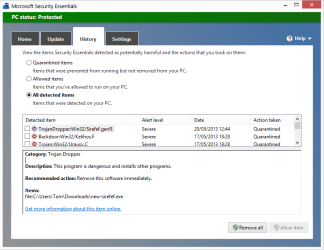
As we commonly use SFC to troubleshoot problems across the board, I think it's best that you're aware of how the latest variant of the ZeroAccess malware interferes with SFC.

If SFC fails (and not just says it found corrupt files, it has to fail), ask for the full CBS log, not sfcdetails.txt! Scroll to the bottom and at the end of the SFC log, you should see why it failed. If you see something like this:

Code:
2013-05-18 16:51:23, Info                  CSI    000001ee [SR] Verifying 100 (0x00000064) components
2013-05-18 16:51:23, Info                  CSI    000001ef [SR] Beginning Verify and Repair transaction
2013-05-18 16:51:39, Error                 CSI    000001f0 (F) STATUS_FILE_IS_A_DIRECTORY #4676410# from Windows::Rtl::SystemImplementation::DirectFileSystemProvider::SysCreateFile(flags = (AllowFileNotFound|AllowSharingViolation|AllowAccessDenied), handle = {provider=NULL, handle=0}, da = (SYNCHRONIZE|FILE_READ_ATTRIBUTES|FILE_READ_DATA), oa = @0xe6ea1c->OBJECT_ATTRIBUTES {s:24; rd:NULL; on:[129]"\SystemRoot\WinSxS\x86_security-malware-windows-defender-events_31bf3856ad364e35_6.0.6000.16386_none_b3613e39beae266f\MpEvMsg.dll"; a:(OBJ_CASE_INSENSITIVE)}, iosb = @0xe6e9d4, as = (null), fa = 0, sa = (FILE_SHARE_READ|FILE_SHARE_WRITE|FILE_SHARE_DELETE), cd = FILE_OPEN, co = (FILE_NON_DIRECTORY_FILE|FILE_SYNCHRONOUS_IO_NONALERT), eab = NULL, eal = 0, disp = Invalid)
[gle=0xd00000ba]
2013-05-18 16:51:39, Error                 CSI    000001f1@2013/5/18:15:51:39.437 (F) d:\longhorn\base\wcp\sil\merged\ntu\ntsystem.cpp(1849): Error STATUS_FILE_IS_A_DIRECTORY originated in function Windows::Rtl::SystemImplementation::DirectFileSystemProvider::SysCreateFile expression: (null)
[gle=0x80004005]
2013-05-18 16:51:48, Error                 CSI    000001f2 (F) STATUS_FILE_IS_A_DIRECTORY #4676409# from Windows::Rtl::SystemImplementation::CDirectory::OpenExistingFile(...)[gle=0xd00000ba]
2013-05-18 16:51:48, Error                 CSI    000001f3 (F) STATUS_FILE_IS_A_DIRECTORY #4676408# from Windows::Rtl::SystemImplementation::CDirectory_IRtlDirectoryTearoff::OpenExistingFile(flags = (MissingFileIsOk|SharingViolationIsOk|AccessDeniedIsOk), da = (SYNCHRONIZE|FILE_READ_DATA), oa = @0xe6ebc4->SIL_OBJECT_ATTRIBUTES {s:20; on:"MpEvMsg.dll"; a:(OBJ_CASE_INSENSITIVE)}, sa = (FILE_SHARE_READ|FILE_SHARE_WRITE|FILE_SHARE_DELETE), oo = (FILE_SYNCHRONOUS_IO_NONALERT|FILE_NON_DIRECTORY_FILE), file = NULL, disp = Invalid)
[gle=0xd00000ba]
In particular, the STATUS_FILE_IS_A_DIRECTORY error, then it is almost a certainty that the user is infected with ZeroAccess.

For those of you who are interested, it has symbolically linked many files associated with Windows Defender and or MSE to a completely different folder, hence blocking access:

Code:
Microsoft Windows [Version 6.0.6002]
Copyright © 2006 Microsoft Corporation. All rights reserved.

C:\Windows\system32>dir C:\Windows\WinSxS\x86_security-malware-windows-defender-
events_31bf3856ad364e35_6.0.6000.16386_none_b3613e39beae266f\
Volume in drive C has no label.
Volume Serial Number is 7378-680D

Directory of C:\Windows\WinSxS\x86_security-malware-windows-defender-events_31b
f3856ad364e35_6.0.6000.16386_none_b3613e39beae266f

02/11/2006 13:35 <DIR> .
02/11/2006 13:35 <DIR> ..
02/11/2006 13:35 <SYMLINK> MpEvMsg.dll [c:\windows\system32\config]
1 File(s) 65,640 bytes
2 Dir(s) 20,953,784,320 bytes free

C:\Windows\system32>

So any calls to C:\Windows\WinSxS\x86_security-malware-windows-defender-events_31bf3856ad364e35_6.0.6000.16386_none_b3613e39beae266f\MpEvMsg.dll are being redirected to c:\windows\system32\config hence why SFC is returning a STATUS_FILE_IS_A_DIRECTORY error.

Tom
 
Last edited:

My Computer

Computer type
PC/Desktop
Computer Manufacturer/Model Number
Build #1
OS
Windows 8.1 Pro x64
CPU
Intel i7 3770K @4.5GHz
Motherboard
ASUS P8Z77-V PRO
Memory
Corsair Vengeance 2x4GB DDR3 1600MHz Low Profile (White)
Graphics Card(s)
Gigabyte Radeon HD 7850 (2GB GDDR5)
Sound Card
Integrated on motherboard
Monitor(s) Displays
23" LG LCD/LED IPS
Screen Resolution
1920*1080
Hard Drives
Samsung EVO 128GB SSD
Seagate Barracuda 2GB 7200rpm
2x Seagate FreeAgent [500gb]
PSU
Corsair TX650W V2 (80+ Bronze)
Case
NZXT Phantom 410 White
Cooling
Corsair H100 Water Cooler
Keyboard
Microsoft Desktop 2000 Wireless Keyboard
Mouse
Microsoft Desktop 2000 Wireless Mouse
Internet Speed
95 Mb/s Download 70 Mb/s Upload
Antivirus
MSE + MBAM Pro
Browser
Firefox
Thanks Tom.

Does MB or MSE detect it yet, or does MSE get compromised too as per Defender?
 

My Computer

Computer type
PC/Desktop
Computer Manufacturer/Model Number
Build #1
OS
Windows 8.1 Pro x64
CPU
Intel i7 3770K @4.5GHz
Motherboard
ASUS P8Z77-V PRO
Memory
Corsair Vengeance 2x4GB DDR3 1600MHz Low Profile (White)
Graphics Card(s)
Gigabyte Radeon HD 7850 (2GB GDDR5)
Sound Card
Integrated on motherboard
Monitor(s) Displays
23" LG LCD/LED IPS
Screen Resolution
1920*1080
Hard Drives
Samsung EVO 128GB SSD
Seagate Barracuda 2GB 7200rpm
2x Seagate FreeAgent [500gb]
PSU
Corsair TX650W V2 (80+ Bronze)
Case
NZXT Phantom 410 White
Cooling
Corsair H100 Water Cooler
Keyboard
Microsoft Desktop 2000 Wireless Keyboard
Mouse
Microsoft Desktop 2000 Wireless Mouse
Internet Speed
95 Mb/s Download 70 Mb/s Upload
Antivirus
MSE + MBAM Pro
Browser
Firefox
2013-05-18 16:51:39, Error CSI 000001f1@2013/5/18:15:51:39.437 (F) d:\longhorn\base\wcp\sil\merged\ntu\ntsystem.cpp(1849): Error STATUS_FILE_IS_A_DIRECTORY originated in function Windows::Rtl::SystemImplementation::DirectFileSystemProvider::SysCreateFile expression: (null)
[gle=0x80004005]
"Longhorn" was the code name of Vista before the real name was announced, is that significant?

What is the log in your 2nd code box?

Thanks for the heads up mate! :D
 

My Computer

Computer type
PC/Desktop
Computer Manufacturer/Model Number
Home Built Desktop By DataTech
OS
Windows 7 Ultimate X64 SP1
CPU
Intel i5-2550K, Differing ~4.4-4.8GHz No built in GPU
Motherboard
ASUS P8Z68-V PRO/GEN3
Memory
16GB G.Skill Sniper 1866MHz @ 2133MHz 2x8GB
Graphics Card(s)
ASUS GTX650TIB-DC2OC-2GD5, (650TI Boost)
Sound Card
Onboard Realtek 5-1
Monitor(s) Displays
Samsung P2570HD
Screen Resolution
1920x1080
Hard Drives
Samsung 840 Pro 256GB SSD for OS, 500GB Seagate Constellation (Enterprise drive) for Data
PSU
Corsair HX650W
Case
Inwin Dragon Rider
Cooling
Hyper 212 EVO w/two Noctua fans, push-pull, @1300 RPM
Keyboard
E-Z Eyes, bright yellow keys with large characters
Mouse
steelseries SENSEI Laser Pro Gaming
Internet Speed
48-51Mbs Mbs down, 11 Mbs up Xfinity Cable
Antivirus
Norton Internet Security 2013
Browser
IE 10, Opera, Pale Moon if needed
Other Info
4 case fans, LG BluRay-RE, ASUS DVD-RW, Mr. Fusion power supply, 1.21 gigawatts.
My pleasure, Harry.


2013-05-18 16:51:39, Error CSI 000001f1@2013/5/18:15:51:39.437 (F) d:\longhorn\base\wcp\sil\merged\ntu\ntsystem.cpp(1849): Error STATUS_FILE_IS_A_DIRECTORY originated in function Windows::Rtl::SystemImplementation::DirectFileSystemProvider::SysCreateFile expression: (null)
[gle=0x80004005]
"Longhorn" was the code name of Vista before the real name was announced, is that significant?

What is the log in your 2nd code box?

Thanks for the heads up mate! :D

When SFC fails to complete, it writes errors very similar to that to the CBS log. Here's a common one:


Code:
2013-01-28 12:44:48, Info                  CBS    Failed to get CSI store. [HRESULT = 0x80070002 - ERROR_FILE_NOT_FOUND]
2013-01-28 12:44:48, Error                 CBS    Failed to initialize store parameters with boot drive:  and windows directory:  [HRESULT = 0x80070002 - ERROR_FILE_NOT_FOUND]
2013-01-28 12:44:51, Error                 CSI    00000ec1 (F) STATUS_OBJECT_NAME_NOT_FOUND #46850892# from Windows::Rtl::SystemImplementation::DirectRegistryProvider::SysOpenKey(flg = (AllowAccessDenied), key = {provider=NULL, handle=0}, da = (KEY_READ|DELETE|KEY_WOW64_64KEY), oa = @0x290ce50->OBJECT_ATTRIBUTES {s:48; rd:NULL; on:[217]"\Registry\Machine\COMPONENTS\DerivedData\VersionedIndex\6.1.7601.17592 (win7sp1_gdr.110408-1631)\ComponentFamilies\amd64_microsoft-windows-g..ebuild-search-index_31bf3856ad364e35_none_6bd558451d4e7a1e\v!6.1.7601.21720"; a:(OBJ_CASE_INSENSITIVE)}, disp = Unmapped disposition: 43044336 (0x0290cdf0))[gle=0xd0000034]
2013-01-28 12:44:51, Error                 CSI    00000ec2@2013/1/28:12:44:51.279 (F) d:\win7sp1_gdr\base\wcp\sil\merged\ntu\ntsystem.cpp(3676): Error STATUS_OBJECT_NAME_NOT_FOUND originated in function Windows::Rtl::SystemImplementation::DirectRegistryProvider::SysOpenKey expression: (null)
[gle=0x80004005]
2013-01-28 12:44:51, Error                 CSI    00000ec3 (F) STATUS_OBJECT_NAME_NOT_FOUND #46850891# from Windows::Rtl::SystemImplementation::DirectRegistryProvider::SysOpenKey(flg = 0, key = {provider=NULL, handle=0}, da = (KEY_READ|DELETE|KEY_WOW64_64KEY), oa = @0x290ce50->OBJECT_ATTRIBUTES {s:48; rd:NULL; on:[217]"\Registry\Machine\COMPONENTS\DerivedData\VersionedIndex\6.1.7601.17592 (win7sp1_gdr.110408-1631)\ComponentFamilies\amd64_microsoft-windows-g..ebuild-search-index_31bf3856ad364e35_none_6bd558451d4e7a1e\v!6.1.7601.21720"; a:(OBJ_CASE_INSENSITIVE)}, disp = Unmapped disposition: 43045400 (0x0290d218))[gle=0xd0000034]
2013-01-28 12:44:51, Error                 CSI    00000ec4@2013/1/28:12:44:51.319 (F) d:\win7sp1_gdr\base\wcp\sil\merged\ntu\ntsystem.cpp(3676): Error STATUS_OBJECT_NAME_NOT_FOUND originated in function Windows::Rtl::SystemImplementation::DirectRegistryProvider::SysOpenKey expression: (null)
[gle=0x80004005]
2013-01-28 12:44:51, Error                 CSI    00000ec5 (F) STATUS_OBJECT_NAME_NOT_FOUND #46850890# from Windows::Rtl::SystemImplementation::CKey::OpenExistingKey(f = 2, da = (KEY_READ|DELETE), oa = @0x290d2b0, key = NULL, disp = (null))[gle=0xd0000034]
2013-01-28 12:44:51, Error                 CSI    00000ec6 (F) STATUS_OBJECT_NAME_NOT_FOUND #46850864# from Windows::Rtl::SystemImplementation::CKey::DeleteRecursively(...)[gle=0xd0000034]
2013-01-28 12:44:51, Error                 CSI    00000ec7 (F) STATUS_OBJECT_NAME_NOT_FOUND #46775063# from Windows::Rtl::SystemImplementation::CKey::DeleteRecursively(...)[gle=0xd0000034]
2013-01-28 12:44:51, Info                  CBS    Failed to get CSI store. [HRESULT = 0x80070002 - ERROR_FILE_NOT_FOUND]
2013-01-28 12:44:51, Error                 CBS    Failed to initialize store parameters with boot drive:  and windows directory:  [HRESULT = 0x80070002 - ERROR_FILE_NOT_FOUND]


But notice this is failing with ERROR_FILE_NOT_FOUND which is a perfectly acceptable reason for SFC to fail.


I've never understood what it means when it references these C++ definitions but Vista and 7 are so similar internally that it wouldn't surprise me if this is just a leftover from Vista that they didn't need to change :)


d:\longhorn\base\wcp\sil\merged\ntu\ntsystem.cpp
d:\win7sp1_gdr\base\wcp\sil\merged\ntu\ntsystem.cpp


The second codebox shows that a hardlink exists on that file, confirming that's why SFC failed:


Code:
Microsoft Windows [Version 6.0.6002]
Copyright © 2006 Microsoft Corporation. All rights reserved.


C:\Windows\system32>dir C:\Windows\WinSxS\x86_security-malware-windows-defender-
events_31bf3856ad364e35_6.0.6000.16386_none_b3613e39beae266f\
Volume in drive C has no label.
Volume Serial Number is 7378-680D


Directory of C:\Windows\WinSxS\x86_security-malware-windows-defender-events_31b
f3856ad364e35_6.0.6000.16386_none_b3613e39beae266f


02/11/2006 13:35 <DIR> .
02/11/2006 13:35 <DIR> ..
02/11/2006 13:35 [B]<SYMLINK>[/B] MpEvMsg.dll [B][c:\windows\system32\config][/B]
1 File(s) 65,640 bytes
2 Dir(s) 20,953,784,320 bytes free


C:\Windows\system32>


The <SYMLINK> represents a symbolic link which essentially redirects calls to this file to another location - in this case C:\Windows\system32\config :)


Tom
 

My Computer

Computer type
PC/Desktop
Computer Manufacturer/Model Number
Build #1
OS
Windows 8.1 Pro x64
CPU
Intel i7 3770K @4.5GHz
Motherboard
ASUS P8Z77-V PRO
Memory
Corsair Vengeance 2x4GB DDR3 1600MHz Low Profile (White)
Graphics Card(s)
Gigabyte Radeon HD 7850 (2GB GDDR5)
Sound Card
Integrated on motherboard
Monitor(s) Displays
23" LG LCD/LED IPS
Screen Resolution
1920*1080
Hard Drives
Samsung EVO 128GB SSD
Seagate Barracuda 2GB 7200rpm
2x Seagate FreeAgent [500gb]
PSU
Corsair TX650W V2 (80+ Bronze)
Case
NZXT Phantom 410 White
Cooling
Corsair H100 Water Cooler
Keyboard
Microsoft Desktop 2000 Wireless Keyboard
Mouse
Microsoft Desktop 2000 Wireless Mouse
Internet Speed
95 Mb/s Download 70 Mb/s Upload
Antivirus
MSE + MBAM Pro
Browser
Firefox
I reckon I need a lot more background to understand all of that Tom. :o
 

My Computer

Computer type
PC/Desktop
Computer Manufacturer/Model Number
Home Built Desktop By DataTech
OS
Windows 7 Ultimate X64 SP1
CPU
Intel i5-2550K, Differing ~4.4-4.8GHz No built in GPU
Motherboard
ASUS P8Z68-V PRO/GEN3
Memory
16GB G.Skill Sniper 1866MHz @ 2133MHz 2x8GB
Graphics Card(s)
ASUS GTX650TIB-DC2OC-2GD5, (650TI Boost)
Sound Card
Onboard Realtek 5-1
Monitor(s) Displays
Samsung P2570HD
Screen Resolution
1920x1080
Hard Drives
Samsung 840 Pro 256GB SSD for OS, 500GB Seagate Constellation (Enterprise drive) for Data
PSU
Corsair HX650W
Case
Inwin Dragon Rider
Cooling
Hyper 212 EVO w/two Noctua fans, push-pull, @1300 RPM
Keyboard
E-Z Eyes, bright yellow keys with large characters
Mouse
steelseries SENSEI Laser Pro Gaming
Internet Speed
48-51Mbs Mbs down, 11 Mbs up Xfinity Cable
Antivirus
Norton Internet Security 2013
Browser
IE 10, Opera, Pale Moon if needed
Other Info
4 case fans, LG BluRay-RE, ASUS DVD-RW, Mr. Fusion power supply, 1.21 gigawatts.
Thanks tom982!

This stuff is spreading like wildfire. There is work being done on it, but not sure as to whether a solution is yet found.

Like you mentioned, it symbolically links files associated with Windows Defender and/or MSE, and there are a couple of tools being used to detect and remove the junctions, but have not seen the final solution. Have you?
 

My Computer

Computer type
PC/Desktop
Computer Manufacturer/Model Number
An ol' eMachines
OS
Windows 7 Home Premium
Internet Speed
Fine for me...I'm retired!
Thanks for the heads-up, Tom!

I've never liked just looking at the SFCDETAILS output - because it misses an awful lot of diagnostics stuff which is necessary, and you almost always have to ask for the full log anyhow.
At least now I have a technical reason to get shirty if the CBS.log isn't forthcoming :)
 

My Computer

Computer type
Laptop
Computer Manufacturer/Model Number
Asus K52F or Lenovo B51-80
OS
Win 7 x64 Home Premium (and x86 VirtualBox VM)/Win10
CPU
i3 370M/i7 6500U
Motherboard
Asus/Lenovo
Memory
8GB - finally :)/8GB
Graphics Card(s)
it's an i3, dude!/dual Intel&nVidia
Sound Card
onboard
Monitor(s) Displays
15.6" built-in
Screen Resolution
1366x768/1920x1080
Hard Drives
750GB Seagate internal
Sundry external drives attached to other computers on the local network
1TB SSD on the Lenovo
PSU
n/a
Internet Speed
as much as I can get - usually on a dongle/phone, so <1MB/s
Antivirus
MSE/Defender
Browser
IE11/12/Edge/Chrome/FF(if I must)
tom982,

Looks like working with the "junction disfunction" and permissions takes care of this variant of ZeroAccess, as well as restores the ability to download files.
 

My Computer

Computer type
PC/Desktop
Computer Manufacturer/Model Number
An ol' eMachines
OS
Windows 7 Home Premium
Internet Speed
Fine for me...I'm retired!
Thanks tom982!

This stuff is spreading like wildfire. There is work being done on it, but not sure as to whether a solution is yet found.

Like you mentioned, it symbolically links files associated with Windows Defender and/or MSE, and there are a couple of tools being used to detect and remove the junctions, but have not seen the final solution. Have you?

Nope, it's above my pay grade I'm afraid :(
 

My Computer

Computer type
PC/Desktop
Computer Manufacturer/Model Number
Build #1
OS
Windows 8.1 Pro x64
CPU
Intel i7 3770K @4.5GHz
Motherboard
ASUS P8Z77-V PRO
Memory
Corsair Vengeance 2x4GB DDR3 1600MHz Low Profile (White)
Graphics Card(s)
Gigabyte Radeon HD 7850 (2GB GDDR5)
Sound Card
Integrated on motherboard
Monitor(s) Displays
23" LG LCD/LED IPS
Screen Resolution
1920*1080
Hard Drives
Samsung EVO 128GB SSD
Seagate Barracuda 2GB 7200rpm
2x Seagate FreeAgent [500gb]
PSU
Corsair TX650W V2 (80+ Bronze)
Case
NZXT Phantom 410 White
Cooling
Corsair H100 Water Cooler
Keyboard
Microsoft Desktop 2000 Wireless Keyboard
Mouse
Microsoft Desktop 2000 Wireless Mouse
Internet Speed
95 Mb/s Download 70 Mb/s Upload
Antivirus
MSE + MBAM Pro
Browser
Firefox


Your pay grade and mine = 0!!!

Fortunately, some with higher paygrades solved the issue.
 

My Computer

Computer type
PC/Desktop
Computer Manufacturer/Model Number
An ol' eMachines
OS
Windows 7 Home Premium
Internet Speed
Fine for me...I'm retired!
Thanks for telling. My laptop was hit by ZeroAccess. MSE failed to scan when hidden folder was scanned and scanning stopped as Not Responding. SFC reported Windows Resource Protection at 21% then 19%.Elevated to run as administrator still failed and used startup repair command prompt same result. No choice but to reformat and execute clean installation Windows 7 again.
 

My Computer

Computer type
Laptop
Computer Manufacturer/Model Number
Acer Aspire 4736G
OS
Windows 7 Home Premium 64bit
CPU
Intel Core 2 Duo T6600 2.2 GHz 800MHz
Motherboard
Intel PM65
Memory
4GB
Graphics Card(s)
Nvidia Geforce G105M
Hard Drives
Toshiba MK5055GSX 99FKS993S LBAS 976773167
Antivirus
AVG Free AV 2015
Browser
IE & Chrome
So in a 'nutshell' C++ fails on MpEvMsg.dll > Client Security kernel-mode mini-filter, which gives/allows buffer overflows and exploitation... this would be a 'pointer' not a 'referrence'.

References cannot be null, whereas pointers can; every reference refers to some object, although it may or may not be valid

Just trying to get the basic understanding of this too. It all goes back to inadequate security, not updating Windows (and other vulnerable programs, such as Java and Adobe) and taking chances with file sharing (P2P).
 

My Computer

Computer type
PC/Desktop
Computer Manufacturer/Model Number
Bruce ... somewhere in his 40's
OS
Windows 7 Ultimate 32bit SP1
CPU
Intel(R) Core(TM)2 Quad CPU @ 2.40GHz, 2400 MHz
Motherboard
INTEL/D975XBX2
Memory
4 GB
Graphics Card(s)
ATI Radeon HD 2600 Pro
Monitor(s) Displays
Samsung SyncMaster 914v
Screen Resolution
1280 x 1024
Hard Drives
2/500GB each ... ST3500630AS ATA Device.
One is not connected
PSU
Rocketfish 700 W
Case
G.Skill Gigabyte Chassis
Keyboard
Standard PS/2 Keyboard
Mouse
Microsoft PS/2 Mouse
Internet Speed
DSL
Antivirus
Avira Internet Security
Browser
IE 11
Other Info
ATI HDMI Audio
So in a 'nutshell' C++ fails on MpEvMsg.dll > Client Security kernel-mode mini-filter, which gives/allows buffer overflows and exploitation... this would be a 'pointer' not a 'referrence'.

References cannot be null, whereas pointers can; every reference refers to some object, although it may or may not be valid
Just trying to get the basic understanding of this too. It all goes back to inadequate security, not updating Windows (and other vulnerable programs, such as Java and Adobe) and taking chances with file sharing (P2P).

Thanks for the update, Jacee :)


Whilst the security software plays a large part in this, quite a lot of the onus is on the user in the first place. As far as I know this variant doesn't come with any form of exploit and requires the user to elevate the program by accepting the UAC prompt - but they've disguised this by loading their dodgy dll under an installer for Adobe Flash Player so the UAC prompt says that Flash wants to elevate, not the ZeroAccess dropper.


If a website ever says you have outdated software, be sure to check this yourself from the vendors website and don't download the file they are offering!
 

My Computer

Computer type
PC/Desktop
Computer Manufacturer/Model Number
Build #1
OS
Windows 8.1 Pro x64
CPU
Intel i7 3770K @4.5GHz
Motherboard
ASUS P8Z77-V PRO
Memory
Corsair Vengeance 2x4GB DDR3 1600MHz Low Profile (White)
Graphics Card(s)
Gigabyte Radeon HD 7850 (2GB GDDR5)
Sound Card
Integrated on motherboard
Monitor(s) Displays
23" LG LCD/LED IPS
Screen Resolution
1920*1080
Hard Drives
Samsung EVO 128GB SSD
Seagate Barracuda 2GB 7200rpm
2x Seagate FreeAgent [500gb]
PSU
Corsair TX650W V2 (80+ Bronze)
Case
NZXT Phantom 410 White
Cooling
Corsair H100 Water Cooler
Keyboard
Microsoft Desktop 2000 Wireless Keyboard
Mouse
Microsoft Desktop 2000 Wireless Mouse
Internet Speed
95 Mb/s Download 70 Mb/s Upload
Antivirus
MSE + MBAM Pro
Browser
Firefox
I found this thread very interesting as I'm not as savvy when it comes to the inner workings of Windows. As someone mentioned, this is above my pay grade (for now). But it is a fascinating read, and something to learn about.

That said, this caught my attention...

If a website ever says you have outdated software, be sure to check this yourself from the vendors website and don't download the file they are offering!

I was doing a Google search for something and ran across a site that piqued my interest. Normally I watch what site I enter, but the article got the better of me. Anyway I clicked the link, and was greeted with a "Your Flash" isn't working, click here to update". Well me being the suspicious type, and knowing my Flash was working, I ignored it. A few hour later I'm looking at this tread and see the above quote :shock:

Thank god for my intuition, and knowing my system!

So yes, keeping your programs, including Windows updated can avoid such problems. I get in arguments about this all the time, but some have the attitude of "if it ain't broke, don't fix it.

Anyway thanks for the info.
 

My Computer

Computer type
PC/Desktop
Computer Manufacturer/Model Number
Custom built by me.
OS
Windows 10 Pro
CPU
Intel Core i7-4770K (3.5Ghz)
Motherboard
Gigabyte G1 Sniper 5 (F10 Bios)
Memory
32 gig Corsair Dominator Platinum (4x8Gig)
Graphics Card(s)
Sapphire Tri-X R9 Fury
Sound Card
Soundblaster ZXR
Monitor(s) Displays
NEC PA242W 24" LCD Monitor
Screen Resolution
1920 x 1200
Hard Drives
Primary - Samsung 850 Pro (512gig), Samsung 840 Pro (256gig), 2TB WD Caviar Black.
PSU
EVGA Supernova 1000 G2
Case
Cooler Master HAF X
Cooling
Corsair H100i with Corsair Air Series SP120 Quiet Fans
Keyboard
Logitech Wireless Wave
Mouse
Logitech Performance MX
Internet Speed
High Speed Cable
Antivirus
Norton Security
Browser
IE11
Other Info
Memory Timings - 1866MHz @ 9-9-9-27-1T @ 1.5 volts
Sygnus I have found lately there are a lot of sites which pop up a window saying My Flash Player is out of date. I always ignore them too.
 

My Computer

Computer type
PC/Desktop
Computer Manufacturer/Model Number
Home Built Desktop By DataTech
OS
Windows 7 Ultimate X64 SP1
CPU
Intel i5-2550K, Differing ~4.4-4.8GHz No built in GPU
Motherboard
ASUS P8Z68-V PRO/GEN3
Memory
16GB G.Skill Sniper 1866MHz @ 2133MHz 2x8GB
Graphics Card(s)
ASUS GTX650TIB-DC2OC-2GD5, (650TI Boost)
Sound Card
Onboard Realtek 5-1
Monitor(s) Displays
Samsung P2570HD
Screen Resolution
1920x1080
Hard Drives
Samsung 840 Pro 256GB SSD for OS, 500GB Seagate Constellation (Enterprise drive) for Data
PSU
Corsair HX650W
Case
Inwin Dragon Rider
Cooling
Hyper 212 EVO w/two Noctua fans, push-pull, @1300 RPM
Keyboard
E-Z Eyes, bright yellow keys with large characters
Mouse
steelseries SENSEI Laser Pro Gaming
Internet Speed
48-51Mbs Mbs down, 11 Mbs up Xfinity Cable
Antivirus
Norton Internet Security 2013
Browser
IE 10, Opera, Pale Moon if needed
Other Info
4 case fans, LG BluRay-RE, ASUS DVD-RW, Mr. Fusion power supply, 1.21 gigawatts.
Sygnus I have found lately there are a lot of sites which pop up a window saying My Flash Player is out of date. I always ignore them too.

Some could be legit, but this is where knowing your PC and your (updating) habits comes into play. I'm pretty obsessive about keeping my stuff updated so when that one popped up it just made me think.

Anyway I don't want to hijack the thread, I just wanted to add that little tid-bit.

Peace :cool:
 

My Computer

Computer type
PC/Desktop
Computer Manufacturer/Model Number
Custom built by me.
OS
Windows 10 Pro
CPU
Intel Core i7-4770K (3.5Ghz)
Motherboard
Gigabyte G1 Sniper 5 (F10 Bios)
Memory
32 gig Corsair Dominator Platinum (4x8Gig)
Graphics Card(s)
Sapphire Tri-X R9 Fury
Sound Card
Soundblaster ZXR
Monitor(s) Displays
NEC PA242W 24" LCD Monitor
Screen Resolution
1920 x 1200
Hard Drives
Primary - Samsung 850 Pro (512gig), Samsung 840 Pro (256gig), 2TB WD Caviar Black.
PSU
EVGA Supernova 1000 G2
Case
Cooler Master HAF X
Cooling
Corsair H100i with Corsair Air Series SP120 Quiet Fans
Keyboard
Logitech Wireless Wave
Mouse
Logitech Performance MX
Internet Speed
High Speed Cable
Antivirus
Norton Security
Browser
IE11
Other Info
Memory Timings - 1866MHz @ 9-9-9-27-1T @ 1.5 volts
So in a 'nutshell' C++ fails on MpEvMsg.dll > Client Security kernel-mode mini-filter, which gives/allows buffer overflows and exploitation... this would be a 'pointer' not a 'reference'.

References cannot be null, whereas pointers can; every reference refers to some object, although it may or may not be valid

Couldn't this BSOD potentially also occur from stack buffer overruns?

STOP 0x000000F7: DRIVER_OVERRAN_STACK_BUFFER ~ BSOD Index
 

My Computer

Computer type
Laptop
Is the faulty symlink always MpEvMsg.dll, or is this just an example?

In case it's always MpEvMsg.dll:
  1. delete the symlink
  2. reinstall microsoft security essentials
Of course this doesn't remove ZeroAccess, but fixes the SFC problem(?) Or is this not the whole story
 

My Computer

Computer type
Laptop
Computer Manufacturer/Model Number
ACER ASPIRE 5742G
OS
Microsoft Windows 7 Home Premium 64-bits 7601 Multiprocessor Free Service Pack 1
CPU
Intel(R) Core(TM) i3 CPU M 370 @ 2.40GHz
Motherboard
Acer Aspire 5742G
Memory
4,00 GB
Graphics Card(s)
ATI Mobility Radeon HD 5400 Series
Sound Card
(1) AMD High Definition Audio Device (2) Realtek High Defi
Screen Resolution
1366 x 768 x 32 bits (4294967296 colors) @ 60 Hz
Hard Drives
WDC WD5000BEVT-22ZAT0
Back
Top