Solved Sfc, windows update, inline repair all fail

walleyek

New member
Local time
3:33 AM
Messages
15
Now spent over 8 hours on this and still no resolution. Tried SFC online and offline, Windows Update Troubleshooter, In-place install -- these all fail. I've checked TrustedInstaller, ran half dozen anti-malware apps -- nothing. System Restore, no change.

I do not want to do a clean install because I have old programs I need that no longer have install media. Any more ideas would be greatly appreciated!
 

My Computer

Computer type
PC/Desktop
OS
Win 7 Home Premium 64 Bit
Now spent over 8 hours on this and still no resolution. Tried SFC online and offline, Windows Update Troubleshooter, In-place install -- these all fail. I've checked TrustedInstaller, ran half dozen anti-malware apps -- nothing. System Restore, no change.

I do not want to do a clean install because I have old programs I need that no longer have install media. Any more ideas would be greatly appreciated!

Do a repair install.

http://www.sevenforums.com/tutorials/3413-repair-install-5.html
 

My Computer

Computer type
PC/Desktop
Computer Manufacturer/Model Number
Custom Build
OS
Windows 7 Professional x64 SP1
CPU
Intel i7-980x @ 3.6GHz
Motherboard
Intel DX58SO
Memory
Corsair 12GB DDR3 RAM (3x4GB)
Graphics Card(s)
EVGA NVIDIA GeForce GTX 760 SC
Sound Card
Intel High Definition 7.1 Audio Subsystem - Realtek ALC889
Monitor(s) Displays
Dual Display - LG Electronics Flatron L227WTG
Screen Resolution
1680 x 1050 60Hz 32-bit
Hard Drives
2 Seagate Constellation ST1000NM0033 1TB SATA 6Gb/s HDDs configured as Intel SATA Array 0, RST RAID 1, Vol. 0 (C:\) & Vol. 1 (D:\), & 2 Seagate Barracuda ST500DM002 500GB SATA 6Gb/s HDDs configured as Intel SATA Array 1 RST RAID 1, Vol. 0 (E:\)
PSU
Corsair HX850W
Case
Antec P182
Cooling
Stock Intel i7-980x Cooling Solution + 4 120mm Case Fans
Keyboard
Microsoft Wireless Multimedia Keyboard 1.1
Mouse
Microsoft Standard Wireless Optical Mouse
Internet Speed
DSL - 3.0 Mb/s download 768 Kb/s upload
Antivirus
ESET Smart Security 12, Defender & SuperAntiSpyware Pro
Browser
Firefox Quantum 64-bit
Other Info
Optical Drives: Pioneer DVR-216R & TSSTcorp SH-S223Q, Anker USB 3.0 PCI-E Card, Hauppauge WinTV-HVR 2250 Dual TV Tuner Board for Windows Media Center, Bose Companion 3 Series II multimedia speaker system, APC Smart-UPS SMT1500
Repair Install Fails right after file decompression....attaching CBS log.
 

My Computer

Computer type
PC/Desktop
OS
Win 7 Home Premium 64 Bit
If you're intent upon keeping your installed programs for which you don't have install discs, then your best course of action would be to try to resolve a portion of your problem so that your system can successfully complete a repair install.

If you have a retail copy of Win 7 with the distribution DVD or a Win 7 repair disc, you should boot off the DVD and follow the menus to "Repair My Computer." If you have a restore point where the system was working relatively well, you could attempt a System Restore operation to get to a point where the Repair Install will succeed.

Check your Windows Logs for the System and Application in Event Viewer and see what errors occur during the attempted repair install. If you click on the error the event properties pop-up will appear. The event properties pop-up has a link to the Event Log Online Help for more information which may offer a fix for that particular error.

What errors are showing in the Windows logs?

Regards
 

My Computer

Computer type
PC/Desktop
Computer Manufacturer/Model Number
Custom Build
OS
Windows 7 Professional x64 SP1
CPU
Intel i7-980x @ 3.6GHz
Motherboard
Intel DX58SO
Memory
Corsair 12GB DDR3 RAM (3x4GB)
Graphics Card(s)
EVGA NVIDIA GeForce GTX 760 SC
Sound Card
Intel High Definition 7.1 Audio Subsystem - Realtek ALC889
Monitor(s) Displays
Dual Display - LG Electronics Flatron L227WTG
Screen Resolution
1680 x 1050 60Hz 32-bit
Hard Drives
2 Seagate Constellation ST1000NM0033 1TB SATA 6Gb/s HDDs configured as Intel SATA Array 0, RST RAID 1, Vol. 0 (C:\) & Vol. 1 (D:\), & 2 Seagate Barracuda ST500DM002 500GB SATA 6Gb/s HDDs configured as Intel SATA Array 1 RST RAID 1, Vol. 0 (E:\)
PSU
Corsair HX850W
Case
Antec P182
Cooling
Stock Intel i7-980x Cooling Solution + 4 120mm Case Fans
Keyboard
Microsoft Wireless Multimedia Keyboard 1.1
Mouse
Microsoft Standard Wireless Optical Mouse
Internet Speed
DSL - 3.0 Mb/s download 768 Kb/s upload
Antivirus
ESET Smart Security 12, Defender & SuperAntiSpyware Pro
Browser
Firefox Quantum 64-bit
Other Info
Optical Drives: Pioneer DVR-216R & TSSTcorp SH-S223Q, Anker USB 3.0 PCI-E Card, Hauppauge WinTV-HVR 2250 Dual TV Tuner Board for Windows Media Center, Bose Companion 3 Series II multimedia speaker system, APC Smart-UPS SMT1500
i posted the CBS log, does anything stand out?
 

My Computer

Computer type
PC/Desktop
OS
Win 7 Home Premium 64 Bit
i posted the CBS log, does anything stand out?

Your CBS log indicates you've got some corrupted files that are known to affect updates: SXS_IDENTITY_PARSE_ERROR

If you check for the errors in the System Windows Log in Event Viewer, and click on the "More Information" for each incident, you may get enough of a solution to repair your system to allow a successful repair install.

The System Update Readiness Tool may be able to resolve some of your issues. Try to run the tool and see if it will repair the corruption to the point where you can perform a repair install.

Download System Update Readiness Tool for Windows 7 for x64-based Systems (KB947821) [May 2014] from Official Microsoft Download Center
 
Last edited:

My Computer

Computer type
PC/Desktop
Computer Manufacturer/Model Number
Custom Build
OS
Windows 7 Professional x64 SP1
CPU
Intel i7-980x @ 3.6GHz
Motherboard
Intel DX58SO
Memory
Corsair 12GB DDR3 RAM (3x4GB)
Graphics Card(s)
EVGA NVIDIA GeForce GTX 760 SC
Sound Card
Intel High Definition 7.1 Audio Subsystem - Realtek ALC889
Monitor(s) Displays
Dual Display - LG Electronics Flatron L227WTG
Screen Resolution
1680 x 1050 60Hz 32-bit
Hard Drives
2 Seagate Constellation ST1000NM0033 1TB SATA 6Gb/s HDDs configured as Intel SATA Array 0, RST RAID 1, Vol. 0 (C:\) & Vol. 1 (D:\), & 2 Seagate Barracuda ST500DM002 500GB SATA 6Gb/s HDDs configured as Intel SATA Array 1 RST RAID 1, Vol. 0 (E:\)
PSU
Corsair HX850W
Case
Antec P182
Cooling
Stock Intel i7-980x Cooling Solution + 4 120mm Case Fans
Keyboard
Microsoft Wireless Multimedia Keyboard 1.1
Mouse
Microsoft Standard Wireless Optical Mouse
Internet Speed
DSL - 3.0 Mb/s download 768 Kb/s upload
Antivirus
ESET Smart Security 12, Defender & SuperAntiSpyware Pro
Browser
Firefox Quantum 64-bit
Other Info
Optical Drives: Pioneer DVR-216R & TSSTcorp SH-S223Q, Anker USB 3.0 PCI-E Card, Hauppauge WinTV-HVR 2250 Dual TV Tuner Board for Windows Media Center, Bose Companion 3 Series II multimedia speaker system, APC Smart-UPS SMT1500
All has been tried, including System Restore to 5 different dates in the past. Cannot run SFC. Cannot run Windows Update. Cannot run Repair Install. Is there a tool out there that can actually repair a corrupted registry?
 

My Computer

Computer type
PC/Desktop
OS
Win 7 Home Premium 64 Bit
All has been tried, including System Restore to 5 different dates in the past. Cannot run SFC. Cannot run Windows Update. Cannot run Repair Install. Is there a tool out there that can actually repair a corrupted registry?

Did you try the System Update Readiness Tool?

These are the reasons why you should have automatic backups with system image set on your machine with the backups and system images being saved on a second hdd.
 

My Computer

Computer type
PC/Desktop
Computer Manufacturer/Model Number
Custom Build
OS
Windows 7 Professional x64 SP1
CPU
Intel i7-980x @ 3.6GHz
Motherboard
Intel DX58SO
Memory
Corsair 12GB DDR3 RAM (3x4GB)
Graphics Card(s)
EVGA NVIDIA GeForce GTX 760 SC
Sound Card
Intel High Definition 7.1 Audio Subsystem - Realtek ALC889
Monitor(s) Displays
Dual Display - LG Electronics Flatron L227WTG
Screen Resolution
1680 x 1050 60Hz 32-bit
Hard Drives
2 Seagate Constellation ST1000NM0033 1TB SATA 6Gb/s HDDs configured as Intel SATA Array 0, RST RAID 1, Vol. 0 (C:\) & Vol. 1 (D:\), & 2 Seagate Barracuda ST500DM002 500GB SATA 6Gb/s HDDs configured as Intel SATA Array 1 RST RAID 1, Vol. 0 (E:\)
PSU
Corsair HX850W
Case
Antec P182
Cooling
Stock Intel i7-980x Cooling Solution + 4 120mm Case Fans
Keyboard
Microsoft Wireless Multimedia Keyboard 1.1
Mouse
Microsoft Standard Wireless Optical Mouse
Internet Speed
DSL - 3.0 Mb/s download 768 Kb/s upload
Antivirus
ESET Smart Security 12, Defender & SuperAntiSpyware Pro
Browser
Firefox Quantum 64-bit
Other Info
Optical Drives: Pioneer DVR-216R & TSSTcorp SH-S223Q, Anker USB 3.0 PCI-E Card, Hauppauge WinTV-HVR 2250 Dual TV Tuner Board for Windows Media Center, Bose Companion 3 Series II multimedia speaker system, APC Smart-UPS SMT1500
Yes, the readiness tool fails as well. Attached is my Windows System Event Viewer Log. Really pulling my hair out with this one. I do have an image back up but afraid if I reformat the drive, re-install Win 7, then restore my image backup I'll just be putting the same problem back?
 

My Computer

Computer type
PC/Desktop
OS
Win 7 Home Premium 64 Bit
Yes, the readiness tool fails as well. Attached is my Windows System Event Viewer Log. Really pulling my hair out with this one. I do have an image back up but afraid if I reformat the drive, re-install Win 7, then restore my image backup I'll just be putting the same problem back?

Your system log indicates your registry was repaired by the system, but some data may have been lost. Also, it appears your system when into hibernation due to a significant thermal event.

Are all your fans working properly? Is your cooling solution well maintained? You may need to remove your cpu fan, if equipped, clean the dust buildup and reinstall with thermal grease.

Based on what you've indicated, I don't think you have a lot to lose by repairing the system with your saved system image. I think the worst case is that you'll be back to where you are now. It may be enough of a repair to do a repair install after the restored image. Use the oldest image you have.

What ever you can do to get to where you can do a repair install is your solution as I see it. However, your programs may also be affected. In which case, since you don't have the discs, your only solution would be to do a clean install and replace the missing program discs.
 

My Computer

Computer type
PC/Desktop
Computer Manufacturer/Model Number
Custom Build
OS
Windows 7 Professional x64 SP1
CPU
Intel i7-980x @ 3.6GHz
Motherboard
Intel DX58SO
Memory
Corsair 12GB DDR3 RAM (3x4GB)
Graphics Card(s)
EVGA NVIDIA GeForce GTX 760 SC
Sound Card
Intel High Definition 7.1 Audio Subsystem - Realtek ALC889
Monitor(s) Displays
Dual Display - LG Electronics Flatron L227WTG
Screen Resolution
1680 x 1050 60Hz 32-bit
Hard Drives
2 Seagate Constellation ST1000NM0033 1TB SATA 6Gb/s HDDs configured as Intel SATA Array 0, RST RAID 1, Vol. 0 (C:\) & Vol. 1 (D:\), & 2 Seagate Barracuda ST500DM002 500GB SATA 6Gb/s HDDs configured as Intel SATA Array 1 RST RAID 1, Vol. 0 (E:\)
PSU
Corsair HX850W
Case
Antec P182
Cooling
Stock Intel i7-980x Cooling Solution + 4 120mm Case Fans
Keyboard
Microsoft Wireless Multimedia Keyboard 1.1
Mouse
Microsoft Standard Wireless Optical Mouse
Internet Speed
DSL - 3.0 Mb/s download 768 Kb/s upload
Antivirus
ESET Smart Security 12, Defender & SuperAntiSpyware Pro
Browser
Firefox Quantum 64-bit
Other Info
Optical Drives: Pioneer DVR-216R & TSSTcorp SH-S223Q, Anker USB 3.0 PCI-E Card, Hauppauge WinTV-HVR 2250 Dual TV Tuner Board for Windows Media Center, Bose Companion 3 Series II multimedia speaker system, APC Smart-UPS SMT1500
is there a way to back up programs and data WITHOUT all the corrupted Windows files? Then I could re-format, do a clean install of Windows, then put my programs and data back. That would be ideal.
 

My Computer

Computer type
PC/Desktop
OS
Win 7 Home Premium 64 Bit
is there a way to back up programs and data WITHOUT all the corrupted Windows files? Then I could re-format, do a clean install of Windows, then put my programs and data back. That would be ideal.

I don't think that can be done. That's why you need program install discs.

What programs do you have installed that you don't have the discs?
 

My Computer

Computer type
PC/Desktop
Computer Manufacturer/Model Number
Custom Build
OS
Windows 7 Professional x64 SP1
CPU
Intel i7-980x @ 3.6GHz
Motherboard
Intel DX58SO
Memory
Corsair 12GB DDR3 RAM (3x4GB)
Graphics Card(s)
EVGA NVIDIA GeForce GTX 760 SC
Sound Card
Intel High Definition 7.1 Audio Subsystem - Realtek ALC889
Monitor(s) Displays
Dual Display - LG Electronics Flatron L227WTG
Screen Resolution
1680 x 1050 60Hz 32-bit
Hard Drives
2 Seagate Constellation ST1000NM0033 1TB SATA 6Gb/s HDDs configured as Intel SATA Array 0, RST RAID 1, Vol. 0 (C:\) & Vol. 1 (D:\), & 2 Seagate Barracuda ST500DM002 500GB SATA 6Gb/s HDDs configured as Intel SATA Array 1 RST RAID 1, Vol. 0 (E:\)
PSU
Corsair HX850W
Case
Antec P182
Cooling
Stock Intel i7-980x Cooling Solution + 4 120mm Case Fans
Keyboard
Microsoft Wireless Multimedia Keyboard 1.1
Mouse
Microsoft Standard Wireless Optical Mouse
Internet Speed
DSL - 3.0 Mb/s download 768 Kb/s upload
Antivirus
ESET Smart Security 12, Defender & SuperAntiSpyware Pro
Browser
Firefox Quantum 64-bit
Other Info
Optical Drives: Pioneer DVR-216R & TSSTcorp SH-S223Q, Anker USB 3.0 PCI-E Card, Hauppauge WinTV-HVR 2250 Dual TV Tuner Board for Windows Media Center, Bose Companion 3 Series II multimedia speaker system, APC Smart-UPS SMT1500
I've never not been able to find a needed program for reinstall. Are there paid programs you're worried about reinstalling as the vendor always provides a way to reinstall without paying again? We can help you with this.

The rest of needed backup is discussed fully in http://www.sevenforums.com/tutorials/219487-clean-reinstall-factory-oem-windows-7-a.html#post1839164 so that nothing is missed.

The steps in that tutorial will also assure you get and keep a perfect install as long as you stick with the tools and methods given. Everything needed is provided.

As to Repair Install it cannot always resolve all problems particularly when trying to reimport program AppData settings which is another reason these should be viewed as a corruption path and never reimported into a fresh install. But you can try establishing a Clean Boot from http://www.sevenforums.com/tutorials/220165-troubleshooting-steps-windows-7-a.html and try new media to see if that helps.
 
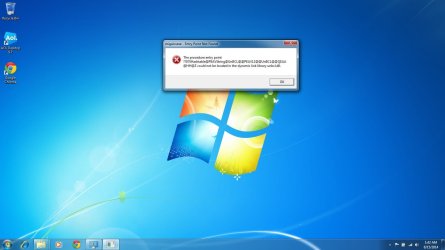
I used Windows Easy Transfer to copy off my files from my old (broken) installation. Right now, those are sitting on an external drive. I finally then did a clean Windows install, formatted the disk first.

When I try to run Windows Easy Transfer from my new Windows installation I get the attached error (screenshot). Now what?
 

Attachments

  • Windows Easy Transfer Error.jpg
    Windows Easy Transfer Error.jpg
    68.6 KB · Views: 4

My Computer

Computer type
PC/Desktop
OS
Win 7 Home Premium 64 Bit
What type of files were you trying to transfer with Windows Easy Transfer?
 

My Computer

Computer type
PC/Desktop
Computer Manufacturer/Model Number
Custom Build
OS
Windows 7 Professional x64 SP1
CPU
Intel i7-980x @ 3.6GHz
Motherboard
Intel DX58SO
Memory
Corsair 12GB DDR3 RAM (3x4GB)
Graphics Card(s)
EVGA NVIDIA GeForce GTX 760 SC
Sound Card
Intel High Definition 7.1 Audio Subsystem - Realtek ALC889
Monitor(s) Displays
Dual Display - LG Electronics Flatron L227WTG
Screen Resolution
1680 x 1050 60Hz 32-bit
Hard Drives
2 Seagate Constellation ST1000NM0033 1TB SATA 6Gb/s HDDs configured as Intel SATA Array 0, RST RAID 1, Vol. 0 (C:\) & Vol. 1 (D:\), & 2 Seagate Barracuda ST500DM002 500GB SATA 6Gb/s HDDs configured as Intel SATA Array 1 RST RAID 1, Vol. 0 (E:\)
PSU
Corsair HX850W
Case
Antec P182
Cooling
Stock Intel i7-980x Cooling Solution + 4 120mm Case Fans
Keyboard
Microsoft Wireless Multimedia Keyboard 1.1
Mouse
Microsoft Standard Wireless Optical Mouse
Internet Speed
DSL - 3.0 Mb/s download 768 Kb/s upload
Antivirus
ESET Smart Security 12, Defender & SuperAntiSpyware Pro
Browser
Firefox Quantum 64-bit
Other Info
Optical Drives: Pioneer DVR-216R & TSSTcorp SH-S223Q, Anker USB 3.0 PCI-E Card, Hauppauge WinTV-HVR 2250 Dual TV Tuner Board for Windows Media Center, Bose Companion 3 Series II multimedia speaker system, APC Smart-UPS SMT1500
I do not get that far. The error posted gets thrown as soon as I try and run the Windows Easy Transfer app on the new install.
 

My Computer

Computer type
PC/Desktop
OS
Win 7 Home Premium 64 Bit
Running Windows Update now and it freezes while installing KB2981580. How can a brand new Windows 7 install have problems like this? Cannot run Windows Easy Transfer nor get through Windows Updates. Pulling out all hair, mostly grey.
 

My Computer

Computer type
PC/Desktop
OS
Win 7 Home Premium 64 Bit
You need to check the condition and integrity of your hdd. What is the make of your hdd?

You should install GSmartControl to view your drive's S.M.A.R.T. data and run the self tests. Post the program output for your drive.

If your drive is failing, your loaded software may not function correctly.

Check your drive manufacturer's website for utilities to check and test the drive. You should also use the manufacturer's utilities to do a full erase or low level format. Usually these type of tests will attempt to write to each sector and if you have a bad sector, the utility should reallocate a spare sector to replace the bad sector.

At the very least, you need to rule out the hdd as an issue.

Another item to check is your Win 7 DVD. If you're not careful handling the DVD or CD, they can get scratched and some of those scratches can cause corrupted files to install. You should install CDCheck and inspect and test your Win 7 DVD. You also want to ensure your DVD or CD is clean before you use it for an install. Grime on the disc from handling can cause bad installs.

Inspect your DVD/CD drive for dust and dirt. Clean it if your inspection indicates it needs it.

Check your hdd and DVD/CD drive cable connections to the drives and motherboard also. Inspect the connection points on the drives. I've seen cracked or broken drive SATA connectors that weren't visible with a casual inspection. These cracked or broken drive cable connectors can cause problems.
 
Last edited:

My Computer

Computer type
PC/Desktop
Computer Manufacturer/Model Number
Custom Build
OS
Windows 7 Professional x64 SP1
CPU
Intel i7-980x @ 3.6GHz
Motherboard
Intel DX58SO
Memory
Corsair 12GB DDR3 RAM (3x4GB)
Graphics Card(s)
EVGA NVIDIA GeForce GTX 760 SC
Sound Card
Intel High Definition 7.1 Audio Subsystem - Realtek ALC889
Monitor(s) Displays
Dual Display - LG Electronics Flatron L227WTG
Screen Resolution
1680 x 1050 60Hz 32-bit
Hard Drives
2 Seagate Constellation ST1000NM0033 1TB SATA 6Gb/s HDDs configured as Intel SATA Array 0, RST RAID 1, Vol. 0 (C:\) & Vol. 1 (D:\), & 2 Seagate Barracuda ST500DM002 500GB SATA 6Gb/s HDDs configured as Intel SATA Array 1 RST RAID 1, Vol. 0 (E:\)
PSU
Corsair HX850W
Case
Antec P182
Cooling
Stock Intel i7-980x Cooling Solution + 4 120mm Case Fans
Keyboard
Microsoft Wireless Multimedia Keyboard 1.1
Mouse
Microsoft Standard Wireless Optical Mouse
Internet Speed
DSL - 3.0 Mb/s download 768 Kb/s upload
Antivirus
ESET Smart Security 12, Defender & SuperAntiSpyware Pro
Browser
Firefox Quantum 64-bit
Other Info
Optical Drives: Pioneer DVR-216R & TSSTcorp SH-S223Q, Anker USB 3.0 PCI-E Card, Hauppauge WinTV-HVR 2250 Dual TV Tuner Board for Windows Media Center, Bose Companion 3 Series II multimedia speaker system, APC Smart-UPS SMT1500
I guess you decided not to follow http://www.sevenforums.com/tutorials/219487-clean-reinstall-factory-oem-windows-7-a.html#post1839164 to get and keep a perfect install. Because there is nothing even mentioned there about Easy Transfer, and had you asked we could have told you that we see cases here regularly where data is lost by it.

It is quite specific about the best way to back up your data as well as proceed with the install, everything that works best in tens of thousands of installs we've directly helped with here.

You may have Updates queued on the Shutdown button in Start Menu which need clearing first before it will proceed. Check now. If it continues to hang on one specific update, deselect it and later open a Support case for it on Windows Update website or in our Updates forum.
 
I guess you decided not to follow http://www.sevenforums.com/tutorials/219487-clean-reinstall-factory-oem-windows-7-a.html#post1839164 to get and keep a perfect install. Because there is nothing even mentioned there about Easy Transfer, and had you asked we could have told you that we see cases here regularly where data is lost by it.

It is quite specific about the best way to back up your data as well as proceed with the install, everything that works best in tens of thousands of installs we've directly helped with here.

You may have Updates queued on the Shutdown button in Start Menu which need clearing first before it will proceed. Check now. If it continue to hang on one specific update, deselect it and later open a Support case for it on Windows Update website or in our Updates forum.

I've never used Windows Easy Transfer. I fully agree that people needing assistance should follow the tutorials carefully for the best results and ask questions before they deviate from the tutorial or to address any issues not described in the tutorials.

Regards
 

My Computer

Computer type
PC/Desktop
Computer Manufacturer/Model Number
Custom Build
OS
Windows 7 Professional x64 SP1
CPU
Intel i7-980x @ 3.6GHz
Motherboard
Intel DX58SO
Memory
Corsair 12GB DDR3 RAM (3x4GB)
Graphics Card(s)
EVGA NVIDIA GeForce GTX 760 SC
Sound Card
Intel High Definition 7.1 Audio Subsystem - Realtek ALC889
Monitor(s) Displays
Dual Display - LG Electronics Flatron L227WTG
Screen Resolution
1680 x 1050 60Hz 32-bit
Hard Drives
2 Seagate Constellation ST1000NM0033 1TB SATA 6Gb/s HDDs configured as Intel SATA Array 0, RST RAID 1, Vol. 0 (C:\) & Vol. 1 (D:\), & 2 Seagate Barracuda ST500DM002 500GB SATA 6Gb/s HDDs configured as Intel SATA Array 1 RST RAID 1, Vol. 0 (E:\)
PSU
Corsair HX850W
Case
Antec P182
Cooling
Stock Intel i7-980x Cooling Solution + 4 120mm Case Fans
Keyboard
Microsoft Wireless Multimedia Keyboard 1.1
Mouse
Microsoft Standard Wireless Optical Mouse
Internet Speed
DSL - 3.0 Mb/s download 768 Kb/s upload
Antivirus
ESET Smart Security 12, Defender & SuperAntiSpyware Pro
Browser
Firefox Quantum 64-bit
Other Info
Optical Drives: Pioneer DVR-216R & TSSTcorp SH-S223Q, Anker USB 3.0 PCI-E Card, Hauppauge WinTV-HVR 2250 Dual TV Tuner Board for Windows Media Center, Bose Companion 3 Series II multimedia speaker system, APC Smart-UPS SMT1500
Back
Top