
SHA2 Self Signed Cert

bfrisan

New member
Local time
2:49 PM
Messages
13
Our Nessus vulnerability scanner has been flagging our computers with the following vulnerability: SSL Certificate Signed Using Weak Hashing Algorithm

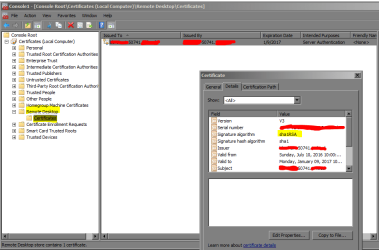
Basically what it's telling us is that we need to upgrade the local Remote Desktop Certificate from SHA1 to SHA2.

These certificates are self-signed and self-generated by the local machine. If you look at the certificate you'll see that theIssued to: and Issued by: fields show the name of the local machine.

The question is: how do these auto-generated, self-signed certificates, which are currently SHA1, get upgraded to SHA2? Remember, these are not created by the local Enterprise CA, they're auto-generated by the local machine itself for Microsoft-branded software such as AD and RDC.

Looking for ideas/suggestions on how to do this.
 

Attachments
  • 923226.png
    923226.png
    23.6 KB · Views: 0

My Computer

Computer type
PC/Desktop
OS
windows 7
You have a worse problem that your scanner isn't telling (or it is?): You're using the default self-signed certificate! That's your real problem.

The default self generated certificate is only meant to provide support for the protocol, but doesn't actually gives you any kind of security, because just anyone can replicate it with zero effort. It doesn't gives you authentication.

Using another self-signed certificate isn't going to give any extra security, it would only silence the scanner without achieving anything useful. What you really need it a serious certificate issued by someone you trust. You mention a "local enterprise CA", if you have it, by all means, use it! Issue certificates from it to all machines, so you get some security, and while doing so, then listen to that scanner and make sure that the certs are signed with SHA256.
Now to install the certificate itself and make Windows use it, there are many tutorials out there. One of such is this one: Replacing the default (self signed) certificate on a RD Session Host server » Adrian Costea's blog

Another question would be, do you even use remote desktop for connecting into those hosts? If not, why bother? :p Just leave them as they are, as you won't use a "vulnerable" service at all.

BTW, at this point, the attacks on SHA1 are mostly theoretical, requiring great hardware to be successful, not something possible to the average hacker but within the capabilities of governments for example. While it's a good idea to no longer issue certs using SHA1, I wouldn't desperately rush to replace all of them, specially on an intranet.
 

My Computer

Computer type
Laptop
Computer Manufacturer/Model Number
Toshiba Sattelite A665-S6092
OS
Windows 7 Ultimate x64
CPU
Intel Core i7-740QM
Memory
8 GB DDR3
Graphics Card(s)
NVIDIA GeForce 330GT
Screen Resolution
1366x768
Hard Drives
Samsung 840 SSD 500GB
1TB USB3 external HD
Cooling
Coolermaster Notepal U3 notebook cooling pad
Internet Speed
3mbps ASDL
Antivirus
ClamWin 0.98.7
Browser
Opera 12.17 x86 (main), Firefox 38 (sec), IE11 (last resort)
Thanks for your response but we still need to know how to create auto generated self signed SHA2 certs.
 

My Computer

Computer type
PC/Desktop
OS
windows 7
Why do you "still need it"? A self signed certificate is totally useless for any security purpose (other than toying/testing). Be sure to not to fall victim of the placebo effect of a green icon of an analysis tool without understanding its real meaning.

That said, Windows will never create anything other than a SHA1 signature certificate by itself. You need another software to produce it. OpenSSL is widely known to handle it, although it's command line only. I personally like xca as a GUI alternative for those chores.

Just be sure to understand that you're NOT adding any security at all by that change alone.
 

My Computer

Computer type
Laptop
Computer Manufacturer/Model Number
Toshiba Sattelite A665-S6092
OS
Windows 7 Ultimate x64
CPU
Intel Core i7-740QM
Memory
8 GB DDR3
Graphics Card(s)
NVIDIA GeForce 330GT
Screen Resolution
1366x768
Hard Drives
Samsung 840 SSD 500GB
1TB USB3 external HD
Cooling
Coolermaster Notepal U3 notebook cooling pad
Internet Speed
3mbps ASDL
Antivirus
ClamWin 0.98.7
Browser
Opera 12.17 x86 (main), Firefox 38 (sec), IE11 (last resort)
Back
Top