
Share Files between a PC and a Mac running W7 on Parallels

wcormode

New member
Local time
9:42 PM
Messages
4
I used to only use PC and I have been using Mac's for the last 10 or so years. But I still have PC's for certain programs.

Here is my issue: I have a PC laptop that runs some accounting software on Windows 7. I have another Mac computer that is running Windows 7 on Parallels Desktop. I need for the accounting software running on W7 inside the Mac to see the folder/s on the PC to share the data. While both computers are technically on the same network, they are not because the Mac computer is supplying the Parallels version with the internet. So the Parallel W7 thinks it has an ethernet connection.

I am mostly positive that this is why Workgroups do not work. But as I have said I am so far out of the loop I really no longer no much at all about administering a PC.

How do I let the two operating systems see each other and share folders?
Any help would be appreciated.
 

My Computer My Computer

At a glance

Windows 7 64 bit and Parallels Desktop Window...
Computer type
Laptop
OS
Windows 7 64 bit and Parallels Desktop Windows 64 bit

My Computer My Computer

At a glance

Windows 7 Ultimate x64 SP1AMD Phenom 2 1090T2x8GB Kingston HyperX Fury Black 1600Mhz Unga...MSI GTX 970 Gaming 4G
Computer type
PC/Desktop
Computer Manufacturer/Model Number
Custom Build
OS
Windows 7 Ultimate x64 SP1
CPU
AMD Phenom 2 1090T
Motherboard
Gigabyte GA-890FXA-UD5
Memory
2x8GB Kingston HyperX Fury Black 1600Mhz Unganged
Graphics Card(s)
MSI GTX 970 Gaming 4G
Sound Card
Realtek On-Board HD 7.1 Audio / Logitech G35
Monitor(s) Displays
3xAcer GD245HQ
Screen Resolution
1920x1080
Hard Drives
Samsung 850 Pro 512GB SSD - OS /
WD Caviar Black SATA 3 - 1 TBx2 - Dynamic RAID 0 /
WD Caviar Green SATA 2 - 640GBx2 - Dynamic RAID 0 /
WD Caviar Green SATA 2 - 640GB - Internal Backup /
Seagate Barracude SATA 3 - 3TB - External Backup/ Sync
PSU
HighPower 1000W
Case
Cooler Master HAF 932
Cooling
Noctua NH-D14
Keyboard
Logitech G19
Mouse
Logitech G500
Internet Speed
100/4 Mbit Cable (100GB quota)
Antivirus
ZoneAlarm Extreme Security / MBAM Pro / MBAE Free / SAS Free
Browser
IE 11 - Firefox - Chrome
Other Info
Logitech F710/ G27/ G940/ Z5500 // TrackIR 5 // Nvidia 3D Surround Vision
Thank you so much. All of my other macs were set up with bridged but that one was set up as shared. I can see it now. I am going to run over to the PC and share the files and I will let you know if that worked.
 

My Computer My Computer

At a glance

Windows 7 64 bit and Parallels Desktop Window...
Computer type
Laptop
OS
Windows 7 64 bit and Parallels Desktop Windows 64 bit
Did you try setting Bridged Mode on Parallels yet? KB Parallels: Which networking mode (Bridged, Shared or Host-Only) should I use for the virtual machine?

Once set correctly, both PCs (real and virtual) should see each other. Additional configuration may be needed on the PCs though once you get to that point.

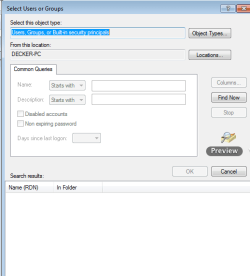
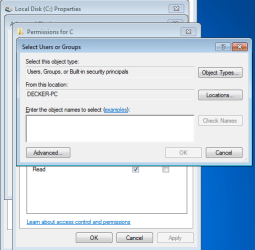
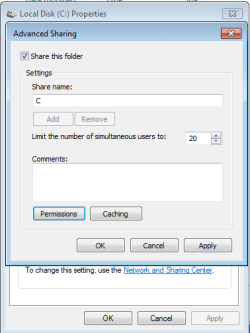
I can now see the computer under network. I tried sharing the C drive under advanced sharing. But for Object name it wont find the computer in question. I can even see the C drive but I do not have permission. The files in question cannot be in the public folders because they belong to an application.
 

My Computer My Computer

At a glance

Windows 7 64 bit and Parallels Desktop Window...
Computer type
Laptop
OS
Windows 7 64 bit and Parallels Desktop Windows 64 bit
My Computer My Computer

At a glance

Windows 7 Ultimate x64 SP1AMD Phenom 2 1090T2x8GB Kingston HyperX Fury Black 1600Mhz Unga...MSI GTX 970 Gaming 4G
Computer type
PC/Desktop
Computer Manufacturer/Model Number
Custom Build
OS
Windows 7 Ultimate x64 SP1
CPU
AMD Phenom 2 1090T
Motherboard
Gigabyte GA-890FXA-UD5
Memory
2x8GB Kingston HyperX Fury Black 1600Mhz Unganged
Graphics Card(s)
MSI GTX 970 Gaming 4G
Sound Card
Realtek On-Board HD 7.1 Audio / Logitech G35
Monitor(s) Displays
3xAcer GD245HQ
Screen Resolution
1920x1080
Hard Drives
Samsung 850 Pro 512GB SSD - OS /
WD Caviar Black SATA 3 - 1 TBx2 - Dynamic RAID 0 /
WD Caviar Green SATA 2 - 640GBx2 - Dynamic RAID 0 /
WD Caviar Green SATA 2 - 640GB - Internal Backup /
Seagate Barracude SATA 3 - 3TB - External Backup/ Sync
PSU
HighPower 1000W
Case
Cooler Master HAF 932
Cooling
Noctua NH-D14
Keyboard
Logitech G19
Mouse
Logitech G500
Internet Speed
100/4 Mbit Cable (100GB quota)
Antivirus
ZoneAlarm Extreme Security / MBAM Pro / MBAE Free / SAS Free
Browser
IE 11 - Firefox - Chrome
Other Info
Logitech F710/ G27/ G940/ Z5500 // TrackIR 5 // Nvidia 3D Surround Vision
I can't understand what you mean by Object name.

Is the Network Location set to Home? (http://www.sevenforums.com/tutorials/43629-network-location-set-home-work-public-network.html)
Try disabling Windows Firewall for both public and private networks for now.

Are you being asked a username/password while trying to access the share? Perhaps http://www.sevenforums.com/tutorials/185429-password-protected-sharing-turn-off-windows-7-a.html

Network Locations are set to Work. Is that a problem?

I am not being asked a password, it just says that I do not have permission.

The attached images are what I mean by object name. I may be trying to do it completely wrong.
 

Attachments

  • Screen Shot 2015-09-04 at 3.23.37 PM.png
    Screen Shot 2015-09-04 at 3.23.37 PM.png
    10.3 KB · Views: 5
  • Screen Shot 2015-09-04 at 3.22.58 PM.png
    Screen Shot 2015-09-04 at 3.22.58 PM.png
    15 KB · Views: 5
  • Screen Shot 2015-09-04 at 3.22.40 PM.png
    Screen Shot 2015-09-04 at 3.22.40 PM.png
    8.9 KB · Views: 5

My Computer My Computer

At a glance

Windows 7 64 bit and Parallels Desktop Window...
Computer type
Laptop
OS
Windows 7 64 bit and Parallels Desktop Windows 64 bit
Try changing to Home, and enable password protected sharing if it is not so. Makes sure both are in the same Workgroup. Firewalls off. Add Everyone to share permissions as Full Control. Also add everyone to NTFS permissions with Full Control (Security tab when you right click the folder). These are not the best for security reasons but should help while trying it out.
 

My Computer My Computer

At a glance

Windows 7 Ultimate x64 SP1AMD Phenom 2 1090T2x8GB Kingston HyperX Fury Black 1600Mhz Unga...MSI GTX 970 Gaming 4G
Computer type
PC/Desktop
Computer Manufacturer/Model Number
Custom Build
OS
Windows 7 Ultimate x64 SP1
CPU
AMD Phenom 2 1090T
Motherboard
Gigabyte GA-890FXA-UD5
Memory
2x8GB Kingston HyperX Fury Black 1600Mhz Unganged
Graphics Card(s)
MSI GTX 970 Gaming 4G
Sound Card
Realtek On-Board HD 7.1 Audio / Logitech G35
Monitor(s) Displays
3xAcer GD245HQ
Screen Resolution
1920x1080
Hard Drives
Samsung 850 Pro 512GB SSD - OS /
WD Caviar Black SATA 3 - 1 TBx2 - Dynamic RAID 0 /
WD Caviar Green SATA 2 - 640GBx2 - Dynamic RAID 0 /
WD Caviar Green SATA 2 - 640GB - Internal Backup /
Seagate Barracude SATA 3 - 3TB - External Backup/ Sync
PSU
HighPower 1000W
Case
Cooler Master HAF 932
Cooling
Noctua NH-D14
Keyboard
Logitech G19
Mouse
Logitech G500
Internet Speed
100/4 Mbit Cable (100GB quota)
Antivirus
ZoneAlarm Extreme Security / MBAM Pro / MBAE Free / SAS Free
Browser
IE 11 - Firefox - Chrome
Other Info
Logitech F710/ G27/ G940/ Z5500 // TrackIR 5 // Nvidia 3D Surround Vision
Back
Top