Solved Share printer HP deskjet 5740 on XP prints backwards from remote Win 7

micahgill85

New member
Member
Local time
12:57 PM
Messages
16
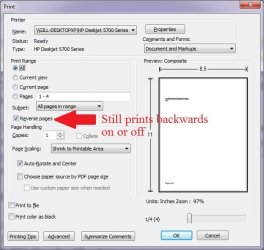
So i want to remotely print from my Windows 7 laptop to my shared HP 5740 on my Windows XP desktop. It prints backwards no matter what.
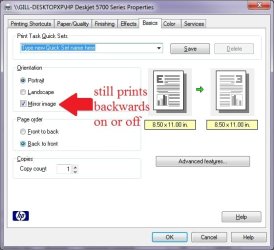
Even if i enter print settings (in adobe reader) and select reverse pages or mirror image,

Option 1: Uncheck Reverse Order, Uncheck Mirror Image = prints backwards
Option 2: Uncheck Reverse Order, check Mirror Image = prints backwards
Option 3: check Reverse Order, Uncheck Mirror Image = prints backwards
Option 4: check Reverse Order, check Mirror Image = prints backwards


I would post screenshots here but this stupid site only allows images from url and it doesnt work when you do
sad.gif


please let me know thanks
 

My Computer My Computer

At a glance

Windows 7 Home Premium 32 BIT OSAMD Sempron SI-42 2.10 GhzDDR2 2048 MB (2 module of 1024 MB Each)ATI Radeon 3100
Computer Manufacturer/Model Number
Toshiba Satellite L455D
OS
Windows 7 Home Premium 32 BIT OS
CPU
AMD Sempron SI-42 2.10 Ghz
Memory
DDR2 2048 MB (2 module of 1024 MB Each)
Graphics Card(s)
ATI Radeon 3100
Monitor(s) Displays
Generic Pnp monitor
Untitled.jpg

Untitled1.jpg

FYI these dont work for me

Yes i tried checking both on both off one on one off and vice versa and nothing

I am able to hook it up directly via USB and it prints fine, so the driver is ok
 
Last edited:

My Computer My Computer

At a glance

Windows 7 Home Premium 32 BIT OSAMD Sempron SI-42 2.10 GhzDDR2 2048 MB (2 module of 1024 MB Each)ATI Radeon 3100
Computer Manufacturer/Model Number
Toshiba Satellite L455D
OS
Windows 7 Home Premium 32 BIT OS
CPU
AMD Sempron SI-42 2.10 Ghz
Memory
DDR2 2048 MB (2 module of 1024 MB Each)
Graphics Card(s)
ATI Radeon 3100
Monitor(s) Displays
Generic Pnp monitor
If this is at the time of printing and it's not "sticking". Try going to the printer itself in the control panel and set the settings you want there and save them. Then when it comes time to print, verify that they are set the way you wanted and print from there and see if they work...
 

My Computer My Computer

At a glance

Windows 7 x64 Ultimatei7 96012 Gig Corsair DominatorNvidia 480
Computer Manufacturer/Model Number
Scratch built
OS
Windows 7 x64 Ultimate
CPU
i7 960
Motherboard
Asus P6X58D
Memory
12 Gig Corsair Dominator
Graphics Card(s)
Nvidia 480
Sound Card
Maudio Delta 44 + breakout box
Monitor(s) Displays
Dell UltraSharp U2410 24in and Samsung 21 dual monitors
Screen Resolution
1920x1200 and 1280x1024
Hard Drives
Primary: Intel X-25M G2 160G SSD
Secondary: Segate baracuda 1.0 TB
HDs in AHCI mode.
PSU
Corasair TX850
Case
Cooler Master HAF
Cooling
Corsair H50
Keyboard
Logitech G15 + N52 game pad
Mouse
Logitech MX518
Internet Speed
15kbs down 4.5kbps up
Other Info
WEI 7.6
CPU & RAM 7.6
Graphics 7.9
Hard disk 7.7
OK problem solved.
so i uninstalled the printer on both computers.
I then re installed it on the XP using auto detect, it installed the correct drivers automatically.
Then i shared it.
Then I searched for it on my win 7 laptop and added it .
then i printed a test page on my win 7 laptop and it prints normal
It must have been installed to the wrong port, manual install messed it up, or something else???
 

My Computer My Computer

At a glance

Windows 7 Home Premium 32 BIT OSAMD Sempron SI-42 2.10 GhzDDR2 2048 MB (2 module of 1024 MB Each)ATI Radeon 3100
Computer Manufacturer/Model Number
Toshiba Satellite L455D
OS
Windows 7 Home Premium 32 BIT OS
CPU
AMD Sempron SI-42 2.10 Ghz
Memory
DDR2 2048 MB (2 module of 1024 MB Each)
Graphics Card(s)
ATI Radeon 3100
Monitor(s) Displays
Generic Pnp monitor
Back
Top