
Share to some, deny to others, how do I do it?

Baja Maniac 913

New member
Local time
3:01 AM
Messages
10
Location
Virginia Beach, VA
Hey everyone, I am new to the forum here, and I have done some searching on my particular issue. Here's what I have:

1x Win 7 Pro SP1 desktop
2x win 7 Home Premium SP1 Laptops (Dell XPS)

I have a neighbor that I am allowing on my wifi network (he's paying me for it), and I want to share my hard drives between my computers without allowing him access. I already know the process on how to share folders and hard drives...and I know how to setup homegroup and workgroups. I have tried to deny him in the permissions section when sharing, but when I click the "check names" button, windows says that the name is invalid. Is there a way to do this?

Oh...I have also tried to change the name of my workgroup, but everyone still has access to the shared drives and folders. Any help on this would be great.

Thanks,

Phil
 

My Computer My Computer

At a glance

Windows 7 Pro SP1 64-bitIntel Core i5-760 Lynnfield LGA 1156 2.8GHz 95w12GB G.Skill Ripjaws Series DDR3 1066 SDRAM
Computer Manufacturer/Model Number
Custom
OS
Windows 7 Pro SP1 64-bit
CPU
Intel Core i5-760 Lynnfield LGA 1156 2.8GHz 95w
Motherboard
Gigabyte GA-P55-USB3 LGA 1156 Intel P55 USB 3.0
Memory
12GB G.Skill Ripjaws Series DDR3 1066 SDRAM
Sound Card
Integrated on Motherboard
Monitor(s) Displays
Dell LCD Monitor
Hard Drives
7x Seagate Barracuda 1.5TB 7200 rpm 3.0Gbps 3.5"
Case
Raidmax Quantum ATX-798WB
Internet Speed
20-45 Mbps Download, 5-15 Mbps Upload, Internal Net 1Gbps
Use the firewall, Luke!

You can set up the firewalls on your PCs to stop any packets / connections from and to his IP address.
Also, you can enable password protected sharing.
 

My Computer My Computer

At a glance

Windows 7 Enterprise x64 SP1
OS
Windows 7 Enterprise x64 SP1
Firewalls? Are you refering to using like a DMZ? I'll look into it...thanks.
 

My Computer My Computer

At a glance

Windows 7 Pro SP1 64-bitIntel Core i5-760 Lynnfield LGA 1156 2.8GHz 95w12GB G.Skill Ripjaws Series DDR3 1066 SDRAM
Computer Manufacturer/Model Number
Custom
OS
Windows 7 Pro SP1 64-bit
CPU
Intel Core i5-760 Lynnfield LGA 1156 2.8GHz 95w
Motherboard
Gigabyte GA-P55-USB3 LGA 1156 Intel P55 USB 3.0
Memory
12GB G.Skill Ripjaws Series DDR3 1066 SDRAM
Sound Card
Integrated on Motherboard
Monitor(s) Displays
Dell LCD Monitor
Hard Drives
7x Seagate Barracuda 1.5TB 7200 rpm 3.0Gbps 3.5"
Case
Raidmax Quantum ATX-798WB
Internet Speed
20-45 Mbps Download, 5-15 Mbps Upload, Internal Net 1Gbps
(No no no! Not DMZ. Use the firewalls on your PCs. Have you ever configured a firewall? If not, I'll write a short guide.)

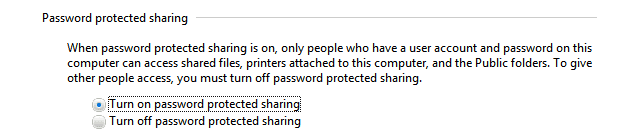
But, to keep things simple. Set up passwords for your user accounts on both PCs and then go to Network and Sharing Center, click Advanced sharing settings and enable Password protected sharing. That way, only the people that know user accounts + passwords on the PCs will be able to access the shared files. Those who don't know them will not be able to access the files.
 

Attachments

  • asdfsadfadfadf.png
    asdfsadfadfadf.png
    3.4 KB · Views: 3

My Computer My Computer

At a glance

Windows 7 Enterprise x64 SP1
OS
Windows 7 Enterprise x64 SP1
The password solution would seem to make a lot of sense, but I've tried it on Home Premium, even with cloned accounts across machines, and switching passwords on does not bring up the challenge dialog, it brings up the access denied dialog. I find it completely illogical, and what should be a good solution doesn't work at all. It's either wide open sharing or none at all.
 

My Computer My Computer

At a glance

Linux Lite 3.2 x64; Windows 7, 8.1Core2Duo 2.46GB ddr2nVidia
Computer type
PC/Desktop
Computer Manufacturer/Model Number
dell precision t3400 tower
OS
Linux Lite 3.2 x64; Windows 7, 8.1
CPU
Core2Duo 2.4
Memory
6GB ddr2
Graphics Card(s)
nVidia
Hard Drives
120gb SSD, 1TB HD, 2TB HD; sata II
Internet Speed
12/2
Browser
Vivaldi, Slimjet (Chromium) x64
The password solution would seem to make a lot of sense, but I've tried it on Home Premium, even with cloned accounts across machines, and switching passwords on does not bring up the challenge dialog, it brings up the access denied dialog. I find it completely illogical, and what should be a good solution doesn't work at all. It's either wide open sharing or none at all.

Yeah...that is what I am finding out. Although, a co-worker chimed in and said I should just used the guest account on my router, that will give him internet and separate him from the network.
 

My Computer My Computer

At a glance

Windows 7 Pro SP1 64-bitIntel Core i5-760 Lynnfield LGA 1156 2.8GHz 95w12GB G.Skill Ripjaws Series DDR3 1066 SDRAM
Computer Manufacturer/Model Number
Custom
OS
Windows 7 Pro SP1 64-bit
CPU
Intel Core i5-760 Lynnfield LGA 1156 2.8GHz 95w
Motherboard
Gigabyte GA-P55-USB3 LGA 1156 Intel P55 USB 3.0
Memory
12GB G.Skill Ripjaws Series DDR3 1066 SDRAM
Sound Card
Integrated on Motherboard
Monitor(s) Displays
Dell LCD Monitor
Hard Drives
7x Seagate Barracuda 1.5TB 7200 rpm 3.0Gbps 3.5"
Case
Raidmax Quantum ATX-798WB
Internet Speed
20-45 Mbps Download, 5-15 Mbps Upload, Internal Net 1Gbps
Back
Top