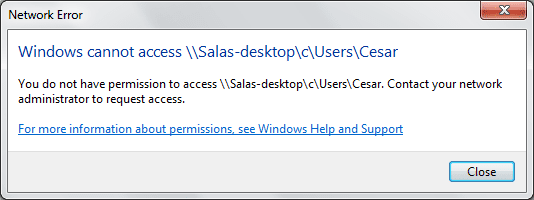
Shared Folder over network problem...

sls123093

New member
Local time
5:01 PM
Messages
2
Location
Los Angeles
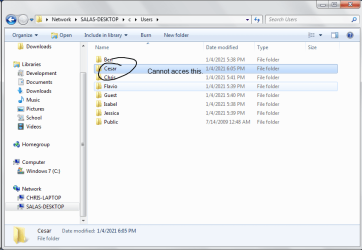
So, there's this problem that I've had for about 2 days now, and for the life of me I can't even seem to think or find out what the problem is, even after hours of Googling the topic. It'd be great if someone where to enlighten me on this small but frustrating problem. :D

Here are some attached screenshots of the problem:
 

Attachments
  • np0.png
    np0.png
    30.3 KB · Views: 24
  • np1.png
    np1.png
    7.7 KB · Views: 10

My Computer

Computer Manufacturer/Model Number
Gateway
OS
Window 7 Home Premium 64bit
CPU
AMD Athlon(TM) II Dual-Core M300
Motherboard
Gateway SJV50TR
Memory
4GB Dual-Channel DDR2 @ 333MHz
Graphics Card(s)
AMD M880G with ATI Mobility Radeon HD 4200
Sound Card
Conexant HD Audio
Monitor(s) Displays
15.6 LCD Monitor
Screen Resolution
1366x768
Hard Drives
500GB Hitachi SATA Harddrive
Hello sls123093,

Create an Identical UserName and Password (same as your LogIn) to Cesar's computer.
Make sure than Netbios is enabled. Here's How.

If his computer has Windows firewall enabled, make sure that Files and Printer sharing is excluded.
Any Security software can also be a culprit if there's one installed. Disable it for now.

From your computer try accessing his computer using the IP Address instead of a computer name, and see if that will make a difference.
Click on Start and type \\IPAddress\C (cesar's computer's IP Address and C is the shared drive)

Please post an update.
 
Last edited:

My Computer

Computer Manufacturer/Model Number
Lenovo Desktop/Samsung Laptop
OS
Win7 & Win8 64bit
CPU
Intel i5
Internet Speed
Charter-20 Mbps
Antivirus
Avast
Browser
FF, IE9 and Chrome
Huh, for the weirdest reason accessing it just by looking under network did not work, but by manually typing the IP address then the folder it worked. I guess it was some kind of bug idk.

Thanks, 2xg!
 

My Computer

Computer Manufacturer/Model Number
Gateway
OS
Window 7 Home Premium 64bit
CPU
AMD Athlon(TM) II Dual-Core M300
Motherboard
Gateway SJV50TR
Memory
4GB Dual-Channel DDR2 @ 333MHz
Graphics Card(s)
AMD M880G with ATI Mobility Radeon HD 4200
Sound Card
Conexant HD Audio
Monitor(s) Displays
15.6 LCD Monitor
Screen Resolution
1366x768
Hard Drives
500GB Hitachi SATA Harddrive
That would fine as long as you can access his computer. Using the IP Address or Computer Name, same thing for me.

Glad that works for 'ya.

You're Welcome.
 

My Computer

Computer Manufacturer/Model Number
Lenovo Desktop/Samsung Laptop
OS
Win7 & Win8 64bit
CPU
Intel i5
Internet Speed
Charter-20 Mbps
Antivirus
Avast
Browser
FF, IE9 and Chrome
Back
Top