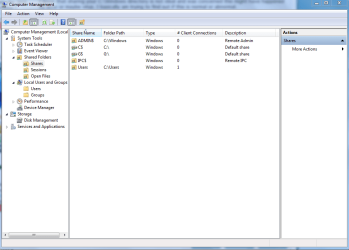
'Shares' question

jailbirdslanger

New member
Member
Local time
5:26 PM
Messages
56
Location
Philadelphia
I was going through the Computer Management Window and was in the 'Shares' tab when I noticed there is a ADMIN$ share for the C:\Windows path ; description: Remote Admin.

I know that sharing your C:\Windows directory is not ideal and was concerned this might have happened by error or maybe virus. I basically am trying to find out if this is normal or abnormal.

Thanks ;)
 

My Computer

Computer Manufacturer/Model Number
Custom - No OEM
OS
Windows 7 Professional x64
CPU
Intel Core i5 CPU 661 @, 3.33 GHz
Motherboard
BIOSTAR GROUP - TPower I55
Memory
16 GB
Graphics Card(s)
nVidia GeForce GTX 465 1024 MB GDDR5
Monitor(s) Displays
LG Flatron 22"
Screen Resolution
1920x1080
Hard Drives
1 TB - Hitachi
Case
ZALMAN
Keyboard
Dynex W7 Keyboard
Mouse
Logitech MX518
Internet Speed
CABLE 20 Down, 6 Up (wireless)
Yes I'd say it's normal. Mine has ADMIN$, C$, G$, IPC$ and Users, and my C: drive isn't shared.
 

Attachments

  • C Users.PNG
    C Users.PNG
    27.7 KB · Views: 7

My Computer

Computer type
PC/Desktop
Computer Manufacturer/Model Number
Home built
OS
Windows 7 Ult, Windows 8.1 Pro,
CPU
Q9650-4.275GHz, E8600 4.5GHz, E6750-3.8GHz
Motherboard
Evga 780i FTW
Memory
G.Skill PC2 9600 1200Mhz 5 5 5 15 2T
Graphics Card(s)
GTX480
Sound Card
Asus Xonar D2
Monitor(s) Displays
HannsG
Screen Resolution
1680X1050
Hard Drives
GSkill Phoenix Pro 120GB SSD
PSU
ThermalTake Toughpower 1000Watt modular
Case
ThermalTake XaserV
Cooling
Xigmatek S1283
Keyboard
Logitech G15
Mouse
Logitech G9
Internet Speed
T1
I figured it was normal. Mainly because I deleted the share and it came back on restart, always good to be sure though ;)
 

My Computer

Computer Manufacturer/Model Number
Custom - No OEM
OS
Windows 7 Professional x64
CPU
Intel Core i5 CPU 661 @, 3.33 GHz
Motherboard
BIOSTAR GROUP - TPower I55
Memory
16 GB
Graphics Card(s)
nVidia GeForce GTX 465 1024 MB GDDR5
Monitor(s) Displays
LG Flatron 22"
Screen Resolution
1920x1080
Hard Drives
1 TB - Hitachi
Case
ZALMAN
Keyboard
Dynex W7 Keyboard
Mouse
Logitech MX518
Internet Speed
CABLE 20 Down, 6 Up (wireless)
Yes, its normal. Its shared by default.
The $ suffix on any share will hide it from network discovery, so you'll need to type in the full address to access it.

These ones in particular (Admin$, IPC$, Drive Roots) are only accessible from the built in administrator, for the purpose of remote administration.
Its the same dealio with previous versions of Windows too.

If you want to share a drive at root, you'll need to manually do it using the usual share folder procedure.
But you're also right, its advised not to share C:\ or C:\windows, or other system folders.
 

My Computer

OS
Windows 7 Enterprise
CPU
Intel Pentium Dual E2200 @2.2GHz
Motherboard
Gigabyte II-G31
Memory
4GB
Graphics Card(s)
Palit GForce 9500GT 1GB
Sound Card
onBoard
Hard Drives
WesternDigital: 250GB + 1TB + 1TB + 2TB
PSU
450W
Case
CoolerMaster CM690
Cooling
Corsair H50
Mouse
Logitech MX518
Thanks for the detailed input xarden.
 

My Computer

Computer Manufacturer/Model Number
Custom - No OEM
OS
Windows 7 Professional x64
CPU
Intel Core i5 CPU 661 @, 3.33 GHz
Motherboard
BIOSTAR GROUP - TPower I55
Memory
16 GB
Graphics Card(s)
nVidia GeForce GTX 465 1024 MB GDDR5
Monitor(s) Displays
LG Flatron 22"
Screen Resolution
1920x1080
Hard Drives
1 TB - Hitachi
Case
ZALMAN
Keyboard
Dynex W7 Keyboard
Mouse
Logitech MX518
Internet Speed
CABLE 20 Down, 6 Up (wireless)
Actually to share the root of a drive you need to use the Security tab and allow for sharing permissions there as well as the standard sharing permissions.
 

My Computer

Computer type
PC/Desktop
Computer Manufacturer/Model Number
Home built
OS
Windows 7 Ult, Windows 8.1 Pro,
CPU
Q9650-4.275GHz, E8600 4.5GHz, E6750-3.8GHz
Motherboard
Evga 780i FTW
Memory
G.Skill PC2 9600 1200Mhz 5 5 5 15 2T
Graphics Card(s)
GTX480
Sound Card
Asus Xonar D2
Monitor(s) Displays
HannsG
Screen Resolution
1680X1050
Hard Drives
GSkill Phoenix Pro 120GB SSD
PSU
ThermalTake Toughpower 1000Watt modular
Case
ThermalTake XaserV
Cooling
Xigmatek S1283
Keyboard
Logitech G15
Mouse
Logitech G9
Internet Speed
T1
Back in the days of Windows 98/NT4/Win2K/WinXP, the shortest way to access a disk's on a remote computer is to use the admin shares (x$ shares). It works like this: When you're logged as an admin class user, you can access a C drive on the remote computer by this address: \\[computer_name_or_ip_address]\C$. It will show you the whole C volume. Of course you need admin account to be able to access this admin share...

In the end, these shares are normal behavior, it's the remnants of old SMB/CIFS protocol of oldie Windows days. Of course if you have an Active Directory domain, it's still the easiest way to access a client's disk...

zzz2496
 

My Computer

Computer Manufacturer/Model Number
Self Built
OS
Windows7 Ultimate 64bit
CPU
Intel Core 2 Quad Q6600
Motherboard
Abit IN9-32X-MMAX
Memory
DDR2 Adata 4GB
Graphics Card(s)
Nvidia GeForce GTX 285 1024 and Nvidia GeForce 8800GT 512
Sound Card
Asus Xonar HDAV 1.3
Monitor(s) Displays
Dell 2407WFP and BenQ 2400v and Philips 150v3
Screen Resolution
3840x1200 and 1024x768
Hard Drives
2 WDC 1TB
1 WDC 1.5TB
1 WDC 640GB
1 WDC 320GB
1 Seagate 200GB
PSU
Corsair TX 850W
Case
Cooler Master HAF932
Cooling
Arctic Cooling Freezer Extreme and plenty of fans...
Keyboard
MicrosoftNaturalKeyboard 4000/Apple Alu keyboard/Dinovo mini
Mouse
Logitech G5/MarbleMouseTrackball/PerformanceMX/SpacePilotPRO
Internet Speed
1.5Mbps down/384Kbps up
Other Info
APC SURT 1000XL
Logitech Z-560
Wiimote
Mikrotik Router
Linksys (now Cisco) SD2008 8 port Gigabit switch
Linksys WRT54G (acting as AP)
Apple wireless Aluminium keyboard
Apple Magic Mouse
Xbox360 wired controller
Back
Top