
Solved sharewareisland browser hijack

TanyaC

New member
Guru
Local time
4:07 AM
Messages
782
Location
Melbourne, Australia
This website has some nice utilities. But they have some attrocious policies. One of them is if you use any of the software they distribute then you must allow then to hijack your browser start page.

If you lock down the home page, they undo the block, intefering with your network security. The hijack also removes any other start pages you may have.

I've tried the lock down of the start page via a registry hack that I found, but as I said, it doesn't stop the hijack.

Apart from bannin g my son from using the keyboard utility for his online game, is there any other way to prevent these malicious people from hijacking the browser?

thanks
Tanya
 

My Computer

Computer type
PC/Desktop
Computer Manufacturer/Model Number
Home Made
OS
Linux Mint 17 Cinnamon | Win 7 Ult x64
CPU
Intel I7-3770K @ 4.2ghz
Motherboard
ASRock Extreme 4
Memory
32GB G-Skill C10Q
Graphics Card(s)
EVGA GTX 670 2GB SC
Sound Card
Creative Fatality ExtremeGamer
Monitor(s) Displays
LG E2742V x 2
Screen Resolution
1920x1080
Hard Drives
256GB Vertex 4 SSD
2TB Seagate ST2000DM001
1TB Seagate ST1000DM003
PSU
Corsair HX 650
Case
HAF 932 advanced
Cooling
Corsair H100i liquid cooler
Keyboard
Logitech Wireless
Mouse
Logitech Wireless
Internet Speed
OptusNet NBN 100/40
Antivirus
Malwarebytes
Browser
Firefox 30
Other Info
Router: Sagemcom F@st 3846 Crippled by Optus.
The Obvious

"Apart from bannin g my son from using the keyboard utility for his online game, is there any other way to prevent these malicious people from hijacking the browser?
"

The solution is obvious don't go there.
 

My Computer

Computer Manufacturer/Model Number
BGC (Bob's Garage Crew)
OS
win 7 X64 Ultimate SP1
CPU
I3770K
Motherboard
Asus P8Z77-V Deluxe
Memory
G Skill F3-14900CL9-4GBXL x 4
Graphics Card(s)
NVIDIA GeForce GTX670 + Intel 4000
Sound Card
Realtek HD 5.1 (MOB)
Monitor(s) Displays
Asus VW224T (1)
Screen Resolution
1920 x 1080
Hard Drives
SATA Corsair Force GT 2.5" 180GB (System) Sata 3
OCZ Vertex3 120GB
OCZ Vertex 2 120GB 2.5" SATA II
ST31000524AS 1000.2GB
WD15EARS (External)
PSU
CoolerMaster 1000 Watt
Case
CoolerMaster HAF X
Cooling
CPU -- CoolerMaster 520N
Keyboard
MS Wireless 3000 V2
Mouse
MS Wireless 3000 V2
Internet Speed
Cable
Antivirus
Norton Internet Security
Browser
IE9
Other Info
AMI Bios 1805
OC'd 3%
"Apart from bannin g my son from using the keyboard utility for his online game, is there any other way to prevent these malicious people from hijacking the browser?
"

The solution is obvious don't go there.

Gosh I wish I'd thought of that :sarc:

He's not visiting the site. The program is a legitemate keyboard shortcut program for Runescape. However, anything distributed from the website interferes with the browser settings.

I should have said "malicious software".
 

My Computer

Computer type
PC/Desktop
Computer Manufacturer/Model Number
Home Made
OS
Linux Mint 17 Cinnamon | Win 7 Ult x64
CPU
Intel I7-3770K @ 4.2ghz
Motherboard
ASRock Extreme 4
Memory
32GB G-Skill C10Q
Graphics Card(s)
EVGA GTX 670 2GB SC
Sound Card
Creative Fatality ExtremeGamer
Monitor(s) Displays
LG E2742V x 2
Screen Resolution
1920x1080
Hard Drives
256GB Vertex 4 SSD
2TB Seagate ST2000DM001
1TB Seagate ST1000DM003
PSU
Corsair HX 650
Case
HAF 932 advanced
Cooling
Corsair H100i liquid cooler
Keyboard
Logitech Wireless
Mouse
Logitech Wireless
Internet Speed
OptusNet NBN 100/40
Antivirus
Malwarebytes
Browser
Firefox 30
Other Info
Router: Sagemcom F@st 3846 Crippled by Optus.
"... legitimate keyboard shortcut program...". Really? I wouldn't run it.

There's all kinds of software out there that comes as an installer. During the install process, the user is prompted with optional "extras" throughout the install and most are set as default. If you click through the install without reading it carefully, you could end up with all sorts of unwanted software. EyeCandy is one developer of this method. You might try un-installing the software and install with caution. If it still loads a "Browser Helper Object", I'd scrap it for sure.

Make your own keyboard shortcuts.
 

My Computer

Computer type
PC/Desktop
Computer Manufacturer/Model Number
Built 2/11/2011
OS
Windows 7 Pro-x64
CPU
i7-2600 3.4GHz - 3.8GHz Turbo
Motherboard
Intel DH67BL-B3
Memory
8Gb - 2x4GB, Muskin 991770 PC3-1333
Graphics Card(s)
Integrated Intel HD 2000
Sound Card
Integrated Intel 10.1 HD, RealTek ALC892
Monitor(s) Displays
Asus LCD VH222H, Haier HL24XSL2a
Screen Resolution
1920x1080, 1920x1080
Hard Drives
Crucial SSD C300-128Gb,
Western Digital WD5002AALX - 500Gb,
Western Digital WD7501AALS - 750Gb
PSU
Seasonic 650W 80+ Gold Modular
Case
Rosewill Defender
Cooling
Stock CPU, Four 120mm case fans, PCH fan added
Keyboard
Logitech EX100 Y-RBH94 Wireless
Mouse
Logitech EX100 M-RCE95 Wireless
Internet Speed
3.0/1.5 Mbs
Antivirus
Microsoft Security Essentials
Browser
Microsoft Internet Explorer 11
Other Info
Antec Veris Premier-Multimedia IR Station,
Cyber Accoustics-3602 Speakers,
AFT XM-5U Card Reader,
Hauppauge TV-HVR-2250,
Sony LX300 USB Turntable
"... legitimate keyboard shortcut program...". Really? I wouldn't run it.

There's all kinds of software out there that comes as an installer. During the install process, the user is prompted with optional "extras" throughout the install and most are set as default. If you click through the install without reading it carefully, you could end up with all sorts of unwanted software. EyeCandy is one developer of this method. You might try un-installing the software and install with caution. If it still loads a "Browser Helper Object", I'd scrap it for sure.

Make your own keyboard shortcuts.

Thanks for your reply. THis is not something that was installed by an installer. It's not installing anything other than the keyboard manager for Runescape. This is quite a popular program from what I can tell. It happens whenever you run the program.

Runscape has some rather slow, mundane mouse and keyboard sequences to accomplish simple tasks. This utility is a huge timesaver and takes away the frustration of having to do half a dozen clicks with one keystroke.

There are no BHOs installed, at least not that I can find.

There are no options in the installed to select or deselect anything. Basically the installer is a licence terms and a drive/path, that's it.

nvm.

I just thought of a work around.

I can create a task in task scheduler to run every 5 minutes that applies a registry patch to reset the homepage to the server we use here. Silly solution, but if the only other option is to stop using the software then I'll have to do this..

thanks
 

My Computer

Computer type
PC/Desktop
Computer Manufacturer/Model Number
Home Made
OS
Linux Mint 17 Cinnamon | Win 7 Ult x64
CPU
Intel I7-3770K @ 4.2ghz
Motherboard
ASRock Extreme 4
Memory
32GB G-Skill C10Q
Graphics Card(s)
EVGA GTX 670 2GB SC
Sound Card
Creative Fatality ExtremeGamer
Monitor(s) Displays
LG E2742V x 2
Screen Resolution
1920x1080
Hard Drives
256GB Vertex 4 SSD
2TB Seagate ST2000DM001
1TB Seagate ST1000DM003
PSU
Corsair HX 650
Case
HAF 932 advanced
Cooling
Corsair H100i liquid cooler
Keyboard
Logitech Wireless
Mouse
Logitech Wireless
Internet Speed
OptusNet NBN 100/40
Antivirus
Malwarebytes
Browser
Firefox 30
Other Info
Router: Sagemcom F@st 3846 Crippled by Optus.
Apart from banning my son from using the keyboard utility for his online game, is there any other way to prevent these malicious people from hijacking the browser?

thanks
Tanya

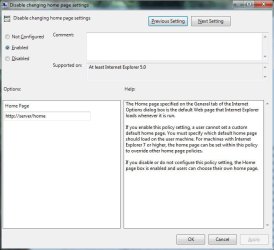
Yep. Sure is. gpedit.msc. (User Configuration, administrative templates, windows components, Internet explorer).

Enable the "Disable changing home page settings" and specify the home page to be used.

Found this quite by accident. Seems to stop them dead in their track so far.
 

Attachments

  • sf1.jpg
    sf1.jpg
    126.3 KB · Views: 9

My Computer

Computer type
PC/Desktop
Computer Manufacturer/Model Number
Home Made
OS
Linux Mint 17 Cinnamon | Win 7 Ult x64
CPU
Intel I7-3770K @ 4.2ghz
Motherboard
ASRock Extreme 4
Memory
32GB G-Skill C10Q
Graphics Card(s)
EVGA GTX 670 2GB SC
Sound Card
Creative Fatality ExtremeGamer
Monitor(s) Displays
LG E2742V x 2
Screen Resolution
1920x1080
Hard Drives
256GB Vertex 4 SSD
2TB Seagate ST2000DM001
1TB Seagate ST1000DM003
PSU
Corsair HX 650
Case
HAF 932 advanced
Cooling
Corsair H100i liquid cooler
Keyboard
Logitech Wireless
Mouse
Logitech Wireless
Internet Speed
OptusNet NBN 100/40
Antivirus
Malwarebytes
Browser
Firefox 30
Other Info
Router: Sagemcom F@st 3846 Crippled by Optus.
Back
Top