Sharing a C drive

vvovv

New member
Local time
10:09 PM
Messages
2
ok I tried everything and can't figure this out.
I have 2 PC running Windows 7 home premium and 1 xp spack2.
I have the Local hard drive on both 7 and I am able to access them however on xp which is on the same workgroup and ip address.
When I go to map the drive it comes up with a error message
i
is not accesible. You might not have permission to use this network resource.Contact the admin of this server to find out if you have access permissions.

Please help
 

My Computer

OS
windows 32bit
Thanks for the quick reply. I read and followed this earlier. It is only with my xp machine unable to access the c drive however I can access the 2 usb drives connected to the PC. I am stumped big time
 

My Computer

OS
windows 32bit
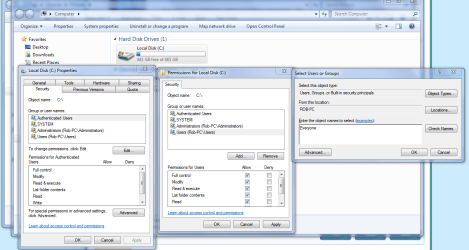
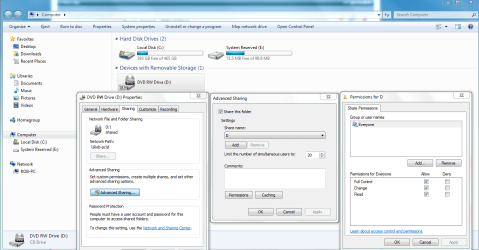
You would need to allow for the usual sharing permissions of the drive but you also need to go into the Security tab of the drive and allow for access to the drive by adding "Everyone" to the shared with list. That should give your XP machine access to the drive.

Sometimes just putting check marks for the Authenticated users is enough, other times you need to put "Everyone" on the shared with list.
 

Attachments

  • Sharing C drive EVERYONE.PNG
    Sharing C drive EVERYONE.PNG
    67.1 KB · Views: 35
  • Sharing D  drive and permissions.PNG
    Sharing D drive and permissions.PNG
    65.4 KB · Views: 20

My Computer

Computer type
PC/Desktop
Computer Manufacturer/Model Number
Home built
OS
Windows 7 Ult, Windows 8.1 Pro,
CPU
Q9650-4.275GHz, E8600 4.5GHz, E6750-3.8GHz
Motherboard
Evga 780i FTW
Memory
G.Skill PC2 9600 1200Mhz 5 5 5 15 2T
Graphics Card(s)
GTX480
Sound Card
Asus Xonar D2
Monitor(s) Displays
HannsG
Screen Resolution
1680X1050
Hard Drives
GSkill Phoenix Pro 120GB SSD
PSU
ThermalTake Toughpower 1000Watt modular
Case
ThermalTake XaserV
Cooling
Xigmatek S1283
Keyboard
Logitech G15
Mouse
Logitech G9
Internet Speed
T1
Back
Top