Sharing and C:\USers

matejdro

New member
Member
Local time
12:26 PM
Messages
55
I have a big problem with sharing. If i want to share anything in C:\Users folder, whole C:\users get shared. So if i want to share "C:\Users\Username\Documents\SharedFolder", it will share whole C:\Users folder and not just the one i selected.

I have most of my data inside documents and on the desktop. So i still have to use USB flash drive to transfer data because i don't want to share whole C:\Users

Is there any way to fix that issue?
 

My Computer

OS
Windows 7 64bit
CPU
Core i7 2600K
Motherboard
Asus P8P67
Memory
APACER DDR3 8GB (2x4GB) 1333 CL9 (DL.08GAJ.H9EK2)
Graphics Card(s)
Gigabyte NVIDIA GTX 570
Sound Card
Integrated
Screen Resolution
1680x1050
Hard Drives
System: KINGSTON SSD HYPERX SH100S3120G
Data: HDD SAMSUNG 1TB SATA2 32MB/7200 (HD103SJ)
PSU
750W (I think)
Right click ..\Users\Username folder.

Select Share With NOBODY

Apply and wait

Right click target folder in ..\Users\Username\whatever

Select Share With

select Everybody or whatever

Apply and wait

Now, only the subfolder should be shared
 

My Computer

Computer Manufacturer/Model Number
Asus P5B
OS
Windows 7 Ultimate
CPU
Intel Q9550
Motherboard
Asus P5B
Memory
4x2GB HyperX
Graphics Card(s)
ATI HD3850 512
Sound Card
Creative X-Fi Platinum
Monitor(s) Displays
Samsung 50 / Samsung 24
Screen Resolution
1920*1080 / 1920*1200
Hard Drives
Multiple RAID volumes
PSU
ThermalTake ToughPower
Case
Armor
Cooling
Liquid
Keyboard
$6 2.4 gHz desktop
Internet Speed
Just this side of fast enough.
Nope, still whole users folder gets shared.

Also i forgot to mention, that i can't access users folder on homegroup page. I have to type \\Computer\Users to get to it.
 

My Computer

OS
Windows 7 64bit
CPU
Core i7 2600K
Motherboard
Asus P8P67
Memory
APACER DDR3 8GB (2x4GB) 1333 CL9 (DL.08GAJ.H9EK2)
Graphics Card(s)
Gigabyte NVIDIA GTX 570
Sound Card
Integrated
Screen Resolution
1680x1050
Hard Drives
System: KINGSTON SSD HYPERX SH100S3120G
Data: HDD SAMSUNG 1TB SATA2 32MB/7200 (HD103SJ)
PSU
750W (I think)
I have avoided HomeGroups since way back in the beta. As such, I can not be of further assistance. Not that I dislike advancements in ease of use - I just did not see what was broken or in need of "advancement".

I can see the oddities that Homegroups foster.
 

My Computer

Computer Manufacturer/Model Number
Asus P5B
OS
Windows 7 Ultimate
CPU
Intel Q9550
Motherboard
Asus P5B
Memory
4x2GB HyperX
Graphics Card(s)
ATI HD3850 512
Sound Card
Creative X-Fi Platinum
Monitor(s) Displays
Samsung 50 / Samsung 24
Screen Resolution
1920*1080 / 1920*1200
Hard Drives
Multiple RAID volumes
PSU
ThermalTake ToughPower
Case
Armor
Cooling
Liquid
Keyboard
$6 2.4 gHz desktop
Internet Speed
Just this side of fast enough.
It is actually not homegroup problem. I remember having same problem with Vista, which have normal sharing.
 

My Computer

OS
Windows 7 64bit
CPU
Core i7 2600K
Motherboard
Asus P8P67
Memory
APACER DDR3 8GB (2x4GB) 1333 CL9 (DL.08GAJ.H9EK2)
Graphics Card(s)
Gigabyte NVIDIA GTX 570
Sound Card
Integrated
Screen Resolution
1680x1050
Hard Drives
System: KINGSTON SSD HYPERX SH100S3120G
Data: HDD SAMSUNG 1TB SATA2 32MB/7200 (HD103SJ)
PSU
750W (I think)
Hmmm. Are you sharing the entire drive? Which would include ..\Users?
 

My Computer

Computer Manufacturer/Model Number
Asus P5B
OS
Windows 7 Ultimate
CPU
Intel Q9550
Motherboard
Asus P5B
Memory
4x2GB HyperX
Graphics Card(s)
ATI HD3850 512
Sound Card
Creative X-Fi Platinum
Monitor(s) Displays
Samsung 50 / Samsung 24
Screen Resolution
1920*1080 / 1920*1200
Hard Drives
Multiple RAID volumes
PSU
ThermalTake ToughPower
Case
Armor
Cooling
Liquid
Keyboard
$6 2.4 gHz desktop
Internet Speed
Just this side of fast enough.
Nope. I just want to share folder inside users folder, i'm not sharing anything else.

Just found that problem is that it don't want to stop sharing. I rigth click on \Users\username --> share with --> nobody. Then window appears and start doing something for few minutes. When window closes, folder is still shared.
 

My Computer

OS
Windows 7 64bit
CPU
Core i7 2600K
Motherboard
Asus P8P67
Memory
APACER DDR3 8GB (2x4GB) 1333 CL9 (DL.08GAJ.H9EK2)
Graphics Card(s)
Gigabyte NVIDIA GTX 570
Sound Card
Integrated
Screen Resolution
1680x1050
Hard Drives
System: KINGSTON SSD HYPERX SH100S3120G
Data: HDD SAMSUNG 1TB SATA2 32MB/7200 (HD103SJ)
PSU
750W (I think)
Are you logged on as an admin?
 

My Computer

Computer Manufacturer/Model Number
Asus P5B
OS
Windows 7 Ultimate
CPU
Intel Q9550
Motherboard
Asus P5B
Memory
4x2GB HyperX
Graphics Card(s)
ATI HD3850 512
Sound Card
Creative X-Fi Platinum
Monitor(s) Displays
Samsung 50 / Samsung 24
Screen Resolution
1920*1080 / 1920*1200
Hard Drives
Multiple RAID volumes
PSU
ThermalTake ToughPower
Case
Armor
Cooling
Liquid
Keyboard
$6 2.4 gHz desktop
Internet Speed
Just this side of fast enough.
Yes. UAC also turned off.
 

My Computer

OS
Windows 7 64bit
CPU
Core i7 2600K
Motherboard
Asus P8P67
Memory
APACER DDR3 8GB (2x4GB) 1333 CL9 (DL.08GAJ.H9EK2)
Graphics Card(s)
Gigabyte NVIDIA GTX 570
Sound Card
Integrated
Screen Resolution
1680x1050
Hard Drives
System: KINGSTON SSD HYPERX SH100S3120G
Data: HDD SAMSUNG 1TB SATA2 32MB/7200 (HD103SJ)
PSU
750W (I think)
I was under the impression that "homegroup" shared users folders by default, thus the issue when attempting to "share" sub folders.
 

My Computer

OS
7 Pro
It is actually not homegroup problem. I remember having same problem with Vista, which have normal sharing.

Did you try turning off the public folder sharing in the advanced sharing setup?
 

My Computer

Computer Manufacturer/Model Number
Homebrew
OS
XP Pro SP3 X86 / Win7 Pro X86
CPU
Amd 64 x2 4200 (2.4ghz)
Motherboard
Asus M2N-MX SE Plus
Memory
Kingston DDR2 800 2gb
Graphics Card(s)
Nvidia GF-8400
Sound Card
Realtek on Motherboard
Monitor(s) Displays
Acer x-193bw
Screen Resolution
1440 x 900
Hard Drives
Western Digital 500g
PSU
350watt In-Win
Case
In-Win
Cooling
Air
Keyboard
yes
Mouse
yes
Internet Speed
5mpbs
Other Info
Also ASRock ION 330 as HTPC (on XP).
Acer Aspire as GP netbook (on XP).
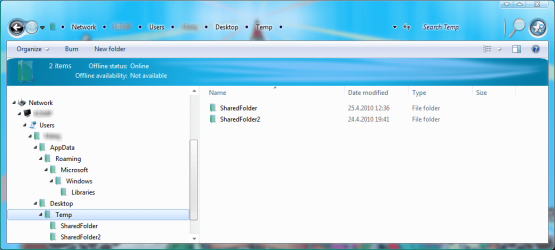
I've managed to unshare every folder and all the public stuff. Now only my shared folders appear and AppData folder leading to empty libraries folder (check screenshot).


But if i open users folder on network on this computer, it will show whole contents of it.

Still nothing appears under homegroup.
 

Attachments

  • usersfolder.png
    usersfolder.png
    58.8 KB · Views: 35

My Computer

OS
Windows 7 64bit
CPU
Core i7 2600K
Motherboard
Asus P8P67
Memory
APACER DDR3 8GB (2x4GB) 1333 CL9 (DL.08GAJ.H9EK2)
Graphics Card(s)
Gigabyte NVIDIA GTX 570
Sound Card
Integrated
Screen Resolution
1680x1050
Hard Drives
System: KINGSTON SSD HYPERX SH100S3120G
Data: HDD SAMSUNG 1TB SATA2 32MB/7200 (HD103SJ)
PSU
750W (I think)
I've managed to unshare every folder and all the public stuff. Now only my shared folders appear and AppData folder leading to empty libraries folder (check screenshot).


But if i open users folder on network on this computer, it will show whole contents of it.

Still nothing appears under homegroup.

http://www.sevenforums.com/tutorials/43980-homegroup-leave.html?filter

I just tested out sharing a single folder in my User name/User folder and it worked perfectly for me and I'm using Homegroups. If you are seeing a problem it has to do with the way you set up your network or there is a third party security or networking program involved.

Looking at your network tree I'd say you have a third party networking program installed there because it certainly doesn't look anything like mine.
 
Last edited:

My Computer

Computer type
PC/Desktop
Computer Manufacturer/Model Number
Home built
OS
Windows 7 Ult, Windows 8.1 Pro,
CPU
Q9650-4.275GHz, E8600 4.5GHz, E6750-3.8GHz
Motherboard
Evga 780i FTW
Memory
G.Skill PC2 9600 1200Mhz 5 5 5 15 2T
Graphics Card(s)
GTX480
Sound Card
Asus Xonar D2
Monitor(s) Displays
HannsG
Screen Resolution
1680X1050
Hard Drives
GSkill Phoenix Pro 120GB SSD
PSU
ThermalTake Toughpower 1000Watt modular
Case
ThermalTake XaserV
Cooling
Xigmatek S1283
Keyboard
Logitech G15
Mouse
Logitech G9
Internet Speed
T1
I don't have any networking program installed.
 

My Computer

OS
Windows 7 64bit
CPU
Core i7 2600K
Motherboard
Asus P8P67
Memory
APACER DDR3 8GB (2x4GB) 1333 CL9 (DL.08GAJ.H9EK2)
Graphics Card(s)
Gigabyte NVIDIA GTX 570
Sound Card
Integrated
Screen Resolution
1680x1050
Hard Drives
System: KINGSTON SSD HYPERX SH100S3120G
Data: HDD SAMSUNG 1TB SATA2 32MB/7200 (HD103SJ)
PSU
750W (I think)
I'm using Folder named Temp on my desktop for saving some data and testing stuff like network sharing in that case. I created that folder manually.
 

My Computer

OS
Windows 7 64bit
CPU
Core i7 2600K
Motherboard
Asus P8P67
Memory
APACER DDR3 8GB (2x4GB) 1333 CL9 (DL.08GAJ.H9EK2)
Graphics Card(s)
Gigabyte NVIDIA GTX 570
Sound Card
Integrated
Screen Resolution
1680x1050
Hard Drives
System: KINGSTON SSD HYPERX SH100S3120G
Data: HDD SAMSUNG 1TB SATA2 32MB/7200 (HD103SJ)
PSU
750W (I think)
I don't have any networking program installed.

Using temp folder to share with is not advised and usually doesn't work very well. I'm not sure what is up with your network tree but it looks nothing like mine does.

If you are still having this problem it's probably because you set up Homegroups in a mixed Op system network which it's not made to do. It tends to cause the User folder to be shared for some strange reason.

I have zero problems sharing single files from my User folder with Homegroups so I can't say what the problem might be.

You aren't using Windows Explorer to share with from what I can see there.

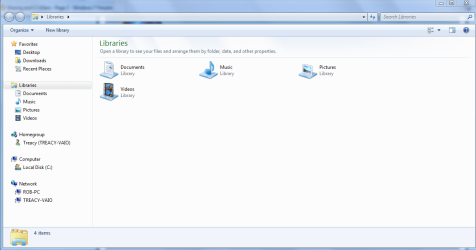
This is what it's supposed to look like.
 

Attachments

  • Library sharing.PNG
    Library sharing.PNG
    41.2 KB · Views: 11

My Computer

Computer type
PC/Desktop
Computer Manufacturer/Model Number
Home built
OS
Windows 7 Ult, Windows 8.1 Pro,
CPU
Q9650-4.275GHz, E8600 4.5GHz, E6750-3.8GHz
Motherboard
Evga 780i FTW
Memory
G.Skill PC2 9600 1200Mhz 5 5 5 15 2T
Graphics Card(s)
GTX480
Sound Card
Asus Xonar D2
Monitor(s) Displays
HannsG
Screen Resolution
1680X1050
Hard Drives
GSkill Phoenix Pro 120GB SSD
PSU
ThermalTake Toughpower 1000Watt modular
Case
ThermalTake XaserV
Cooling
Xigmatek S1283
Keyboard
Logitech G15
Mouse
Logitech G9
Internet Speed
T1
It is not temp folder. It is just a regular folder on the desktop named temp.
 

My Computer

OS
Windows 7 64bit
CPU
Core i7 2600K
Motherboard
Asus P8P67
Memory
APACER DDR3 8GB (2x4GB) 1333 CL9 (DL.08GAJ.H9EK2)
Graphics Card(s)
Gigabyte NVIDIA GTX 570
Sound Card
Integrated
Screen Resolution
1680x1050
Hard Drives
System: KINGSTON SSD HYPERX SH100S3120G
Data: HDD SAMSUNG 1TB SATA2 32MB/7200 (HD103SJ)
PSU
750W (I think)
Do any of your libraries contain one of the desktop\temp folders?
 

My Computer

Computer Manufacturer/Model Number
Asus P5B
OS
Windows 7 Ultimate
CPU
Intel Q9550
Motherboard
Asus P5B
Memory
4x2GB HyperX
Graphics Card(s)
ATI HD3850 512
Sound Card
Creative X-Fi Platinum
Monitor(s) Displays
Samsung 50 / Samsung 24
Screen Resolution
1920*1080 / 1920*1200
Hard Drives
Multiple RAID volumes
PSU
ThermalTake ToughPower
Case
Armor
Cooling
Liquid
Keyboard
$6 2.4 gHz desktop
Internet Speed
Just this side of fast enough.
Use Windows explorer for sharing not temp folders. Why on earth would you want to use a temp folder for sharing? I doubt that any of those temp folders have been indexed correctly either.

You aren't giving me any info to work with. You need to start by using Windows explorer to share with. And some info on what other Op systems are in your network would be helpful.
 

My Computer

Computer type
PC/Desktop
Computer Manufacturer/Model Number
Home built
OS
Windows 7 Ult, Windows 8.1 Pro,
CPU
Q9650-4.275GHz, E8600 4.5GHz, E6750-3.8GHz
Motherboard
Evga 780i FTW
Memory
G.Skill PC2 9600 1200Mhz 5 5 5 15 2T
Graphics Card(s)
GTX480
Sound Card
Asus Xonar D2
Monitor(s) Displays
HannsG
Screen Resolution
1680X1050
Hard Drives
GSkill Phoenix Pro 120GB SSD
PSU
ThermalTake Toughpower 1000Watt modular
Case
ThermalTake XaserV
Cooling
Xigmatek S1283
Keyboard
Logitech G15
Mouse
Logitech G9
Internet Speed
T1
Do any of your libraries contain one of the desktop\temp folders?

Nope. But maybe it have to do something with libraries.

When i installed Win7, i copied everything from backed up my documents folder directly into documents library. Was that OK?

Use Windows explorer for sharing not temp folders. You aren't giving me any info to work with here.

What info exactly you need?

Ignore that temp folder, just pretend that is named "Data" or something else. It has nothing to do with windows temporary folders or anything else. Is just standard plain folder on the desktop with that name. I created that folder and gave it name Temp.
 

My Computer

OS
Windows 7 64bit
CPU
Core i7 2600K
Motherboard
Asus P8P67
Memory
APACER DDR3 8GB (2x4GB) 1333 CL9 (DL.08GAJ.H9EK2)
Graphics Card(s)
Gigabyte NVIDIA GTX 570
Sound Card
Integrated
Screen Resolution
1680x1050
Hard Drives
System: KINGSTON SSD HYPERX SH100S3120G
Data: HDD SAMSUNG 1TB SATA2 32MB/7200 (HD103SJ)
PSU
750W (I think)
Back
Top