Sharing and C:\USers

We need you to address this...

...If you are still having this problem it's probably because you set up Homegroups in a mixed Op system network which it's not made to do. It tends to cause the User folder to be shared for some strange reason...
 

My Computer

Computer Manufacturer/Model Number
Asus P5B
OS
Windows 7 Ultimate
CPU
Intel Q9550
Motherboard
Asus P5B
Memory
4x2GB HyperX
Graphics Card(s)
ATI HD3850 512
Sound Card
Creative X-Fi Platinum
Monitor(s) Displays
Samsung 50 / Samsung 24
Screen Resolution
1920*1080 / 1920*1200
Hard Drives
Multiple RAID volumes
PSU
ThermalTake ToughPower
Case
Armor
Cooling
Liquid
Keyboard
$6 2.4 gHz desktop
Internet Speed
Just this side of fast enough.
Do any of your libraries contain one of the desktop\temp folders?

Nope. But maybe it have to do something with libraries.

When i installed Win7, i copied everything from backed up my documents folder directly into documents library. Was that OK?

Use Windows explorer for sharing not temp folders. You aren't giving me any info to work with here.

What info exactly you need?

Ignore that temp folder, just pretend that is named "Data" or something else. It has nothing to do with windows temporary folders or anything else. Is just standard plain folder on the desktop with that name. I created that folder and gave it name Temp.

You would be better served by sending the "Documents back up file" to the "My Documents"> User name/My Documents folder instead of Libraries. After that it will show up in Libraries.

I think the problem with your User folder is that you have other Op systems "besides Windows 7" in your Homegroup network which always seems to cause User folder problems for some reason. If that is the case then you need to leave the Homegroup and set up a Workgroup instead.

Also, as I mentioned earlier do not use a temp folder "or any folder created on the desktop" as a network folder. Use Windows Explorer for that please. You can just click on the folder icon lower left for that.
 
Last edited:

My Computer

Computer type
PC/Desktop
Computer Manufacturer/Model Number
Home built
OS
Windows 7 Ult, Windows 8.1 Pro,
CPU
Q9650-4.275GHz, E8600 4.5GHz, E6750-3.8GHz
Motherboard
Evga 780i FTW
Memory
G.Skill PC2 9600 1200Mhz 5 5 5 15 2T
Graphics Card(s)
GTX480
Sound Card
Asus Xonar D2
Monitor(s) Displays
HannsG
Screen Resolution
1680X1050
Hard Drives
GSkill Phoenix Pro 120GB SSD
PSU
ThermalTake Toughpower 1000Watt modular
Case
ThermalTake XaserV
Cooling
Xigmatek S1283
Keyboard
Logitech G15
Mouse
Logitech G9
Internet Speed
T1
Is not mixed OP. Every pc in the homegroup have Win7.

I have an XP laptop but i connect it every few weeks, so i guess it should not be a problem.
 

My Computer

OS
Windows 7 64bit
CPU
Core i7 2600K
Motherboard
Asus P8P67
Memory
APACER DDR3 8GB (2x4GB) 1333 CL9 (DL.08GAJ.H9EK2)
Graphics Card(s)
Gigabyte NVIDIA GTX 570
Sound Card
Integrated
Screen Resolution
1680x1050
Hard Drives
System: KINGSTON SSD HYPERX SH100S3120G
Data: HDD SAMSUNG 1TB SATA2 32MB/7200 (HD103SJ)
PSU
750W (I think)
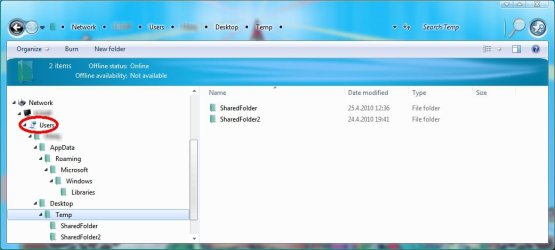
Looks like you are sharing the whole Users Folder:
 

Attachments

  • SharingPix.jpg
    SharingPix.jpg
    43 KB · Views: 14

My Computer

Computer type
PC/Desktop
Computer Manufacturer/Model Number
Dell OP7010
OS
Windows 7 Enterprise (x64); Windows Server 2008 R2 (x64)
Memory
16GB
Monitor(s) Displays
4 Dell 24" LCD
Screen Resolution
1280x1024
Keyboard
Dell
Mouse
Dell Optical
Internet Speed
40meg

My Computer

Computer Manufacturer/Model Number
Asus P5B
OS
Windows 7 Ultimate
CPU
Intel Q9550
Motherboard
Asus P5B
Memory
4x2GB HyperX
Graphics Card(s)
ATI HD3850 512
Sound Card
Creative X-Fi Platinum
Monitor(s) Displays
Samsung 50 / Samsung 24
Screen Resolution
1920*1080 / 1920*1200
Hard Drives
Multiple RAID volumes
PSU
ThermalTake ToughPower
Case
Armor
Cooling
Liquid
Keyboard
$6 2.4 gHz desktop
Internet Speed
Just this side of fast enough.
@WindowsStar That is the whole problem. If i share anything under users folder, whole folder gets automatically shared.

@Casta I figured out and edited my post a minute before
 

My Computer

OS
Windows 7 64bit
CPU
Core i7 2600K
Motherboard
Asus P8P67
Memory
APACER DDR3 8GB (2x4GB) 1333 CL9 (DL.08GAJ.H9EK2)
Graphics Card(s)
Gigabyte NVIDIA GTX 570
Sound Card
Integrated
Screen Resolution
1680x1050
Hard Drives
System: KINGSTON SSD HYPERX SH100S3120G
Data: HDD SAMSUNG 1TB SATA2 32MB/7200 (HD103SJ)
PSU
750W (I think)
You need to break that share before you make a new one. Remove that share and do a cold reboot. Make sure the share is NOT there before you do anything else.
 

My Computer

Computer type
PC/Desktop
Computer Manufacturer/Model Number
Dell OP7010
OS
Windows 7 Enterprise (x64); Windows Server 2008 R2 (x64)
Memory
16GB
Monitor(s) Displays
4 Dell 24" LCD
Screen Resolution
1280x1024
Keyboard
Dell
Mouse
Dell Optical
Internet Speed
40meg
Is not mixed OP. Every pc in the homegroup have Win7.

I have an XP laptop but i connect it every few weeks, so i guess it should not be a problem.

Nope you can't mix the XP machine into a Homegroup network without causing certain types of sharing problems. That may not be the cause of the User folder problem but usually when you add a non Windows 7 machine to a Homegroup it will cause strange sharing of the User folder for some reason. That might be the problem here. I'm really not sure why that happens. Try the steps below please.

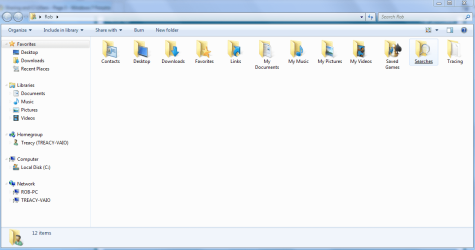
To share single files from your User folder just click on your User name > start/User Name >upper right you will see User name, click there. You will get the entire user folder like in the picture below, click on which ever file you want to share and choose "share with" then select "Homegroup read/write" or what ever you want.

Do not use a temp folder or desktop created folder for this like you are doing now. This works for me everytime I try so hopefully it will work for you as well. :)
 

Attachments

  • user folder Rob.PNG
    user folder Rob.PNG
    39.8 KB · Views: 6
Last edited:

My Computer

Computer type
PC/Desktop
Computer Manufacturer/Model Number
Home built
OS
Windows 7 Ult, Windows 8.1 Pro,
CPU
Q9650-4.275GHz, E8600 4.5GHz, E6750-3.8GHz
Motherboard
Evga 780i FTW
Memory
G.Skill PC2 9600 1200Mhz 5 5 5 15 2T
Graphics Card(s)
GTX480
Sound Card
Asus Xonar D2
Monitor(s) Displays
HannsG
Screen Resolution
1680X1050
Hard Drives
GSkill Phoenix Pro 120GB SSD
PSU
ThermalTake Toughpower 1000Watt modular
Case
ThermalTake XaserV
Cooling
Xigmatek S1283
Keyboard
Logitech G15
Mouse
Logitech G9
Internet Speed
T1
Well i haven't done anything with sharing or homegroups on this XP laptop. I just used it to browse a web.

Maybe it have added automatically to the homegroup or something. How to remove it?

@WindowsStar I tried many ways of removing Users folder. It won't appear in network when removed, but it will reappear when sharing anything inside of it.

EDIT:

I'm doing just as you said. Rigth click and share with homegroup. And is not only in temp folder.

I just renamed that folder to Data to prevent confusion. For the last time, it's not a temporary folder, it's just a folder with name "Temp".
 

My Computer

OS
Windows 7 64bit
CPU
Core i7 2600K
Motherboard
Asus P8P67
Memory
APACER DDR3 8GB (2x4GB) 1333 CL9 (DL.08GAJ.H9EK2)
Graphics Card(s)
Gigabyte NVIDIA GTX 570
Sound Card
Integrated
Screen Resolution
1680x1050
Hard Drives
System: KINGSTON SSD HYPERX SH100S3120G
Data: HDD SAMSUNG 1TB SATA2 32MB/7200 (HD103SJ)
PSU
750W (I think)
Well i haven't done anything with sharing or homegroups on this XP laptop. I just used it to browse a web.

Maybe it have added automatically to the homegroup or something. How to remove it?

@WindowsStar I tried many ways of removing Users folder. It won't appear in network when removed, but it will reappear when sharing anything inside of it.

EDIT:

I'm doing just as you said. Rigth click and share with homegroup. And is not only in temp folder.

I just renamed that folder to Data to prevent confusion. For the last time, it's not a temporary folder, it's just a folder with name "Temp".

My point was that sharing doesn't work so well from folders created on the desktop. Best to use the little folder icon lower left for sharing just to eliminate potential problems and also to avoid confusion. The way you were doing it before can also cause sharing problems.

Please clairify this statement...I'm doing just as you said. Rigth click and share with homegroup. And is not only in temp folder.

Are the User files you shared the only ones being shared yet?
 

My Computer

Computer type
PC/Desktop
Computer Manufacturer/Model Number
Home built
OS
Windows 7 Ult, Windows 8.1 Pro,
CPU
Q9650-4.275GHz, E8600 4.5GHz, E6750-3.8GHz
Motherboard
Evga 780i FTW
Memory
G.Skill PC2 9600 1200Mhz 5 5 5 15 2T
Graphics Card(s)
GTX480
Sound Card
Asus Xonar D2
Monitor(s) Displays
HannsG
Screen Resolution
1680X1050
Hard Drives
GSkill Phoenix Pro 120GB SSD
PSU
ThermalTake Toughpower 1000Watt modular
Case
ThermalTake XaserV
Cooling
Xigmatek S1283
Keyboard
Logitech G15
Mouse
Logitech G9
Internet Speed
T1
Sorry for my last post, i badly read your previous one.

Tried to share file from my user folder as you said. And still no. Appears in \\PC\Users\Username folder, but not in homegroup.

EDIT:

Actually when i just share file from my user folder, PC won't appear in homegroup list. But if i share another folder which is not in users for example C:\SharedFolder, PC will show up in Homegroup list but with only SharedFolder which i have on C:\
 

My Computer

OS
Windows 7 64bit
CPU
Core i7 2600K
Motherboard
Asus P8P67
Memory
APACER DDR3 8GB (2x4GB) 1333 CL9 (DL.08GAJ.H9EK2)
Graphics Card(s)
Gigabyte NVIDIA GTX 570
Sound Card
Integrated
Screen Resolution
1680x1050
Hard Drives
System: KINGSTON SSD HYPERX SH100S3120G
Data: HDD SAMSUNG 1TB SATA2 32MB/7200 (HD103SJ)
PSU
750W (I think)
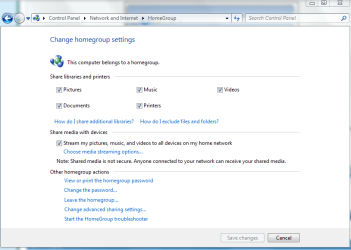
Maybe you haven't checked off the things you want to share with the Homegroup yet? The first picture shows what needs to be checked.

You seem to have more problems than just the User folder because the other machines in the Homegroup should be showing up all the time. I'm not sure why that is so.

Your going to have to go down this Homegroup check list and make sure that everything is in order before we go any further.
Ultimate Troubleshooting Guide for Windows 7 HomeGroup Connection Issues

This first page needs to have these shared items checked in order for Homegroup sharing to work. This is really covering some basic stuff here.

You also might want to check under the Advance Network Settings to make sure that everything is like the second picture below.
 

Attachments

  • Homegroup sharing library's.PNG
    Homegroup sharing library's.PNG
    23 KB · Views: 11
  • Home or work homegroup enable.PNG
    Home or work homegroup enable.PNG
    45 KB · Views: 12

My Computer

Computer type
PC/Desktop
Computer Manufacturer/Model Number
Home built
OS
Windows 7 Ult, Windows 8.1 Pro,
CPU
Q9650-4.275GHz, E8600 4.5GHz, E6750-3.8GHz
Motherboard
Evga 780i FTW
Memory
G.Skill PC2 9600 1200Mhz 5 5 5 15 2T
Graphics Card(s)
GTX480
Sound Card
Asus Xonar D2
Monitor(s) Displays
HannsG
Screen Resolution
1680X1050
Hard Drives
GSkill Phoenix Pro 120GB SSD
PSU
ThermalTake Toughpower 1000Watt modular
Case
ThermalTake XaserV
Cooling
Xigmatek S1283
Keyboard
Logitech G15
Mouse
Logitech G9
Internet Speed
T1
I used C:\SharedFolder just for a test to see if homegroup connection is working. I guess folder in root is most likely going to work, so i tested with it.

Anyway, i just checked everything on that list and Pictures, Music, Videos, Documents folders appeared under Homegroup. But still no file that i shared.
 

My Computer

OS
Windows 7 64bit
CPU
Core i7 2600K
Motherboard
Asus P8P67
Memory
APACER DDR3 8GB (2x4GB) 1333 CL9 (DL.08GAJ.H9EK2)
Graphics Card(s)
Gigabyte NVIDIA GTX 570
Sound Card
Integrated
Screen Resolution
1680x1050
Hard Drives
System: KINGSTON SSD HYPERX SH100S3120G
Data: HDD SAMSUNG 1TB SATA2 32MB/7200 (HD103SJ)
PSU
750W (I think)
Best to test Homegroups with GUI from folder icon. Try the walk though link I posted because there are other problems here besides the User folder. After the check list it may work best to leave the Homegroup from all machines then create a new Homegroup then join that Homegroup using the new Homegroup password from all machines and try again.

Ultimate Troubleshooting Guide for Windows 7 HomeGroup Connection Issues
 

My Computer

Computer type
PC/Desktop
Computer Manufacturer/Model Number
Home built
OS
Windows 7 Ult, Windows 8.1 Pro,
CPU
Q9650-4.275GHz, E8600 4.5GHz, E6750-3.8GHz
Motherboard
Evga 780i FTW
Memory
G.Skill PC2 9600 1200Mhz 5 5 5 15 2T
Graphics Card(s)
GTX480
Sound Card
Asus Xonar D2
Monitor(s) Displays
HannsG
Screen Resolution
1680X1050
Hard Drives
GSkill Phoenix Pro 120GB SSD
PSU
ThermalTake Toughpower 1000Watt modular
Case
ThermalTake XaserV
Cooling
Xigmatek S1283
Keyboard
Logitech G15
Mouse
Logitech G9
Internet Speed
T1
It's not connectinon issue. I can share stuff that are not inside users folder without problems.

I already tried leaving everywhere and rejoining, but it didn't help.
 

My Computer

OS
Windows 7 64bit
CPU
Core i7 2600K
Motherboard
Asus P8P67
Memory
APACER DDR3 8GB (2x4GB) 1333 CL9 (DL.08GAJ.H9EK2)
Graphics Card(s)
Gigabyte NVIDIA GTX 570
Sound Card
Integrated
Screen Resolution
1680x1050
Hard Drives
System: KINGSTON SSD HYPERX SH100S3120G
Data: HDD SAMSUNG 1TB SATA2 32MB/7200 (HD103SJ)
PSU
750W (I think)
Back
Top