JavaScript is disabled. For a better experience, please enable JavaScript in your browser before proceeding.
You are using an out of date browser. It may not display this or other websites correctly.
You should upgrade or use an
alternative browser .
sharing files Between win7 and xp
i looked on all the other threads but none helped.
i have win 7 laptop and xp pc.
i did everything from all the other threads.
my win7 can find the xp on the map but cant access it.
the xp cant find the other one at all
please help
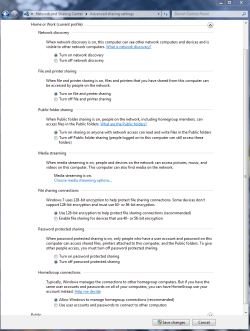
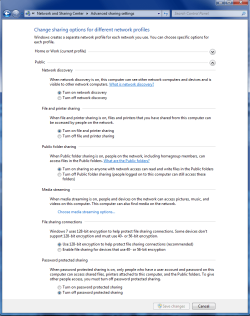
You might want to check under Advanced Sharing settings first to make sure all these settings are set like in the pictures. You need to check these settings under both Windows Home-Work and public file sharing.
You need to set up a Work group on the Windows 7 machine and then join that Workgroup by running the network setup Wizard on the XP machine. It's very important that both machines are using the same name for the Workgroup.
http://windows.microsoft.com/en-US/...mputers-running-different-versions-of-Windows
Home or work homegroup enable.PNG
45 KB
· Views: 168
public sharing enabled all.PNG
39.7 KB
· Views: 102
Computer type PC/Desktop Computer Manufacturer/Model Number Home built OS Windows 7 Ult, Windows 8.1 Pro, CPU Q9650-4.275GHz, E8600 4.5GHz, E6750-3.8GHz Motherboard Evga 780i FTW Memory G.Skill PC2 9600 1200Mhz 5 5 5 15 2T Graphics Card(s) GTX480 Sound Card Asus Xonar D2 Monitor(s) Displays HannsG Screen Resolution 1680X1050 Hard Drives GSkill Phoenix Pro 120GB SSD PSU ThermalTake Toughpower 1000Watt modular Case ThermalTake XaserV Cooling Xigmatek S1283 Keyboard Logitech G15 Mouse Logitech G9 Internet Speed T1
The only thing i did as per my tut in my sig with regards to Advance Sharing setting , was to turn "File and Printer sharing" ON (to allow Xp to see/connect to W7). The rest was just a matter of creating shares and connecting.
Computer Manufacturer/Model Number Lenovo ThinkPad T60 OS Windows 7 Ultimate 64Bit CPU GenuineIntel Intel(R) Core(TM) DuoCore T2400 @ 1.83GHz Motherboard Intel(R) 82801G (ICH7 Family) Memory 2.00 GB Graphics Card(s) Mobile Intel(R) 945 Express Chipset Sound Card SoundMAX Integrated Digital HD Audio Monitor(s) Displays ThinkPad Display Screen Resolution 1400x1050 Hard Drives 100Gb SATA Keyboard Standard Keyboard Mouse HID-compliant Mouse Internet Speed Cable Broadband - 54Mbps Other Info Intel(R) PRO/1000 PL Network Connection
Worked Like A Charm
New member
Thread Starter
i've already did all that and it dosent work.
You test ping, by going into the command prompt and type: ping ipaddress (of the destination machine). For exmple, ping 192.168.1.5
Computer Manufacturer/Model Number Lenovo ThinkPad T60 OS Windows 7 Ultimate 64Bit CPU GenuineIntel Intel(R) Core(TM) DuoCore T2400 @ 1.83GHz Motherboard Intel(R) 82801G (ICH7 Family) Memory 2.00 GB Graphics Card(s) Mobile Intel(R) 945 Express Chipset Sound Card SoundMAX Integrated Digital HD Audio Monitor(s) Displays ThinkPad Display Screen Resolution 1400x1050 Hard Drives 100Gb SATA Keyboard Standard Keyboard Mouse HID-compliant Mouse Internet Speed Cable Broadband - 54Mbps Other Info Intel(R) PRO/1000 PL Network Connection
New member
Thread Starter
tried that, didnt work either
Well there is your problem right there. Pls provide details of both machine's ipconfig /all. I trust you already gone thru my tut in my sig?
Computer Manufacturer/Model Number Lenovo ThinkPad T60 OS Windows 7 Ultimate 64Bit CPU GenuineIntel Intel(R) Core(TM) DuoCore T2400 @ 1.83GHz Motherboard Intel(R) 82801G (ICH7 Family) Memory 2.00 GB Graphics Card(s) Mobile Intel(R) 945 Express Chipset Sound Card SoundMAX Integrated Digital HD Audio Monitor(s) Displays ThinkPad Display Screen Resolution 1400x1050 Hard Drives 100Gb SATA Keyboard Standard Keyboard Mouse HID-compliant Mouse Internet Speed Cable Broadband - 54Mbps Other Info Intel(R) PRO/1000 PL Network Connection
Chev65,
That is very good. I'm glad to see that the links I post come in handy for some of us. I post those pictures because it's the most basic of settings and that is where most of the mistakes occur. It's interesting how easy it is to set up a network when those simple directions are followed.
Computer type PC/Desktop Computer Manufacturer/Model Number Home built OS Windows 7 Ult, Windows 8.1 Pro, CPU Q9650-4.275GHz, E8600 4.5GHz, E6750-3.8GHz Motherboard Evga 780i FTW Memory G.Skill PC2 9600 1200Mhz 5 5 5 15 2T Graphics Card(s) GTX480 Sound Card Asus Xonar D2 Monitor(s) Displays HannsG Screen Resolution 1680X1050 Hard Drives GSkill Phoenix Pro 120GB SSD PSU ThermalTake Toughpower 1000Watt modular Case ThermalTake XaserV Cooling Xigmatek S1283 Keyboard Logitech G15 Mouse Logitech G9 Internet Speed T1