Solved Sharing folder with other User

crispyclot

New member
Local time
9:48 AM
Messages
53
Just want to share my pic folder so my wife can edit upload etc while signed onto hers instead of mine . I right clicked folder , added specific user , box popped up and looked like it worked . Checked on hers and nothing ?

Am i missing something , thanks

Chris
 

My Computer

OS
Window 7 Home Premium 64Bit
Hello Chris,

You might check using the tutorial below to see if you may have missed setting the permission settings for her user account on the folder.

http://www.sevenforums.com/tutorials/24232-sharing-permissions.html

Another option would be to place the files you would like to share in the C:\Users\Public\Public Pictures folder. By default, all users have access to the Public folders. The Public folders are also included in the libraries by default as well.

Hope this helps,
Shawn
 

My Computer

Computer type
PC/Desktop
Computer Manufacturer/Model Number
Self built custom
OS
64-bit Windows 11 Pro for Workstations
CPU
Intel i7-8700K OC'd to 5 GHz
Motherboard
ASUS ROG Maximus XI Formula Z390
Memory
64 GB (4x16GB) G.SKILL TridentZ RGB DDR4 3600 MHz
Graphics Card(s)
ASUS ROG-STRIX-GTX1080TI-O11G-GAMING
Sound Card
Integrated
Monitor(s) Displays
2 x Samsung Odyssey G7 27"
Screen Resolution
2560x1440
Hard Drives
1TB Samsung 990 PRO M.2,
4TB Samsung 990 PRO PRO M.2,
TerraMaster F8 SSD Plus NAS
PSU
Seasonic Prime Titanium 850W
Case
Thermaltake Core P3
Cooling
Corsair Hydro H115i
Keyboard
Logitech wireless K800
Mouse
Logitech MX Master 4
Internet Speed
2 Gb/s Download and 100 Mb/s Upload
Antivirus
Malwarebyte Anti-Malware Premium
Browser
Google Chrome
Other Info
Logitech Z625 speaker system,
Logitech BRIO 4K Pro webcam,
HP Color LaserJet Pro MFP M477fdn,
APC SMART-UPS RT 1000 XL - SURT1000XLI,
Galaxy S23 Plus phone
Thanks Brink , the linked post was great info as well as yours about the public folder option .

The folder to be shared is to big to replicate w/o running out of room right away , and i followed step for step the permissions link but still no go .

Ive had a helluva time with this new computer/OS and sharing and permissions . I would like to restore all defaults to wide open sharing for all because its been such a painful process with WMC ( still cant connect to xbox extender ) , Zune ( on xbox ) and general sharing .

Im fairly knowlegdable with networking , i have 3 independent IP serurity cams running flawlessly ( worst software ever prize ) , wireless e-printer and 2 Logitech SMC Network panels , the Xbox and PS3 , wireless BD etc.

This is my 1st time with Windows 7 so maybe im missing an option somewhere , its making me crazy . The WMCenter with the Xbox should have been a 3 minute adventure which turned into 3 days and a 5 page post of people trying to help .

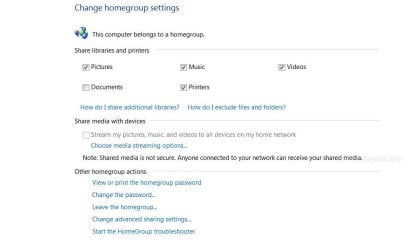
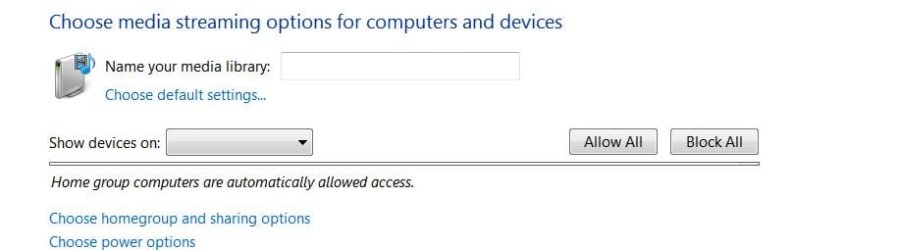
Any other ideas heh , one thing i took a bunch of 'snips' ill upload a couple . The stream and devices tabs on both pics have never been highlighed and able to choose

Help! :)
 

Attachments

  • homegroup.JPG
    homegroup.JPG
    43.8 KB · Views: 32
  • sharing homegroup.JPG
    sharing homegroup.JPG
    27.3 KB · Views: 15

My Computer

OS
Window 7 Home Premium 64Bit
If you moved (cut and paste) the files into the C:\Users\Public\Public Pictures folder, then it wouldn't use any space than they are already using.

This way you both could access them from that location or from your Pictures library Since you are sharing this folder, I would also recommend to set the default "Save" folder for the Pictures library to be the C:\Users\Public\Public Pictures folder.

Library folders are easily shared in homegroups and media as well.
 

My Computer

Computer type
PC/Desktop
Computer Manufacturer/Model Number
Self built custom
OS
64-bit Windows 11 Pro for Workstations
CPU
Intel i7-8700K OC'd to 5 GHz
Motherboard
ASUS ROG Maximus XI Formula Z390
Memory
64 GB (4x16GB) G.SKILL TridentZ RGB DDR4 3600 MHz
Graphics Card(s)
ASUS ROG-STRIX-GTX1080TI-O11G-GAMING
Sound Card
Integrated
Monitor(s) Displays
2 x Samsung Odyssey G7 27"
Screen Resolution
2560x1440
Hard Drives
1TB Samsung 990 PRO M.2,
4TB Samsung 990 PRO PRO M.2,
TerraMaster F8 SSD Plus NAS
PSU
Seasonic Prime Titanium 850W
Case
Thermaltake Core P3
Cooling
Corsair Hydro H115i
Keyboard
Logitech wireless K800
Mouse
Logitech MX Master 4
Internet Speed
2 Gb/s Download and 100 Mb/s Upload
Antivirus
Malwarebyte Anti-Malware Premium
Browser
Google Chrome
Other Info
Logitech Z625 speaker system,
Logitech BRIO 4K Pro webcam,
HP Color LaserJet Pro MFP M477fdn,
APC SMART-UPS RT 1000 XL - SURT1000XLI,
Galaxy S23 Plus phone

My Computer

OS
Window 7 Home Premium 64Bit
You're most welcome Chris.

I'm afraid that I do not use WMC enough to be familiar enough to be able to help with that. :(
 

My Computer

Computer type
PC/Desktop
Computer Manufacturer/Model Number
Self built custom
OS
64-bit Windows 11 Pro for Workstations
CPU
Intel i7-8700K OC'd to 5 GHz
Motherboard
ASUS ROG Maximus XI Formula Z390
Memory
64 GB (4x16GB) G.SKILL TridentZ RGB DDR4 3600 MHz
Graphics Card(s)
ASUS ROG-STRIX-GTX1080TI-O11G-GAMING
Sound Card
Integrated
Monitor(s) Displays
2 x Samsung Odyssey G7 27"
Screen Resolution
2560x1440
Hard Drives
1TB Samsung 990 PRO M.2,
4TB Samsung 990 PRO PRO M.2,
TerraMaster F8 SSD Plus NAS
PSU
Seasonic Prime Titanium 850W
Case
Thermaltake Core P3
Cooling
Corsair Hydro H115i
Keyboard
Logitech wireless K800
Mouse
Logitech MX Master 4
Internet Speed
2 Gb/s Download and 100 Mb/s Upload
Antivirus
Malwarebyte Anti-Malware Premium
Browser
Google Chrome
Other Info
Logitech Z625 speaker system,
Logitech BRIO 4K Pro webcam,
HP Color LaserJet Pro MFP M477fdn,
APC SMART-UPS RT 1000 XL - SURT1000XLI,
Galaxy S23 Plus phone
Back
Top