"Sharing" & "Ownership" Questions

XOVERX

New member
Local time
8:50 AM
Messages
6
Hi, folks. I just recently upgraded from x64 to 7x64.

I know next to nothing about "sharing" and "ownership" of files, except that I hate it. I don't even know if this is the correct forum for help.

I have several external HDs. They have thousands of files on them: avi, mp3, etc.

I just want them to play. But I'm having to go through each directory and subdirectory, clicking on each, to make them "share." Then the files inside each subdirectory won't play because I'm not the "owner" anymore. Lord have mercy.

I've got hundreds of directories and thousands of files.

Is there some "global" command somewhere where all my media will suddenly become "shared" and "owned" so everything just works again?

I've also got some databases that won't load anymore, each saying it is "already opened exclusively by another user, or you need permission to view its data." Are these DBs just gone?

I've set up the Administrator user, figuring this might be the "trick." But no.

To go from XP to Windows 7 is really a culture shock, at least for me. I am so frustrated.

Help appreciated. Thanks.
 

My Computer My Computer

At a glance

Windows 7 Ultimate x64AMD Athlon 64 x2 Dual Core 4400+ 2.21 Ghz4.00 GBATI Radeon HD 5450
Computer Manufacturer/Model Number
Custom build
OS
Windows 7 Ultimate x64
CPU
AMD Athlon 64 x2 Dual Core 4400+ 2.21 Ghz
Motherboard
ACPI x64 based PC (Asus A8N32-SLI Deluxe)
Memory
4.00 GB
Graphics Card(s)
ATI Radeon HD 5450
Sound Card
ATI HD Audio | Plantronics Headset | Realtec AC'97 Audio
Monitor(s) Displays
Sceptre X30SV-Naga3 | Sharp HDMI
Hard Drives
WDC WD20EADS-00R6BO ATA Device
WD 10EAVS External USB Device
WD My Book 1111 USB Device
WD My Book 1130 USB Device
PSU
850W
Case
Thermaltake Tsunami VA3000
Click "Computer", RIGHT-click on the external HDD that shows up there, and click properties. Click on the Security tab above the General tab page you show up to, and click edit. if you are a standard user, click users. If you are an administrator, click administrators. Then on the bottom, make sure you click the box that says "full control", and click okay. If any password prompts come up, enter the administrator's password. That SHOULD work, let me know if it doesn't.
 

My Computer My Computer

At a glance

Microsoft Windows 8.1 Pro 64-bitIntel(R) Core(TM) i3-4130 CPU @ 3.40GHz8.00 GBNone
Computer type
PC/Desktop
Computer Manufacturer/Model Number
Custom Asus Build
OS
Microsoft Windows 8.1 Pro 64-bit
CPU
Intel(R) Core(TM) i3-4130 CPU @ 3.40GHz
Motherboard
B85M-E
Memory
8.00 GB
Graphics Card(s)
None
Sound Card
Realtek High Definition Audio
Monitor(s) Displays
Asus 23.6" Monitor
Screen Resolution
1920 x 1080 x 32 bits (4294967296 colors) @ 60 Hz
Hard Drives
INTEL SSDSC2BW180A4
Samsung SSD 840 PRO Series
PSU
Seasonic S12II-380Bronze
Case
Lian Li
Cooling
Fan, Passive
Keyboard
Logitech K120
Mouse
Microsoft Touch Mouse
Internet Speed
4ms Ping, 19.0 Mbps Download, 19.0 Mbps Upload
Antivirus
Eset Endpoint
Browser
Internet Explorer, Chrome
Thank you. Yes, it does work.

Plus, on this site I found a "global" ownership fix that lets you take ownership of an entire drive, directory, etc.

Ownership does not necessarily fix the "permissions" issue, and now I'm sorting through permissions.
 

My Computer My Computer

At a glance

Windows 7 Ultimate x64AMD Athlon 64 x2 Dual Core 4400+ 2.21 Ghz4.00 GBATI Radeon HD 5450
Computer Manufacturer/Model Number
Custom build
OS
Windows 7 Ultimate x64
CPU
AMD Athlon 64 x2 Dual Core 4400+ 2.21 Ghz
Motherboard
ACPI x64 based PC (Asus A8N32-SLI Deluxe)
Memory
4.00 GB
Graphics Card(s)
ATI Radeon HD 5450
Sound Card
ATI HD Audio | Plantronics Headset | Realtec AC'97 Audio
Monitor(s) Displays
Sceptre X30SV-Naga3 | Sharp HDMI
Hard Drives
WDC WD20EADS-00R6BO ATA Device
WD 10EAVS External USB Device
WD My Book 1111 USB Device
WD My Book 1130 USB Device
PSU
850W
Case
Thermaltake Tsunami VA3000

My Computer My Computer

At a glance

Microsoft Windows 8.1 Pro 64-bitIntel(R) Core(TM) i3-4130 CPU @ 3.40GHz8.00 GBNone
Computer type
PC/Desktop
Computer Manufacturer/Model Number
Custom Asus Build
OS
Microsoft Windows 8.1 Pro 64-bit
CPU
Intel(R) Core(TM) i3-4130 CPU @ 3.40GHz
Motherboard
B85M-E
Memory
8.00 GB
Graphics Card(s)
None
Sound Card
Realtek High Definition Audio
Monitor(s) Displays
Asus 23.6" Monitor
Screen Resolution
1920 x 1080 x 32 bits (4294967296 colors) @ 60 Hz
Hard Drives
INTEL SSDSC2BW180A4
Samsung SSD 840 PRO Series
PSU
Seasonic S12II-380Bronze
Case
Lian Li
Cooling
Fan, Passive
Keyboard
Logitech K120
Mouse
Microsoft Touch Mouse
Internet Speed
4ms Ping, 19.0 Mbps Download, 19.0 Mbps Upload
Antivirus
Eset Endpoint
Browser
Internet Explorer, Chrome
If you use the drives on multiple computers and varieties of user accounts and types you may wish to:

Right click drive, Properties, Security, Advanced, Change Permissions, Add user "Everyone" and grant them read only of full control depending on the usage requirement.

Making sure to replace child object permissions and remove redundant user entries
although i would also explicitly allow your account just incase.

Please note this is a security risk and anyone who can access the drive physically or over a network can pretty much do what they want with it ("do you leave them plugged in or only when needed" is a major factor in the decision making process here).
 

My Computer My Computer

At a glance

Windows 7 Ultimate x64Intel Core2 Quad Q8300 2.5GhzKingston HyperX 4x1GB DDR2 1066MhzAsus/Nvidia 9500GT 1GB
Computer type
PC/Desktop
Computer Manufacturer/Model Number
Self Build
OS
Windows 7 Ultimate x64
CPU
Intel Core2 Quad Q8300 2.5Ghz
Motherboard
Asus P5QD Turbo
Memory
Kingston HyperX 4x1GB DDR2 1066Mhz
Graphics Card(s)
Asus/Nvidia 9500GT 1GB
Sound Card
On-Board HD
Monitor(s) Displays
22" Widescreen TFT
Screen Resolution
1920x1080
Hard Drives
2x 320Gb Seagate SATAII RAID 0
2x 80Gb Seagate SATAII RAID 0
1x 1tb hybrid (8gb ssd)
PSU
650w
Case
ATX
Cooling
140mm front, 120mm Rear, 80mm Chipset + stock CPU and GPU
Keyboard
Plastic one
Mouse
Plastic one
Internet Speed
4Mbps
Other Info
Laptop: HP Elitebook 2560p
i5 @2.7Ghz 4GB DDR3
I have a XP backup that I no longer want to keep on my d drive. Windows 7 is running, and I want to recover the space on my d drive.

I'm having trouble with a couple of files. I log into Windows 7 as Administrator, which I set up. Administrator "owns" the files to which I reference.

However, Administrator can't delete them. I figure this is a permissions issue since Admin owns the files. When I navigate Properties>Security>Advanced>Owner, in fact it verifies that Administrator is the owner.

I see, however, that Effective Permissions (whatever they are) are unaccessible (grayed out).

When I navigate Properties>Security>Edit>Add>Advanced>Find Now, and then choose Administrator, I'm thinking I'm giving Admin "full control." The "Permissions for Administrator" have all the checked marks, including "full control". I do note that these checked marks are grayed in -- I cannot manually change them.

Then I "ok" out of everything and go to delete, but I get the error message, "You require permission from Administrator to make changes to this file."

I have also gone through and given "permissions" to the "Everyone" group, but I still cannot affect the object file to delete.
 

My Computer My Computer

At a glance

Windows 7 Ultimate x64AMD Athlon 64 x2 Dual Core 4400+ 2.21 Ghz4.00 GBATI Radeon HD 5450
Computer Manufacturer/Model Number
Custom build
OS
Windows 7 Ultimate x64
CPU
AMD Athlon 64 x2 Dual Core 4400+ 2.21 Ghz
Motherboard
ACPI x64 based PC (Asus A8N32-SLI Deluxe)
Memory
4.00 GB
Graphics Card(s)
ATI Radeon HD 5450
Sound Card
ATI HD Audio | Plantronics Headset | Realtec AC'97 Audio
Monitor(s) Displays
Sceptre X30SV-Naga3 | Sharp HDMI
Hard Drives
WDC WD20EADS-00R6BO ATA Device
WD 10EAVS External USB Device
WD My Book 1111 USB Device
WD My Book 1130 USB Device
PSU
850W
Case
Thermaltake Tsunami VA3000
OMG why didn't I know this? I had a bunch of shared files and folders and the ownerships got screwed up. I had to go through hundreds of files and resetting the permissions. Let me tell you, that night wasn't fun. I even re-intalled windows Vista. But guess what? It still kept the files!
 

My Computer My Computer

At a glance

Windows 7 profesional4 Gigs
Computer Manufacturer/Model Number
HP
OS
Windows 7 profesional
Memory
4 Gigs
Monitor(s) Displays
Built in display
Hard Drives
1 280 gig
Case
N/A
Keyboard
Built in
Mouse
Built in
Internet Speed
100 mbps
I have a XP backup that I no longer want to keep on my d drive. Windows 7 is running, and I want to recover the space on my d drive.
Is xp backup located on a separate partition? Try defragmenting your Hard Disk. I myself would search up how to delete an undeletable file, and how to remove an xp backup, etc

why do you have an xp backup on win7?
 

My Computer My Computer

At a glance

Microsoft Windows 8.1 Pro 64-bitIntel(R) Core(TM) i3-4130 CPU @ 3.40GHz8.00 GBNone
Computer type
PC/Desktop
Computer Manufacturer/Model Number
Custom Asus Build
OS
Microsoft Windows 8.1 Pro 64-bit
CPU
Intel(R) Core(TM) i3-4130 CPU @ 3.40GHz
Motherboard
B85M-E
Memory
8.00 GB
Graphics Card(s)
None
Sound Card
Realtek High Definition Audio
Monitor(s) Displays
Asus 23.6" Monitor
Screen Resolution
1920 x 1080 x 32 bits (4294967296 colors) @ 60 Hz
Hard Drives
INTEL SSDSC2BW180A4
Samsung SSD 840 PRO Series
PSU
Seasonic S12II-380Bronze
Case
Lian Li
Cooling
Fan, Passive
Keyboard
Logitech K120
Mouse
Microsoft Touch Mouse
Internet Speed
4ms Ping, 19.0 Mbps Download, 19.0 Mbps Upload
Antivirus
Eset Endpoint
Browser
Internet Explorer, Chrome
I have two internal HDs. One is C and one is D.

C used to contain XPx64. D contained a copy of C, at least the system files and was bootable. In case the C drive crashed.

Last weekend I upgraded to Windows 7. So C was wiped out.

Now that Windows 7 x64 seems to be stable, etc, I'm re-organizing D. Taking off the old XPx64 files for space. I will eventually copy C to D, as before.

I will try defrag and your other suggestions. Thanks.
 

My Computer My Computer

At a glance

Windows 7 Ultimate x64AMD Athlon 64 x2 Dual Core 4400+ 2.21 Ghz4.00 GBATI Radeon HD 5450
Computer Manufacturer/Model Number
Custom build
OS
Windows 7 Ultimate x64
CPU
AMD Athlon 64 x2 Dual Core 4400+ 2.21 Ghz
Motherboard
ACPI x64 based PC (Asus A8N32-SLI Deluxe)
Memory
4.00 GB
Graphics Card(s)
ATI Radeon HD 5450
Sound Card
ATI HD Audio | Plantronics Headset | Realtec AC'97 Audio
Monitor(s) Displays
Sceptre X30SV-Naga3 | Sharp HDMI
Hard Drives
WDC WD20EADS-00R6BO ATA Device
WD 10EAVS External USB Device
WD My Book 1111 USB Device
WD My Book 1130 USB Device
PSU
850W
Case
Thermaltake Tsunami VA3000
you can completely reformat. I would suggest moving any important files off of "D" and onto "C" or a flashdrive.

Then type computer management into the search bar. On the left menu, under computer management (local), under storage, click disk management. It will pop up your two disk drives. RIGHT-click on your "D" drive at the top there and click format. Here is some extra reading in case you get stuck: How to partition and format a hard disk by using Windows XP Setup program
 

My Computer My Computer

At a glance

Microsoft Windows 8.1 Pro 64-bitIntel(R) Core(TM) i3-4130 CPU @ 3.40GHz8.00 GBNone
Computer type
PC/Desktop
Computer Manufacturer/Model Number
Custom Asus Build
OS
Microsoft Windows 8.1 Pro 64-bit
CPU
Intel(R) Core(TM) i3-4130 CPU @ 3.40GHz
Motherboard
B85M-E
Memory
8.00 GB
Graphics Card(s)
None
Sound Card
Realtek High Definition Audio
Monitor(s) Displays
Asus 23.6" Monitor
Screen Resolution
1920 x 1080 x 32 bits (4294967296 colors) @ 60 Hz
Hard Drives
INTEL SSDSC2BW180A4
Samsung SSD 840 PRO Series
PSU
Seasonic S12II-380Bronze
Case
Lian Li
Cooling
Fan, Passive
Keyboard
Logitech K120
Mouse
Microsoft Touch Mouse
Internet Speed
4ms Ping, 19.0 Mbps Download, 19.0 Mbps Upload
Antivirus
Eset Endpoint
Browser
Internet Explorer, Chrome
Wells bells, I continue to have permissions issues.

I have downloaded, say, 10 files. I immediately "took ownership" (as Admin) of the directory. I like the files to be of a certain format, so I formatted them, which was no problem.

Then I go to cut and paste the new files on top of the old files, but I'm told I don't have "permission." Good grief, I hate permissions.

Anyhow, so far, I haven't successfully gotten even one file to give me permission to do a simply cut and paste. A frickin' cut and paste, for crying out loud.

While it is true I do not understand the theoretical beauties, harmonies, and benefits of home networking, sharing, etc, I do wonder if this "ownership/permissions" thing is a bridge too far into the wasteland of computer geek-hood. Mary, Jesus, and Joseph I hate permissions.

Is there any way to change permissions "globally"? Or am I stuck file-by-file?
 

My Computer My Computer

At a glance

Windows 7 Ultimate x64AMD Athlon 64 x2 Dual Core 4400+ 2.21 Ghz4.00 GBATI Radeon HD 5450
Computer Manufacturer/Model Number
Custom build
OS
Windows 7 Ultimate x64
CPU
AMD Athlon 64 x2 Dual Core 4400+ 2.21 Ghz
Motherboard
ACPI x64 based PC (Asus A8N32-SLI Deluxe)
Memory
4.00 GB
Graphics Card(s)
ATI Radeon HD 5450
Sound Card
ATI HD Audio | Plantronics Headset | Realtec AC'97 Audio
Monitor(s) Displays
Sceptre X30SV-Naga3 | Sharp HDMI
Hard Drives
WDC WD20EADS-00R6BO ATA Device
WD 10EAVS External USB Device
WD My Book 1111 USB Device
WD My Book 1130 USB Device
PSU
850W
Case
Thermaltake Tsunami VA3000
It's times like these when I really wish Microsoft had some serious competition.

As administrator, I downloaded some files. As administrator, I have taken "ownership" of those downloaded files. As administrator, I have gone through the gyrations and mysteries for the "permissions" for those files.

And yet, as administrator, I am not allowed to do a simple cut and paste? Pitiful. Absolutely pitiful.

At this point, I'm not sure if I'm the one that's pitiful or if Microsoft is the one that's pitiful. Maybe I'm making some grand mistake going through Properties>Security>Edit>Add>Advanced>Find Now>[Choose User]>Allow>Apply>Ok, but I don't think so. I mean, look at that convulted procedure to manipulate "permissions"!

Here's the deal: If you're logged in as Administrator, all this "ownership/permissions" mumbo-jumbo security stuff ought to be switched off. Put another way, the Administrator should automatically have ownership/permissions to do anything he wants. Period.

Then, if you want security, you set up other users, who have the ownership/permissions problem.

As it is now, even if I figure out the Administrator permissions issue, you still have to manipulate every single downloaded file, apparently. That's just wrong if you're supposed to be "the" Administrator. Jeez.

Onward through the fog.
 

My Computer My Computer

At a glance

Windows 7 Ultimate x64AMD Athlon 64 x2 Dual Core 4400+ 2.21 Ghz4.00 GBATI Radeon HD 5450
Computer Manufacturer/Model Number
Custom build
OS
Windows 7 Ultimate x64
CPU
AMD Athlon 64 x2 Dual Core 4400+ 2.21 Ghz
Motherboard
ACPI x64 based PC (Asus A8N32-SLI Deluxe)
Memory
4.00 GB
Graphics Card(s)
ATI Radeon HD 5450
Sound Card
ATI HD Audio | Plantronics Headset | Realtec AC'97 Audio
Monitor(s) Displays
Sceptre X30SV-Naga3 | Sharp HDMI
Hard Drives
WDC WD20EADS-00R6BO ATA Device
WD 10EAVS External USB Device
WD My Book 1111 USB Device
WD My Book 1130 USB Device
PSU
850W
Case
Thermaltake Tsunami VA3000
Now hold up, don't go blaming microsoft. They preset things to where users shouldn't have to go through making a bunch of changes. I know I myself can go into a folder and cut and past a word document fine.

1. What type of files are you cut and pasting? You probably cannot cut and paste a whole C drive folder, for example.

2. You are storing them on an external drive, correct? Did you follow all of the previous advice given? (Perhaps look back just to make sure), and if not, which advice did you/did you not take? Has the external drive been corrupted? (This following proceure is time consuming and may not result in anything, but you might as well do it, perhaps during the night so you don't have to wait so long) go to computer, RIGHT-click your drive that you are doing these cut and pastes, go to tools tab, click check now for error checking, click both boxes and click schedule disk check, then restart.

3. The same problem occurs when you cut and paste a file WITHOUT first going into ther ownership and permissions settings and changing them?

4. in Computer, RIGHT-click the disk and click the Hardware tab. Click the disk you are having problems with and click properties at the bottom. click policies and (at least temporary) click better performance, and below that, click enable write caching on the device. click okay and see if this helps any.

5. You are using the Administrator's account right? You really shouldn't ever have to change permissions in windows EVER, and sometimes changing permissions, unless you really know what you're doing, can do the opposite of what you intended it to do in the first place. Is this computer linked to a domain or is it just your home computer?

6. Is this happening everywhere in windows or just with files on that hard disk you were having problems with? Has this always happened before?

try to cut and paste simple word documents on that hard drive and on your regular hard drive.

IF all else fails, we will go back to changing permissions, and this should be the last time. I will post the guide for you, give me a minute...
 

My Computer My Computer

At a glance

Microsoft Windows 8.1 Pro 64-bitIntel(R) Core(TM) i3-4130 CPU @ 3.40GHz8.00 GBNone
Computer type
PC/Desktop
Computer Manufacturer/Model Number
Custom Asus Build
OS
Microsoft Windows 8.1 Pro 64-bit
CPU
Intel(R) Core(TM) i3-4130 CPU @ 3.40GHz
Motherboard
B85M-E
Memory
8.00 GB
Graphics Card(s)
None
Sound Card
Realtek High Definition Audio
Monitor(s) Displays
Asus 23.6" Monitor
Screen Resolution
1920 x 1080 x 32 bits (4294967296 colors) @ 60 Hz
Hard Drives
INTEL SSDSC2BW180A4
Samsung SSD 840 PRO Series
PSU
Seasonic S12II-380Bronze
Case
Lian Li
Cooling
Fan, Passive
Keyboard
Logitech K120
Mouse
Microsoft Touch Mouse
Internet Speed
4ms Ping, 19.0 Mbps Download, 19.0 Mbps Upload
Antivirus
Eset Endpoint
Browser
Internet Explorer, Chrome
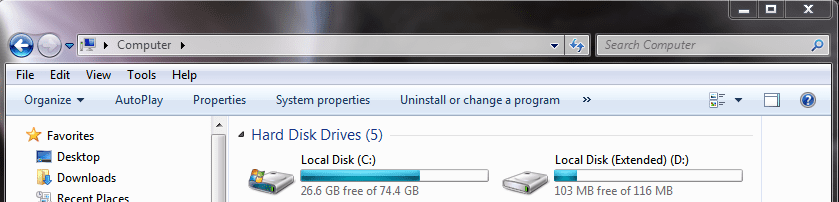
Go to Computer, RIGHT-click on the drive that is giving you trouble
step 1 computer.PNG
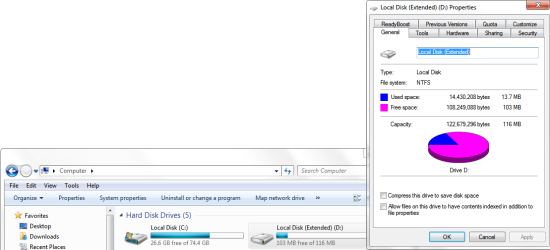
Click properties
step 2 properties.PNG
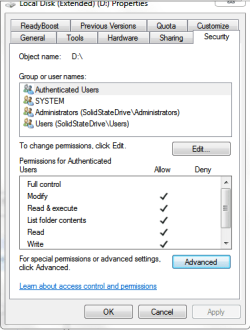
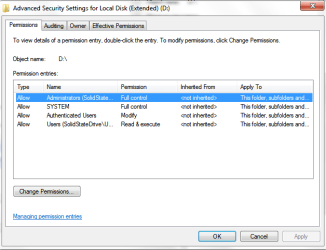
click the security tab at the top, click advanced at the bottom
step 3 advanced.PNG
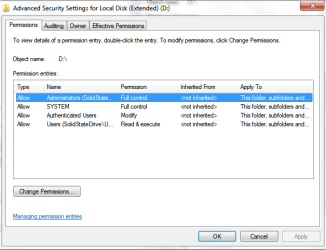
Under the permissions tab, look under name and find administrator, look to the right of it under permission and make sure it says full control. Look again to the right and make sure, under apply to, that it says this folder, subfolders and ... (and it lists some more, so long as it has that).
 

Attachments

  • step 4.PNG
    step 4.PNG
    14.8 KB · Views: 2

My Computer My Computer

At a glance

Microsoft Windows 8.1 Pro 64-bitIntel(R) Core(TM) i3-4130 CPU @ 3.40GHz8.00 GBNone
Computer type
PC/Desktop
Computer Manufacturer/Model Number
Custom Asus Build
OS
Microsoft Windows 8.1 Pro 64-bit
CPU
Intel(R) Core(TM) i3-4130 CPU @ 3.40GHz
Motherboard
B85M-E
Memory
8.00 GB
Graphics Card(s)
None
Sound Card
Realtek High Definition Audio
Monitor(s) Displays
Asus 23.6" Monitor
Screen Resolution
1920 x 1080 x 32 bits (4294967296 colors) @ 60 Hz
Hard Drives
INTEL SSDSC2BW180A4
Samsung SSD 840 PRO Series
PSU
Seasonic S12II-380Bronze
Case
Lian Li
Cooling
Fan, Passive
Keyboard
Logitech K120
Mouse
Microsoft Touch Mouse
Internet Speed
4ms Ping, 19.0 Mbps Download, 19.0 Mbps Upload
Antivirus
Eset Endpoint
Browser
Internet Explorer, Chrome
Then, under the same menu listed at the top
step 4.PNG
CLick the owner tab. make sure administrators is listed under name.

These things should already be set up correctly, and if they are, there is some other problem with the computer that we may have to keep looking for. Let me know how all this goes. Sorry to make you do so much work, but this is not normal for a computer to respond in this way, and I am not entirely sure why it is yet.
 

My Computer My Computer

At a glance

Microsoft Windows 8.1 Pro 64-bitIntel(R) Core(TM) i3-4130 CPU @ 3.40GHz8.00 GBNone
Computer type
PC/Desktop
Computer Manufacturer/Model Number
Custom Asus Build
OS
Microsoft Windows 8.1 Pro 64-bit
CPU
Intel(R) Core(TM) i3-4130 CPU @ 3.40GHz
Motherboard
B85M-E
Memory
8.00 GB
Graphics Card(s)
None
Sound Card
Realtek High Definition Audio
Monitor(s) Displays
Asus 23.6" Monitor
Screen Resolution
1920 x 1080 x 32 bits (4294967296 colors) @ 60 Hz
Hard Drives
INTEL SSDSC2BW180A4
Samsung SSD 840 PRO Series
PSU
Seasonic S12II-380Bronze
Case
Lian Li
Cooling
Fan, Passive
Keyboard
Logitech K120
Mouse
Microsoft Touch Mouse
Internet Speed
4ms Ping, 19.0 Mbps Download, 19.0 Mbps Upload
Antivirus
Eset Endpoint
Browser
Internet Explorer, Chrome
Back
Top