Solved Sharing tab gone missing

EdNygma

New member
Power User
Local time
7:11 AM
Messages
60
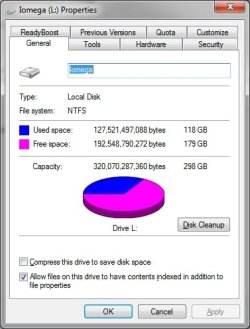
Hi all - I am running Windows 7 Ultimate x64 and just recently (exactly "when" I am not not certain) the Sharing Tab normally found when clicking on any "properties" has disappeared (see attached). I am hoping that someone here can give me insights on what steps can be taken to force it to reappear. I have tried many different tactics found here and other web based suggestions to no avail. I am nearing the point of running "repair" on the system (I reeealy do not want to do that). Any help would be greatly appreciated.

It should also be noted, as I stated, this is a "recent" anomaly as it was there before and have successfully used the sharing feature normally in the past. In fact the previously set up hard drive designations are still showing on other connected computers.

Best regards :)
 

Attachments

  • Properties.jpg
    Properties.jpg
    116 KB · Views: 204

My Computer

OS
Windows 7 Ultimate x64
Hello Ed,

This REG file below that I extracted from my system for this may be able to restore the "Share" tab in properties for your drive.

Hope this helps,
Shawn
 
Last edited:

My Computer

Computer type
PC/Desktop
Computer Manufacturer/Model Number
Self built custom
OS
64-bit Windows 11 Pro for Workstations
CPU
Intel i7-8700K OC'd to 5 GHz
Motherboard
ASUS ROG Maximus XI Formula Z390
Memory
64 GB (4x16GB) G.SKILL TridentZ RGB DDR4 3600 MHz
Graphics Card(s)
ASUS ROG-STRIX-GTX1080TI-O11G-GAMING
Sound Card
Integrated
Monitor(s) Displays
2 x Samsung Odyssey G7 27"
Screen Resolution
2560x1440
Hard Drives
1TB Samsung 990 PRO M.2,
4TB Samsung 990 PRO PRO M.2,
TerraMaster F8 SSD Plus NAS
PSU
Seasonic Prime Titanium 850W
Case
Thermaltake Core P3
Cooling
Corsair Hydro H115i
Keyboard
Logitech wireless K800
Mouse
Logitech MX Master 4
Internet Speed
2 Gb/s Download and 100 Mb/s Upload
Antivirus
Malwarebyte Anti-Malware Premium
Browser
Google Chrome
Other Info
Logitech Z625 speaker system,
Logitech BRIO 4K Pro webcam,
HP Color LaserJet Pro MFP M477fdn,
APC SMART-UPS RT 1000 XL - SURT1000XLI,
Galaxy S23 Plus phone
Thanks Shawn - Sadly I had tried that very reg hack found in a previous post but it did not work for me. Just tried again (your link) and it's still a no-go :(

Any other tricks up your sleeve :D
 

My Computer

OS
Windows 7 Ultimate x64
Here is an interesting development... I have ACDSee Pro (an image manager) which has the ability to allows users to select "the Windows Explorer shell context menu as the default right click menu" in the options setup. Just for kicks I tried it and lo-and-behold... there is was just as one would expect. The right click "Share With" option, and subsequent "Sharing" tab appear as they are supposed to (but still not showing in the native Windows environment). The target HD is now enabled and accessible on all networked puters.

This glitch/SNAFU seems to revolve around the Windows Explorer shell context menu?? Assuming it got hammered up somehow (I hate to think viral), is there a way to reset/restore it to a "default" state?

...Curiouser and curiouser!
 

My Computer

OS
Windows 7 Ultimate x64
Strange, the context menu (ContextMenuHandlers) and properties page (PropertySheetHandlers) use different locations in the registry. That program may have changed the settings in both locations.

Here's a new version of the REG file that also includes the HKLM locations as well. You'll need to restart the computer afterwards to fully apply though. Hopefully it may help.
 

Attachments

My Computer

Computer type
PC/Desktop
Computer Manufacturer/Model Number
Self built custom
OS
64-bit Windows 11 Pro for Workstations
CPU
Intel i7-8700K OC'd to 5 GHz
Motherboard
ASUS ROG Maximus XI Formula Z390
Memory
64 GB (4x16GB) G.SKILL TridentZ RGB DDR4 3600 MHz
Graphics Card(s)
ASUS ROG-STRIX-GTX1080TI-O11G-GAMING
Sound Card
Integrated
Monitor(s) Displays
2 x Samsung Odyssey G7 27"
Screen Resolution
2560x1440
Hard Drives
1TB Samsung 990 PRO M.2,
4TB Samsung 990 PRO PRO M.2,
TerraMaster F8 SSD Plus NAS
PSU
Seasonic Prime Titanium 850W
Case
Thermaltake Core P3
Cooling
Corsair Hydro H115i
Keyboard
Logitech wireless K800
Mouse
Logitech MX Master 4
Internet Speed
2 Gb/s Download and 100 Mb/s Upload
Antivirus
Malwarebyte Anti-Malware Premium
Browser
Google Chrome
Other Info
Logitech Z625 speaker system,
Logitech BRIO 4K Pro webcam,
HP Color LaserJet Pro MFP M477fdn,
APC SMART-UPS RT 1000 XL - SURT1000XLI,
Galaxy S23 Plus phone
Final update - fixed

Thanks again Shawn but I had tried that (by rolling up my sleeves and digging into the registry manually) the entries in your hack all appeared as they should (the hack would not work (at least on my system)).

Here's what I did do tho.... I have a simple utilty, "ShellExView" which I'm sure you are aware shows whats lurking in the context menu and allows one to "dis-able" certain goodies. I had tried this tool earlier but either did not see or overlooked the setting for "sharing". Just tried again but this time I sorted the items on who was enabled/disabled and sure enough it WAS disabled <DOH>. I simply re-enabled the little bugger and voila, problem solved. I still don't know how (it had to be my fat sausages pounding ton the keys) but all is right in my microcosm (at least for the moment) whew!!!

Huge thanks for the help and support. Best regards, E
 

My Computer

OS
Windows 7 Ultimate x64
Ah, that's great news. Thank you for posting back with your results and solution. :)
 

My Computer

Computer type
PC/Desktop
Computer Manufacturer/Model Number
Self built custom
OS
64-bit Windows 11 Pro for Workstations
CPU
Intel i7-8700K OC'd to 5 GHz
Motherboard
ASUS ROG Maximus XI Formula Z390
Memory
64 GB (4x16GB) G.SKILL TridentZ RGB DDR4 3600 MHz
Graphics Card(s)
ASUS ROG-STRIX-GTX1080TI-O11G-GAMING
Sound Card
Integrated
Monitor(s) Displays
2 x Samsung Odyssey G7 27"
Screen Resolution
2560x1440
Hard Drives
1TB Samsung 990 PRO M.2,
4TB Samsung 990 PRO PRO M.2,
TerraMaster F8 SSD Plus NAS
PSU
Seasonic Prime Titanium 850W
Case
Thermaltake Core P3
Cooling
Corsair Hydro H115i
Keyboard
Logitech wireless K800
Mouse
Logitech MX Master 4
Internet Speed
2 Gb/s Download and 100 Mb/s Upload
Antivirus
Malwarebyte Anti-Malware Premium
Browser
Google Chrome
Other Info
Logitech Z625 speaker system,
Logitech BRIO 4K Pro webcam,
HP Color LaserJet Pro MFP M477fdn,
APC SMART-UPS RT 1000 XL - SURT1000XLI,
Galaxy S23 Plus phone
I too had the same problem and tried the reg patch from Shawn - thanks btw ;) at first it didnt work.
So I deleted the key value and then ran the reg patch again which worked for me
 

My Computer

OS
Western Cape
No success on my side

I tried the reg file, and tried deleting the keys manually and adding them again - no luck. I think my problem has deeper roots ... ones that involve a broken HomeGroup I can't leave and a "server" service that won't run due to "error 2" :\
 

My Computer

Computer type
PC/Desktop
OS
Windows 7 32 Ultimate
How to fix the Sharing Tab Missing:

Open Regedit

Go to the following Key

Key: HKEY_CLASSES_ROOT\Directory\shellex\PropertySheetHandlers

Create the following subkey

{f81e9010-6ea4-11ce-a7ff-00aa003ca9f6}


Problem solved
 

My Computer

Computer type
PC/Desktop
Computer Manufacturer/Model Number
Own making
OS
Widows 7 x64
CPU
Pentium G4400(S0) Skylake S
Motherboard
ASRock H110HDS
Memory
4 Gb
Graphics Card(s)
NVIDIA Geforce GX 220
Hard Drives
150 Gb
Antivirus
Malwarebytes
Browser
Chrome
How to fix the Sharing Tab Missing:

Open Regedit

Go to the following Key

Key: HKEY_CLASSES_ROOT\Directory\shellex\PropertySheetHandlers

Create the following subkey

{f81e9010-6ea4-11ce-a7ff-00aa003ca9f6}


Problem solved

Yep, that's what the .reg file posted above at the link below does. :)

Sharing tab gone missing
 

My Computer

Computer type
PC/Desktop
Computer Manufacturer/Model Number
Self built custom
OS
64-bit Windows 11 Pro for Workstations
CPU
Intel i7-8700K OC'd to 5 GHz
Motherboard
ASUS ROG Maximus XI Formula Z390
Memory
64 GB (4x16GB) G.SKILL TridentZ RGB DDR4 3600 MHz
Graphics Card(s)
ASUS ROG-STRIX-GTX1080TI-O11G-GAMING
Sound Card
Integrated
Monitor(s) Displays
2 x Samsung Odyssey G7 27"
Screen Resolution
2560x1440
Hard Drives
1TB Samsung 990 PRO M.2,
4TB Samsung 990 PRO PRO M.2,
TerraMaster F8 SSD Plus NAS
PSU
Seasonic Prime Titanium 850W
Case
Thermaltake Core P3
Cooling
Corsair Hydro H115i
Keyboard
Logitech wireless K800
Mouse
Logitech MX Master 4
Internet Speed
2 Gb/s Download and 100 Mb/s Upload
Antivirus
Malwarebyte Anti-Malware Premium
Browser
Google Chrome
Other Info
Logitech Z625 speaker system,
Logitech BRIO 4K Pro webcam,
HP Color LaserJet Pro MFP M477fdn,
APC SMART-UPS RT 1000 XL - SURT1000XLI,
Galaxy S23 Plus phone
Back
Top