Sharing Woes

lakecityransom

New member
Local time
2:35 PM
Messages
9
I am having no luck with sharing with Win 7 computers.

How can I meet these conditions:

1. All files are available to anyone connected on my router, which has password

2. All public networks are disallowed access to files regardless of 'Everyone' permission being set.

My solution: Set password protected sharing for the public networks in the advanced sharing. Yet I have come to realize what I save for the home/work dropdown will change the public networks dropdown settings!!! wtf...

My alternate solution: When I try to make "identical accounts" as Windows help says (I take this to mean the computer I am accessing has the exact same user account name on it to login to) and used passworded file sharing for both home/work and public networks, I don't even get the opportunity to login. Despite giving credentials to the user on the share/security tab, I just get a "you do not have access contact administrator blahblah..."
 
Last edited:

My Computer

OS
Win7 64bit
Hello and welcome to the forums, lakecityransom,

The solution is rather simple,

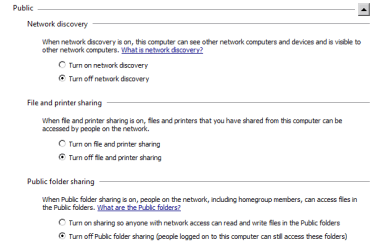
If you do not want other devices/PCs to access your files when you're in a Public Network go to the advanced sharing box once again, and turn off network discovery and turn off file and printer sharing. Those two options can be set seperately for each type of network and will not overwrite the others...

The password protected sharing option is the only one that applies to all types of Networks (Home/Business/Public) indiscriminately.

For example, this screenshot shows that I've forbidden external access to my files by disabling file and printer sharing when in a Public Network

Capture1.PNG

While at the same time allowing others to see my files and shares on my home, password protected router...

Capture2.PNG

Hope that helps!
 

My Computer

Computer Manufacturer/Model Number
DELL SXPS 1640
OS
Windows 7 x64 Professional SP1
CPU
Intel C2D T9550 2.66 GHz @ 2.793 GHz (Thanks ThrottleStop!!)
Motherboard
Intel PM45
Memory
8 GB DDR3
Graphics Card(s)
ATI MOBILITY RADEON 4670
Sound Card
CREATIVE XFI AUDIO NOTEBOOK
Monitor(s) Displays
16.1 WLED
Screen Resolution
1920x1080
Hard Drives
Seagate ST9500420AS 500GB (465GiBi) 7200 RPM Drive

External Drives:-
2 TB WD Essentials x 3
1 TB WD Mybook Gen 1
1 TB WD Mybook Gen 2
1 TB Seagate
1 TB Seagate
320 GB WD Scorpio Black (enclosed)
PSU
90W Dell Power Brick
Case
Dell Chassis
Cooling
Coolermaster Cooling Pad
Keyboard
Built-in backlighted Keyboard
Mouse
Logitech Wireless Mini Mouse
Internet Speed
4/0.5
This doesn't work for me, if I say I am on a public network on the computer that is sharing, I can still retrieve any files from other computer as same as when it was set to home/work network. This is with turning off sharing options on the public dropdown. This is without the sharing computer being in a homegroup. I don't see why this is happening...
 

My Computer

OS
Win7 64bit
Hmm... it is interesting that Windows will not honor the settings that you've put for it...

In the meantime, can try to disable the 2 Homegroup Service(s) (HomeGroup Listener and HomeGroup Provider) for the computer sharing the files and folders and try again?

Start|Services.msc|HomeGroup Listener|right click|properties|stop|disable|repeat for HomeGroup Provider

(We're forcing the PCs to use Workgroup sharing instead)

Be right back, with more help...
 

My Computer

Computer Manufacturer/Model Number
DELL SXPS 1640
OS
Windows 7 x64 Professional SP1
CPU
Intel C2D T9550 2.66 GHz @ 2.793 GHz (Thanks ThrottleStop!!)
Motherboard
Intel PM45
Memory
8 GB DDR3
Graphics Card(s)
ATI MOBILITY RADEON 4670
Sound Card
CREATIVE XFI AUDIO NOTEBOOK
Monitor(s) Displays
16.1 WLED
Screen Resolution
1920x1080
Hard Drives
Seagate ST9500420AS 500GB (465GiBi) 7200 RPM Drive

External Drives:-
2 TB WD Essentials x 3
1 TB WD Mybook Gen 1
1 TB WD Mybook Gen 2
1 TB Seagate
1 TB Seagate
320 GB WD Scorpio Black (enclosed)
PSU
90W Dell Power Brick
Case
Dell Chassis
Cooling
Coolermaster Cooling Pad
Keyboard
Built-in backlighted Keyboard
Mouse
Logitech Wireless Mini Mouse
Internet Speed
4/0.5
Still no go :\

I will try this complete ACL reset/repair tool I found tomorrow...
 

My Computer

OS
Win7 64bit
Nevermind I tried it now it didn't help... any other suggestions
 

My Computer

OS
Win7 64bit
If you want to share files across a network, it MUST be a 'private' network - Public networks are such as those in Starbucks.

Set your Windows 7 to accept your home router network as being Home Network.
Put any files you want to share across the network in your Public folder, and everything should just work.
 

My Computer

Computer type
Laptop
Computer Manufacturer/Model Number
Asus K52F or Lenovo B51-80
OS
Win 7 x64 Home Premium (and x86 VirtualBox VM)/Win10
CPU
i3 370M/i7 6500U
Motherboard
Asus/Lenovo
Memory
8GB - finally :)/8GB
Graphics Card(s)
it's an i3, dude!/dual Intel&nVidia
Sound Card
onboard
Monitor(s) Displays
15.6" built-in
Screen Resolution
1366x768/1920x1080
Hard Drives
750GB Seagate internal
Sundry external drives attached to other computers on the local network
1TB SSD on the Lenovo
PSU
n/a
Internet Speed
as much as I can get - usually on a dongle/phone, so <1MB/s
Antivirus
MSE/Defender
Browser
IE11/12/Edge/Chrome/FF(if I must)

My Computer

Computer type
PC/Desktop
Computer Manufacturer/Model Number
Home made Desktop
OS
Windows 10 Pro. 64/ version 1709 Windows 7 Pro/64
CPU
Intel i7-6800K @ 4.3
Motherboard
ASUS X-99 Deluxe II
Memory
Corsair Platinum 16 gig @2400
Graphics Card(s)
EVGA GTX 1070 OC
Monitor(s) Displays
Asus 27" LED LCD/VE278Q
Screen Resolution
1920-1080 or 1280-720 HDMI
Hard Drives
INTEL SSD 730-240 Gb Sata 3.0/
PSU
EVGA Platium 1200W
Case
Phanteks Luxe Tempered Glass 8 fans/ one radiator
Cooling
XSPC/ Water Cooled CPU
Keyboard
Das 4 Professional
Mouse
Logitech M705/MX Anywhere 2-S
Internet Speed
100 mbits
Antivirus
Microsoft Security Essentials/ Malwarebytes Premium 3.0/ SAS
Browser
I.E. 11 default/Firefox/ ISP Time Warner Cable/Spectrum
Other Info
LG BluRay Burner/
Sound system-KLipsch-THX/
Icy Dock ssd Hot Swap bays.
If you want to share files across a network, it MUST be a 'private' network - Public networks are such as those in Starbucks.

Set your Windows 7 to accept your home router network as being Home Network.
Put any files you want to share across the network in your Public folder, and everything should just work.

I know the difference, I am simply testing to see if people could still steal my files by trying to access shared machine from laptop while it is in 'public' mode.

It doesn't matter what I configure it as, the rules remain the same. Its open house to anyone and everyone if its set to home/work or public. When I change it I've even tried resetting the connecting and restarting the computer. It still doesn't make the rules reflected in advanced sharing take hold.

I really do not want to use the 'public' folders like music, videos, etc. I want to use direct sharing of certain folders and perhaps entire hard drives.

I feel like this has something to do with me using the 'Everybody' permission. If I turn it on, everyone can access files. If I turn it off, nobody can access files (regardless of network mode).
 
Last edited:

My Computer

OS
Win7 64bit
I've managed to figure this out utilizing the homegroup. The drawback: Home users cannot access your files unless they are capable of joining your homegroup (think special LAN devices here). If anyone happens upon this subject here is what I did:

Make sure you have a homegroup setup. After you activate it, you can change the password from the 'HomeGroup' link. If you want to do this do it now. Make sure the network type is still set to home and join any computers you want to share with.

Here was my advanced sharing buttons as follows:
home dropdown - on, on, off (public file sharing turns on for public networks otherwise), off, 128-bit, on
public dropdown - off, off, off, off, 128-bit, on

To Share:
Right click and properties on what you want to share; Advanced, permissions, type homeusers and hit enter to add. You need to delete 'everyone' as a share. You also need to delete it from the security tab permissions. When you share a file/folder this permission is added automatically.

Warning: Deleting the homegroup and making a new one or changing the password messed up sharing for me. You will know, because the permission on a shared folder no longer says homegroup, but instead gets stuck with a {x-x-x-xxxx....} key that does not turn into decode into the homeusers permission text in a couple seconds. If this happens delete that key and type in homeusers again on your shared folders.

Once the user has joined the homegroup, they will have permission to access files regardless of if it is set to a public network or not. This is where I got confused. I checked with other computers to make sure they did not have access.

If you put a device on homegroup and still get access denied, try logging out of the device. Sometimes it gets stuck for reasons beyond my knowing.

Note 1: If you cannot access subdirs of your shared folder, check the security tab for homeuser permissions. It must reflect the exact same permissions you put into your share tab. You might want to delete other spammy accounts like {x-x-x-xxxx....}. This is just a list of anything that ever got into that file/folder.

Note 2: Regarding the user folder getting auto-shared: http://susan-ng.hubpages.com/hub/Windows-7-unshare-users-folder
 
Last edited:

My Computer

OS
Win7 64bit
By default, a workgroup share will allow "everyone" read access to the folder/files. If you don't want that, you have to remove that security group and give only certain users access.
 

My Computer

Computer Manufacturer/Model Number
Dell XPS 15 L502x
OS
Windows 7 Ultimate x64 SP1
CPU
Core i7-2670QM
Memory
8GB DDR3 PC3-10600
Graphics Card(s)
Intel HD Graphics 3000 + GeForce GT 540M
Screen Resolution
1920x1080
Hard Drives
1TB 5400RPM Seagate
Sorry - but the concept ot 'workgroups' does not exist in Windows Vista and higher.
 

My Computer

Computer type
Laptop
Computer Manufacturer/Model Number
Asus K52F or Lenovo B51-80
OS
Win 7 x64 Home Premium (and x86 VirtualBox VM)/Win10
CPU
i3 370M/i7 6500U
Motherboard
Asus/Lenovo
Memory
8GB - finally :)/8GB
Graphics Card(s)
it's an i3, dude!/dual Intel&nVidia
Sound Card
onboard
Monitor(s) Displays
15.6" built-in
Screen Resolution
1366x768/1920x1080
Hard Drives
750GB Seagate internal
Sundry external drives attached to other computers on the local network
1TB SSD on the Lenovo
PSU
n/a
Internet Speed
as much as I can get - usually on a dongle/phone, so <1MB/s
Antivirus
MSE/Defender
Browser
IE11/12/Edge/Chrome/FF(if I must)
Oh forgot to say that, added a few more bits as well. I don't mean to hijack sharing recommendation topics but if anyone gets desperate try this...

@NoelDP Workgroup most certainly does still exist, winkey+pause/break key and scroll down you'll see it listed.
 
Last edited:

My Computer

OS
Win7 64bit
As far as Win7 is concerned, 'Workgroup' is irrelevant,
So long as the network parameters are correct, Win7 will connect to another compuer whatever the 'workgroup' assignment.
Workgroup is an overlay, and has no real existence in modern systems.

Yes, it's still visible, but no - so long as the IP and mask are correct, then the systems will connect, whatever the workgroup assignation.
 

My Computer

Computer type
Laptop
Computer Manufacturer/Model Number
Asus K52F or Lenovo B51-80
OS
Win 7 x64 Home Premium (and x86 VirtualBox VM)/Win10
CPU
i3 370M/i7 6500U
Motherboard
Asus/Lenovo
Memory
8GB - finally :)/8GB
Graphics Card(s)
it's an i3, dude!/dual Intel&nVidia
Sound Card
onboard
Monitor(s) Displays
15.6" built-in
Screen Resolution
1366x768/1920x1080
Hard Drives
750GB Seagate internal
Sundry external drives attached to other computers on the local network
1TB SSD on the Lenovo
PSU
n/a
Internet Speed
as much as I can get - usually on a dongle/phone, so <1MB/s
Antivirus
MSE/Defender
Browser
IE11/12/Edge/Chrome/FF(if I must)
Back
Top