Sharing XP print server with Windows 7 network

texascarb

New member
Local time
5:38 AM
Messages
6
Our home has a mixed-platform network composed of three Windows 7 machines, two Vista machines, and (hopefully) one Windows XP print server. I would love to upgrade the print server to Windows 7, but it doesn't have enough RAM.

How can I connect the Windows XP print server to my home network? I don't need the ability to share files over the network. I simply need to be able to print directly to the laserjet from any of my networked machines.

I've poked around the forums and elsewhere on the Internet, and have come across variants of this question but haven't found any clear-cut instructions that explain how to do this.

Thanks!

Aaron
 

My Computer

OS
Vista
Does the Vista & Win7 computers see the XP computer? Have you tried install network printer from all of them? Do you have the XP printer set as sharing?
 

My Computer

Computer type
PC/Desktop
Computer Manufacturer/Model Number
Built them myself, Science Experiments !
OS
Win7 Enterprise, Win7 x86 (Ult 7600), Win7 x64 Ult 7600, TechNet RTM on AMD x64 (2.8Ghz)
CPU
AMD fx8350 4ghz, AMD-32 2400mhz, AMD-64 3200mhz, AMDx64 2.8G
Motherboard
SIS 755, ECS-K8M890M-M (Ult 7600), GigaByte & others
Memory
2gb, 4gb on the Ult 7600, 4gb on Technet RTM, 32gb on FX8350
Graphics Card(s)
Draw my own Graphics, several nVidia cards
Sound Card
on motherboard
Monitor(s) Displays
19" flat scr, 28" I-Inc widescr,22" Emprex Widescr, 23" Acer
Screen Resolution
1280 x 1024, 1440 x 900, 1920 x 1080
Hard Drives
6 pata Ide HD's & 2 Sata HD's
added 80gb external on Ult 7600 computer,
numerous extra 1tb, 2TB, 3Tb SATA HD's
A collection of ext HD Docks w/ HDs
PSU
430w, 550w, 600w, 700, 800, etc
Case
All Generic Full Towers
Cooling
Open Air & a few fans, some w/ colored LEDs
Keyboard
Compaq & Dell recycled from GoodWill
Mouse
Made in China Optical Wired Mouse
Internet Speed
Fast Cable InterNet
Antivirus
AVG Free on 24 different Desktops, NO Problems!
Browser
IE 8 is preferred, but use FireFox sometimes
Other Info
Linksys Routers, switches, & Hubs
Too Many USB Flash Drives to count, Biggest is 64GB !
Eight computers in my home network.
Sixteen computers at my business network.
Linked via TeamViewer !
Lots of old used spare computer parts everywhere!
Here is my two network printers that are connected to two different XP computers. I can print to either of them from Win7.
 

Attachments

  • Devices.JPG
    Devices.JPG
    54.6 KB · Views: 952

My Computer

Computer type
PC/Desktop
Computer Manufacturer/Model Number
Built them myself, Science Experiments !
OS
Win7 Enterprise, Win7 x86 (Ult 7600), Win7 x64 Ult 7600, TechNet RTM on AMD x64 (2.8Ghz)
CPU
AMD fx8350 4ghz, AMD-32 2400mhz, AMD-64 3200mhz, AMDx64 2.8G
Motherboard
SIS 755, ECS-K8M890M-M (Ult 7600), GigaByte & others
Memory
2gb, 4gb on the Ult 7600, 4gb on Technet RTM, 32gb on FX8350
Graphics Card(s)
Draw my own Graphics, several nVidia cards
Sound Card
on motherboard
Monitor(s) Displays
19" flat scr, 28" I-Inc widescr,22" Emprex Widescr, 23" Acer
Screen Resolution
1280 x 1024, 1440 x 900, 1920 x 1080
Hard Drives
6 pata Ide HD's & 2 Sata HD's
added 80gb external on Ult 7600 computer,
numerous extra 1tb, 2TB, 3Tb SATA HD's
A collection of ext HD Docks w/ HDs
PSU
430w, 550w, 600w, 700, 800, etc
Case
All Generic Full Towers
Cooling
Open Air & a few fans, some w/ colored LEDs
Keyboard
Compaq & Dell recycled from GoodWill
Mouse
Made in China Optical Wired Mouse
Internet Speed
Fast Cable InterNet
Antivirus
AVG Free on 24 different Desktops, NO Problems!
Browser
IE 8 is preferred, but use FireFox sometimes
Other Info
Linksys Routers, switches, & Hubs
Too Many USB Flash Drives to count, Biggest is 64GB !
Eight computers in my home network.
Sixteen computers at my business network.
Linked via TeamViewer !
Lots of old used spare computer parts everywhere!
Doc Brown,

Nice name. :) How did you make your network see the XP machine and vice versa? I started over from scratch, and currently have three Windows 7 machines connected to a homegroup. The workgroup name for these machines is "WORKGROUP." This is also the workgroup name for the XP machine. But the Windows 7 machines can't see the XP machine and vice versa.

Should I start over from scratch, bypassing the homegroup process?

Aaron
 

My Computer

OS
Vista
My first win7 x86 computer defaulted to setting up the network as their NEW HOMEGROUP thingy. It did not play well with my network. So since then I set up the newer win7 computers I have tested as a Business type network. When I set the printers as shared on the XP computers, then on the win7's I just go to Devices & Printers & select add printer. Then pick add a network printer. I think I remember somewhere to set turn Discovery ON !
 

Attachments

  • add_printer.JPG
    add_printer.JPG
    40.7 KB · Views: 110

My Computer

Computer type
PC/Desktop
Computer Manufacturer/Model Number
Built them myself, Science Experiments !
OS
Win7 Enterprise, Win7 x86 (Ult 7600), Win7 x64 Ult 7600, TechNet RTM on AMD x64 (2.8Ghz)
CPU
AMD fx8350 4ghz, AMD-32 2400mhz, AMD-64 3200mhz, AMDx64 2.8G
Motherboard
SIS 755, ECS-K8M890M-M (Ult 7600), GigaByte & others
Memory
2gb, 4gb on the Ult 7600, 4gb on Technet RTM, 32gb on FX8350
Graphics Card(s)
Draw my own Graphics, several nVidia cards
Sound Card
on motherboard
Monitor(s) Displays
19" flat scr, 28" I-Inc widescr,22" Emprex Widescr, 23" Acer
Screen Resolution
1280 x 1024, 1440 x 900, 1920 x 1080
Hard Drives
6 pata Ide HD's & 2 Sata HD's
added 80gb external on Ult 7600 computer,
numerous extra 1tb, 2TB, 3Tb SATA HD's
A collection of ext HD Docks w/ HDs
PSU
430w, 550w, 600w, 700, 800, etc
Case
All Generic Full Towers
Cooling
Open Air & a few fans, some w/ colored LEDs
Keyboard
Compaq & Dell recycled from GoodWill
Mouse
Made in China Optical Wired Mouse
Internet Speed
Fast Cable InterNet
Antivirus
AVG Free on 24 different Desktops, NO Problems!
Browser
IE 8 is preferred, but use FireFox sometimes
Other Info
Linksys Routers, switches, & Hubs
Too Many USB Flash Drives to count, Biggest is 64GB !
Eight computers in my home network.
Sixteen computers at my business network.
Linked via TeamViewer !
Lots of old used spare computer parts everywhere!
workgroup, MSHOME, Homegroup is to generic & common for the name of your network. You might like using "Texas_Star"
but you have to change the workgroup name on all computers & reboot them.
 

My Computer

Computer type
PC/Desktop
Computer Manufacturer/Model Number
Built them myself, Science Experiments !
OS
Win7 Enterprise, Win7 x86 (Ult 7600), Win7 x64 Ult 7600, TechNet RTM on AMD x64 (2.8Ghz)
CPU
AMD fx8350 4ghz, AMD-32 2400mhz, AMD-64 3200mhz, AMDx64 2.8G
Motherboard
SIS 755, ECS-K8M890M-M (Ult 7600), GigaByte & others
Memory
2gb, 4gb on the Ult 7600, 4gb on Technet RTM, 32gb on FX8350
Graphics Card(s)
Draw my own Graphics, several nVidia cards
Sound Card
on motherboard
Monitor(s) Displays
19" flat scr, 28" I-Inc widescr,22" Emprex Widescr, 23" Acer
Screen Resolution
1280 x 1024, 1440 x 900, 1920 x 1080
Hard Drives
6 pata Ide HD's & 2 Sata HD's
added 80gb external on Ult 7600 computer,
numerous extra 1tb, 2TB, 3Tb SATA HD's
A collection of ext HD Docks w/ HDs
PSU
430w, 550w, 600w, 700, 800, etc
Case
All Generic Full Towers
Cooling
Open Air & a few fans, some w/ colored LEDs
Keyboard
Compaq & Dell recycled from GoodWill
Mouse
Made in China Optical Wired Mouse
Internet Speed
Fast Cable InterNet
Antivirus
AVG Free on 24 different Desktops, NO Problems!
Browser
IE 8 is preferred, but use FireFox sometimes
Other Info
Linksys Routers, switches, & Hubs
Too Many USB Flash Drives to count, Biggest is 64GB !
Eight computers in my home network.
Sixteen computers at my business network.
Linked via TeamViewer !
Lots of old used spare computer parts everywhere!
Thanks, DocBrown. I've changed my workgroup name to something unique and am bypassing the homegroup network. No luck so far, but I think I may be trying too many machines at one time. I'm going to start with the XP print-sharing computer and my wife's Vista-based PC. If I can get those to work, I may be able to add the Windows 7 machines back into the network one at a time.

I love Windows 7, but the use of the word "Homegroup" seems confusing from a usability standpoint. In theory, isn't it possible to have a networked machine identified as a "home location" without using the homegroup network?

Aaron
 

My Computer

OS
Vista
Thanks, DocBrown.
I love Windows 7, but the use of the word "Homegroup" seems confusing from a usability standpoint. In theory, isn't it possible to have a networked machine identified as a "home location" without using the homegroup network?

Aaron


I thought it was a confusing name to use, also. :confused:

That is why I set it up like the old business network that always worked for me in XP :geek: I have only had one Vista machine that I used for a while. Really did not like it :mad: Even though I was a LongHorn Beta Tester years ago before it became Vista :huh:

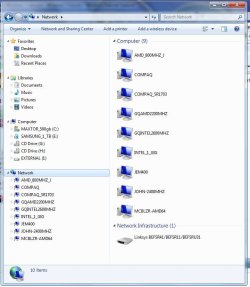
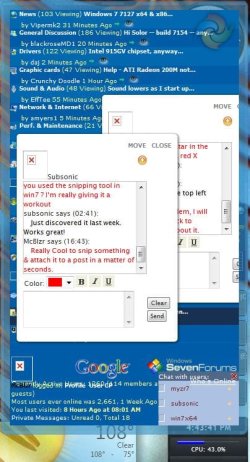
When you get things up & running check out the 7_Forums Desktop Gadget :) It is really neat & keeps you up to date on what is happening here :cool:

And the snipping tool in win7 is fantastic ;)
 

Attachments

  • NetWork_Computers.JPG
    NetWork_Computers.JPG
    67 KB · Views: 185
  • Chat_Gadget.JPG
    Chat_Gadget.JPG
    66.9 KB · Views: 186

My Computer

Computer type
PC/Desktop
Computer Manufacturer/Model Number
Built them myself, Science Experiments !
OS
Win7 Enterprise, Win7 x86 (Ult 7600), Win7 x64 Ult 7600, TechNet RTM on AMD x64 (2.8Ghz)
CPU
AMD fx8350 4ghz, AMD-32 2400mhz, AMD-64 3200mhz, AMDx64 2.8G
Motherboard
SIS 755, ECS-K8M890M-M (Ult 7600), GigaByte & others
Memory
2gb, 4gb on the Ult 7600, 4gb on Technet RTM, 32gb on FX8350
Graphics Card(s)
Draw my own Graphics, several nVidia cards
Sound Card
on motherboard
Monitor(s) Displays
19" flat scr, 28" I-Inc widescr,22" Emprex Widescr, 23" Acer
Screen Resolution
1280 x 1024, 1440 x 900, 1920 x 1080
Hard Drives
6 pata Ide HD's & 2 Sata HD's
added 80gb external on Ult 7600 computer,
numerous extra 1tb, 2TB, 3Tb SATA HD's
A collection of ext HD Docks w/ HDs
PSU
430w, 550w, 600w, 700, 800, etc
Case
All Generic Full Towers
Cooling
Open Air & a few fans, some w/ colored LEDs
Keyboard
Compaq & Dell recycled from GoodWill
Mouse
Made in China Optical Wired Mouse
Internet Speed
Fast Cable InterNet
Antivirus
AVG Free on 24 different Desktops, NO Problems!
Browser
IE 8 is preferred, but use FireFox sometimes
Other Info
Linksys Routers, switches, & Hubs
Too Many USB Flash Drives to count, Biggest is 64GB !
Eight computers in my home network.
Sixteen computers at my business network.
Linked via TeamViewer !
Lots of old used spare computer parts everywhere!
I'm very frustrated, but am slightly closer to solving this problem. After trying for several hours to see the XP machine on the network, I realized that I might need to upgrade that machine to SP3. Then, I realized that it also needed the Link Layer Protocol Responder added to the system, and a hotfix was required to make this work with SP3. Finally, managed to get all of that sorted out, and here is my current dilemma:

When I go to the network sharing center to view Network Computers and Devices, I can only see the two Windows 7 machines. However, if I click on "See Full Map," I've confirmed that the Windows 7 machines can actually see my XP system on the network. Woo hoo!

But I still cannot add the XP machine's shared printer. Sigh.... Does anyone have any ideas?

Aaron
 

My Computer

OS
Vista
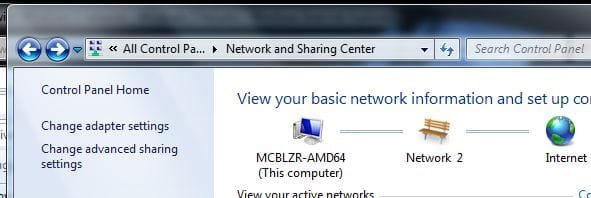
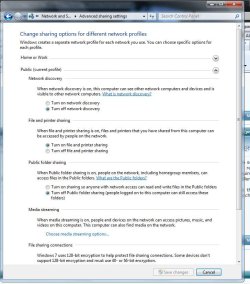
I snipped these for you, as this is what is working for me.
 

Attachments

  • Advanced settings.JPG
    Advanced settings.JPG
    26.3 KB · Views: 293
  • Discovery_Settings.JPG
    Discovery_Settings.JPG
    88.4 KB · Views: 1,468

My Computer

Computer type
PC/Desktop
Computer Manufacturer/Model Number
Built them myself, Science Experiments !
OS
Win7 Enterprise, Win7 x86 (Ult 7600), Win7 x64 Ult 7600, TechNet RTM on AMD x64 (2.8Ghz)
CPU
AMD fx8350 4ghz, AMD-32 2400mhz, AMD-64 3200mhz, AMDx64 2.8G
Motherboard
SIS 755, ECS-K8M890M-M (Ult 7600), GigaByte & others
Memory
2gb, 4gb on the Ult 7600, 4gb on Technet RTM, 32gb on FX8350
Graphics Card(s)
Draw my own Graphics, several nVidia cards
Sound Card
on motherboard
Monitor(s) Displays
19" flat scr, 28" I-Inc widescr,22" Emprex Widescr, 23" Acer
Screen Resolution
1280 x 1024, 1440 x 900, 1920 x 1080
Hard Drives
6 pata Ide HD's & 2 Sata HD's
added 80gb external on Ult 7600 computer,
numerous extra 1tb, 2TB, 3Tb SATA HD's
A collection of ext HD Docks w/ HDs
PSU
430w, 550w, 600w, 700, 800, etc
Case
All Generic Full Towers
Cooling
Open Air & a few fans, some w/ colored LEDs
Keyboard
Compaq & Dell recycled from GoodWill
Mouse
Made in China Optical Wired Mouse
Internet Speed
Fast Cable InterNet
Antivirus
AVG Free on 24 different Desktops, NO Problems!
Browser
IE 8 is preferred, but use FireFox sometimes
Other Info
Linksys Routers, switches, & Hubs
Too Many USB Flash Drives to count, Biggest is 64GB !
Eight computers in my home network.
Sixteen computers at my business network.
Linked via TeamViewer !
Lots of old used spare computer parts everywhere!
I'm very frustrated, but am slightly closer to solving this problem. After trying for several hours to see the XP machine on the network, I realized that I might need to upgrade that machine to SP3. Then, I realized that it also needed the Link Layer Protocol Responder added to the system, and a hotfix was required to make this work with SP3. Finally, managed to get all of that sorted out, and here is my current dilemma:

When I go to the network sharing center to view Network Computers and Devices, I can only see the two Windows 7 machines. However, if I click on "See Full Map," I've confirmed that the Windows 7 machines can actually see my XP system on the network. Woo hoo!

But I still cannot add the XP machine's shared printer. Sigh.... Does anyone have any ideas?

Aaron

I did not do any Link Layered stuff nor did I have to upgrade all XP machines to SP3, most are still at SP2. :huh:
 

My Computer

Computer type
PC/Desktop
Computer Manufacturer/Model Number
Built them myself, Science Experiments !
OS
Win7 Enterprise, Win7 x86 (Ult 7600), Win7 x64 Ult 7600, TechNet RTM on AMD x64 (2.8Ghz)
CPU
AMD fx8350 4ghz, AMD-32 2400mhz, AMD-64 3200mhz, AMDx64 2.8G
Motherboard
SIS 755, ECS-K8M890M-M (Ult 7600), GigaByte & others
Memory
2gb, 4gb on the Ult 7600, 4gb on Technet RTM, 32gb on FX8350
Graphics Card(s)
Draw my own Graphics, several nVidia cards
Sound Card
on motherboard
Monitor(s) Displays
19" flat scr, 28" I-Inc widescr,22" Emprex Widescr, 23" Acer
Screen Resolution
1280 x 1024, 1440 x 900, 1920 x 1080
Hard Drives
6 pata Ide HD's & 2 Sata HD's
added 80gb external on Ult 7600 computer,
numerous extra 1tb, 2TB, 3Tb SATA HD's
A collection of ext HD Docks w/ HDs
PSU
430w, 550w, 600w, 700, 800, etc
Case
All Generic Full Towers
Cooling
Open Air & a few fans, some w/ colored LEDs
Keyboard
Compaq & Dell recycled from GoodWill
Mouse
Made in China Optical Wired Mouse
Internet Speed
Fast Cable InterNet
Antivirus
AVG Free on 24 different Desktops, NO Problems!
Browser
IE 8 is preferred, but use FireFox sometimes
Other Info
Linksys Routers, switches, & Hubs
Too Many USB Flash Drives to count, Biggest is 64GB !
Eight computers in my home network.
Sixteen computers at my business network.
Linked via TeamViewer !
Lots of old used spare computer parts everywhere!
As obvious and these sound, you would be surprised at how many veteran PC guru's forget these.:o

Did you turn OFF the firewall on the XP box?
Also, did you add the printer and file sharing protocol to the NIC?
 

My Computer

Computer Manufacturer/Model Number
Home
OS
Windows XP, Windows 7
CPU
AMD Athlon 64 x2 Dual Core 5400+
Motherboard
MSI
Memory
6G
Graphics Card(s)
Nvidia 9800 GT x2
Sound Card
onboard
Monitor(s) Displays
LG W1952TQ
Hard Drives
2-SATA
2-IDE
PSU
580W
Case
Soyo Dragon
Cooling
Fan, Fan, Fan, Fan
EDIT: I didn't realize how old this thread was until now. Anyhow, maybe this info will help someone else in the future.

you would be surprised at how many veteran PC guru's forget ...

turn OFF the firewall on the XP box

disabling the XP firewall is not really necessary (and I wouldn't even recommend it) so long as file and print sharing ports are allowed.

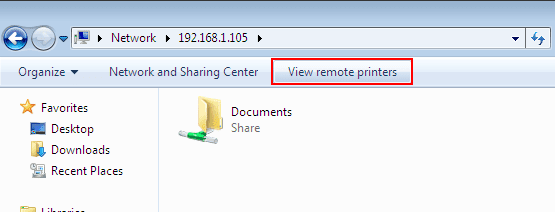
When you go to Network and double-click on the computer with the shared printer, there should be a button like this (see attachment)

Sometimes you have to log in to the computer remotely before you can access the shared printer (at least that is how I have configured my network. In the XP computer, Local Security Policy, I have disabled Anonymous access (also Guest access) as well as "Simple File Sharing").
 

Attachments

  • viewprint.png
    viewprint.png
    7.1 KB · Views: 47
Last edited:

My Computer

Computer Manufacturer/Model Number
Too many to list.
OS
XP, Seven, 2008R2
CPU
AMD, Intel, VIA
Motherboard
Various
Memory
Corsair, Kingston, etc.
Graphics Card(s)
ATI, NVIDIA
Monitor(s) Displays
Samsung
Hard Drives
Maxtor, Western Digital
Keyboard
qwerty
Internet Speed
22 Mb/s @ home, 1 Gb/s @ server
Other Info
All of my systems still run fastest on XP 32-bit for the most part. Win7 is fun to play with, but I still prefer XP for raw speed, security, and functionality.
HI, I kind of have a similar issue and question in that I have my PSC 2355 HP printer/scanner/copier connected via USB cable to my desktop which is running windows 7 64 bit, i would like to be able to share this printer with my Compaq Presario laptop which is running windows XP home edition, I don't want to upgrade the laptop to 7 really as the system is very stable and reliable and thus far my new desktop with 7 isnt..

I can stream music from the laptop media player to my desktop and that seems to work, i can also see the laptop for file sharing in the network map on the desktop in 7 but it says that it cant access it, ideally I would like to file share from the desktop to the laptop also but the XP laptop doesn't seem able to see the main desktop PC, I tried the configure home network option in XP and it says i should create a network settings disk which i did by saving to a USB stick but i don't know what to do from there???

Any help appreciated, thanks....
 

My Computer

Computer type
PC/Desktop
Computer Manufacturer/Model Number
Nomad Creative Solutions (Home build)
OS
Windows 7 64 bit
CPU
AMD hexa core AMD Phenom II X6 1090T BE processor 3.2ghz
Motherboard
ASUS M4N98TD EVO with sli NVIDIA 980a chipset
Memory
8gb 2 x 4gb Crucial Tactical Tracers Elite DDR3 1600mhz
Graphics Card(s)
MSI NVIDIA GTX660OC 2048MB AT 1215MHZ
Sound Card
Onboard VIA HD audio 1708S
Monitor(s) Displays
samsung 40 inch LED monitor
Screen Resolution
1920 X 1080 P
Hard Drives
1 TB Samsung f3 spinpoint
1 TB SATA WDC green
500GB SATA Seagate
250 GB IDE Samsung
PSU
800w PSU
Case
Coolermaster CM690 II Advanced
Cooling
1x140mm In, 2x120mm In, 2x140mm Out, 1x120mm Out
Keyboard
WIRELESS KEYBOARD/TOUCH PAD
Internet Speed
10.6MBPS
Other Info
WINDOWS 7 HOME PREMIUM 64 BIT SP1

Tuniq Tower 120 Extreme CPU cooler
When I go to the network sharing center to view Network Computers and Devices, I can only see the two Windows 7 machines. However, if I click on "See Full Map," I've confirmed that the Windows 7 machines can actually see my XP system on the network. Woo hoo!

But I still cannot add the XP machine's shared printer. Sigh.... Does anyone have any ideas?

Aaron

The trick here is NOT to bring XP up to Win7... you need to go the other way and set Win7 up to understand XP style sharing... i.e. Workgroups.


Ok... you're using a "Home Network"... ya?

If so then you need to switch to a "Work Network" then in advanced sharing...

Turn on network discovery
Turn on file and printer sharing
Turn off media sharing
Turn off password protected sharing
Turn on User names and Passwords to access other computers.

In your network adaptor properties
Uncheck Internet protocal TCPIP V6
Uncheck both Link Layer topology drivers

Reboot...

Can you see the XP machines now?
 

My Computer

Computer Manufacturer/Model Number
Homebrew
OS
XP Pro SP3 X86 / Win7 Pro X86
CPU
Amd 64 x2 4200 (2.4ghz)
Motherboard
Asus M2N-MX SE Plus
Memory
Kingston DDR2 800 2gb
Graphics Card(s)
Nvidia GF-8400
Sound Card
Realtek on Motherboard
Monitor(s) Displays
Acer x-193bw
Screen Resolution
1440 x 900
Hard Drives
Western Digital 500g
PSU
350watt In-Win
Case
In-Win
Cooling
Air
Keyboard
yes
Mouse
yes
Internet Speed
5mpbs
Other Info
Also ASRock ION 330 as HTPC (on XP).
Acer Aspire as GP netbook (on XP).
Back
Top