
ShellFolderFix - Manage folder window positions/size

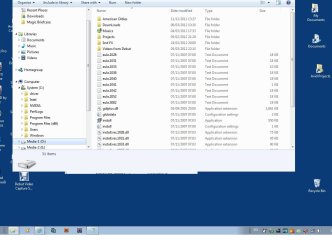
jpg of a snapped folder

Exellent and blessed tool. Thanks a lot!

My only problem: When open some specific folders, not by pointing the mouse and "Open in a new window", but by double clicking it, I get a snapped window.
I can then pull it a little, or maximize it, to restore its full shape.
Any idea for how I can fix this?
attached here is a jpg of a snapped window
Thanks again.
Using windows 7 professional x64
 

Attachments
  • snapped window.jpg
    snapped window.jpg
    187.3 KB · Views: 46

My Computer

OS
Windows 7 Professional x64
problem is solved

tick.png


my problem is solved by checking the "Enable Basic theme redraw fix"
in ShellFolderFix options


Exellent and blessed tool. Thanks a lot!

My only problem: When open some specific folders, not by pointing the mouse and "Open in a new window", but by double clicking it, I get a snapped window.
I can then pull it a little, or maximize it, to restore its full shape.
Any idea for how I can fix this?
attached here is a jpg of a snapped window
Thanks again.
Using windows 7 professional x64
 

My Computer

OS
Windows 7 Professional x64
Seems to be working in Win 8 Consumer Preview 64 bit

ShellFolderFix seems to be working for me in Win 8 Consumer Preview 64 bit.

As an example My Computer, Recycle Bin, Network maintained their respective sizes / locations. I created a couple of folders, sent a shortcut for each to the desktop, then opened the shortcut & resized. Then reopened the previously mentioned Win 8 std folders. Everything retained the size and location.

But of course, turning off the crap to get a useable desktop and folders with that Office 2007 "ribbon" annoyance minimized is a whole different story. Now for a Start Button, Hibernate that works, reading pdfs w/o everything in the background going black, etc.
 

My Computer

OS
Win 7 Pro 64 bit
I've been using ShellFolderFix for a while on one PC, but have just installed W7 Home Premium on a new PC and on the surface at least, SP1 seems to have fixed the original problem. Can anyone comment on what ShellFolderFix does that SP1 does not?
 

My Computer

OS
Windows 7 Pro 64-bit
I've been using ShellFolderFix for a while on one PC, but have just installed W7 Home Premium on a new PC and on the surface at least, SP1 seems to have fixed the original problem. Can anyone comment on what ShellFolderFix does that SP1 does not?

Not meaning to hijack the thread, but if I understand it shellfolderfix remembers the windows size and position for "windows" dialogs, but not for applications. I've been using Window Manager since before Windows 7 even went retail, but it doesn't work very well.

Are you saying that SP1 fixed the size/position issues? Because I've not been lucky enough to experience that. Even on SP1 it still exhibits the same annoying behaviours.

I was going to use shellfolderfix, it has a good rep. But I would really like to have it rememeber my application windows too. If SP1 fixed the issues, how do I make mine work, and is there a real need for shellfolderfix if that is all I want from it?
 

My Computer

Computer type
PC/Desktop
Computer Manufacturer/Model Number
Home Made
OS
Linux Mint 17 Cinnamon | Win 7 Ult x64
CPU
Intel I7-3770K @ 4.2ghz
Motherboard
ASRock Extreme 4
Memory
32GB G-Skill C10Q
Graphics Card(s)
EVGA GTX 670 2GB SC
Sound Card
Creative Fatality ExtremeGamer
Monitor(s) Displays
LG E2742V x 2
Screen Resolution
1920x1080
Hard Drives
256GB Vertex 4 SSD
2TB Seagate ST2000DM001
1TB Seagate ST1000DM003
PSU
Corsair HX 650
Case
HAF 932 advanced
Cooling
Corsair H100i liquid cooler
Keyboard
Logitech Wireless
Mouse
Logitech Wireless
Internet Speed
OptusNet NBN 100/40
Antivirus
Malwarebytes
Browser
Firefox 30
Other Info
Router: Sagemcom F@st 3846 Crippled by Optus.
No, SP1 does not "fix" the issue. It's not an issue to fix, according to Microsoft. W7 not remembering window positions is fully intentional. That's the way they want it. They think it's what people want. Utterly crazy, but there it is.

About application window position; Not sure what you mean. Most, if not all of my applications open at the same place I last closed them. Firefox, Office, Paintshop Pro, Nero - even Notepad and Calculator. Those applications that doesn't, doesn't do it because the application doesn't do it. Not related to the OS as far as I know.
 
Last edited:

My Computer

OS
W7
About application window position; Not sure what you mean. Most, if not all of my applications open at the same place I last closed them. Firefox, Office, Paintshop Pro, Nero - even Notepad and Calculator. Those applications that doesn't, doesn't do it because the application doesn't do it. Not related to the OS as far as I know.

When I downloaded shellfolderfix I recall reading some notes that it doesn't do application windows, and Window Manager was suggested, as long as you don't let the two conflict. I've never actually tried it, but I think I better, because Window Manager is driving me crazy (cuts off windows so you can't see the buttons, forgets settings and more).

I'll post back with my results.

I would be interested in know what peter6389 wes referring to though..
 

My Computer

Computer type
PC/Desktop
Computer Manufacturer/Model Number
Home Made
OS
Linux Mint 17 Cinnamon | Win 7 Ult x64
CPU
Intel I7-3770K @ 4.2ghz
Motherboard
ASRock Extreme 4
Memory
32GB G-Skill C10Q
Graphics Card(s)
EVGA GTX 670 2GB SC
Sound Card
Creative Fatality ExtremeGamer
Monitor(s) Displays
LG E2742V x 2
Screen Resolution
1920x1080
Hard Drives
256GB Vertex 4 SSD
2TB Seagate ST2000DM001
1TB Seagate ST1000DM003
PSU
Corsair HX 650
Case
HAF 932 advanced
Cooling
Corsair H100i liquid cooler
Keyboard
Logitech Wireless
Mouse
Logitech Wireless
Internet Speed
OptusNet NBN 100/40
Antivirus
Malwarebytes
Browser
Firefox 30
Other Info
Router: Sagemcom F@st 3846 Crippled by Optus.
I'm going to do more testing (the new PC is home built and I'm getting it set up), but here's a quote from a Microsoft document on SP1 that I got here which sure suggests it should do the right thing. http://download.microsoft.com/downl...and Windows Server 2008 R2 Service Pack 1.doc


[FONT=&quot]Change to behavior of “Restore previous folders at logon” functionality[/FONT]

[FONT=&quot]SP1 changes the behavior of the “Restore previous folders at logon” function available in the Folder Options Explorer dialog. Prior to SP1, previous folders would be restored in a cascaded position based on the location of the most recently active folder. That behavior changes in SP1 so that all folders are restored to their previous positions.[/FONT]
 

My Computer

OS
Windows 7 Pro 64-bit
OK, I've verified that SP1 only partially fixes the problem. Logging out and back in leaves folders where they were and the same sizes, but if I close them and reopen they're back to the crummy cascaded look again. SFF is a must! Sadly, folder view settings are still not kept. Are we going to see this in a future SFF version? Please?
 

My Computer

OS
Windows 7 Pro 64-bit
About application window position; Not sure what you mean. Most, if not all of my applications open at the same place I last closed them. Firefox, Office, Paintshop Pro, Nero - even Notepad and Calculator. Those applications that doesn't, doesn't do it because the application doesn't do it. Not related to the OS as far as I know.

When I downloaded shellfolderfix I recall reading some notes that it doesn't do application windows, and Window Manager was suggested, as long as you don't let the two conflict. I've never actually tried it, but I think I better, because Window Manager is driving me crazy (cuts off windows so you can't see the buttons, forgets settings and more).

I'll post back with my results.

I would be interested in know what peter6389 wes referring to though..

Well, I've been running shellfolderfix for about a week now and it's working beautifully. After some experimentation, I found that WindowManager itself was the program causing the problems with applications. Scary. A Program designed to manage window size and position cuts off window sections and continually forgets size and position and is a nightmare to get it to remember some size/position of applications in the first place.

Well, I've stopped using that one. I'll stick with Shellfolderfix which actually works.
 

My Computer

Computer type
PC/Desktop
Computer Manufacturer/Model Number
Home Made
OS
Linux Mint 17 Cinnamon | Win 7 Ult x64
CPU
Intel I7-3770K @ 4.2ghz
Motherboard
ASRock Extreme 4
Memory
32GB G-Skill C10Q
Graphics Card(s)
EVGA GTX 670 2GB SC
Sound Card
Creative Fatality ExtremeGamer
Monitor(s) Displays
LG E2742V x 2
Screen Resolution
1920x1080
Hard Drives
256GB Vertex 4 SSD
2TB Seagate ST2000DM001
1TB Seagate ST1000DM003
PSU
Corsair HX 650
Case
HAF 932 advanced
Cooling
Corsair H100i liquid cooler
Keyboard
Logitech Wireless
Mouse
Logitech Wireless
Internet Speed
OptusNet NBN 100/40
Antivirus
Malwarebytes
Browser
Firefox 30
Other Info
Router: Sagemcom F@st 3846 Crippled by Optus.
shellfolderfix wont remember setting if explorer crashes

I've noticed that when explorer.exe crashes, which it is prone to do regularly on Win7, for example, if you try to perform an operation (like rename), on an object that is locked; that shellfolderfix won't remember settings at all, until I either kill and restart it, or I reboot my computer.
 

My Computer

Computer type
PC/Desktop
Computer Manufacturer/Model Number
Home Made
OS
Linux Mint 17 Cinnamon | Win 7 Ult x64
CPU
Intel I7-3770K @ 4.2ghz
Motherboard
ASRock Extreme 4
Memory
32GB G-Skill C10Q
Graphics Card(s)
EVGA GTX 670 2GB SC
Sound Card
Creative Fatality ExtremeGamer
Monitor(s) Displays
LG E2742V x 2
Screen Resolution
1920x1080
Hard Drives
256GB Vertex 4 SSD
2TB Seagate ST2000DM001
1TB Seagate ST1000DM003
PSU
Corsair HX 650
Case
HAF 932 advanced
Cooling
Corsair H100i liquid cooler
Keyboard
Logitech Wireless
Mouse
Logitech Wireless
Internet Speed
OptusNet NBN 100/40
Antivirus
Malwarebytes
Browser
Firefox 30
Other Info
Router: Sagemcom F@st 3846 Crippled by Optus.
how to make windows 7 or XP remember window size and position

I know this sounds wierd but it works. 1. Open the window that you want to resize. 2. Close or minimize other windows. 3. Right click on task bar and then left click on "show windows side by side". 4. Resize/position the window to the way you want it. 5. Close the window.

This works with most windows/programs but not all. Once you try it a few times, it's easy, and requires no extra little programs. Works with IE but all websites will open in same remembered position.
 

My Computer

Computer Manufacturer/Model Number
Dell
OS
windows home 64bit
CPU
I7
Memory
12GB ram
Сould somebody send me a copy of x64 1.1.4 @ [email protected] or alternative links. These don't work.
Thx.

Welcome to the Seven Forums
The downloads work for me
I will post it here see if you can download it from this post.
Jerry
 

Attachments

My Computer

Computer type
Laptop
Computer Manufacturer/Model Number
Sager NP9170
OS
Win 7 Pro x64 / Win 10 Pro
CPU
Intel(R) Core(TM) i7-3630QM CPU @ 2.40GHz
Motherboard
CLEVO P170EM
Memory
12 GB
Graphics Card(s)
(1) Intel(R) HD Graphics 4000 (2) NVIDIA GeForce GTX 675M
Sound Card
(1) Realtek High Definition Audio (2) Intel(R) Display Aud
Monitor(s) Displays
17.3
Screen Resolution
1920x1080
Hard Drives
(1) Samsung 860 EVO 500GB(OS) (1) Samsung 860 EVO 500GB(Data)
Keyboard
Backlite
Antivirus
MSE, Malwarebytes Pro
Browser
Firefox
Other Info
DESKTOP: Custom-built.
OS: Win 10 Pro x64.
CASE: Rosewill R5.
CPU: Intel I5 4670K CPU @ 3.40GHz.
CPU COOLER: Cool Master Hyper 212 EVO.
MOTHERBOARD: Asus Z87-A.
MEMORY: Kingston HyperX 2x4 GB.
GPU: Nvidia Geforce 650 TI.
PSU: Corsair TX750.
DRIVES: (1) Samsung 840 120 GB SSD (2) Western Digital blue 500 GB 7200 RPM.
Thank you! Thank you! Thank you!

THANK YOU! This issue was so annoying, I almost went back to XP, nothing seemed to do this job the way I wanted (that is, automatically and without my intervention). Great work! This beautiful wee app deserves its own site. Also, where do I donate? -fm (edit: ps. how do I keep my line-breaks in posts here???)
 

My Computer

OS
Windows 7 Ultimate x64
THANK YOU! This issue was so annoying, I almost went back to XP, nothing seemed to do this job the way I wanted (that is, automatically and without my intervention). Great work! This beautiful wee app deserves its own site. Also, where do I donate? -fm (edit: ps. how do I keep my line-breaks in posts here???)

Welcome to the Seven Forums
There is no place to donate, just enjoy a great Windows 7 forum. I'm not sure about the line breaks.
Jerry
 

My Computer

Computer type
Laptop
Computer Manufacturer/Model Number
Sager NP9170
OS
Win 7 Pro x64 / Win 10 Pro
CPU
Intel(R) Core(TM) i7-3630QM CPU @ 2.40GHz
Motherboard
CLEVO P170EM
Memory
12 GB
Graphics Card(s)
(1) Intel(R) HD Graphics 4000 (2) NVIDIA GeForce GTX 675M
Sound Card
(1) Realtek High Definition Audio (2) Intel(R) Display Aud
Monitor(s) Displays
17.3
Screen Resolution
1920x1080
Hard Drives
(1) Samsung 860 EVO 500GB(OS) (1) Samsung 860 EVO 500GB(Data)
Keyboard
Backlite
Antivirus
MSE, Malwarebytes Pro
Browser
Firefox
Other Info
DESKTOP: Custom-built.
OS: Win 10 Pro x64.
CASE: Rosewill R5.
CPU: Intel I5 4670K CPU @ 3.40GHz.
CPU COOLER: Cool Master Hyper 212 EVO.
MOTHERBOARD: Asus Z87-A.
MEMORY: Kingston HyperX 2x4 GB.
GPU: Nvidia Geforce 650 TI.
PSU: Corsair TX750.
DRIVES: (1) Samsung 840 120 GB SSD (2) Western Digital blue 500 GB 7200 RPM.
Thankyou for this app.

There are a few things that I still find really annoying with Windows Explorer 7, and I wonder if anyone knows of any decent workarounds:

1. I can't easily get a context menu for the current folder. In XP Explorer, I would right-click on the top-left windows titlebar icon. This would include registered context actions for applications, such as "play in Foobar", and "Mp3Tag", etc. Win7 Explorer has taken that away. ShellFolderFix has provided a way of displaying the icon, but there's only the basic context actions for Move, Size, etc.

So at the moment, I Alt-Up to go up a folder, and then have to find the folder that I've come from.

Is there any way to get a full context menu for the current folder?
 

My Computer

OS
Windows 7 Home Premium x64
Great App! One mystery I have though...

I have one program (Beyond Compare) where the window position is remembered correctly on my HP Notebook, but my HP Desktop will never remember where I've placed this program's window. Any thoughts?

Both my notebook and desktop are running Win7-64 with all updates. And the settings on both machines are pretty much set up identical to each other.

TIA!
 

My Computer

OS
Windows 7 Professional
Window border rendering issue

Ever since I installed 1.1.4 and turned off Aero, the edges of my windows don't render properly. The edges bleed into what's behind, and when I click to adjust the window size it re-renders and corrects itself. Anyone seen this??
 

My Computer

OS
Windows 7 Enterprise x64
Shortcut for Workspaces

ShellFolderFix is a great app. It has made the transition from XP to Win7 much easier. I would like to know if there is an easier way to open a Workspace other than right-clicking the tray icon and choosing Restore Workspace.

Is there a way to create a shortcut to open a Workspace? Or better yet, can the Workspace be referenced directly so it can be opened from customizable Favorites keys on a keyboard?
 

My Computer

OS
Windows 7 Enterprise
Back
Top