ShellFolderFix - Manage folder window positions/size

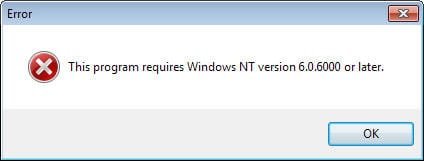
Tried to use the installer - ShellFolderFixSetup.exe - but it reported that I must have NT 6.0.6xxx to install the program. I use 32-bit Win7 Professional! Dowloaded the 32-bit ZIP version and it works fine.

BTW, it seems that Completely FREE Software (CFS) @ Completely FREE Software - Windows & DOS freeware is going to feature this program shortly. Georg may want to contact the editor at [email protected] about this. CFS is reported to be one of the largest and oldest freeware sites on the Net.
 

My Computer

Computer Manufacturer/Model Number
Home made
OS
Windows 7 Professional
CPU
Intel Core 2 Duo (E6300) 2.8GHz CPU
Motherboard
GigaByte (S-Series) GA-P35-DS3
Memory
4GB 800MHz (DDR2) RAM
Graphics Card(s)
GeForce 7300 GS 256MB (GigaByte GV-NX73G256D-RH) PCI Express
Sound Card
built-in (Realtek)
Monitor(s) Displays
Acer AL2216W 22-inch widescreen (8:5 ratio set at 1440x900)
Hard Drives
# Seagate Barracuda 7200:11 (ST31500341AS) 3GB/s 7200rpm SATA 1.5TB internal HDD
# Western Digital "My Book Essential Edition" (10EAVS) 1TB USB external HDD
Any chance of making a Portable version to run off flashdrives? Cos you know those USB sticks never save their window settings.

Could you explain a little more what you mean? Do you mean that window size and position isn't correctly restore when you open a folder on a flash drive? or do you want the program options and/or database to be saved on the flash drive?


Tried to use the installer - ShellFolderFixSetup.exe - but it reported that I must have NT 6.0.6xxx to install the program. I use 32-bit Win7 Professional! Dowloaded the 32-bit ZIP version and it works fine.

BTW, it seems that Completely FREE Software (CFS) @ Completely FREE Software - Windows & DOS freeware is going to feature this program shortly.

Hmm, that's the first report I've seen about the installer failing to recognize the windows version. 6.0.6000 is vista, did that just to be on the safe side even if it isn't meant for vista. Sounds like a bug in the installer framework. I should get the latest version of that for bug fixes.

Thanks for the heads up on the CFS thing- Where did you read that?
 

My Computer

OS
w7-64, w2k
Error.jpg
Tried to use the installer - ShellFolderFixSetup.exe - but it reported that I must have NT 6.0.6xxx to install the program. I use 32-bit Win7 Professional! Dowloaded the 32-bit ZIP version and it works fine.

BTW, it seems that Completely FREE Software (CFS) @ Completely FREE Software - Windows & DOS freeware is going to feature this program shortly. Georg may want to contact the editor at [email protected] about this. CFS is reported to be one of the largest and oldest freeware sites on the Net.

I just got the same error using the installer:
---------------------------
Error
---------------------------
This program requires Windows NT version 6.0.6000 or later.
---------------------------
OK
---------------------------

OS is Windows 7 Ultimate

moz-screenshot.png
 

My Computer

OS
Windows 7
This program requires Windows NT version 6.0.6000 or later.

OS is Windows 7 Ultimate

Odd that it seems to have started happening so suddenly, unless others just haven't reported it. Maybe related to some windows update.

If you can, use the installer-less version for now. I'll try to get out a new release, using the latest installer kit, in a day or two.
 

My Computer

OS
w7-64, w2k
Any chance of making a Portable version to run off flashdrives? Cos you know those USB sticks never save their window settings.

Could you explain a little more what you mean? Do you mean that window size and position isn't correctly restore when you open a folder on a flash drive? or do you want the program options and/or database to be saved on the flash drive?

Your program is working great on all my desktop windows, USB and local alike. But my flashdrive won't remember its window positions when I plug it into a different machine. Removables never do. So a portable version of your program would be a really sweet way to fix that.

Portable apps run completely off a removable device on any reasonably normal Windows box. No setup necessary on the host machine, and no traces left there when the user is done. (Of course, what he does with his docs is up to him.)

www.portableapps.com
www.pendriveapps.com/software/usb-tools/

Portable apps are the wave of the future.

And of the past, since everything used to be on floppies. But I like the "future" idea better. :D
 

My Computer

OS
Windows 7

My Computer

Computer Manufacturer/Model Number
Home made
OS
Windows 7 Professional
CPU
Intel Core 2 Duo (E6300) 2.8GHz CPU
Motherboard
GigaByte (S-Series) GA-P35-DS3
Memory
4GB 800MHz (DDR2) RAM
Graphics Card(s)
GeForce 7300 GS 256MB (GigaByte GV-NX73G256D-RH) PCI Express
Sound Card
built-in (Realtek)
Monitor(s) Displays
Acer AL2216W 22-inch widescreen (8:5 ratio set at 1440x900)
Hard Drives
# Seagate Barracuda 7200:11 (ST31500341AS) 3GB/s 7200rpm SATA 1.5TB internal HDD
# Western Digital "My Book Essential Edition" (10EAVS) 1TB USB external HDD
awesome!!!
 

My Computer

Computer Manufacturer/Model Number
asus
OS
win7 64
CPU
c2d 2.2
Motherboard
laptop
Memory
4 gb
Graphics Card(s)
ati 4670 w/1gb
Sound Card
external audigy2 -> klipsch promedia ultra 5.1
Cooling
dortmunder gold
@ tweaker: Man, you really made my day! I have spent hours to solve this problem! Works perfect here on Win7 64Bit! Thanks for sharing it! :)
 

My Computer

OS
Win7 64Bit
New version is available.

Hopefully the version failure of the installer is gone, but if anyone who encountered that issue could try the new one and report back, that would be great.


changes:

- fixed bug with recently used folder list not being restored across sessions even though "Keep recent folder across sessions" was enabled (this only happend when the database was at full capacity)
- added /portable commandline switch which loads/saves all configuration and data files in the same directory as the EXE file (Windows registry is not used)
- added window extact overlap prevention when multiple windows of the same folder is opened (avoids the windows ending up at the exact same position)
- fixed (rare?) bug that did not correctly identify search windows, which could result in incorrect behavior in some areas including "Update window for search result"
- some other smaller internal fixes
 

My Computer

OS
w7-64, w2k
New version is available.
- added /portable commandline switch which loads/saves all configuration and data files in the same directory as the EXE file (Windows registry is not used)

Thanks for adding portability to the new version. I'd love to start using it, but I don't understand the installation instructions. I saw no commandline options in the program, in the installer, or in the files in the .zip archive. I tried everything I could think of, but even with StartMenu/Run, it all came out just like I'd doubleclicked the Installer file. (No disabling of "start automatically", etc.) Please understand that not everybody knows command-lines. People tell us switches but nobody ever tells us how or where to actually enter them in. PR1ME
 

My Computer

OS
Windows 7
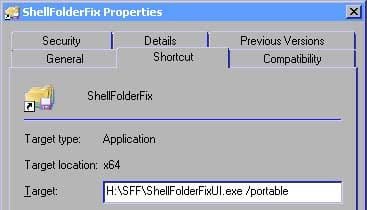
You'd have to make a (windows) shortcut/link to the exe file, and then edit the Properties of that shortcut and change "Target" to the effect of

J:\myportablestuff\ShellFolderFixUI.exe /portable


I don't know exactly how that portable "distribution" works that you linked to (the information wasn't detailed on the main pages), whether it's a completely boot an whole OS from stick distribution or if it's only running a collection of apps and the USB stick has to be plugged into an existing windows computer.

If I understand it right you plug it in to an existing system and only run apps off of it. For that scenario it doesn't make sense to use the installer, as that one installs on the current windows system (adding registry entries etc. that a normal installer does). It would require a completely installer for portable, that doesn't affect the registry of the host computer, which is a little too much work. The best thing is to just download on of the zip packages, and unzip it in a folder on the USB stick and then create a shortcut to that, and place ther shortcut on that portable app menu thingie or however it works.


edit: image added for clarity
 

Attachments

  • sffportable.jpg
    sffportable.jpg
    35 KB · Views: 22

My Computer

OS
w7-64, w2k
You'd have to make a (windows) shortcut/link to the exe file, and then edit the Properties of that shortcut and change "Target" to the effect of

J:\myportablestuff\ShellFolderFixUI.exe /portable


I don't know exactly how that portable "distribution" works that you linked to (the information wasn't detailed on the main pages), whether it's a completely boot an whole OS from stick distribution or if it's only running a collection of apps and the USB stick has to be plugged into an existing windows computer.

If I understand it right you plug it in to an existing system and only run apps off of it. For that scenario it doesn't make sense to use the installer, as that one installs on the current windows system (adding registry entries etc. that a normal installer does). It would require a completely installer for portable, that doesn't affect the registry of the host computer, which is a little too much work. The best thing is to just download on of the zip packages, and unzip it in a folder on the USB stick and then create a shortcut to that, and place ther shortcut on that portable app menu thingie or however it works.


Yep. Once I did it right, it seems to work. Though it is hard to tell which instance I'm using, since I have it on C and on F. Oh well.

Total thanks. You've improved my computer AND my flashdrive.

To anyone else confused by the "switch" thing: download the .zip version, extract to a folder on your flashdrive, make a shortcut to ShellFolderFixUI.exe from that folder, append " \portable" to the Target portion of the shortcut's Properties, and launch ShellFolderFix with that shortcut. And I did add the shortcut to my portable app launcher (PStart). Ding.

If Windoze7 (which I am slowly learning to hate) hadn't broken Autorun and the Launch batchfile, then my ShellFolderFix and my PStart and my Knot stickynotes programs would all autolaunch whenever I insert the flashdrive. But No. Microsoft broke it. FREAKIN' GRRRR....

Anyway. PortableApps.com is a "bundled suite" of apps along with a little launcher that goes in the systray. (Sort of like PStart, but not as good.) You can download everything individually if you want. There's no rebooting in either case.

Many portable apps are distroed in .zip files because, as you noted, no installer is needed and wouldn't be worth the trouble to build.

If you want, I could post several links of portable app lists, everything from a portable Tor/Firefox bundle to "gpg4usb" to an 'office' suite to fully portable desktop environments. But never any rebooting; they all run under the existing OS.

PR1ME
 

My Computer

OS
Windows 7
Thanks Again

Tweaker

Thanks again for your GREAT program. Windows 7 would not be tolerable without it!
 

My Computer

OS
windows 7
New version is available.

Hopefully the version failure of the installer is gone, but if anyone who encountered that issue could try the new one and report back, that would be great.


The installer works OK for me now. Thanks for update.
 

My Computer

Computer Manufacturer/Model Number
Home made
OS
Windows 7 Professional
CPU
Intel Core 2 Duo (E6300) 2.8GHz CPU
Motherboard
GigaByte (S-Series) GA-P35-DS3
Memory
4GB 800MHz (DDR2) RAM
Graphics Card(s)
GeForce 7300 GS 256MB (GigaByte GV-NX73G256D-RH) PCI Express
Sound Card
built-in (Realtek)
Monitor(s) Displays
Acer AL2216W 22-inch widescreen (8:5 ratio set at 1440x900)
Hard Drives
# Seagate Barracuda 7200:11 (ST31500341AS) 3GB/s 7200rpm SATA 1.5TB internal HDD
# Western Digital "My Book Essential Edition" (10EAVS) 1TB USB external HDD
Thanks again for your GREAT program.

It would be good if the "Close all folders" it could quickly close the keyboard, an example of the Ctrl-Z ....
 

My Computer

OS
windows 7
Opening window parent's position

I remember, in previous versions of windows, clicking on a folder icon in one Explorer window in order to open a new "child" window in that parent window's position. Or, I opened the window in some other way, like with a desktop shortcut, in which case there is no parent present, and the new window would, with luck, open where it was when last closed. (Note: A child folder is not necessarily a folder that is subjacent to the current working folder in the directory structure. A child folder is not the same as a child window, it is merely a new window opened by clicking a folder shown in the previous window).

It is rather disorienting to my aging brain when I open a window, expecting it to open in place of the parent window that I'm looking at, eventually, then notice that the child window is already opened way over on the other side of my 17+" laptop screen. Then I wonder how long it's been there, and whether anyone else has noticed.

OK slight exaggeration. But really, Windows XP normally opened new "child" windows in the place, size, and position of the parent window, when I clicked a folder icon in that parent window. That doesn't seem to be what ShellFolderFix is doing on my Windows 7 64-bit laptop, either before or after installing ShellFolderFix.

I notice that nobody else has mentioned this, as though ShellFolderFix were providing the same window behaviour that we had with Windows XP. So I fear I've missed something obvious, ... again. Could someone straighten me out, here? Is there an option to open in the position of the parent, instead of where the child was when it was last closed? If so, is there a way to change the default?

Thanks in advance for your answer.
 
Last edited:

My Computer

Computer Manufacturer/Model Number
HP Pavilion DV8408
OS
Windows 7
CPU
AMD Tuion II Ultra Mobile M600 dual core 2.4 GHz
Is there an option to open in place of the parent, instead of where the child was when it was last closed?

Just change the option "When navigating to a new location" to either "Use window as is" or "Temporarily use window as is", that will prevent the window from moving around.
 

My Computer

OS
w7-64, w2k
K1Starr, do you have your system set to open a new window every time you navigate into (i.e., double click) a folder?

I think tweaker's response is based on his having set his system (as I have) to open new folders in the same window.

Hope this helps.

-Noel
 

My Computer

Computer Manufacturer/Model Number
Dell Precision Workstation 490
OS
Windows 7 x64
CPU
2 x Dual Core Xeon 3.2 GHz
Motherboard
Dell
Memory
12 GB
Graphics Card(s)
ATI Radeon HD 4670
Sound Card
Onboard
Monitor(s) Displays
Dual Dell 20.1" LCD
Hard Drives
Dual 500 GB, Raid 0
PSU
Dell
Case
Dell
Cooling
Dell
Appreciation and Compensation

I want to pay you for this app. Seriously. Post a link or PayPal or something.
Hi Tweaker -
I agree with Todd. This is worth a cash token of my appreciation. If you are not already being compensated, I'll help compensate you.
Jerry
 

My Computer

Computer Manufacturer/Model Number
HP Pavilion DV8408
OS
Windows 7
CPU
AMD Tuion II Ultra Mobile M600 dual core 2.4 GHz
Back
Top