- Local time
- 8:23 AM
- Messages
- 62
Just to clarify, I am NOT talking about the shield overlay for icons.
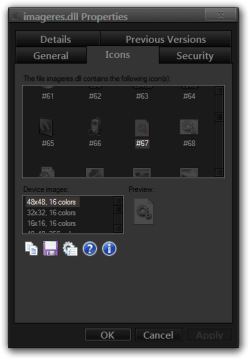
So, awhile back I came here to ask how to get my default icons back after using IconPackager. Well, finally figured it out, just had to select the regular Windows theme (simple enough). After awhile, I found out it's not "exactly" the regular Windows theme. It put all the icons back to default state, except my .dll icons.
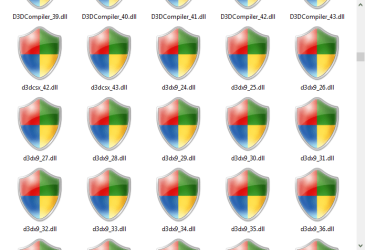
They're big red, blue, green, and yellow shields. Again, I'm not talking about the shield overlay for icons. The icons themselves are shields, see for yourself... It is very much an eye sore to me. Any way of getting the ol' dll icons back? You know the blank page with the two gears on them? I miss em'!
So, awhile back I came here to ask how to get my default icons back after using IconPackager. Well, finally figured it out, just had to select the regular Windows theme (simple enough). After awhile, I found out it's not "exactly" the regular Windows theme. It put all the icons back to default state, except my .dll icons.
They're big red, blue, green, and yellow shields. Again, I'm not talking about the shield overlay for icons. The icons themselves are shields, see for yourself... It is very much an eye sore to me. Any way of getting the ol' dll icons back? You know the blank page with the two gears on them? I miss em'!
Attachments
My Computer
- Computer type
- PC/Desktop
- Computer Manufacturer/Model Number
- Custom Built
- OS
- Windows 7 Home Premium 64-bit SP1
- CPU
- AMD FX-6300 Vishera 3.5GHz (4.1GHz Turbo)
- Motherboard
- ASRock PRO3 R2.0
- Memory
- Corsair 8GB DDR3
- Graphics Card(s)
- 1024MB ATI Radeon HD 4650 (XFX Pine Group)
- Sound Card
- AMD High Definition Audio Device
- Monitor(s) Displays
- VE247 on ATI Radeon HD 4650
- Screen Resolution
- 1920x1080
- Hard Drives
- 150GB Seagate ST316081,
3TB Seagate Barracuda ST3000DM001
- Mouse
- Razor Deathadder