shift & ctrl not persistent when held down

jmainer

New member
Local time
5:44 PM
Messages
4
Hello, I am having a very strange behavior. When I press and hold the SHIFT key, it will not persist. For example, if I wanted to type a row of "*", I press the shift key and hold it, and it will type "*****888888". This happens on the laptop keyboard, a USB keyboard I attached, and the on screen keyboard, so it does not appear to be a hardware problem.

It seems as though the shift is activated for only about a second when I press and hold the shift key, and then it reverts back.

The same thing happens to the CTRL key. Very annoying when trying to do cut/paste (ctrl-c/ctrl-v).

Can anyone help?

Thanks in advance!!!
 

My Computer

Computer Manufacturer/Model Number
HP 6530b laptop
OS
Win 7 enterprise 64 bit
CPU
Intel Core 2 Duo T9600 2.80 Ghz
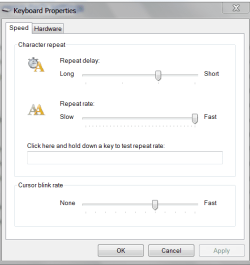
I just tried on my system and I can not duplicate your problem.

I've included a snapshot of my settings from:
Control Panel | Keyboard

keyboardsettings.PNG
 

My Computer

Computer Manufacturer/Model Number
Toshiba Satellite S875D-S7239 laptop
OS
MS Windows 7 Ultimate SP1 64-bit
CPU
AMD A10-4600M
Motherboard
AMD Pumori (Socket FT1)
Memory
6.00 GB Dual-Channel DDR3 @ 798MHz (11-11-12-28)
Graphics Card(s)
AMD Radeon HD 7660G
Sound Card
High Definition Audio Device
Monitor(s) Displays
Generic PnP Monitor (1600x900@60Hz)
Screen Resolution
1600x900@60Hz
Hard Drives
SSD 119GB Corsair CSSD-V128GB2 ATA Device
Keyboard
Standard PS/2 Keyboard
Mouse
HP Wireless Optical Mobile Mouse Model FHA-3410
Internet Speed
What the local pub, local coffee shop offers.
Other Info
Optical Drive:MATSHITA BD-CMB UJ160B ATA Device


Also have an Asus ha1002xp netbook with Win 7 Ultimate installed.
Yes, I have confirmed that the character repeat settings are properly set. I am wondering if there is some registry key that is messed up, but cannot find anything on this issue. I also cannot find details about the keyboard registry keys that I might be able to check. short of reinstalling the OS, I was hoping for some clue as to what might be causing this. Any thoughts on next step?
 

My Computer

Computer Manufacturer/Model Number
HP 6530b laptop
OS
Win 7 enterprise 64 bit
CPU
Intel Core 2 Duo T9600 2.80 Ghz
One other question, are you aware of other Win 7 forums that might have some insight into this?
 

My Computer

Computer Manufacturer/Model Number
HP 6530b laptop
OS
Win 7 enterprise 64 bit
CPU
Intel Core 2 Duo T9600 2.80 Ghz
Install and run CCleaner. Run the cleaner portion thereof. Afterwards, carry out following:
LIST OF STARTUP PROGRAMS USING CCLEANER


CCleaner | Tasks icon | Startup tab | click on Save to text file button (bottom right side)

Using the PAPER CLIP icon in the top panel of a Message Reply window, attach the .txt file generated by CCleaner.

Link to ccleaner in my sig.
 
Last edited:

My Computer

Computer Manufacturer/Model Number
Toshiba Satellite S875D-S7239 laptop
OS
MS Windows 7 Ultimate SP1 64-bit
CPU
AMD A10-4600M
Motherboard
AMD Pumori (Socket FT1)
Memory
6.00 GB Dual-Channel DDR3 @ 798MHz (11-11-12-28)
Graphics Card(s)
AMD Radeon HD 7660G
Sound Card
High Definition Audio Device
Monitor(s) Displays
Generic PnP Monitor (1600x900@60Hz)
Screen Resolution
1600x900@60Hz
Hard Drives
SSD 119GB Corsair CSSD-V128GB2 ATA Device
Keyboard
Standard PS/2 Keyboard
Mouse
HP Wireless Optical Mobile Mouse Model FHA-3410
Internet Speed
What the local pub, local coffee shop offers.
Other Info
Optical Drive:MATSHITA BD-CMB UJ160B ATA Device


Also have an Asus ha1002xp netbook with Win 7 Ultimate installed.
UPDATE YOUR SEVENFORUMS SYSTEM SPECS


User CP (3rd item in the top menu bar) |
in left-hand column, under Your Profile, Edit System Spec |


Use Speccy - System Information - Free Download
and/or SIW to gather info for filling in the blanks.

Do me a favor and add the word laptop or desktop to the “system manufacturer” block.

Use the “Other Info” block for Optical Reader, Mouse, touchpad, wifi adapter, speakers, monitor

Scroll down and click on the SAVE CHANGES button.
 

My Computer

Computer Manufacturer/Model Number
Toshiba Satellite S875D-S7239 laptop
OS
MS Windows 7 Ultimate SP1 64-bit
CPU
AMD A10-4600M
Motherboard
AMD Pumori (Socket FT1)
Memory
6.00 GB Dual-Channel DDR3 @ 798MHz (11-11-12-28)
Graphics Card(s)
AMD Radeon HD 7660G
Sound Card
High Definition Audio Device
Monitor(s) Displays
Generic PnP Monitor (1600x900@60Hz)
Screen Resolution
1600x900@60Hz
Hard Drives
SSD 119GB Corsair CSSD-V128GB2 ATA Device
Keyboard
Standard PS/2 Keyboard
Mouse
HP Wireless Optical Mobile Mouse Model FHA-3410
Internet Speed
What the local pub, local coffee shop offers.
Other Info
Optical Drive:MATSHITA BD-CMB UJ160B ATA Device


Also have an Asus ha1002xp netbook with Win 7 Ultimate installed.

My Computer

Computer type
PC/Desktop
Computer Manufacturer/Model Number
Home Built Desktop By DataTech
OS
Windows 7 Ultimate X64 SP1
CPU
Intel i5-2550K, Differing ~4.4-4.8GHz No built in GPU
Motherboard
ASUS P8Z68-V PRO/GEN3
Memory
16GB G.Skill Sniper 1866MHz @ 2133MHz 2x8GB
Graphics Card(s)
ASUS GTX650TIB-DC2OC-2GD5, (650TI Boost)
Sound Card
Onboard Realtek 5-1
Monitor(s) Displays
Samsung P2570HD
Screen Resolution
1920x1080
Hard Drives
Samsung 840 Pro 256GB SSD for OS, 500GB Seagate Constellation (Enterprise drive) for Data
PSU
Corsair HX650W
Case
Inwin Dragon Rider
Cooling
Hyper 212 EVO w/two Noctua fans, push-pull, @1300 RPM
Keyboard
E-Z Eyes, bright yellow keys with large characters
Mouse
steelseries SENSEI Laser Pro Gaming
Internet Speed
48-51Mbs Mbs down, 11 Mbs up Xfinity Cable
Antivirus
Norton Internet Security 2013
Browser
IE 10, Opera, Pale Moon if needed
Other Info
4 case fans, LG BluRay-RE, ASUS DVD-RW, Mr. Fusion power supply, 1.21 gigawatts.

My Computer

Computer Manufacturer/Model Number
Toshiba Satellite S875D-S7239 laptop
OS
MS Windows 7 Ultimate SP1 64-bit
CPU
AMD A10-4600M
Motherboard
AMD Pumori (Socket FT1)
Memory
6.00 GB Dual-Channel DDR3 @ 798MHz (11-11-12-28)
Graphics Card(s)
AMD Radeon HD 7660G
Sound Card
High Definition Audio Device
Monitor(s) Displays
Generic PnP Monitor (1600x900@60Hz)
Screen Resolution
1600x900@60Hz
Hard Drives
SSD 119GB Corsair CSSD-V128GB2 ATA Device
Keyboard
Standard PS/2 Keyboard
Mouse
HP Wireless Optical Mobile Mouse Model FHA-3410
Internet Speed
What the local pub, local coffee shop offers.
Other Info
Optical Drive:MATSHITA BD-CMB UJ160B ATA Device


Also have an Asus ha1002xp netbook with Win 7 Ultimate installed.
Hello Karlsnooks. Here is the startup.txt file from ccleaner. Let me know if you have any ideas.
 

Attachments

My Computer

Computer Manufacturer/Model Number
HP 6530b laptop
OS
Win 7 enterprise 64 bit
CPU
Intel Core 2 Duo T9600 2.80 Ghz
WIN | type MSCONFIG | ENTER | STARTUP tab |
uncheck ALL except for:
SynTPEnh %ProgramFiles%\Synaptics\SynTP\SynTPEnh.exe |
APPLY | RESTART your computer

WIN is the key with the Microsoft flag on top.

Don't worry. You haven't disabled or deleted any programs. You've simply told WIN 7 that you don't want those programs to run at startup time.

The least interfering anti-virus program which is also free, excellent and the only anti-virus that I recommend is Microsoft Security Essentials (link in my tab).
 

My Computer

Computer Manufacturer/Model Number
Toshiba Satellite S875D-S7239 laptop
OS
MS Windows 7 Ultimate SP1 64-bit
CPU
AMD A10-4600M
Motherboard
AMD Pumori (Socket FT1)
Memory
6.00 GB Dual-Channel DDR3 @ 798MHz (11-11-12-28)
Graphics Card(s)
AMD Radeon HD 7660G
Sound Card
High Definition Audio Device
Monitor(s) Displays
Generic PnP Monitor (1600x900@60Hz)
Screen Resolution
1600x900@60Hz
Hard Drives
SSD 119GB Corsair CSSD-V128GB2 ATA Device
Keyboard
Standard PS/2 Keyboard
Mouse
HP Wireless Optical Mobile Mouse Model FHA-3410
Internet Speed
What the local pub, local coffee shop offers.
Other Info
Optical Drive:MATSHITA BD-CMB UJ160B ATA Device


Also have an Asus ha1002xp netbook with Win 7 Ultimate installed.
Back
Top