Solved Shifting Win7 partition

nayhem

New member
Local time
10:12 PM
Messages
5
Years ago, I installed Win7 as dual boot on an old XP box my family uses. The XP partition was shrunk, and Win7 took up the back half of an 80GB drive. Now that the Win7 partition is getting critical in size, I want to fully replace the XP partition with the Win7 and give it the entire drive. What would be the best way to go about this?

My first attempt resulted in deactivation (I suppose some of the robocopy settings I used to pass over the hibernation and page files also skipped licensing). If I didn't know better, I would also have lost the Win7 partition.

So I'm mainly concerned with keeping the licensing intact, and also avoiding drive letter issues if possible.

If there is a way to simply extend the front of the Win7 partition, that would probably be my first choice.
 

My Computer

Computer Manufacturer/Model Number
Gateway
OS
Windows 7 RC 7100
CPU
Pentium 4 530, 3.00 GHz
Motherboard
Intel D915GAG
Memory
2GB DDR 400
Graphics Card(s)
ATI Radeon HD 2600
Sound Card
Realtek integrated
Screen Resolution
1024×768
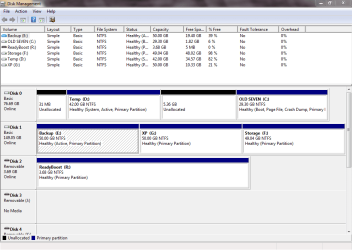
Please post back a screenshot of your maximized Disk Management drive map and listings:

1. Type Disk Management in Start Search box.
2. Open Disk Mgmt. window and maximize it.
3. Type Snipping Tool in Start Search box.
4. Open Snipping Tool, choose Rectangular Snip, click New, draw a box around full drive map and all listings.
5, Save Snip, attach using paper clip in Reply Box.

Tell us what is on each partition.

We will give you the specific steps to recover the WIn7 boot files and disk space into its partition.
 
The main task is moving C: to D:'s position (note 6% free space), or somehow extending it forward. D: is otherwise disposable. I don't recall what the 31MB at front was doing—HDTune doesn't indicate any problems with sectors.

G: was the XP installation that used to be in D: (Thinking about it now, I'm not sure if it will boot correctly, but it hasn't been used in quite a while.) E: is available for space (backups/imaging) and currently contains nothing indisposable.

I had tried using something like "robocopy C: D: /copyall /xj /mir /r:2" (not sure about actual drive letters, since they were shifted around in Recovery Mode). It told me 22 copies had failed, which I suppose were hiberfil.sys and pagefile.sys, and probably licensing.
 

Attachments

  • Capture.PNG
    Capture.PNG
    25.3 KB · Views: 8

My Computer

Computer Manufacturer/Model Number
Gateway
OS
Windows 7 RC 7100
CPU
Pentium 4 530, 3.00 GHz
Motherboard
Intel D915GAG
Memory
2GB DDR 400
Graphics Card(s)
ATI Radeon HD 2600
Sound Card
Realtek integrated
Screen Resolution
1024×768
Mark E Inactive: Partition - Mark as Inactive - Windows 7 Forums

Then Mark Win7 C Partition Active

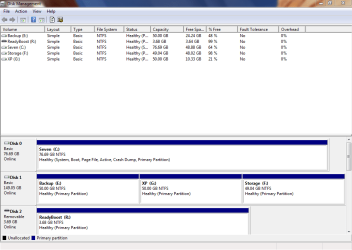
Power down to unplug Disk1, boot Win7 DVD System Recovery Options or System Repair Disk to Run Startup Repair - Run up to 3 Separate Times.

Once WIn7 boots and holds the System Active boot flags, boot into free Partition Wizard bootable CD, rightclick D to Delete, click OK.

Then rightclick C to Resize, slide left border all the way to the left side of HD, Click OK, Apply steps.

You can now plug back in the other HD's, if desired install EasyBCD (click Download - no Name or Email required) to add XP on Add OS Entry tab. If it fails to boot run an XP Repair Install with all other HD's unplugged.
 
That'll do. Thanks!
 

Attachments

  • Capture 2.PNG
    Capture 2.PNG
    22.5 KB · Views: 4

My Computer

Computer Manufacturer/Model Number
Gateway
OS
Windows 7 RC 7100
CPU
Pentium 4 530, 3.00 GHz
Motherboard
Intel D915GAG
Memory
2GB DDR 400
Graphics Card(s)
ATI Radeon HD 2600
Sound Card
Realtek integrated
Screen Resolution
1024×768
Back
Top