
guillaume133
New member
Hello,
Is there a Short-cut in Windows 7 Premium for selecting which screens you see?
For instance, If you plug in a second screen or a projector, and you want to select whether you see only the screen plugged in, or only the initial one, or both..
Thank you
Is there a Short-cut in Windows 7 Premium for selecting which screens you see?
For instance, If you plug in a second screen or a projector, and you want to select whether you see only the screen plugged in, or only the initial one, or both..
Thank you
My Computer
- Computer Manufacturer/Model Number
- Packard Bell imedia S3720
- OS
- Windows 7 Premium 64 BIT
- CPU
- Pentium(R) Dual-Core CPU E5300
- Memory
- 2.60 GHZ
- Graphics Card(s)
- NVIDIA GeForce G210
- Sound Card
- Realteck 7.1 high definition audio
- Monitor(s) Displays
- Acer x223w
- Screen Resolution
- 1680 x 1050
- Hard Drives
- 230 GB internal hard drive
- Other Info
- 4GB of RAM


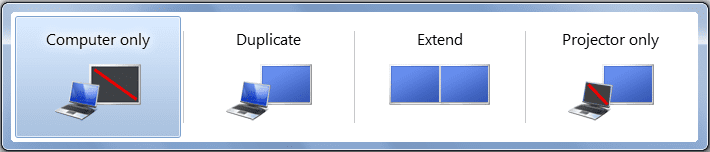
 rb: and type Connect to a Projector in the search box and press enter/return.