
Short start menu puzzle

debugged

New member
Local time
2:25 PM
Messages
195
Location
UK
This is great for minimalists, but I have no idea how it came about. (I'm talking about the size of the box, not the fact that I have nothing in it!):

short start 4.PNG

Compared with normal (tall) start menu:
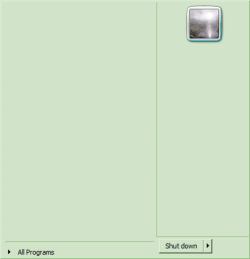
tall start 4.PNG

I would love to know how to get this result intentionally. This is with modified Windows Classic theme. When I put the same theme in other identical 7 systems, it gets the usual large start menu. I've searched through system settings and registry and it all looks the same as my other almost identical Windows 7 installations. No help finding a Start Menu size adjustment online either - the only advice is to install various shell replacements or desktop managers which I don't want to do.

Has anyone done this on purpose? Or any suggestions where to look for the setting that makes it happen?
 
Last edited:

My Computer

OS
Windows 7
I can duplicate it on my PC by selecting Do Not Show This Item, and removing other selection check marks on the Start Menu properties page.
 

My Computer

OS
Windows 7 Ultimate x64
CPU
P4 3.2
Motherboard
Intel 815GM
Memory
DDR 400
Graphics Card(s)
ATI HD3850
Sound Card
C-Media 7.1
Monitor(s) Displays
SyncMaster 244T
Screen Resolution
1920*1200
Hard Drives
Several
PSU
500
Case
PowerSpec $24
Cooling
ThermalTake copper
Internet Speed
Blazing
I can duplicate it on my PC by selecting Do Not Show This Item, and removing other selection check marks on the Start Menu properties page.

I've done what you say on many systems, and it only clears out all the links on the Start Menu, it doesn't shrink it down to the small size I see on this one particular system.

If you can shrink it down so easily, like it used to do in XP, I wonder if anyone or everyone else can?
 

My Computer

OS
Windows 7
Not sure if this is what you're looking for. Go to Taskbar and Start Menu Properties (right-click taskbar or start menu). On the Start Menu tab, click Customize and uncheck the "Use Large Icons" item.
save
 

Attachments

  • Capture.PNG
    Capture.PNG
    13.1 KB · Views: 6

My Computer

Computer Manufacturer/Model Number
ASUS K42JK
OS
Windows 7 Ultimate x64 (main), Windows 8 Consumer Preview x64
...I've done what you say on many systems, and it only clears out all the links on the Start Menu, it doesn't shrink it down to the small size I see on this one particular system..
Lower the value for recent programs and remove pinned items. Select Do Not show user name.
 

My Computer

OS
Windows 7 Ultimate x64
CPU
P4 3.2
Motherboard
Intel 815GM
Memory
DDR 400
Graphics Card(s)
ATI HD3850
Sound Card
C-Media 7.1
Monitor(s) Displays
SyncMaster 244T
Screen Resolution
1920*1200
Hard Drives
Several
PSU
500
Case
PowerSpec $24
Cooling
ThermalTake copper
Internet Speed
Blazing
No, ziklz and DeVandal, that's not it, but thanks for replying, it helps me realize I wasn't clear about it in my first post, so I edited it. I'm only talking about the size of the Start Menu box. I've done all the customization you refer to zillions of times in the past without getting the box to be so short. So the question is how it got that way this time. Or is the question why does it usually stay so tall even when its emptied?
 

My Computer

OS
Windows 7
I know this is a few years old, but I just so happen to be starting a new Win7 image at work and also wanted to accomplish this same thing.

Ziklz was almost right. There is another part you have to adjust to make the windows shrink down a bit, along with what he suggested. When you are looking at the "customize Start Menu" box, look at the bottom of it where it says "Start menu size". Change those values to a much lower number, and it will shrink accordingly. It's leaving spaces for however many items you have it set to display. It also depends on how many buttons you have on the right side as well. If you get rid of most of them at the same time, it will shrink down a bit with it.

Hope this helps if you haven't found the solution in the past couple years haha. Or for anyone else who stumbles upon this thread in the future.
 

My Computer

Computer type
PC/Desktop
OS
Windows 7
Back
Top