Shortcut arrows missing; strange picture instead

dorkpixie

New member
Local time
11:09 AM
Messages
34
Location
On Long Island in NY
This isn't really a major issue but a minor annoyance.

Last night my boyfriend popped his removable USB storage drive in. I noticed that documents made in Notepad were opening in Visual Basic, which is not where I want them to open. So I went to properties and told it to open these types of docs in Notepad. Fine, it didn't work, but that's not the weirdest or most annoying part.
All of my desktop icons, the little arrow that shows it's a short-cut, they're all gone. In their place are those little icons for a file (particularly an image file) that windows doesn't know which program to use to open it. This happened right after I changed the properties of the one file that was not even on my computer.
I checked for viruses, checked the shortcut properties, even tried deleting the original shortcut and creating a new one; to no avail.
Does anyone know how to fix this or had this happen to them and know what caused it? Please help. Any help would be great. Thank you.
 

My Computer My Computer

At a glance

Windows Pro 7 64-bitIntel Core 2 Duo8 GB DDR2Onboard; Intel(R) Q35 chipset
Computer Manufacturer/Model Number
Lenovo 9979A11
OS
Windows Pro 7 64-bit
CPU
Intel Core 2 Duo
Motherboard
Lenovo
Memory
8 GB DDR2
Graphics Card(s)
Onboard; Intel(R) Q35 chipset
Sound Card
onboard... High Def Audio
Monitor(s) Displays
Acer V173
Screen Resolution
1280 X 1024
Hard Drives
160 GB WD (XP)
320 GB Samsung (7)
500 GB Samsung (storage)
320 Iomega External (backup & storage)
PSU
N/A onboard vid; Intel Q35 Chipset
Case
Mini
Cooling
Native Intel Core 2 Duo fan & Heatsink; 2 case fans
Keyboard
general
Mouse
general
Internet Speed
Cable
Other Info
Windows 7 Pro 64-bit
First, try this : http://www.sevenforums.com/tutorials/19449-default-file-type-associations-restore.html

If not worked, this : http://www.sevenforums.com/tutorials/700-system-restore.html to a previous day .

Third option : http://www.sevenforums.com/tutorials/1538-sfc-scannow-command-system-file-checker.html

And if everything failed, the last way is http://www.sevenforums.com/tutorials/3413-repair-install.html ; but it needs the Windows 7 installation DVD. Do you have it ? If no, Do you have the recovery partition at least ?
 

My Computer My Computer

At a glance

Microsoft Windows 10 Pro Insider Preview 64-bitIntel(R) Core(TM) i3-4130 CPU @ 3.40GHzCorsair Vengence 4GB x2 (8.00GB Dual-Channel ...2047MB GeForce GTS 450 (ZOTAC International)
Computer type
PC/Desktop
Computer Manufacturer/Model Number
Self Assembled
OS
Microsoft Windows 10 Pro Insider Preview 64-bit
CPU
Intel(R) Core(TM) i3-4130 CPU @ 3.40GHz
Motherboard
Gigabyte Technology Co., Ltd. B85M-D3H
Memory
Corsair Vengence 4GB x2 (8.00GB Dual-Channel DDR3 @ 798MHz)
Graphics Card(s)
2047MB GeForce GTS 450 (ZOTAC International)
Sound Card
Onboard (Realtek High Definition Audio)
Monitor(s) Displays
LG Flatron E2040T
Screen Resolution
1600x900
Hard Drives
Western Digital 1 TB
Seagate 500 GB
PSU
Corsair VS550
Case
Cooler Master K380
Cooling
Cooler Master Seidon 120V Plus
Keyboard
Logitech MK260r
Mouse
Logitech MK260r
Internet Speed
PMPL Broadband
Antivirus
Windows Defender + MBAM
Browser
Firefox
Other Info
Dell Studio 15" Laptop

My Computer My Computer

At a glance

Windows 7 Ultimate 32 bitIntel(R) Pentium(R) 4 CPU 3.00GHz2.50 GB RAMNVIDIA GeForce 7600 GS
Computer Manufacturer/Model Number
Home built
OS
Windows 7 Ultimate 32 bit
CPU
Intel(R) Pentium(R) 4 CPU 3.00GHz
Motherboard
ASUS P4P800-VM Motherboard Chipset: Intel 865G + ICH5
Memory
2.50 GB RAM
Graphics Card(s)
NVIDIA GeForce 7600 GS
Sound Card
SoundMax Integrated Digital Audio (Chip)
Monitor(s) Displays
ViewSonic VX 1962 wm
Screen Resolution
1680 X 1050
Hard Drives
Seagate Barracuda 7200.10 80 GB
ST380215A ATA Device 18.6 GB
Western Digital "My Book" external hard drive 750 GB
Cooling
Fan based
Keyboard
Microsoft Comfort Curve Keyboard 2000 v10 USB
Mouse
Logitec optic USB
Internet Speed
3.01 Mb/s download 0.64 Mb/s upload

My Computer My Computer

At a glance

64-bit Windows 11 Pro for WorkstationsIntel i7-8700K OC'd to 5 GHz64 GB (4x16GB) G.SKILL TridentZ RGB DDR4 3600...ASUS ROG-STRIX-GTX1080TI-O11G-GAMING
Computer type
PC/Desktop
Computer Manufacturer/Model Number
Self built custom
OS
64-bit Windows 11 Pro for Workstations
CPU
Intel i7-8700K OC'd to 5 GHz
Motherboard
ASUS ROG Maximus XI Formula Z390
Memory
64 GB (4x16GB) G.SKILL TridentZ RGB DDR4 3600 MHz
Graphics Card(s)
ASUS ROG-STRIX-GTX1080TI-O11G-GAMING
Sound Card
Integrated
Monitor(s) Displays
2 x Samsung Odyssey G7 27"
Screen Resolution
2560x1440
Hard Drives
1TB Samsung 990 PRO M.2,
4TB Samsung 990 PRO PRO M.2,
TerraMaster F8 SSD Plus NAS
PSU
Seasonic Prime Titanium 850W
Case
Thermaltake Core P3
Cooling
Corsair Hydro H115i
Keyboard
Logitech wireless K800
Mouse
Logitech MX Master 4
Internet Speed
2 Gb/s Download and 100 Mb/s Upload
Antivirus
Malwarebyte Anti-Malware Premium
Browser
Google Chrome
Other Info
Logitech Z625 speaker system,
Logitech BRIO 4K Pro webcam,
HP Color LaserJet Pro MFP M477fdn,
APC SMART-UPS RT 1000 XL - SURT1000XLI,
Galaxy S23 Plus phone

My Computer My Computer

At a glance

Microsoft Windows 10 Pro Insider Preview 64-bitIntel(R) Core(TM) i3-4130 CPU @ 3.40GHzCorsair Vengence 4GB x2 (8.00GB Dual-Channel ...2047MB GeForce GTS 450 (ZOTAC International)
Computer type
PC/Desktop
Computer Manufacturer/Model Number
Self Assembled
OS
Microsoft Windows 10 Pro Insider Preview 64-bit
CPU
Intel(R) Core(TM) i3-4130 CPU @ 3.40GHz
Motherboard
Gigabyte Technology Co., Ltd. B85M-D3H
Memory
Corsair Vengence 4GB x2 (8.00GB Dual-Channel DDR3 @ 798MHz)
Graphics Card(s)
2047MB GeForce GTS 450 (ZOTAC International)
Sound Card
Onboard (Realtek High Definition Audio)
Monitor(s) Displays
LG Flatron E2040T
Screen Resolution
1600x900
Hard Drives
Western Digital 1 TB
Seagate 500 GB
PSU
Corsair VS550
Case
Cooler Master K380
Cooling
Cooler Master Seidon 120V Plus
Keyboard
Logitech MK260r
Mouse
Logitech MK260r
Internet Speed
PMPL Broadband
Antivirus
Windows Defender + MBAM
Browser
Firefox
Other Info
Dell Studio 15" Laptop
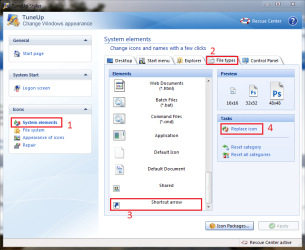
Thank you everyone so very much!!!! This one is the one that brought back my little short cut arrows: Shortcut Arrow - Change, Remove, or Restore
I am also going to try the restore default file types for the notebook files opening in Visual Studio. Again thanks you guys!!! :)
 

My Computer My Computer

At a glance

Windows Pro 7 64-bitIntel Core 2 Duo8 GB DDR2Onboard; Intel(R) Q35 chipset
Computer Manufacturer/Model Number
Lenovo 9979A11
OS
Windows Pro 7 64-bit
CPU
Intel Core 2 Duo
Motherboard
Lenovo
Memory
8 GB DDR2
Graphics Card(s)
Onboard; Intel(R) Q35 chipset
Sound Card
onboard... High Def Audio
Monitor(s) Displays
Acer V173
Screen Resolution
1280 X 1024
Hard Drives
160 GB WD (XP)
320 GB Samsung (7)
500 GB Samsung (storage)
320 Iomega External (backup & storage)
PSU
N/A onboard vid; Intel Q35 Chipset
Case
Mini
Cooling
Native Intel Core 2 Duo fan & Heatsink; 2 case fans
Keyboard
general
Mouse
general
Internet Speed
Cable
Other Info
Windows 7 Pro 64-bit
You are most welcome, dorkpixie :D
 

My Computer My Computer

At a glance

Microsoft Windows 10 Pro Insider Preview 64-bitIntel(R) Core(TM) i3-4130 CPU @ 3.40GHzCorsair Vengence 4GB x2 (8.00GB Dual-Channel ...2047MB GeForce GTS 450 (ZOTAC International)
Computer type
PC/Desktop
Computer Manufacturer/Model Number
Self Assembled
OS
Microsoft Windows 10 Pro Insider Preview 64-bit
CPU
Intel(R) Core(TM) i3-4130 CPU @ 3.40GHz
Motherboard
Gigabyte Technology Co., Ltd. B85M-D3H
Memory
Corsair Vengence 4GB x2 (8.00GB Dual-Channel DDR3 @ 798MHz)
Graphics Card(s)
2047MB GeForce GTS 450 (ZOTAC International)
Sound Card
Onboard (Realtek High Definition Audio)
Monitor(s) Displays
LG Flatron E2040T
Screen Resolution
1600x900
Hard Drives
Western Digital 1 TB
Seagate 500 GB
PSU
Corsair VS550
Case
Cooler Master K380
Cooling
Cooler Master Seidon 120V Plus
Keyboard
Logitech MK260r
Mouse
Logitech MK260r
Internet Speed
PMPL Broadband
Antivirus
Windows Defender + MBAM
Browser
Firefox
Other Info
Dell Studio 15" Laptop
You are very welcome. I am glad you have half of the battle won.
 

My Computer My Computer

At a glance

Windows 7 Ultimate 32 bitIntel(R) Pentium(R) 4 CPU 3.00GHz2.50 GB RAMNVIDIA GeForce 7600 GS
Computer Manufacturer/Model Number
Home built
OS
Windows 7 Ultimate 32 bit
CPU
Intel(R) Pentium(R) 4 CPU 3.00GHz
Motherboard
ASUS P4P800-VM Motherboard Chipset: Intel 865G + ICH5
Memory
2.50 GB RAM
Graphics Card(s)
NVIDIA GeForce 7600 GS
Sound Card
SoundMax Integrated Digital Audio (Chip)
Monitor(s) Displays
ViewSonic VX 1962 wm
Screen Resolution
1680 X 1050
Hard Drives
Seagate Barracuda 7200.10 80 GB
ST380215A ATA Device 18.6 GB
Western Digital "My Book" external hard drive 750 GB
Cooling
Fan based
Keyboard
Microsoft Comfort Curve Keyboard 2000 v10 USB
Mouse
Logitec optic USB
Internet Speed
3.01 Mb/s download 0.64 Mb/s upload
I had a similar issue happen to me today. When I turned on my computer this afternoon the transparent shortcut overlay was replaced with the image of "unknown". Like when windows does not know what program to use to open something. I followed the instructions above which did restore my shortcut arrow. However when I attempt to remove the shortcut arrow again using the Remove_Restore_Shortcut_Arrow I get the same unknown overlay image. Can someone help me. Thanks so much

Windows 7 Ultimate 64bit
 

My Computer My Computer

At a glance

Winodws 7 Ultimate 64bit
OS
Winodws 7 Ultimate 64bit
Back
Top