Solved Shortcut command to shutdown without cmd popup

osandakj

New member
Local time
6:52 AM
Messages
21
Hello, I tried many commands with switches to shut down the system, but everything is popping a prompt and closes itself withing seconds. This is very annoying. Are there any way to shut down silently like default power button do?
 

My Computer My Computer

At a glance

Genuine Windows® 7 Ultimate x64Intel® Core™ i7-640M2GB X 2 Samsung DDR3-SDRAM(s)NVIDIA® GeForce® GT 420M
Computer type
Laptop
Computer Manufacturer/Model Number
Acer Aspire 5745G
OS
Genuine Windows® 7 Ultimate x64
CPU
Intel® Core™ i7-640M
Motherboard
Acer ZR7
Memory
2GB X 2 Samsung DDR3-SDRAM(s)
Graphics Card(s)
NVIDIA® GeForce® GT 420M
Sound Card
Realtek High Definition Audio
Monitor(s) Displays
Generic PnP Monitor
Screen Resolution
1366x768, HD, 16:9
Hard Drives
Hitachi HTS545050B9A300 (500GB)
Keyboard
Standard PS/2 Keyboard
Mouse
Synaptics PS/2 Port TouchPad
Internet Speed
3.6 Mbps
Antivirus
Kaspersky Internet Security 2012
Browser
Google Chrome
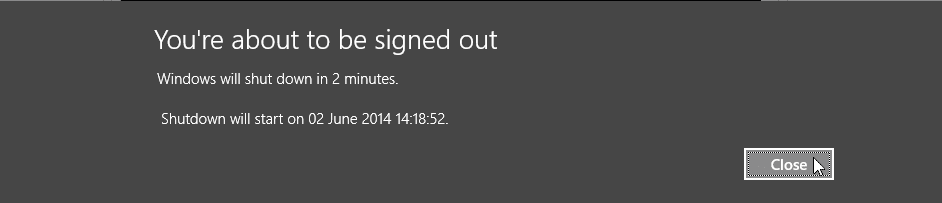
The command shutdown -s -t XXX shuts down the computer after XXX seconds. To give user time to abort an unwanted scheduled shutdown, Windows will warn user. Screenshot below shows the prompt in Windows 8.1, the idea is the same in Windows 7:

2014-06-02_14h17_12.png

When prompted, user can then give the abort command shutdown -a to cancel shut down. If you want to shutdown immediately without any prompts, the command is shutdown -s -t 0.

Kari
 

My Computer My Computer

At a glance

Windows 10 Pro x64 EN-GB1.6 GHz Intel Core i7-720QM Processor6 GBATI Mobility Radeon HD 5850 Graphics
Computer type
Laptop
Computer Manufacturer/Model Number
HP ENVY 17-1150eg
OS
Windows 10 Pro x64 EN-GB
CPU
1.6 GHz Intel Core i7-720QM Processor
Memory
6 GB
Graphics Card(s)
ATI Mobility Radeon HD 5850 Graphics
Sound Card
Beats sound system with integrated subwoofer
Monitor(s) Displays
17" laptop display, 22" LED and 32" Full HD TV through HDMI
Screen Resolution
1600*900 (1), 1920*1080 (2&3)
Hard Drives
Internal: 2 x 500 GB SATA Hard Disk Drive 7200 rpm
External: 2TB for backups, 3TB USB3 network drive for media
Cooling
As Envy runs a bit warm, I have it on a Cooler Master pad
Keyboard
Logitech diNovo Media Desktop Laser (bluetooth)
Mouse
Logitech Performance Mouse MX
Internet Speed
50/10 Mbps VDSL
Antivirus
Windows Defender 4.3.9431.0
Browser
Maxthon 3.5.2., IE11
The command shutdown -s -t XXX shuts down the computer after XXX seconds. To give user time to abort an unwanted scheduled shutdown, Windows will warn user. Screenshot below shows the prompt in Windows 8.1, the idea is the same in Windows 7:


When prompted, user can then give the abort command shutdown -a to cancel shut down. If you want to shutdown immediately without any prompts, the command is shutdown -s -t 0.

Kari

Just a quick correction for you there Kari,

If you want to fully shutdown the system, without any delay / prompts you need to use the -f flag for a forceful shutdown, this will stop any programs that are being used in admin mode and it stops all services.

The full shortcut would look like this,

shutdown.exe /f /s /t 0

This would then provide an immediate, no prompt shutdown.

Fun fact, you can also use the -c flag to customize the shutdown message. Just add it to the end of the switch followed by your message.
 

My Computer My Computer

At a glance

Windows 8.1Intel i5 3750k OC'd 4.0Ghz16GB Vengence CorsairGTX 770 OC 2GB Windforce
Computer type
PC/Desktop
Computer Manufacturer/Model Number
Custom Build
OS
Windows 8.1
CPU
Intel i5 3750k OC'd 4.0Ghz
Motherboard
P8Z77-V LX3
Memory
16GB Vengence Corsair
Graphics Card(s)
GTX 770 OC 2GB Windforce
Sound Card
C-Media 7.1 Surround Card
Monitor(s) Displays
Asus 3D 23" & BenQ 24" & LG 19"
Screen Resolution
1920*1080, 1920*1080, 1440*900
Hard Drives
Crucial 512GB SSD
WD 1.5 TB
WD 500Gb
PSU
850MW Silverstone
Case
inWin DragonRider
Cooling
4 * 140mm LED Akasa, One 140mm Fan Akasa
Keyboard
Corsair k95
Mouse
R.A.T 7 Contagion
Internet Speed
152 Mb Fiber Optic
Antivirus
ESET Nod32
Browser
Waterfox x64 / Chrome x64
Other Info
Freenas / Plex Media server
Q6600
6Gb DDR3
6TB ZFS Raid
500W PSu
2 x Intel NIC's
Windows is quite good in closing applications when the shutdown command is given; I use the delayed command (-t XXX secs) daily on a couple of rigs without the -f switch, for instance as a sleep timer on my bedroom desktop when watching some videos or listening music when going to bed, never had any issues.
 

My Computer My Computer

At a glance

Windows 10 Pro x64 EN-GB1.6 GHz Intel Core i7-720QM Processor6 GBATI Mobility Radeon HD 5850 Graphics
Computer type
Laptop
Computer Manufacturer/Model Number
HP ENVY 17-1150eg
OS
Windows 10 Pro x64 EN-GB
CPU
1.6 GHz Intel Core i7-720QM Processor
Memory
6 GB
Graphics Card(s)
ATI Mobility Radeon HD 5850 Graphics
Sound Card
Beats sound system with integrated subwoofer
Monitor(s) Displays
17" laptop display, 22" LED and 32" Full HD TV through HDMI
Screen Resolution
1600*900 (1), 1920*1080 (2&3)
Hard Drives
Internal: 2 x 500 GB SATA Hard Disk Drive 7200 rpm
External: 2TB for backups, 3TB USB3 network drive for media
Cooling
As Envy runs a bit warm, I have it on a Cooler Master pad
Keyboard
Logitech diNovo Media Desktop Laser (bluetooth)
Mouse
Logitech Performance Mouse MX
Internet Speed
50/10 Mbps VDSL
Antivirus
Windows Defender 4.3.9431.0
Browser
Maxthon 3.5.2., IE11
Back
Top