
Not sure how or why this happens, but I put my computer to sleep last night (no pun intended) and this morning when turning it on all "shortcut" icons on my desktop were the same - and you can still see the regular icons behind it. Note: Only the "shortcut" icons were affected and no other ones. Also, the shortcuts all still worked properly. Just the so called "overlay" is different.
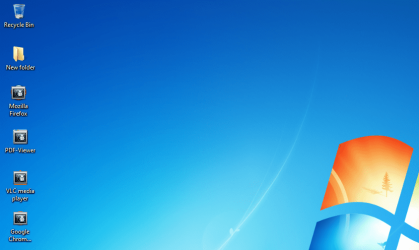
I happened to try adding a new shortcut, and when I do so all the "shortcut" icons change again.

Sometimes they all change to the exact same "overlay" and other times there can be more than one overlay, but only the "shortcut" icons are affected.
After searching the forums - I would have tried rebuilding icon cache that was mentioned a number of times, but the post has the following note:I've also checked the default file extension's associations post and my registry entries matched up with the "lnk" entry on that page, except for:
"IconPath"="%SystemRoot%\system32\shell32.dll,-16769"
Is there a specific place in the registry that controls the "shortcut" overlay?
Also, any ideas on how they changed on their own and why they would change when creating a new shortcut? could it be malware or just a corrupt file or incorrect registry entry?
Thanks.
I happened to try adding a new shortcut, and when I do so all the "shortcut" icons change again.
Sometimes they all change to the exact same "overlay" and other times there can be more than one overlay, but only the "shortcut" icons are affected.
After searching the forums - I would have tried rebuilding icon cache that was mentioned a number of times, but the post has the following note:
This will not help with any of the following icon issues:
- All icons for a specific file extension display the wrong icon. This may be do to setting the wrong association for what program to open the file extension instead. You can restore the default file extension's associations to fix this icon instead.
and mine has:[HKEY_CLASSES_ROOT\.lnk\ShellNew]
"IconPath"=hex(2):25,00,53,00,79,00,73,00,74,00,65,00,6d,00,52,00,6f,00,6f,00,\
74,00,25,00,5c,00,73,00,79,00,73,00,74,00,65,00,6d,00,33,00,32,00,5c,00,73,\
00,68,00,65,00,6c,00,6c,00,33,00,32,00,2e,00,64,00,6c,00,6c,00,2c,00,2d,00,\
31,00,36,00,37,00,36,00,39,00,00,00
"IconPath"="%SystemRoot%\system32\shell32.dll,-16769"
Also, any ideas on how they changed on their own and why they would change when creating a new shortcut? could it be malware or just a corrupt file or incorrect registry entry?
Thanks.
My Computer
At a glance
Windows 7 Pro x64
- Computer type
- PC/Desktop
- OS
- Windows 7 Pro x64

