Shortcut modification

blackzero

Banned
Local time
3:53 AM
Messages
86
I couldn't find it anywhere so I figured I should post it here. xD

Basically I want to set so if a shortcut is double clicked (say a game shortcut) it runs on HIGH PRIORITY setting. Usually it's normal priority right?

I've tried editing the shortcut link but it didn't work.

Anyone has an idea how to do that?

Thanks.
 

My Computer

OS
Windows 7 Ultimate 32 bit
CPU
Intel Core2Duo E8400 2.7 Ghz
Motherboard
Gigabyte G31M-ES2C
Memory
Corsair 3 GB DDR2 PC6400
Graphics Card(s)
XFX Radeon 4850 512 MB
Sound Card
Onboard
Monitor(s) Displays
GTC 16'
Screen Resolution
1024x768
Hard Drives
SATA Western Digital 750 GB
PSU
Simbadda 500w
Case
Generic
Keyboard
Logitech Keyboard
Mouse
Logitech USB
Internet Speed
2 mbps adsl
Last edited:

My Computer

Computer type
PC/Desktop
Computer Manufacturer/Model Number
Dell XPS 420
OS
Windows 10, Home Clean Install
CPU
Intel Core2 processsor Q8200(2.33Ghz 1333FSB) Quad Core Tech
Motherboard
Dell
Memory
6 gb
Graphics Card(s)
ATI Radeon 256MB HD3650
Sound Card
Intergrated 7.1 Channel Audio
Monitor(s) Displays
Dell SP2009W 20"
Hard Drives
640 GB Serial ATA Hard drive
Cooling
Fan
Keyboard
Dell USB Keyboard
Mouse
Dell Premium Optical USB
Internet Speed
DSL 2.85
start /high

At the command prompt, type start /?
to see all parameters.
 

My Computer

Computer Manufacturer/Model Number
Dell and Custom
OS
Systems 1 and 2: Windows 7 Enterprise x64, Win 8 Developer
CPU
System 1: i7 [email protected], System 2: AMD FX-4100 Zambezi 3.6G
Motherboard
System 1:Dell 06NWYK System 2: ASUS M5A97 AM3+
Memory
System 1: 8GB System 2: 8GB
Graphics Card(s)
System 1: ATI FirePro V4800 System 2: Radeon HD 6850
Sound Card
System 1: onboard System 2: onboard
Monitor(s) Displays
System1: Viewsonic HDMI 24"
Screen Resolution
System 1: 1920x1080 System 2: 1920x1080
Hard Drives
System 1: Mirrored .5B drives System 2: Seagate Barracuda ST1000DM003 1TB 7200 RPM 64MB Cache SATA 6.0Gb/s
Case
System 1: Dell System 2: Cooler Master
Internet Speed
10 MBPS
Say I'm running winvnc4.exe through the shortcut located on the desktop.

If you open Windows Task Manager and click Processes tab the exe should be listed there. Try to right click on the exe and set priority. It should list the process is running as normal priority.

I wish for the winvnc4.exe to run under high priority right after the shortcut is executed. Right now usually I do it manually via Task manager.

EDIT: whooops I answered to the 2nd post and when I finished posting, 3rd and 4th suddenly appeared. I'll look onto them first.


EDIT again:

http://www.vasileios.gr/freesoft/adv_short_composer.htm

The link dies. Can anyone open the site?

Thanks for a while. xD
 

My Computer

OS
Windows 7 Ultimate 32 bit
CPU
Intel Core2Duo E8400 2.7 Ghz
Motherboard
Gigabyte G31M-ES2C
Memory
Corsair 3 GB DDR2 PC6400
Graphics Card(s)
XFX Radeon 4850 512 MB
Sound Card
Onboard
Monitor(s) Displays
GTC 16'
Screen Resolution
1024x768
Hard Drives
SATA Western Digital 750 GB
PSU
Simbadda 500w
Case
Generic
Keyboard
Logitech Keyboard
Mouse
Logitech USB
Internet Speed
2 mbps adsl
Hi,

You could look at This Article and see if it helps :)


OS
 

My Computer

Computer Manufacturer/Model Number
Compaq Desktop
OS
Windows 7 Ultimate x64
CPU
AMD Sempron Dual Core
Memory
3GB
Graphics Card(s)
NVIDIA GeForce 6150SE nForce 430
Screen Resolution
1024x768
Hard Drives
150GB Sata

My Computer

OS
Windows 7 Ultimate 32 bit
CPU
Intel Core2Duo E8400 2.7 Ghz
Motherboard
Gigabyte G31M-ES2C
Memory
Corsair 3 GB DDR2 PC6400
Graphics Card(s)
XFX Radeon 4850 512 MB
Sound Card
Onboard
Monitor(s) Displays
GTC 16'
Screen Resolution
1024x768
Hard Drives
SATA Western Digital 750 GB
PSU
Simbadda 500w
Case
Generic
Keyboard
Logitech Keyboard
Mouse
Logitech USB
Internet Speed
2 mbps adsl
I do not think that there is any simple way to set the CPU priority level of a process programatically.

In any case unless the game, or any other program for that matter, only ran a single process then only the first process would have its priority changed. In order to achieve what you are looking for you would have to re-write all the calls within the program calls that referenced outside processes.

far better to let the operating system manage priority options as they are extremely fluid and critical to the operation of the whole system
 

My Computers

System One System Two

  • Computer type
    PC/Desktop
    Computer Manufacturer/Model Number
    ChillBlast - Custom to my design
    OS
    Windows 11 Pro x64 [Latest Release and Release Preview]
    CPU
    Ryzen 9 5950X, 3.8 - 5.2 MHz
    Motherboard
    Asus Prime X570-Pro
    Memory
    64GB [2 x 32GB] DDR4 3200MHz
    Graphics Card(s)
    4GB NVIDIA GEFORCE GTX 1650 Ti
    Sound Card
    On-board SPDIF to 5.1 System + HDMI [5.1 system]
    Monitor(s) Displays
    32" UHD 32 Bit HDR Monitor + 43" UHD 4K 32Bit HDR TV
    Screen Resolution
    2 x 3840 x 2160 @60Hz
    Hard Drives
    1TB M2 SSD OS, 500GB Fast Access SSD, 2 x 8TB Data + Various Externals from 1TB to 4TB, 10TB NAS
    PSU
    NZXT C750 80 PLUS Gold 750W Modular PSU
    Case
    Workstation Case [Matt Black]
    Cooling
    NZXT Kraken X63 280mm CPU Cooler +2x Quiet Case fans
    Keyboard
    Logitech Wireless MX Keys & K400 + others
    Mouse
    Logitech Wireless MX Master 3S
    Internet Speed
    920 MB Down 50 MB Up
    Antivirus
    BitDefender Total Security Pro
    Browser
    Chrome (always run latest Non-Beta)
    Other Info
    Also run ...
    Laptop - Quad 8GB - Windows 10 Pro x64
    Nexus 7 Android tablet x2
    Samsung 10.2" tablet
    Blackview TAB 8 4G Android Tablet c/w Keyboard
    Wacom Intuos Pro Medium Pen Pad
    Wacom Intuos Pro Small Pen Pad
    Wacom Expresskeys Remote
    Loopdeck+ Graphics Controller
    Shuttle Pro v2 Control
  • Computer type
    Laptop
    System Manufacturer/Model Number
    Dell XPS 17 10750H
    OS
    Windows 11 Pro x64 Latest RP
    CPU
    Intel I7 10750H 5.0GHz
    Motherboard
    Dell XPS
    Memory
    32GB [2x16GB] DDR4 2933 MHz
    Graphics Card(s)
    nVidia GTX1650Ti 4 GB GDDR6
    Sound Card
    Stock [Realtek] 4 Speaker
    Monitor(s) Displays
    17" IPS UHD+ Infinity Edge Touchscreen
    Screen Resolution
    3840 x 2400
    Hard Drives
    2TB M2 NVMe, 4TB External + various 500GB & 1TB External NVMe (also have access to spinner HDD from
    PSU
    Stock
    Case
    Stock XPS Aluminium & Carbon Fibre
    Cooling
    Stock - Active Fan Control
    Keyboard
    Backlit + Various Logitech
    Mouse
    Stock Track Pad + Logitech MX Trackball
    Internet Speed
    72 MB Down 18MB Up
    Browser
    Chrome
    Other Info
    Also run ...
    Laptop - Quad 8GB - Windows 10 Pro x64
    Nexus 7 Android tablet x2
    10.2" tablet
    Sony Z3 Android Smartphone
    Wacom Intuos Pro Medium Pen Pad
    Wacom Intuos Pro Small Pen Pad
    Wacom Expresskeys Remote
    Loopdeck+ Graphics Controller
    Shuttle Pro v2 Control Pad
    10TB NAS
I do not think that there is any simple way to set the CPU priority level of a process programatically.

In any case unless the game, or any other program for that matter, only ran a single process then only the first process would have its priority changed. In order to achieve what you are looking for you would have to re-write all the calls within the program calls that referenced outside processes.

far better to let the operating system manage priority options as they are extremely fluid and critical to the operation of the whole system


I think I should explain why I want this,

I'm currently playing Pro Evolution Soccer 2011.

My current specs should be more than enough to run it smoothly but for some reason, my system experiences lags and stutters whenever I play the game normally.

The only way to return the smoothness is by assigning the game exe as a high priority via Task Manager. Currently I'm doing that manually by running the game first, alt tab, open Task Manager and assign the priority.

It's a bit irritating to do it repeatedly. If this shortcut modification can help ease the troublesome process why not? xD
 

My Computer

OS
Windows 7 Ultimate 32 bit
CPU
Intel Core2Duo E8400 2.7 Ghz
Motherboard
Gigabyte G31M-ES2C
Memory
Corsair 3 GB DDR2 PC6400
Graphics Card(s)
XFX Radeon 4850 512 MB
Sound Card
Onboard
Monitor(s) Displays
GTC 16'
Screen Resolution
1024x768
Hard Drives
SATA Western Digital 750 GB
PSU
Simbadda 500w
Case
Generic
Keyboard
Logitech Keyboard
Mouse
Logitech USB
Internet Speed
2 mbps adsl
Try this...

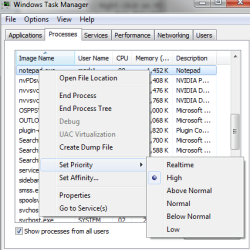
cmd.exe /c start /high notepad.exe
 

My Computer

Computer Manufacturer/Model Number
Dell and Custom
OS
Systems 1 and 2: Windows 7 Enterprise x64, Win 8 Developer
CPU
System 1: i7 [email protected], System 2: AMD FX-4100 Zambezi 3.6G
Motherboard
System 1:Dell 06NWYK System 2: ASUS M5A97 AM3+
Memory
System 1: 8GB System 2: 8GB
Graphics Card(s)
System 1: ATI FirePro V4800 System 2: Radeon HD 6850
Sound Card
System 1: onboard System 2: onboard
Monitor(s) Displays
System1: Viewsonic HDMI 24"
Screen Resolution
System 1: 1920x1080 System 2: 1920x1080
Hard Drives
System 1: Mirrored .5B drives System 2: Seagate Barracuda ST1000DM003 1TB 7200 RPM 64MB Cache SATA 6.0Gb/s
Case
System 1: Dell System 2: Cooler Master
Internet Speed
10 MBPS
You can see the priority of notepad here, which was set from the command above:
 

Attachments

  • priority.png
    priority.png
    15.4 KB · Views: 10

My Computer

Computer Manufacturer/Model Number
Dell and Custom
OS
Systems 1 and 2: Windows 7 Enterprise x64, Win 8 Developer
CPU
System 1: i7 [email protected], System 2: AMD FX-4100 Zambezi 3.6G
Motherboard
System 1:Dell 06NWYK System 2: ASUS M5A97 AM3+
Memory
System 1: 8GB System 2: 8GB
Graphics Card(s)
System 1: ATI FirePro V4800 System 2: Radeon HD 6850
Sound Card
System 1: onboard System 2: onboard
Monitor(s) Displays
System1: Viewsonic HDMI 24"
Screen Resolution
System 1: 1920x1080 System 2: 1920x1080
Hard Drives
System 1: Mirrored .5B drives System 2: Seagate Barracuda ST1000DM003 1TB 7200 RPM 64MB Cache SATA 6.0Gb/s
Case
System 1: Dell System 2: Cooler Master
Internet Speed
10 MBPS
Thanks lemur. I tried that and indeed notepad was set to high.

But I can't set it for my game exe. Say the name is pro.exe when I did

cmd.exe /c start /high pro.exe

my windows complained about me not getting the name correctly. xD

I'm downloading the program above (shortcut composer) as we speak. I'll see what it can do.
 

My Computer

OS
Windows 7 Ultimate 32 bit
CPU
Intel Core2Duo E8400 2.7 Ghz
Motherboard
Gigabyte G31M-ES2C
Memory
Corsair 3 GB DDR2 PC6400
Graphics Card(s)
XFX Radeon 4850 512 MB
Sound Card
Onboard
Monitor(s) Displays
GTC 16'
Screen Resolution
1024x768
Hard Drives
SATA Western Digital 750 GB
PSU
Simbadda 500w
Case
Generic
Keyboard
Logitech Keyboard
Mouse
Logitech USB
Internet Speed
2 mbps adsl
unless there is a path to pro.exe, you are going to have to give an explicit one.
 

My Computer

Computer Manufacturer/Model Number
Dell and Custom
OS
Systems 1 and 2: Windows 7 Enterprise x64, Win 8 Developer
CPU
System 1: i7 [email protected], System 2: AMD FX-4100 Zambezi 3.6G
Motherboard
System 1:Dell 06NWYK System 2: ASUS M5A97 AM3+
Memory
System 1: 8GB System 2: 8GB
Graphics Card(s)
System 1: ATI FirePro V4800 System 2: Radeon HD 6850
Sound Card
System 1: onboard System 2: onboard
Monitor(s) Displays
System1: Viewsonic HDMI 24"
Screen Resolution
System 1: 1920x1080 System 2: 1920x1080
Hard Drives
System 1: Mirrored .5B drives System 2: Seagate Barracuda ST1000DM003 1TB 7200 RPM 64MB Cache SATA 6.0Gb/s
Case
System 1: Dell System 2: Cooler Master
Internet Speed
10 MBPS
unless there is a path to pro.exe, you are going to have to give an explicit one.

Are you saying like

cmd.exe /c start /high c:/program/pes2011/pro.exe

like that?
 

My Computer

OS
Windows 7 Ultimate 32 bit
CPU
Intel Core2Duo E8400 2.7 Ghz
Motherboard
Gigabyte G31M-ES2C
Memory
Corsair 3 GB DDR2 PC6400
Graphics Card(s)
XFX Radeon 4850 512 MB
Sound Card
Onboard
Monitor(s) Displays
GTC 16'
Screen Resolution
1024x768
Hard Drives
SATA Western Digital 750 GB
PSU
Simbadda 500w
Case
Generic
Keyboard
Logitech Keyboard
Mouse
Logitech USB
Internet Speed
2 mbps adsl
exactly.
 

My Computer

Computer Manufacturer/Model Number
Dell and Custom
OS
Systems 1 and 2: Windows 7 Enterprise x64, Win 8 Developer
CPU
System 1: i7 [email protected], System 2: AMD FX-4100 Zambezi 3.6G
Motherboard
System 1:Dell 06NWYK System 2: ASUS M5A97 AM3+
Memory
System 1: 8GB System 2: 8GB
Graphics Card(s)
System 1: ATI FirePro V4800 System 2: Radeon HD 6850
Sound Card
System 1: onboard System 2: onboard
Monitor(s) Displays
System1: Viewsonic HDMI 24"
Screen Resolution
System 1: 1920x1080 System 2: 1920x1080
Hard Drives
System 1: Mirrored .5B drives System 2: Seagate Barracuda ST1000DM003 1TB 7200 RPM 64MB Cache SATA 6.0Gb/s
Case
System 1: Dell System 2: Cooler Master
Internet Speed
10 MBPS
Thanks for the helpful insight.

I'll try both methods and if neither is working I'll just whine here again. xD

Again, thanks people, much appreciated!
 
Last edited:

My Computer

OS
Windows 7 Ultimate 32 bit
CPU
Intel Core2Duo E8400 2.7 Ghz
Motherboard
Gigabyte G31M-ES2C
Memory
Corsair 3 GB DDR2 PC6400
Graphics Card(s)
XFX Radeon 4850 512 MB
Sound Card
Onboard
Monitor(s) Displays
GTC 16'
Screen Resolution
1024x768
Hard Drives
SATA Western Digital 750 GB
PSU
Simbadda 500w
Case
Generic
Keyboard
Logitech Keyboard
Mouse
Logitech USB
Internet Speed
2 mbps adsl
NP. Let us know. I'm sure it can be resolved by using or modifying the command above.
 

My Computer

Computer Manufacturer/Model Number
Dell and Custom
OS
Systems 1 and 2: Windows 7 Enterprise x64, Win 8 Developer
CPU
System 1: i7 [email protected], System 2: AMD FX-4100 Zambezi 3.6G
Motherboard
System 1:Dell 06NWYK System 2: ASUS M5A97 AM3+
Memory
System 1: 8GB System 2: 8GB
Graphics Card(s)
System 1: ATI FirePro V4800 System 2: Radeon HD 6850
Sound Card
System 1: onboard System 2: onboard
Monitor(s) Displays
System1: Viewsonic HDMI 24"
Screen Resolution
System 1: 1920x1080 System 2: 1920x1080
Hard Drives
System 1: Mirrored .5B drives System 2: Seagate Barracuda ST1000DM003 1TB 7200 RPM 64MB Cache SATA 6.0Gb/s
Case
System 1: Dell System 2: Cooler Master
Internet Speed
10 MBPS
C:\Windows\System32\cmd.exe /c start /high D:\Games program files\Pro Evolution Soccer 2011\pes2011.exe

Hi, it works. Now I'm happy.

Thanks so much! xD
 

My Computer

OS
Windows 7 Ultimate 32 bit
CPU
Intel Core2Duo E8400 2.7 Ghz
Motherboard
Gigabyte G31M-ES2C
Memory
Corsair 3 GB DDR2 PC6400
Graphics Card(s)
XFX Radeon 4850 512 MB
Sound Card
Onboard
Monitor(s) Displays
GTC 16'
Screen Resolution
1024x768
Hard Drives
SATA Western Digital 750 GB
PSU
Simbadda 500w
Case
Generic
Keyboard
Logitech Keyboard
Mouse
Logitech USB
Internet Speed
2 mbps adsl
We aim to please! :)
 

My Computer

Computer Manufacturer/Model Number
Dell and Custom
OS
Systems 1 and 2: Windows 7 Enterprise x64, Win 8 Developer
CPU
System 1: i7 [email protected], System 2: AMD FX-4100 Zambezi 3.6G
Motherboard
System 1:Dell 06NWYK System 2: ASUS M5A97 AM3+
Memory
System 1: 8GB System 2: 8GB
Graphics Card(s)
System 1: ATI FirePro V4800 System 2: Radeon HD 6850
Sound Card
System 1: onboard System 2: onboard
Monitor(s) Displays
System1: Viewsonic HDMI 24"
Screen Resolution
System 1: 1920x1080 System 2: 1920x1080
Hard Drives
System 1: Mirrored .5B drives System 2: Seagate Barracuda ST1000DM003 1TB 7200 RPM 64MB Cache SATA 6.0Gb/s
Case
System 1: Dell System 2: Cooler Master
Internet Speed
10 MBPS

My Computer

Computer Manufacturer/Model Number
Compaq Desktop
OS
Windows 7 Ultimate x64
CPU
AMD Sempron Dual Core
Memory
3GB
Graphics Card(s)
NVIDIA GeForce 6150SE nForce 430
Screen Resolution
1024x768
Hard Drives
150GB Sata
Back
Top