Shortcut To A Shortcut

Ron Maide

New member
Hi people,
unbeknownst to yourselves, some of you have already been of great help to me, but now I've created for myself a specific little problem.
I'll do my best to keep this brief, but I tend to ramble to be as clear as possible, often just achieving the opposite.

I've finally sort of come to terms with the Win7 way of working, adapting my ways of WinXP organisation into the new and supposedly better ways of 7. I'm very anal about my organisations, which causes the problems I need other people to solve for me. First a quick history.

The start menu in my XP did the following:
START > Games > shortcuts to all my games
or START > Audio > shortcuts to all my audiosoftware
You might imagine what I did for the videotools...

In Win7 I've accepted pinning the most used icons to the start menu, in all honesty I don't use enough to warrant several distinct folders, but for reasons I won't bother you with I want access to shortcuts to all installed games through the start menu.
I know I can just search the menu, a nice feature, I can admit finally, but I will at one point have so many unfinished games installed I might forget one or two. I've solved this by putting a folder containing the shortcuts in my Gamefolder and I wish to put that Shortcutfolder into the start menu. So far, so good.
Now, for no other reason than esthetics I want the Shortcutfolder I've put in the start menu to have a different name than it's parent in my Gamefolder.

The problem seems clear to me, but it's my problem, after all. If you understand what I'm trying to do and have an idea on how to fix it, I'd love to hear it. Thanks for the help and if you couldn't help, thanks for reading all of this. ;)
 

My Computer

Computer Manufacturer/Model Number
HP Probook 4720s
OS
Windows 7
CPU
Intel i5
Memory
4GB
Graphics Card(s)
ATI Radeon Mobility 512MB
Hard Drives
Just one. SATA II 500GB.
So you have a shortcut to your gamefolder that has all of your shortcuts to your video games, and you'd like to rename the shortcut? Can you right click the shortcut in the start menu and click "rename"?
 

My Computer

Computer Manufacturer/Model Number
Custom Built
OS
Windows 7 Ultimate
CPU
AMD Athlon II X2 245 2.90Ghz
Motherboard
Some Gigabyte one, dont remember model
Memory
3.00 GB
Graphics Card(s)
8800GTS 512MB
Sound Card
Sound Blaster X-Fi Titanium Fatal1ty
Monitor(s) Displays
Dual 22" widescreen
Hard Drives
250GB internal, 500GB internal
PSU
CORSAIR CMPSU-850TX 850W Power Supply
Case
Thermalkake Tsunami Dream
Cooling
Thermaltake Golden Orb II
Keyboard
Saitek Eclipse 2
Mouse
Logitech MX518
Hello Ron,

In addition to the above post:

Not sure if this may help or not, but it may be an idea to consider.

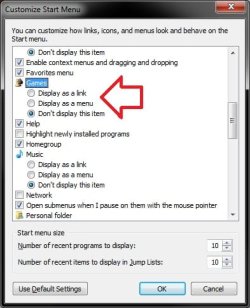
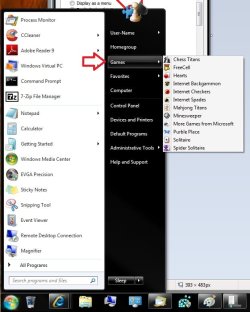
Normally when you install games, they will be automatically added to the Games folder. You could use the Customize Start Menu settings to add the Games button on the Start Menu for easy access to these game shortcuts. You can also add games to this as well.

Customize.jpg Start_Menu.jpg


Hope this helps,
Shawn
 

My Computer

Computer type
PC/Desktop
Computer Manufacturer/Model Number
Self built custom
OS
64-bit Windows 11 Pro for Workstations
CPU
Intel i7-8700K OC'd to 5 GHz
Motherboard
ASUS ROG Maximus XI Formula Z390
Memory
64 GB (4x16GB) G.SKILL TridentZ RGB DDR4 3600 MHz
Graphics Card(s)
ASUS ROG-STRIX-GTX1080TI-O11G-GAMING
Sound Card
Integrated
Monitor(s) Displays
2 x Samsung Odyssey G7 27"
Screen Resolution
2560x1440
Hard Drives
1TB Samsung 990 PRO M.2,
4TB Samsung 990 PRO PRO M.2,
TerraMaster F8 SSD Plus NAS
PSU
Seasonic Prime Titanium 850W
Case
Thermaltake Core P3
Cooling
Corsair Hydro H115i
Keyboard
Logitech wireless K800
Mouse
Logitech MX Master 4
Internet Speed
2 Gb/s Download and 100 Mb/s Upload
Antivirus
Malwarebyte Anti-Malware Premium
Browser
Google Chrome
Other Info
Logitech Z625 speaker system,
Logitech BRIO 4K Pro webcam,
HP Color LaserJet Pro MFP M477fdn,
APC SMART-UPS RT 1000 XL - SURT1000XLI,
Galaxy S23 Plus phone
Thanks for the help so far, however, renaming the link in the start menu also renames the folder.
If I make a shortcut to the folder by right-clicking and selcting "create shortcut", I can put that shortcut in the start menu, but I'll have two shortcuts: The one I want, in the start menu and the one it refers to, which in turn refers to the folder. When I remove the second unwanted shortcut, the shortcut in start menu can't find it's way to the folder and tells me the specified location doesn't exist anymore (something to that extent anyway).
So I dragged the original folder into the start menu and renaming that link in the start menu results in renaming the folder.

At the moment I'm just working the double-shortcut method and I dumped the second shortcut in with all the game shortcuts. Oddly enough Windows is perfectly able to establish if the file was renamed or moved and follows it's path without issues.

My orginal post may have suggested a bit that I'm a total idiot, but I'm actually jus a little bit of an idiot. I used to know my way around Windows and I used to be able to create an acceptable workaround for every problem I made, but this whole Win7 thing has got me almost back to square one. So, yeah, I tried right-click rename. ;)

@ Shawn: Mr. Brink, I've benefited off alot of your How-To's already, so thanks for those. I'll go and have look to see if I can beat and bend the Games button into the shape I'd like it.
You'd figure I'd be able to solve something as simple as this myself and because it's so simple I'm thinking it's just not possible. Anyway, thanks.
 
Last edited:

My Computer

Computer Manufacturer/Model Number
HP Probook 4720s
OS
Windows 7
CPU
Intel i5
Memory
4GB
Graphics Card(s)
ATI Radeon Mobility 512MB
Hard Drives
Just one. SATA II 500GB.
Your answer is classic shell
Welcome to Classic Shell

I know where you are coming from.. I 'build my own' menus as well..
With the 'old menu' interface, using classic shell, its just as easy as it was before.. "Open All Users", nav to a given directory..drop in your .lnks.

Good luck!
 

My Computer

Computer Manufacturer/Model Number
HomeBrew
OS
Win7/XP
CPU
INTEL E8600 @ 4.2GHz
Motherboard
Asus P5E w/Formula Rampage BIOS
Memory
8GB PC8500 Corsiar Dominator
Graphics Card(s)
nVidia GTX 280
Sound Card
Asus FXII (SoundMax controlled)
Monitor(s) Displays
2 x I-INC 28'
Screen Resolution
1920x1200
Hard Drives
2 x Seagate 1.5TB
PSU
Ultra 700W
Case
Something..with alot of air
Cooling
Tuniq 120 CPU - Several 80mm and one 120MM fan
Keyboard
IBM MODEL M - YA BABY!!! NEVER SAY DIE!
Mouse
MS Intellimouse
Internet Speed
50/5

My Computer

Computer Manufacturer/Model Number
HP, Dell, Gateway, Toshiba - 4 laptops and 2 desktops
OS
Vista, Windows7, Mint Mate, Zorin, Windows 8
CPU
from 1.6GHz Duo to i7
Monitor(s) Displays
2x HP w2207
Hard Drives
5x HDD, 7x SSD, 12x Externals
Keyboard
with trackball - no mices
Mouse
Trackball mice
Internet Speed
DSL 6000
The Games button didn't do it for me, but thanks.

@ dood: I'll have a look at Classic Shell, but I must admit that I do feel I need to move on and why not sooner than later. The shortcut-to-shortcut workaround is fine, so far.
Cool avatar, by the way.

@ whs: That's almost exactly what I want. It's just on the worst spot of the taskbar, for me. Your video-tutorial has me interested in some more experimenting with the sidebar and stuff though.
Thanks for the help people, so far I'm satisfied with what I got, actually.
 

My Computer

Computer Manufacturer/Model Number
HP Probook 4720s
OS
Windows 7
CPU
Intel i5
Memory
4GB
Graphics Card(s)
ATI Radeon Mobility 512MB
Hard Drives
Just one. SATA II 500GB.
If you are interested in editing the start menu the old fashioned way, set explorer to display hidden and system files and go to Program Data > Microsoft > Windows > Start Menu > Programs. I've renamed and regrouped folders, and renamed shortcuts without breaking anything. I just find it faster than trying to do it in the actual start menu. I like to group all my Microsoft programs in one folder and shorten the names. As an example I change Microsoft Office Outlook 2003 to just Outlook. Its a lot easier to just click the icon text and rename it than to navigate though the start menu for each one and have to right click and select rename. I also delete all the un-install shortcuts and readme's just to clean things up.
 
Last edited:

My Computer

Computer type
PC/Desktop
Computer Manufacturer/Model Number
Home Built
OS
Windows 10 Education 64 bit
CPU
AMD Phenom II X4 980 Black Edition Deneb 3.7GHz
Motherboard
Asus M4N68T-M V2 µATX Motherboard
Memory
8GB 4GBx2 Kingston PC10600 DDR3 1333 Memory
Graphics Card(s)
Zotac NVIDIA Geforce GT640 2 Gig DDR3 PCIe
Sound Card
VIA VT1708s High Definition Audio 8-channel Onboard
Monitor(s) Displays
22" LG E2242 1080p and 2 19" I-INC AG191D
Screen Resolution
1280x1024 - 1920x1080 - 1280x1024
Hard Drives
Crucial M100 256 GB SSD and 500 GB WD Blue SATA
PSU
Thermaltake TR 620
Case
Power Up Black ATX Mid-Tower Case
Cooling
Stock heatsink and fan
Keyboard
Logitech Wireless K350 Wave
Mouse
Logitech Wireless M570 Trackman Wheel
Internet Speed
80 Mbps Down 30 Mbps Up
Antivirus
Windows Defender
Browser
Internet Explorer 11
Other Info
HP DVD1040e Lightscribe - External USB2
The Games button didn't do it for me, but thanks.

@ dood: I'll have a look at Classic Shell, but I must admit that I do feel I need to move on and why not sooner than later. The shortcut-to-shortcut workaround is fine, so far.
Cool avatar, by the way.

@ whs: That's almost exactly what I want. It's just on the worst spot of the taskbar, for me. Your video-tutorial has me interested in some more experimenting with the sidebar and stuff though.
Thanks for the help people, so far I'm satisfied with what I got, actually.
If you have a 32bit system, you could use the AppLauncher in the Vista style sidebar (which can be put in). For 64bit, that AppLauncher does not work though. If you need more assistance. let me know.
 

My Computer

Computer Manufacturer/Model Number
HP, Dell, Gateway, Toshiba - 4 laptops and 2 desktops
OS
Vista, Windows7, Mint Mate, Zorin, Windows 8
CPU
from 1.6GHz Duo to i7
Monitor(s) Displays
2x HP w2207
Hard Drives
5x HDD, 7x SSD, 12x Externals
Keyboard
with trackball - no mices
Mouse
Trackball mice
Internet Speed
DSL 6000
Excellent! I was looking for the start menu folder. Thanks for that tip.

So far I've got alot of good info, thanks!
 

My Computer

Computer Manufacturer/Model Number
HP Probook 4720s
OS
Windows 7
CPU
Intel i5
Memory
4GB
Graphics Card(s)
ATI Radeon Mobility 512MB
Hard Drives
Just one. SATA II 500GB.
Back
Top