
Shortcut to My Documents, why?

OppfinnarJocke

New member
Member
Local time
10:43 AM
Messages
69
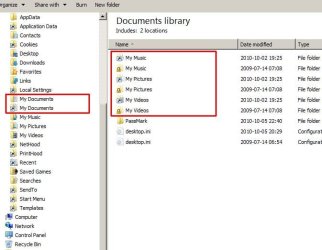
I just now noticed that Windows Explorer shows a whole bunch of shortcuts to folders that really don't need any shortcuts. See the pic below. For all those shortcuts, clicking or double-clicking them, gives an Access Denied dialog.
What are those shortcuts?
Where did they come from?
Why don't I have access to them?

I am not sure if this came about with the latest update the other day, I just installed W7 on this machine just a few days ago.

And now I see... why are there two desktop.ini there? How can there be two different files with the same name in the same dir?

EDIT: Sorry, should have googled a little more before posting. Junctions, that what they are... and I had "Show hidden files" turned on... Don't know why, but it won't happen again...
 

Attachments
  • W7 Explorer.jpg
    W7 Explorer.jpg
    40.6 KB · Views: 52

My Computer My Computer

At a glance

Win 7
OS
Win 7
Look closely. You are not viewing a directory, you are viewing a LIBRARY. A library contains folders and files. New feature. So the two desktop.ini files are really in different directories which happen to have their files included in that library.

EDIT: Oh I see you have the same signup as I do :D

Click the start menu, then your username, then try to get to My Documents from there. That is what I do. Personally, I find the Libraries more confusing than they are helpful.
 

My Computer My Computer

At a glance

Windows 8 Pro x64Intel Core i7 92012GB (2GB x6) Triple Channel DDR3 1333 MHzATI Radeon HD 4870 X2 2GB GDDR5
Computer Manufacturer/Model Number
iBuyPower Chimera X58
OS
Windows 8 Pro x64
CPU
Intel Core i7 920
Motherboard
Asus P6T Deluxe V2
Memory
12GB (2GB x6) Triple Channel DDR3 1333 MHz
Graphics Card(s)
ATI Radeon HD 4870 X2 2GB GDDR5
Sound Card
Integrated Digital HD 7.1 Surround Sound
Monitor(s) Displays
24.6-inch ASUS VW246H 20000:1 Contrast, 2 ms response time,
Screen Resolution
1920x1080
Hard Drives
1 TB 7200 RPM SATA II 3 GBps 16MB cache
PSU
NZXT 800W Gaming Series
Case
Guardian Inferno (Custom Painted NZXT Guardian 921)
Cooling
Thermaltake V1 Fan Cooling System OC Proof
Keyboard
Razer Lycosa
Mouse
iBuyPower Ergonomical Internet Mouse
Internet Speed
11 MBps High-speed Cable
I just now noticed that Windows Explorer shows a whole bunch of shortcuts to folders that really don't need any shortcuts. See the pic below. For all those shortcuts, clicking or double-clicking them, gives an Access Denied dialog.
What are those shortcuts?
Where did they come from?
Why don't I have access to them?

I am not sure if this came about with the latest update the other day, I just installed W7 on this machine just a few days ago.

And now I see... why are there two desktop.ini there? How can there be two different files with the same name in the same dir?

EDIT: Sorry, should have googled a little more before posting. Junctions, that what they are... and I had "Show hidden files" turned on... Don't know why, but it won't happen again...

Those are called junction points. They allow older software to continue to function with the newly designed directory structure and naming in Windows 7. The BEST advice about those shortcuts is DON'T worry about them, DON'T mess with them. They WILL cause you problems if you attempt to change the permissions or alter them in any way. Just pretend they aren't there.

Edit: Just saw at the bottom of your post that you figured this out already.
 

My Computer My Computer

At a glance

Windows 7 Ultimate RTM (Technet)3.00 gigahertz Intel Core2 Duo E84004GBATI Radeon X1950 Pro
Computer Manufacturer/Model Number
Custom
OS
Windows 7 Ultimate RTM (Technet)
CPU
3.00 gigahertz Intel Core2 Duo E8400
Motherboard
ASUSTeK Computer INC. P5K/EPU Rev 1.xx
Memory
4GB
Graphics Card(s)
ATI Radeon X1950 Pro
Sound Card
Built in HD Audio
Monitor(s) Displays
22" Gateway LCD
Screen Resolution
1920 x 1200
Hard Drives
ST3160023A [Hard drive] (160.04 GB) -- drive 0, rev 8.01, ST3500630AS [Hard drive] (500.11 GB) -- drive 2, rev 3.AAK
ST3500630AS [Hard drive] (500.11 GB) -- drive 1, rev 3.AAK
Keyboard
Logitech G11
Mouse
Microsoft Wireless Laser Mouse 5000
Internet Speed
13.44 Mbps
Back
Top