Solved Shortcuts change path and becomes corrupt after each restart

them0narch

New member
Local time
3:50 PM
Messages
12
Dear Community,

I have been having a problem these last 6 months and it's starting to get to me. I've roamed the web for someone who've had similar issues, but no success. I apologize if this issue have been addressed before, and if it has, I'd appreciate a link to the solution.

Every time I restart my computer, all shortcuts on my desktop and in the start menu change their path to disk F: (1TB, WD1002FAEX) , although the software is located on disk C: (120GB SSD, KINGSTON). The only thing that is changed in the target-path is that the C: is replaced by F:.

As a background notice I' ll inform you that I earlier on had the Windows 7 home premium 64-bit on my 1TB hard disk. When I bought the SSD, I used my windows cd to format it and reinstalled it on my C:. No problems the first months of use, then suddenly one day I had this issue and been bothered by it ever since.

Called microsoft and they just told me to delete and reinstall everything, but I was hoping to avoid that as my both my hard disks are almost full, so I would have needed to buy a new one to do this.

Shortcut to folders do not have the same problems, and my makeshift solution have been to use shortcuts to the folders, and then open the softwares directly through the .exe files. That is becoming increasingly tiresome though, so I would be grateful for some assistance.

Kind regards Jonas

From earlier posts I gathered that having a log file from Process monitor may assist in the aid, so I've attached a file. I presume this program cannot monitor things that occur during restart of the OS, so I don't know if it's of much use. Thought I attach it anyway. It's logging a failed attempt of using a start menu shortcut to open google chrome.
 
Last edited:

My Computer My Computer

At a glance

Windows 7 home premium, 64bit, version 6.1.7601Amd Phenom II X6 1055T, 2800MhzKINGSTON 12GB 1600MHZ DDR32 x AMD Radeon HD 6850
Computer type
PC/Desktop
Computer Manufacturer/Model Number
Custom build
OS
Windows 7 home premium, 64bit, version 6.1.7601
CPU
Amd Phenom II X6 1055T, 2800Mhz
Motherboard
Asus m4a89td pro usb3
Memory
KINGSTON 12GB 1600MHZ DDR3
Graphics Card(s)
2 x AMD Radeon HD 6850
Hard Drives
120GB SSD: KINGSTON SV300S37A120G
1TB: Western Digital Black WD1002FAEX-00Z3A0, 1TB 7200 RPM 64MB Cache SATA 6.0Gb/s 3.5" Internal Hard Drive Bare Drive
Antivirus
AVAST free, latest version
Browser
Opera Chrome, latest version

My Computer My Computer

At a glance

Windows 7 Ultimate x64 SP1AMD Phenom 2 1090T2x8GB Kingston HyperX Fury Black 1600Mhz Unga...MSI GTX 970 Gaming 4G
Computer type
PC/Desktop
Computer Manufacturer/Model Number
Custom Build
OS
Windows 7 Ultimate x64 SP1
CPU
AMD Phenom 2 1090T
Motherboard
Gigabyte GA-890FXA-UD5
Memory
2x8GB Kingston HyperX Fury Black 1600Mhz Unganged
Graphics Card(s)
MSI GTX 970 Gaming 4G
Sound Card
Realtek On-Board HD 7.1 Audio / Logitech G35
Monitor(s) Displays
3xAcer GD245HQ
Screen Resolution
1920x1080
Hard Drives
Samsung 850 Pro 512GB SSD - OS /
WD Caviar Black SATA 3 - 1 TBx2 - Dynamic RAID 0 /
WD Caviar Green SATA 2 - 640GBx2 - Dynamic RAID 0 /
WD Caviar Green SATA 2 - 640GB - Internal Backup /
Seagate Barracude SATA 3 - 3TB - External Backup/ Sync
PSU
HighPower 1000W
Case
Cooler Master HAF 932
Cooling
Noctua NH-D14
Keyboard
Logitech G19
Mouse
Logitech G500
Internet Speed
100/4 Mbit Cable (100GB quota)
Antivirus
ZoneAlarm Extreme Security / MBAM Pro / MBAE Free / SAS Free
Browser
IE 11 - Firefox - Chrome
Other Info
Logitech F710/ G27/ G940/ Z5500 // TrackIR 5 // Nvidia 3D Surround Vision
Thank you for your advice.

Using Malwarebytes I found some bloatware(probably from some CNET download) that had escaped AVAST, but nothing serious or related to the issue. Quarantined the files, did not change anything.

I proceeded with the clean startup. Worked my way through the software in the service and startup section by process of elimination as described in the nice manual you sent me. Created new desktop shortcuts directly from the .exe files every time. This did unfortunately not affect the problem.

It did however assist me in recalling why I let this slip when the issue first presented itself. It only seemed to affected google chrome. I've made a couple of shortcuts to other software located at C: and these have not had this issue during the last startup (spotify, Opera, mbam). This suggest that this is an isolated issue for chrome, but that is not the case.

Earlier today I installed asus PCE-AC68 WLAN Control Center (software for wireless network card), and after a restart this had the same issue and it sparked this post.

Any other things I can try?

(have deleted and reinstalled chrome several times. Also manually gone through both disks to make sure no files or folders were remaining. Will repeat today as well to see if there is some kind of obscure error connected to any of the malware. )
 

My Computer My Computer

At a glance

Windows 7 home premium, 64bit, version 6.1.7601Amd Phenom II X6 1055T, 2800MhzKINGSTON 12GB 1600MHZ DDR32 x AMD Radeon HD 6850
Computer type
PC/Desktop
Computer Manufacturer/Model Number
Custom build
OS
Windows 7 home premium, 64bit, version 6.1.7601
CPU
Amd Phenom II X6 1055T, 2800Mhz
Motherboard
Asus m4a89td pro usb3
Memory
KINGSTON 12GB 1600MHZ DDR3
Graphics Card(s)
2 x AMD Radeon HD 6850
Hard Drives
120GB SSD: KINGSTON SV300S37A120G
1TB: Western Digital Black WD1002FAEX-00Z3A0, 1TB 7200 RPM 64MB Cache SATA 6.0Gb/s 3.5" Internal Hard Drive Bare Drive
Antivirus
AVAST free, latest version
Browser
Opera Chrome, latest version
Also noticed that if i go to proporties of the corrupted chrome shortcut and change the path to C: manually, it resets as soon as I click ok.. No error message or anything, but if I reopen properties it has been set to F: again.

Don't know if this add any useful information, but thought I'd mention it...
 

My Computer My Computer

At a glance

Windows 7 home premium, 64bit, version 6.1.7601Amd Phenom II X6 1055T, 2800MhzKINGSTON 12GB 1600MHZ DDR32 x AMD Radeon HD 6850
Computer type
PC/Desktop
Computer Manufacturer/Model Number
Custom build
OS
Windows 7 home premium, 64bit, version 6.1.7601
CPU
Amd Phenom II X6 1055T, 2800Mhz
Motherboard
Asus m4a89td pro usb3
Memory
KINGSTON 12GB 1600MHZ DDR3
Graphics Card(s)
2 x AMD Radeon HD 6850
Hard Drives
120GB SSD: KINGSTON SV300S37A120G
1TB: Western Digital Black WD1002FAEX-00Z3A0, 1TB 7200 RPM 64MB Cache SATA 6.0Gb/s 3.5" Internal Hard Drive Bare Drive
Antivirus
AVAST free, latest version
Browser
Opera Chrome, latest version
Did you try disabling everything in Startup and all non-MS services (check hide MS services)? It is important that everything is disabled. Disconnect from Internet while testing this since AV will be disabled too. Disregard this if you have already done so.

Try another user account - http://www.sevenforums.com/tutorials/181024-user-account-create.html

Also please post a screenshot of Disk Management as described in http://www.sevenforums.com/tutorials/274797-disk-management-post-screen-capture-image.html and attach here http://www.sevenforums.com/tutorials/9733-screenshots-files-upload-post-seven-forums.html

I will also ask you to scan with a couple more security software just in case:
- ESET Online
- Super Anti Spyware
- AdwCleaner AdwCleaner Download
 

My Computer My Computer

At a glance

Windows 7 Ultimate x64 SP1AMD Phenom 2 1090T2x8GB Kingston HyperX Fury Black 1600Mhz Unga...MSI GTX 970 Gaming 4G
Computer type
PC/Desktop
Computer Manufacturer/Model Number
Custom Build
OS
Windows 7 Ultimate x64 SP1
CPU
AMD Phenom 2 1090T
Motherboard
Gigabyte GA-890FXA-UD5
Memory
2x8GB Kingston HyperX Fury Black 1600Mhz Unganged
Graphics Card(s)
MSI GTX 970 Gaming 4G
Sound Card
Realtek On-Board HD 7.1 Audio / Logitech G35
Monitor(s) Displays
3xAcer GD245HQ
Screen Resolution
1920x1080
Hard Drives
Samsung 850 Pro 512GB SSD - OS /
WD Caviar Black SATA 3 - 1 TBx2 - Dynamic RAID 0 /
WD Caviar Green SATA 2 - 640GBx2 - Dynamic RAID 0 /
WD Caviar Green SATA 2 - 640GB - Internal Backup /
Seagate Barracude SATA 3 - 3TB - External Backup/ Sync
PSU
HighPower 1000W
Case
Cooler Master HAF 932
Cooling
Noctua NH-D14
Keyboard
Logitech G19
Mouse
Logitech G500
Internet Speed
100/4 Mbit Cable (100GB quota)
Antivirus
ZoneAlarm Extreme Security / MBAM Pro / MBAE Free / SAS Free
Browser
IE 11 - Firefox - Chrome
Other Info
Logitech F710/ G27/ G940/ Z5500 // TrackIR 5 // Nvidia 3D Surround Vision
Thanks again for you suggestions.

Yes I disabled everything. I had to do some settings adjustments with AVAST to disable it, everything else was just to check and uncheck the boxes. I did't however disconnect from the internet, so I'll try that.

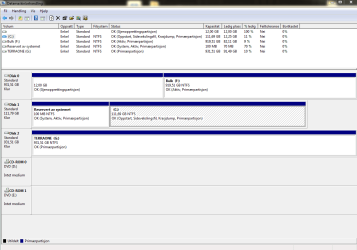
Here is the screen capture of disk management. I apologize for Norwegian as native language of this windows. I tried to change it last time I installed, but it seems like the version I bought only gives me the option of Norwegian. If there are words you cannot make out, please don't hesitate to ask for a translation

In the meantime I'll work my way through the other malware-software and try creating a new account.

Kind regards Jonas
 

Attachments

  • Screencap-disk management.PNG
    Screencap-disk management.PNG
    25.1 KB · Views: 1
Last edited:

My Computer My Computer

At a glance

Windows 7 home premium, 64bit, version 6.1.7601Amd Phenom II X6 1055T, 2800MhzKINGSTON 12GB 1600MHZ DDR32 x AMD Radeon HD 6850
Computer type
PC/Desktop
Computer Manufacturer/Model Number
Custom build
OS
Windows 7 home premium, 64bit, version 6.1.7601
CPU
Amd Phenom II X6 1055T, 2800Mhz
Motherboard
Asus m4a89td pro usb3
Memory
KINGSTON 12GB 1600MHZ DDR3
Graphics Card(s)
2 x AMD Radeon HD 6850
Hard Drives
120GB SSD: KINGSTON SV300S37A120G
1TB: Western Digital Black WD1002FAEX-00Z3A0, 1TB 7200 RPM 64MB Cache SATA 6.0Gb/s 3.5" Internal Hard Drive Bare Drive
Antivirus
AVAST free, latest version
Browser
Opera Chrome, latest version
I suggested disconnecting from the Internet since I asked you to disable AV too :) It was a precaution to not let you catch anything while trying a clean startup.
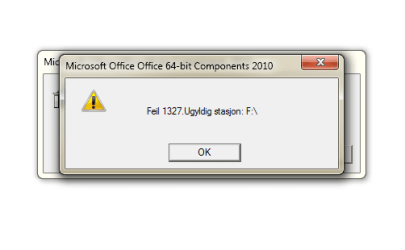
Well, your old HDD (F) is still marked active, I wonder if that's causing any issues. Would you please shutdown and remove that HDD and try booting without? Lets see first if you need that drive to boot at all.

Edit: If it can boot with SSD alone, you can mark F inactive as instructed in http://www.sevenforums.com/tutorials/197157-partition-mark-inactive.html
 

My Computer My Computer

At a glance

Windows 7 Ultimate x64 SP1AMD Phenom 2 1090T2x8GB Kingston HyperX Fury Black 1600Mhz Unga...MSI GTX 970 Gaming 4G
Computer type
PC/Desktop
Computer Manufacturer/Model Number
Custom Build
OS
Windows 7 Ultimate x64 SP1
CPU
AMD Phenom 2 1090T
Motherboard
Gigabyte GA-890FXA-UD5
Memory
2x8GB Kingston HyperX Fury Black 1600Mhz Unganged
Graphics Card(s)
MSI GTX 970 Gaming 4G
Sound Card
Realtek On-Board HD 7.1 Audio / Logitech G35
Monitor(s) Displays
3xAcer GD245HQ
Screen Resolution
1920x1080
Hard Drives
Samsung 850 Pro 512GB SSD - OS /
WD Caviar Black SATA 3 - 1 TBx2 - Dynamic RAID 0 /
WD Caviar Green SATA 2 - 640GBx2 - Dynamic RAID 0 /
WD Caviar Green SATA 2 - 640GB - Internal Backup /
Seagate Barracude SATA 3 - 3TB - External Backup/ Sync
PSU
HighPower 1000W
Case
Cooler Master HAF 932
Cooling
Noctua NH-D14
Keyboard
Logitech G19
Mouse
Logitech G500
Internet Speed
100/4 Mbit Cable (100GB quota)
Antivirus
ZoneAlarm Extreme Security / MBAM Pro / MBAE Free / SAS Free
Browser
IE 11 - Firefox - Chrome
Other Info
Logitech F710/ G27/ G940/ Z5500 // TrackIR 5 // Nvidia 3D Surround Vision
Ha ha, ok, well I guess I survived.. Doesn't seem like such a bad idea to rescan for malware now.. ;)

Yes, I'll try to remove that disk. I guess removing the power-supply to it will be enough right?
 

My Computer My Computer

At a glance

Windows 7 home premium, 64bit, version 6.1.7601Amd Phenom II X6 1055T, 2800MhzKINGSTON 12GB 1600MHZ DDR32 x AMD Radeon HD 6850
Computer type
PC/Desktop
Computer Manufacturer/Model Number
Custom build
OS
Windows 7 home premium, 64bit, version 6.1.7601
CPU
Amd Phenom II X6 1055T, 2800Mhz
Motherboard
Asus m4a89td pro usb3
Memory
KINGSTON 12GB 1600MHZ DDR3
Graphics Card(s)
2 x AMD Radeon HD 6850
Hard Drives
120GB SSD: KINGSTON SV300S37A120G
1TB: Western Digital Black WD1002FAEX-00Z3A0, 1TB 7200 RPM 64MB Cache SATA 6.0Gb/s 3.5" Internal Hard Drive Bare Drive
Antivirus
AVAST free, latest version
Browser
Opera Chrome, latest version
Yes, you can just un-plug power cable.

Deleted a double post and also edited previous post for the tutorial link.
 

My Computer My Computer

At a glance

Windows 7 Ultimate x64 SP1AMD Phenom 2 1090T2x8GB Kingston HyperX Fury Black 1600Mhz Unga...MSI GTX 970 Gaming 4G
Computer type
PC/Desktop
Computer Manufacturer/Model Number
Custom Build
OS
Windows 7 Ultimate x64 SP1
CPU
AMD Phenom 2 1090T
Motherboard
Gigabyte GA-890FXA-UD5
Memory
2x8GB Kingston HyperX Fury Black 1600Mhz Unganged
Graphics Card(s)
MSI GTX 970 Gaming 4G
Sound Card
Realtek On-Board HD 7.1 Audio / Logitech G35
Monitor(s) Displays
3xAcer GD245HQ
Screen Resolution
1920x1080
Hard Drives
Samsung 850 Pro 512GB SSD - OS /
WD Caviar Black SATA 3 - 1 TBx2 - Dynamic RAID 0 /
WD Caviar Green SATA 2 - 640GBx2 - Dynamic RAID 0 /
WD Caviar Green SATA 2 - 640GB - Internal Backup /
Seagate Barracude SATA 3 - 3TB - External Backup/ Sync
PSU
HighPower 1000W
Case
Cooler Master HAF 932
Cooling
Noctua NH-D14
Keyboard
Logitech G19
Mouse
Logitech G500
Internet Speed
100/4 Mbit Cable (100GB quota)
Antivirus
ZoneAlarm Extreme Security / MBAM Pro / MBAE Free / SAS Free
Browser
IE 11 - Firefox - Chrome
Other Info
Logitech F710/ G27/ G940/ Z5500 // TrackIR 5 // Nvidia 3D Surround Vision
Thanks, u guys! The information has been very helpful for me!!!
 

My Computer My Computer

At a glance

Windows 7 Home Premium 32bit
Computer type
PC/Desktop
Computer Manufacturer/Model Number
Dell
OS
Windows 7 Home Premium 32bit
Motherboard
China
Don't thank me, GokAy is the one doing all the thinking here.. :) Glad to hear that the post helped you though!

So I made another administrator user, same problem for that account, so I guess it's not related to my user account, but an OS issue..?

When I started the computer without the disk F: my shortcuts didn't stray from their path, and I was able to follow them to open software. I suppose this confirms your suspicion GokAy. Any other suggestions than to buy another hard-disk, transfer the valuable data, and then run a complete wipe out? Is there a way of telling it that it should no longer refer to that F: disk, and manually delete the files and folders that make it recognize it as an OS-disk?
 

My Computer My Computer

At a glance

Windows 7 home premium, 64bit, version 6.1.7601Amd Phenom II X6 1055T, 2800MhzKINGSTON 12GB 1600MHZ DDR32 x AMD Radeon HD 6850
Computer type
PC/Desktop
Computer Manufacturer/Model Number
Custom build
OS
Windows 7 home premium, 64bit, version 6.1.7601
CPU
Amd Phenom II X6 1055T, 2800Mhz
Motherboard
Asus m4a89td pro usb3
Memory
KINGSTON 12GB 1600MHZ DDR3
Graphics Card(s)
2 x AMD Radeon HD 6850
Hard Drives
120GB SSD: KINGSTON SV300S37A120G
1TB: Western Digital Black WD1002FAEX-00Z3A0, 1TB 7200 RPM 64MB Cache SATA 6.0Gb/s 3.5" Internal Hard Drive Bare Drive
Antivirus
AVAST free, latest version
Browser
Opera Chrome, latest version
I would not suggest buying another HDD just yet, I don't think it is HDD's fault.

It may have been a glitch, so:
- First try plugging the HDD back in and boot normally. See if issue will re-occur. It may have corrected once there was no F partition.
- Then mark F as inactive, I posted the link in post #7.
- Finally, try changing the drive letter to anything else from Disk Management.
 

My Computer My Computer

At a glance

Windows 7 Ultimate x64 SP1AMD Phenom 2 1090T2x8GB Kingston HyperX Fury Black 1600Mhz Unga...MSI GTX 970 Gaming 4G
Computer type
PC/Desktop
Computer Manufacturer/Model Number
Custom Build
OS
Windows 7 Ultimate x64 SP1
CPU
AMD Phenom 2 1090T
Motherboard
Gigabyte GA-890FXA-UD5
Memory
2x8GB Kingston HyperX Fury Black 1600Mhz Unganged
Graphics Card(s)
MSI GTX 970 Gaming 4G
Sound Card
Realtek On-Board HD 7.1 Audio / Logitech G35
Monitor(s) Displays
3xAcer GD245HQ
Screen Resolution
1920x1080
Hard Drives
Samsung 850 Pro 512GB SSD - OS /
WD Caviar Black SATA 3 - 1 TBx2 - Dynamic RAID 0 /
WD Caviar Green SATA 2 - 640GBx2 - Dynamic RAID 0 /
WD Caviar Green SATA 2 - 640GB - Internal Backup /
Seagate Barracude SATA 3 - 3TB - External Backup/ Sync
PSU
HighPower 1000W
Case
Cooler Master HAF 932
Cooling
Noctua NH-D14
Keyboard
Logitech G19
Mouse
Logitech G500
Internet Speed
100/4 Mbit Cable (100GB quota)
Antivirus
ZoneAlarm Extreme Security / MBAM Pro / MBAE Free / SAS Free
Browser
IE 11 - Firefox - Chrome
Other Info
Logitech F710/ G27/ G940/ Z5500 // TrackIR 5 // Nvidia 3D Surround Vision
I've used this manual http://www.sevenforums.com/tutorials/197157-partition-mark-inactive.html and inactivated F:. It froze my PC for 5-6 seconds as it entered windows after a reboot, but now seems to be working as normal.

I made a new shortcut to chrome before restart and it worked as it should during the first seconds after the frozen incident. Then, for some reason it lost it's icon and became corrupted. I will restart the computer again and try to log it with process monitor.

I'll edit this post and attach it here.

Ok, I managed to log it, but the since there is so much going on during the startup the logfile is 700mb.. And that was less with less than a second wasted before saving the file. Any filter I can apply to sort this out?
 
Last edited:

My Computer My Computer

At a glance

Windows 7 home premium, 64bit, version 6.1.7601Amd Phenom II X6 1055T, 2800MhzKINGSTON 12GB 1600MHZ DDR32 x AMD Radeon HD 6850
Computer type
PC/Desktop
Computer Manufacturer/Model Number
Custom build
OS
Windows 7 home premium, 64bit, version 6.1.7601
CPU
Amd Phenom II X6 1055T, 2800Mhz
Motherboard
Asus m4a89td pro usb3
Memory
KINGSTON 12GB 1600MHZ DDR3
Graphics Card(s)
2 x AMD Radeon HD 6850
Hard Drives
120GB SSD: KINGSTON SV300S37A120G
1TB: Western Digital Black WD1002FAEX-00Z3A0, 1TB 7200 RPM 64MB Cache SATA 6.0Gb/s 3.5" Internal Hard Drive Bare Drive
Antivirus
AVAST free, latest version
Browser
Opera Chrome, latest version
I wouldn't know much about how to filter Process Monitor, maybe if you manually change a shortcut while it is running, you can spot it?

Did you try changing F drive letter to anything else yet?
 

My Computer My Computer

At a glance

Windows 7 Ultimate x64 SP1AMD Phenom 2 1090T2x8GB Kingston HyperX Fury Black 1600Mhz Unga...MSI GTX 970 Gaming 4G
Computer type
PC/Desktop
Computer Manufacturer/Model Number
Custom Build
OS
Windows 7 Ultimate x64 SP1
CPU
AMD Phenom 2 1090T
Motherboard
Gigabyte GA-890FXA-UD5
Memory
2x8GB Kingston HyperX Fury Black 1600Mhz Unganged
Graphics Card(s)
MSI GTX 970 Gaming 4G
Sound Card
Realtek On-Board HD 7.1 Audio / Logitech G35
Monitor(s) Displays
3xAcer GD245HQ
Screen Resolution
1920x1080
Hard Drives
Samsung 850 Pro 512GB SSD - OS /
WD Caviar Black SATA 3 - 1 TBx2 - Dynamic RAID 0 /
WD Caviar Green SATA 2 - 640GBx2 - Dynamic RAID 0 /
WD Caviar Green SATA 2 - 640GB - Internal Backup /
Seagate Barracude SATA 3 - 3TB - External Backup/ Sync
PSU
HighPower 1000W
Case
Cooler Master HAF 932
Cooling
Noctua NH-D14
Keyboard
Logitech G19
Mouse
Logitech G500
Internet Speed
100/4 Mbit Cable (100GB quota)
Antivirus
ZoneAlarm Extreme Security / MBAM Pro / MBAE Free / SAS Free
Browser
IE 11 - Firefox - Chrome
Other Info
Logitech F710/ G27/ G940/ Z5500 // TrackIR 5 // Nvidia 3D Surround Vision
Fantastic!

Changing the F drive letter actually did the trick.. Thanks for not giving up on me, I was about to resign myself. Hopefully this will have sorted it for good! Appreciate the help. Have a good weekend! :)
 

My Computer My Computer

At a glance

Windows 7 home premium, 64bit, version 6.1.7601Amd Phenom II X6 1055T, 2800MhzKINGSTON 12GB 1600MHZ DDR32 x AMD Radeon HD 6850
Computer type
PC/Desktop
Computer Manufacturer/Model Number
Custom build
OS
Windows 7 home premium, 64bit, version 6.1.7601
CPU
Amd Phenom II X6 1055T, 2800Mhz
Motherboard
Asus m4a89td pro usb3
Memory
KINGSTON 12GB 1600MHZ DDR3
Graphics Card(s)
2 x AMD Radeon HD 6850
Hard Drives
120GB SSD: KINGSTON SV300S37A120G
1TB: Western Digital Black WD1002FAEX-00Z3A0, 1TB 7200 RPM 64MB Cache SATA 6.0Gb/s 3.5" Internal Hard Drive Bare Drive
Antivirus
AVAST free, latest version
Browser
Opera Chrome, latest version
Glad to hear :) it was a rather interesting case
 

My Computer My Computer

At a glance

Windows 7 Ultimate x64 SP1AMD Phenom 2 1090T2x8GB Kingston HyperX Fury Black 1600Mhz Unga...MSI GTX 970 Gaming 4G
Computer type
PC/Desktop
Computer Manufacturer/Model Number
Custom Build
OS
Windows 7 Ultimate x64 SP1
CPU
AMD Phenom 2 1090T
Motherboard
Gigabyte GA-890FXA-UD5
Memory
2x8GB Kingston HyperX Fury Black 1600Mhz Unganged
Graphics Card(s)
MSI GTX 970 Gaming 4G
Sound Card
Realtek On-Board HD 7.1 Audio / Logitech G35
Monitor(s) Displays
3xAcer GD245HQ
Screen Resolution
1920x1080
Hard Drives
Samsung 850 Pro 512GB SSD - OS /
WD Caviar Black SATA 3 - 1 TBx2 - Dynamic RAID 0 /
WD Caviar Green SATA 2 - 640GBx2 - Dynamic RAID 0 /
WD Caviar Green SATA 2 - 640GB - Internal Backup /
Seagate Barracude SATA 3 - 3TB - External Backup/ Sync
PSU
HighPower 1000W
Case
Cooler Master HAF 932
Cooling
Noctua NH-D14
Keyboard
Logitech G19
Mouse
Logitech G500
Internet Speed
100/4 Mbit Cable (100GB quota)
Antivirus
ZoneAlarm Extreme Security / MBAM Pro / MBAE Free / SAS Free
Browser
IE 11 - Firefox - Chrome
Other Info
Logitech F710/ G27/ G940/ Z5500 // TrackIR 5 // Nvidia 3D Surround Vision
Don't know if this should be a new post but I think the problems might be connected beyond one leading to the other.

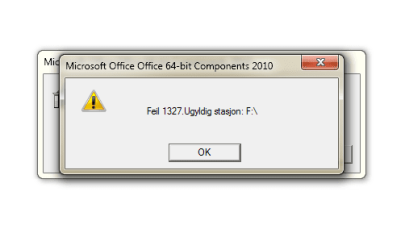
Changing the disk volume letter cause more severe problems for me. I cannot use microsoft office software. When I try to open word or any other microsoft office software I get the error 1327 invalid drive. I have a genuine copy. I had no way of telling it to search B: instead of F:, it refused to let me proceed.

I thought of a way to try to work around it. I changed the drive letter back to F: and the deleted the office version. I followed up with reinstalling office to C:. I felt quite smug, as I was sure this would do the trick. I changed the letter of that drive back to B: to solve the shortcut problem.

I was stunned to find that this was not enough. Microsoft initiates some kind of setup whenever I try to open any office related software. This setup process cannot locate office at drive F: and gives me yet another Error 1327 and shut downs the software. It refuses to let me use any of its software claiming that it's unlicensed and that is just utter b***s**t. I used my license code when I installed it and microsoft claimed they evaluated and accepted it in that process.

I don't know what to do here.. I feel like microsoft is making me choose between the devil and the deep blue sea..
 

My Computer My Computer

At a glance

Windows 7 home premium, 64bit, version 6.1.7601Amd Phenom II X6 1055T, 2800MhzKINGSTON 12GB 1600MHZ DDR32 x AMD Radeon HD 6850
Computer type
PC/Desktop
Computer Manufacturer/Model Number
Custom build
OS
Windows 7 home premium, 64bit, version 6.1.7601
CPU
Amd Phenom II X6 1055T, 2800Mhz
Motherboard
Asus m4a89td pro usb3
Memory
KINGSTON 12GB 1600MHZ DDR3
Graphics Card(s)
2 x AMD Radeon HD 6850
Hard Drives
120GB SSD: KINGSTON SV300S37A120G
1TB: Western Digital Black WD1002FAEX-00Z3A0, 1TB 7200 RPM 64MB Cache SATA 6.0Gb/s 3.5" Internal Hard Drive Bare Drive
Antivirus
AVAST free, latest version
Browser
Opera Chrome, latest version
I am not home to look at this in detail, however did you change drive letter to B? That is traditionally used for a floppy drive. If so, try changing to one of D-Z.
 

My Computer My Computer

At a glance

Windows 7 Ultimate x64 SP1AMD Phenom 2 1090T2x8GB Kingston HyperX Fury Black 1600Mhz Unga...MSI GTX 970 Gaming 4G
Computer type
PC/Desktop
Computer Manufacturer/Model Number
Custom Build
OS
Windows 7 Ultimate x64 SP1
CPU
AMD Phenom 2 1090T
Motherboard
Gigabyte GA-890FXA-UD5
Memory
2x8GB Kingston HyperX Fury Black 1600Mhz Unganged
Graphics Card(s)
MSI GTX 970 Gaming 4G
Sound Card
Realtek On-Board HD 7.1 Audio / Logitech G35
Monitor(s) Displays
3xAcer GD245HQ
Screen Resolution
1920x1080
Hard Drives
Samsung 850 Pro 512GB SSD - OS /
WD Caviar Black SATA 3 - 1 TBx2 - Dynamic RAID 0 /
WD Caviar Green SATA 2 - 640GBx2 - Dynamic RAID 0 /
WD Caviar Green SATA 2 - 640GB - Internal Backup /
Seagate Barracude SATA 3 - 3TB - External Backup/ Sync
PSU
HighPower 1000W
Case
Cooler Master HAF 932
Cooling
Noctua NH-D14
Keyboard
Logitech G19
Mouse
Logitech G500
Internet Speed
100/4 Mbit Cable (100GB quota)
Antivirus
ZoneAlarm Extreme Security / MBAM Pro / MBAE Free / SAS Free
Browser
IE 11 - Firefox - Chrome
Other Info
Logitech F710/ G27/ G940/ Z5500 // TrackIR 5 // Nvidia 3D Surround Vision
Tried to change it to D:, but made no difference.

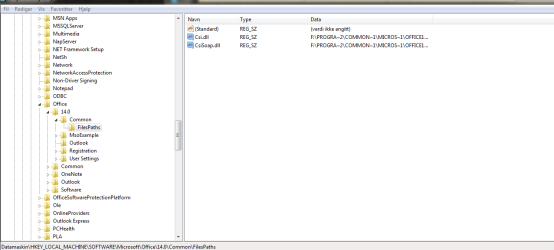
I've noticed that there are files in regedit that still points towards F:. I've tried changing the two files in the office folder, but did not affect it.

Also files in the microsoft - windows - curren version- shared DLLs that at least have names involving F:, and this is just me doing a quick random check..

Screen caps attached
 

Attachments

  • Skjermbilde.PNG
    Skjermbilde.PNG
    7.5 KB · Views: 10
  • Skjermbilde2.PNG
    Skjermbilde2.PNG
    7.5 KB · Views: 10
  • regedit.PNG
    regedit.PNG
    18.3 KB · Views: 0
  • regedit2.PNG
    regedit2.PNG
    29.2 KB · Views: 0

My Computer My Computer

At a glance

Windows 7 home premium, 64bit, version 6.1.7601Amd Phenom II X6 1055T, 2800MhzKINGSTON 12GB 1600MHZ DDR32 x AMD Radeon HD 6850
Computer type
PC/Desktop
Computer Manufacturer/Model Number
Custom build
OS
Windows 7 home premium, 64bit, version 6.1.7601
CPU
Amd Phenom II X6 1055T, 2800Mhz
Motherboard
Asus m4a89td pro usb3
Memory
KINGSTON 12GB 1600MHZ DDR3
Graphics Card(s)
2 x AMD Radeon HD 6850
Hard Drives
120GB SSD: KINGSTON SV300S37A120G
1TB: Western Digital Black WD1002FAEX-00Z3A0, 1TB 7200 RPM 64MB Cache SATA 6.0Gb/s 3.5" Internal Hard Drive Bare Drive
Antivirus
AVAST free, latest version
Browser
Opera Chrome, latest version
Do you have any other problems other than MS Office?

I would backup/image C right now with Macrium free - http://www.sevenforums.com/tutorials/73828-imaging-free-macrium.html. Then we can try things more freely.
Also create a manual System Restore point. http://www.sevenforums.com/tutorials/700-system-restore.html

You have already deleted Office, right? Like deleting the folder?
Can you uninstall Office from Control Panel - Programs and Features?

Report back after trying to uninstall please.
 

My Computer My Computer

At a glance

Windows 7 Ultimate x64 SP1AMD Phenom 2 1090T2x8GB Kingston HyperX Fury Black 1600Mhz Unga...MSI GTX 970 Gaming 4G
Computer type
PC/Desktop
Computer Manufacturer/Model Number
Custom Build
OS
Windows 7 Ultimate x64 SP1
CPU
AMD Phenom 2 1090T
Motherboard
Gigabyte GA-890FXA-UD5
Memory
2x8GB Kingston HyperX Fury Black 1600Mhz Unganged
Graphics Card(s)
MSI GTX 970 Gaming 4G
Sound Card
Realtek On-Board HD 7.1 Audio / Logitech G35
Monitor(s) Displays
3xAcer GD245HQ
Screen Resolution
1920x1080
Hard Drives
Samsung 850 Pro 512GB SSD - OS /
WD Caviar Black SATA 3 - 1 TBx2 - Dynamic RAID 0 /
WD Caviar Green SATA 2 - 640GBx2 - Dynamic RAID 0 /
WD Caviar Green SATA 2 - 640GB - Internal Backup /
Seagate Barracude SATA 3 - 3TB - External Backup/ Sync
PSU
HighPower 1000W
Case
Cooler Master HAF 932
Cooling
Noctua NH-D14
Keyboard
Logitech G19
Mouse
Logitech G500
Internet Speed
100/4 Mbit Cable (100GB quota)
Antivirus
ZoneAlarm Extreme Security / MBAM Pro / MBAE Free / SAS Free
Browser
IE 11 - Firefox - Chrome
Other Info
Logitech F710/ G27/ G940/ Z5500 // TrackIR 5 // Nvidia 3D Surround Vision
Back
Top