

Two Win7 computers
[1] 32-bit
[2] 64-bit
On [1] Win7 32bit
- to add a short cut to Notepad.EXE file
Start > RClick > New Shortcut
Browse to "C:Windows\Notepad.EXE" file etc
... shortcut runs the EXE file
... I run primary shortcuts with WinKey > number 0 to 9
On [2] Win7 64bit
- add a short cut to Notepad.EXE file
Start > RClick > New Shortcut
Browse to "C:Windows\Notepad.EXE" file etc
- shortcut on Start is created as a menu ... (I am not clicking on the "New Folder" on context menu)
- the menu contains Recent Items
- to run the EXE file I have to "Click" the menu name,
*** WinKey > number only opens the menus side list
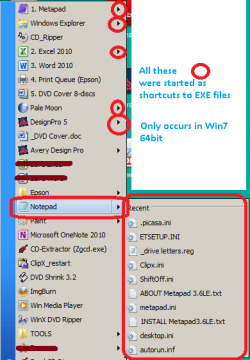
In 32-bit I can also add folders/shortcuts to Start menu at ...
C:\Users\<Computer name, eg Owner>\AppData\Roaming\Microsoft\Windows\Start Menu\Programs
But where would that be in 64-bit ?
Or am I missing something ?
Would appreciate any help
------------------
Both PC have Classic Start Menu
- maybe my question should be directed to "Classic Start Menu" ??
[1] 32-bit
[2] 64-bit
On [1] Win7 32bit
- to add a short cut to Notepad.EXE file
Start > RClick > New Shortcut
Browse to "C:Windows\Notepad.EXE" file etc
... shortcut runs the EXE file
... I run primary shortcuts with WinKey > number 0 to 9
On [2] Win7 64bit
- add a short cut to Notepad.EXE file
Start > RClick > New Shortcut
Browse to "C:Windows\Notepad.EXE" file etc
- shortcut on Start is created as a menu ... (I am not clicking on the "New Folder" on context menu)
- the menu contains Recent Items
- to run the EXE file I have to "Click" the menu name,
*** WinKey > number only opens the menus side list
In 32-bit I can also add folders/shortcuts to Start menu at ...
C:\Users\<Computer name, eg Owner>\AppData\Roaming\Microsoft\Windows\Start Menu\Programs
But where would that be in 64-bit ?
Or am I missing something ?
Would appreciate any help
------------------
Both PC have Classic Start Menu
- maybe my question should be directed to "Classic Start Menu" ??
My Computer
At a glance
XP Pro (x86) | 7 HP (x86) & (x64) | 7 Pro (x64)
- Computer type
- PC/Desktop
- Computer Manufacturer/Model Number
- Toshiba, Lenovo (laptops) + 4 rigs
- OS
- XP Pro (x86) | 7 HP (x86) & (x64) | 7 Pro (x64)

