
Shortcuts to network folders added automatically in "Computer"
Hi All,
I have the following situation at work and hopefully someone will be able to help me with it
I have a mapped drive for a location on SharePoint. That location also has subfolders so I access all through the Windows Explorer.
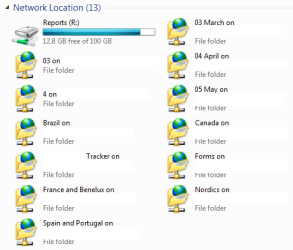
My issue is that whenever I access a subfolder and a file in that subfolder a new shorcut is created next to the mapped drive.
So instead of having only one mapped drive, after some time I end up with the mapped drive and more than 10 network folder shortcuts.
My question is, can anyone share on how to disable the automatic creation of network folders?
Thanks!
Mitko
Hi All,
I have the following situation at work and hopefully someone will be able to help me with it
I have a mapped drive for a location on SharePoint. That location also has subfolders so I access all through the Windows Explorer.
My issue is that whenever I access a subfolder and a file in that subfolder a new shorcut is created next to the mapped drive.
So instead of having only one mapped drive, after some time I end up with the mapped drive and more than 10 network folder shortcuts.
My question is, can anyone share on how to disable the automatic creation of network folders?
Thanks!
Mitko
Attachments
Last edited:
My Computer
- Computer Manufacturer/Model Number
- Lenovo ThinkPad T400
- OS
- Windows 7 Ultimate x64
- Memory
- 6 GB
- Screen Resolution
- 1440x900
