shortcuts

mikal83

New member
Local time
12:55 AM
Messages
7
I like windows BUT my pal is a Mac person. I love how all his shortcuts on his desktop are all on the side and hidden until he sort of scrolls up and down and they sort of curve around the sieds of the screen. Can W7 do anything like that....

reasom I'm asking is we both like the shortcuts on DT as its quick to get to the most used websites.....mail/google etc etc
 

My Computer

OS
windows7

My Computer

Computer type
PC/Desktop
Computer Manufacturer/Model Number
DELL VOSTRO 3650
OS
Windows 8.1 PRO
CPU
3rd Generation Intel Core i7‐3612QM CPU @ 2.10GHZ
Memory
8GB DDR3
Graphics Card(s)
NVIDIA GeForce GT 525M (128 bit), 1GB Grpahics
Screen Resolution
1920X1080
Hard Drives
750GB 5400RPM
It cant be done with windows itself but i bet you can find a 3rd part software.
 

My Computer

Computer Manufacturer/Model Number
HP
OS
Windows 7 Ultimate x64
CPU
Instel
Motherboard
ASUS
Memory
5 GB
Monitor(s) Displays
22 in. HP
Hard Drives
500GB
Rocket Dock for Win7. In Vista and XP, you put them into a folder on the desktop and push the folder all the way into the top (or the side). Then you right click on the dock and specify "Hide" and other options. Same with Rocket Dock.
 

My Computer

Computer Manufacturer/Model Number
HP, Dell, Gateway, Toshiba - 4 laptops and 2 desktops
OS
Vista, Windows7, Mint Mate, Zorin, Windows 8
CPU
from 1.6GHz Duo to i7
Monitor(s) Displays
2x HP w2207
Hard Drives
5x HDD, 7x SSD, 12x Externals
Keyboard
with trackball - no mices
Mouse
Trackball mice
Internet Speed
DSL 6000
flippin heck, those replies made my head hurt........... does this rocket/object dock do the same as a mac? R Dock looks quite cool
 

My Computer

OS
windows7
This is how my Rocket Dock looks like whilst I have the cursor on it. When I withdraw the cursor, it hides. The icons on which the cursor is pointing are always the biggest. It acts like a carousel as you move the cursor along the icons.

2010-03-17_194012-1.png
 

My Computer

Computer Manufacturer/Model Number
HP, Dell, Gateway, Toshiba - 4 laptops and 2 desktops
OS
Vista, Windows7, Mint Mate, Zorin, Windows 8
CPU
from 1.6GHz Duo to i7
Monitor(s) Displays
2x HP w2207
Hard Drives
5x HDD, 7x SSD, 12x Externals
Keyboard
with trackball - no mices
Mouse
Trackball mice
Internet Speed
DSL 6000

My Computer

Computer Manufacturer/Model Number
* BFK Customs *
OS
W 7 64-bit Ultimate
CPU
Intel Q9550 Yorkfield
Motherboard
ASUS P5Q Pro
Memory
8GB Dominator 8500C5D
Graphics Card(s)
ATI : XFX 5870
Sound Card
Realtek HD Audio 7-1
Monitor(s) Displays
1x 47" LCD HDMI & 3x 26" LCD HDMI
Screen Resolution
1920x1080P & 1920x1200
Hard Drives
1x 80GB Intel X25-M G2 SSD : 1x 500GB & 1x 640GB WD Caviar Black(s)
PSU
Corsair 620HX
Case
Cooler Master RC-690
Cooling
Tuniq Tower 120, 2x 140mm and 3x 120mm case fans
Keyboard
Microsoft 500
Mouse
Razer Diamondback 3G
Internet Speed
14 Mb/s
Other Info
1x Koutech 3Gb/s SATA HDD Hot Swap Rack
How about a button in the task bar that gives you a pop up with all your short cuts, links, etc. You can put folders in there that when hovered over give you a menu list. It is very easily customized, and very non intrusive...it is called Quick Launch, comes with Windows (have to create the tool bar in Win7) and frankly the only thing that has suited me since it first came out with IE yes 4.
 

My Computer

Computer Manufacturer/Model Number
I made it
OS
Win7 Ultimate
CPU
Celeron E1400 @ 2 gig dual core
Motherboard
MSI MS-7529
Memory
4 gig dual channel
Graphics Card(s)
nVidia 6600LE 512mgs mem
Sound Card
On Board Realtek HD
Monitor(s) Displays
1 Sceptre Flat
Screen Resolution
I like 1280x800
Hard Drives
System Drive: 300 gig Maxtor SATA3 (It was cheap)

My Storage: 160 gig WD SATA3
Wife's Storage 160 gig WD SATA3
Keyboard
MS Dgital Media Pro
Mouse
MS Optical 3000
Internet Speed
1.5 DSL
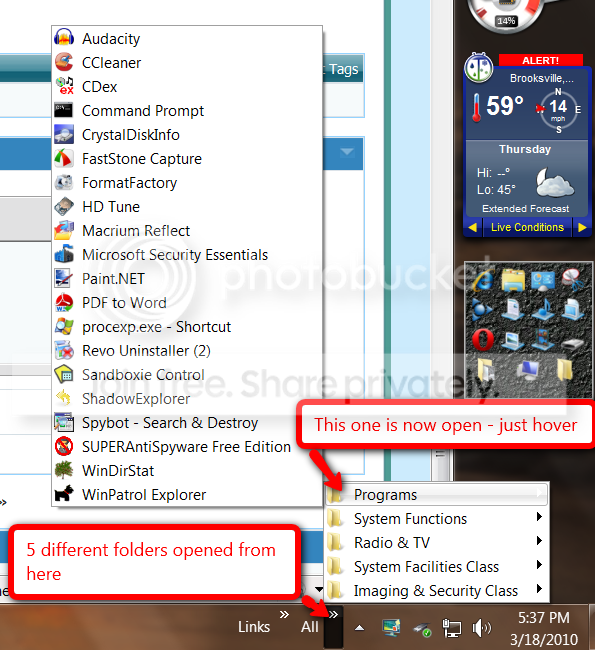
boastree is right. Toolbar(s) are an excellent alternative. See this example:

toolbar.png
 

My Computer

Computer Manufacturer/Model Number
HP, Dell, Gateway, Toshiba - 4 laptops and 2 desktops
OS
Vista, Windows7, Mint Mate, Zorin, Windows 8
CPU
from 1.6GHz Duo to i7
Monitor(s) Displays
2x HP w2207
Hard Drives
5x HDD, 7x SSD, 12x Externals
Keyboard
with trackball - no mices
Mouse
Trackball mice
Internet Speed
DSL 6000

My Computer

Computer Manufacturer/Model Number
* BFK Customs *
OS
W 7 64-bit Ultimate
CPU
Intel Q9550 Yorkfield
Motherboard
ASUS P5Q Pro
Memory
8GB Dominator 8500C5D
Graphics Card(s)
ATI : XFX 5870
Sound Card
Realtek HD Audio 7-1
Monitor(s) Displays
1x 47" LCD HDMI & 3x 26" LCD HDMI
Screen Resolution
1920x1080P & 1920x1200
Hard Drives
1x 80GB Intel X25-M G2 SSD : 1x 500GB & 1x 640GB WD Caviar Black(s)
PSU
Corsair 620HX
Case
Cooler Master RC-690
Cooling
Tuniq Tower 120, 2x 140mm and 3x 120mm case fans
Keyboard
Microsoft 500
Mouse
Razer Diamondback 3G
Internet Speed
14 Mb/s
Other Info
1x Koutech 3Gb/s SATA HDD Hot Swap Rack

My Computer

Computer Manufacturer/Model Number
HP, Dell, Gateway, Toshiba - 4 laptops and 2 desktops
OS
Vista, Windows7, Mint Mate, Zorin, Windows 8
CPU
from 1.6GHz Duo to i7
Monitor(s) Displays
2x HP w2207
Hard Drives
5x HDD, 7x SSD, 12x Externals
Keyboard
with trackball - no mices
Mouse
Trackball mice
Internet Speed
DSL 6000

To tell you the truth, I prefer the toolbar approach over the tweaked Quick Launch since that does not really work like in Vista (no "add to Quick Launch" in the right click context menu). And that makes it a little awkward to work with. And in the toolbar you can stack the folders 9 deep.


I haven't found a tutorial about adding a toolbar yet, do you know of one?
 

My Computer

Computer Manufacturer/Model Number
* BFK Customs *
OS
W 7 64-bit Ultimate
CPU
Intel Q9550 Yorkfield
Motherboard
ASUS P5Q Pro
Memory
8GB Dominator 8500C5D
Graphics Card(s)
ATI : XFX 5870
Sound Card
Realtek HD Audio 7-1
Monitor(s) Displays
1x 47" LCD HDMI & 3x 26" LCD HDMI
Screen Resolution
1920x1080P & 1920x1200
Hard Drives
1x 80GB Intel X25-M G2 SSD : 1x 500GB & 1x 640GB WD Caviar Black(s)
PSU
Corsair 620HX
Case
Cooler Master RC-690
Cooling
Tuniq Tower 120, 2x 140mm and 3x 120mm case fans
Keyboard
Microsoft 500
Mouse
Razer Diamondback 3G
Internet Speed
14 Mb/s
Other Info
1x Koutech 3Gb/s SATA HDD Hot Swap Rack
haven't found a tutorial about adding a toolbar yet, do you know of one?
If you want, I make you one. But it is really dead simple.

1. Right click on taskbar > toolbars > new toolbar
2. choose the folder where you have parked your shortcuts. That folder can be anywhere, but I found it is easiest, if you keep it on the desktop (for easy additions). That folder can contain shortcuts or more folders containing shortcuts (that is the best to keep order if you want to park a lot of shortcuts. Bundle them by theme, each into their own folder).
3. when you click on the toolbar chevrons (named "All" in my previous picture) all the folders of the toolbar will pop up. Hover over a folder and the icons from that folder will pop up. It is that easy.
 

My Computer

Computer Manufacturer/Model Number
HP, Dell, Gateway, Toshiba - 4 laptops and 2 desktops
OS
Vista, Windows7, Mint Mate, Zorin, Windows 8
CPU
from 1.6GHz Duo to i7
Monitor(s) Displays
2x HP w2207
Hard Drives
5x HDD, 7x SSD, 12x Externals
Keyboard
with trackball - no mices
Mouse
Trackball mice
Internet Speed
DSL 6000
haven't found a tutorial about adding a toolbar yet, do you know of one?
If you want, I make you one. But it is really dead simple.

1. Right click on taskbar > toolbars > new toolbar
2. choose the folder where you have parked your shortcuts. That folder can be anywhere, but I found it is easiest, if you keep it on the desktop (for easy additions). That folder can contain shortcuts or more folders containing shortcuts (that is the best to keep order if you want to park a lot of shortcuts. Bundle them by theme).
3. when you click on the toolbar chevrons (named "All" in my previous picture) all the folders of the toolbar will pop up. Hover over a folder and the icons from that folder will pop up. It is that easy.


Hello whs, thanks.


I know how to do it, I just find it way easier to link people to tutorials rather than continually write instructions out all the time, if you create one I'll link people to it whenever I have a need to; just be sure to use "toolbar" as the first word in the title so it'll be easy to find.
 

My Computer

Computer Manufacturer/Model Number
* BFK Customs *
OS
W 7 64-bit Ultimate
CPU
Intel Q9550 Yorkfield
Motherboard
ASUS P5Q Pro
Memory
8GB Dominator 8500C5D
Graphics Card(s)
ATI : XFX 5870
Sound Card
Realtek HD Audio 7-1
Monitor(s) Displays
1x 47" LCD HDMI & 3x 26" LCD HDMI
Screen Resolution
1920x1080P & 1920x1200
Hard Drives
1x 80GB Intel X25-M G2 SSD : 1x 500GB & 1x 640GB WD Caviar Black(s)
PSU
Corsair 620HX
Case
Cooler Master RC-690
Cooling
Tuniq Tower 120, 2x 140mm and 3x 120mm case fans
Keyboard
Microsoft 500
Mouse
Razer Diamondback 3G
Internet Speed
14 Mb/s
Other Info
1x Koutech 3Gb/s SATA HDD Hot Swap Rack
OK, I will make a video tutorial later. The subject lends itself for a video.
 

My Computer

Computer Manufacturer/Model Number
HP, Dell, Gateway, Toshiba - 4 laptops and 2 desktops
OS
Vista, Windows7, Mint Mate, Zorin, Windows 8
CPU
from 1.6GHz Duo to i7
Monitor(s) Displays
2x HP w2207
Hard Drives
5x HDD, 7x SSD, 12x Externals
Keyboard
with trackball - no mices
Mouse
Trackball mice
Internet Speed
DSL 6000
OK, I will make a video tutorial later. The subject lends itself for a video.


Seven Forums no longer has a video section, it has been disabled due to lack of interest.
 

My Computer

Computer Manufacturer/Model Number
* BFK Customs *
OS
W 7 64-bit Ultimate
CPU
Intel Q9550 Yorkfield
Motherboard
ASUS P5Q Pro
Memory
8GB Dominator 8500C5D
Graphics Card(s)
ATI : XFX 5870
Sound Card
Realtek HD Audio 7-1
Monitor(s) Displays
1x 47" LCD HDMI & 3x 26" LCD HDMI
Screen Resolution
1920x1080P & 1920x1200
Hard Drives
1x 80GB Intel X25-M G2 SSD : 1x 500GB & 1x 640GB WD Caviar Black(s)
PSU
Corsair 620HX
Case
Cooler Master RC-690
Cooling
Tuniq Tower 120, 2x 140mm and 3x 120mm case fans
Keyboard
Microsoft 500
Mouse
Razer Diamondback 3G
Internet Speed
14 Mb/s
Other Info
1x Koutech 3Gb/s SATA HDD Hot Swap Rack
That does not matter. I just post the link to my Vimeo.
 

My Computer

Computer Manufacturer/Model Number
HP, Dell, Gateway, Toshiba - 4 laptops and 2 desktops
OS
Vista, Windows7, Mint Mate, Zorin, Windows 8
CPU
from 1.6GHz Duo to i7
Monitor(s) Displays
2x HP w2207
Hard Drives
5x HDD, 7x SSD, 12x Externals
Keyboard
with trackball - no mices
Mouse
Trackball mice
Internet Speed
DSL 6000
uploaded the dock to my old pc, mmmmm not as good as I hoped. You can only fill it with so many shortcuts
 

My Computer

OS
windows7

My Computer

Computer Manufacturer/Model Number
HP, Dell, Gateway, Toshiba - 4 laptops and 2 desktops
OS
Vista, Windows7, Mint Mate, Zorin, Windows 8
CPU
from 1.6GHz Duo to i7
Monitor(s) Displays
2x HP w2207
Hard Drives
5x HDD, 7x SSD, 12x Externals
Keyboard
with trackball - no mices
Mouse
Trackball mice
Internet Speed
DSL 6000
Back
Top