shortcuts

lectricfunrl

Banned
Local time
5:27 PM
Messages
52
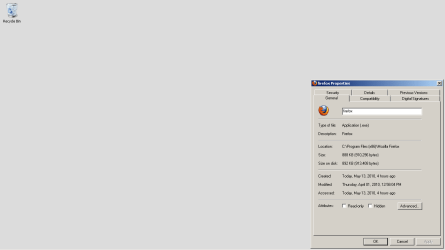
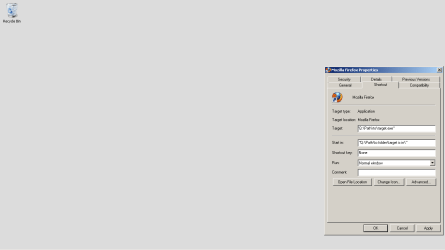
I just installed and am trying to setup my shortcut keys. I noticed that if I don't have a start menu entry for a program, navigating to the folder and finding the .exe, then right-clicking and choosing properties doesn't list a shortcut tab in properties. Why is this, is it a glitch?

I'm also having issues where programs aren't installing and placing icons on the taskbar as I tell the program to do, is this an early release bug?

Thanks!
 

My Computer

OS
Ubuntu
The first is not a glitch, because it is not a shortcut. Right click it and choose send to desktop, and it should appear when you right click the shortcut.

As to the second, I am not sure. It works fine on mine.
Are you installing as admin?

~Lordbob
 

My Computer

Computer Manufacturer/Model Number
Hera
OS
Windows 7 Ultimate x64, Mint 9
CPU
Intel i5-2500k
Motherboard
ASUS P8P67 Pro
Memory
2x 4Gb Corsair VENGEANCE DDR3-1600
Graphics Card(s)
NVidia GeForce N260GTX Twin Frozr
Sound Card
Realtek HD OnBoard Audio
Monitor(s) Displays
ASUS 24" Monitor
Screen Resolution
1920x1080
Hard Drives
G.SKILL Phoenix Series 60GB SATA II MLC Internal Solid State Drive (SSD)
SAMSUNG Spinpoint F3R 1TB 7200 RPM 32MB Cache SATA II
PSU
Cooler Master Real Power Pro 750W
Case
Cooler Master Haf 932
Cooling
Fans
Keyboard
Razer Tarantula
Mouse
Razer Lachesis
Internet Speed
not fast enough
in answer

1) so in order to set a shortcut key I have to use a shortcut link?
2)I'm not in the habit of installing programs with elevated permissions, it sounds like I should be?

Thanks!

While I'm at it, I was using Belarc Advisor for benchmarking, but it doesn't perform this for 7. Is there a program out there that is as reliable?
 

My Computer

OS
Ubuntu
1. Well, technically no. The reason it doesn't show is because that is the actual executable. So you need to create a shortcut (you can do that by right clicking on the desktop, create shortcut) before that section will show. You can also do it the way I said above to create a simple shortcut to an application.

2. I don't know. Sometimes they ask for UAC regardless, sometimes they ask first, or not at all. I recommend trying to install something as admin anyways to see if that fixes it.

Also, I didn't know what that was (googled it) and I don't have a clue for a replacement.

~Lordbob
 

My Computer

Computer Manufacturer/Model Number
Hera
OS
Windows 7 Ultimate x64, Mint 9
CPU
Intel i5-2500k
Motherboard
ASUS P8P67 Pro
Memory
2x 4Gb Corsair VENGEANCE DDR3-1600
Graphics Card(s)
NVidia GeForce N260GTX Twin Frozr
Sound Card
Realtek HD OnBoard Audio
Monitor(s) Displays
ASUS 24" Monitor
Screen Resolution
1920x1080
Hard Drives
G.SKILL Phoenix Series 60GB SATA II MLC Internal Solid State Drive (SSD)
SAMSUNG Spinpoint F3R 1TB 7200 RPM 32MB Cache SATA II
PSU
Cooler Master Real Power Pro 750W
Case
Cooler Master Haf 932
Cooling
Fans
Keyboard
Razer Tarantula
Mouse
Razer Lachesis
Internet Speed
not fast enough
Maybe we get different results for what we do, according to our own customisation.
A right click on an .exe for me, does offer a shortcut option. But it places it in the current folder. It also shows the option to pin to the tasbar, which works for me.
But for the first, I right click and drag it to the folder I want (Start Menu in Program Data - Microsoft - Windows - Start menu - Programs?). It then asks me if I want to copy or create a shortcut.
The second query works for me also.
 

My Computer

Computer Manufacturer/Model Number
Three desktops and one laptop with good specs..
OS
Vista and now 7 in 32 and 64 bit.
Attached are two images.

I advise looking at the visual and keeping in mind that I understand why there is no shortcut tab, but I don't understand why there is no means to set a shortcut key to run the executable from the installation directory vs. a shortcut executing a symbolic link. This of course is useful because I don't have to litter my desktop with a bunch of shortcuts or create them and put them in an off place so I don't have to look at them.
 

Attachments

  • properties menu for an executable file when navigating to its absolute path.png
    properties menu for an executable file when navigating to its absolute path.png
    9 KB · Views: 6
  • properties menu from a desktop shortcut or start menu entry shortcut when right clicked.png
    properties menu from a desktop shortcut or start menu entry shortcut when right clicked.png
    8.3 KB · Views: 8
Last edited:

My Computer

OS
Ubuntu
Back
Top