Solved Should I manually set RAM timings?

LikeASomebodyy

New member
Local time
8:26 AM
Messages
14
My ram is rated at 8-8-8-24 at 1.65v but my bios sets it automatically to 9-9-9-24.
Will keeping it at automatic bios settings cause system instability? Also my motherboard only supports 1.5v RAM instead of the 1.65v I have. Can this also cause system instability?
My motherboard is a MSI H55M-E23 and my ram is Crucial Ballistix 8-8-8-24 1.65v 1600mhz
Edit:I also have run memtest86 for 17 passes and it showed 0 errors.
 

My Computer

OS
Windows 7 Ultimate x64
Is the RAM also being clocked at 1333? That's what I've seen in the past few motherboards I've used. Setting the BIOS to use the XMP or manual settings were required to get higher frequencies.

For my own system, I set the frequency, timings, and voltage manually to the manufacturer's recommended values. (Sometimes, I've had to back off the timings a little when using four DIMMs on a dual-channel system.)
 

My Computer

Computer Manufacturer/Model Number
homegrown
OS
Windows 7 Pro X64 SP1
CPU
Intel Core I7-3930k
Motherboard
Asus P9X79 Pro
Memory
16 GB Gskill DDR3-2133
Graphics Card(s)
eVGA GTX680
Sound Card
Creative X-Fi Titanium
Monitor(s) Displays
As PA246Q
Screen Resolution
1920 X 1200
Hard Drives
Corsair Force GT, 120 GB
WDC 1.5TB Caviar Black
PSU
PCP&C Silencer 750 Crossfire
Case
Silverstone FT02
Cooling
Noctua NH-D14
Keyboard
cheap Logitech USB
Mouse
Microsoft Intellimouse Explorer (old optical) USB
Internet Speed
6Mb cable
Other Info
Pioneer BDR-205
Samsung SH-203B
Monsoon 5.1 speakers
I had to set mine manually because sometimes BIOS would put mine at 5-5-5-15-21 (CL-tRCD-tRP-tRAS-tRC) on automatic settings. Meanwhile, the memory is rated at 1.80v. But in my BIOS settings there's this voltage setting that says 1.90v, and that's the lowest setting possible for this motherboard.
 

My Computer

Computer type
PC/Desktop
Computer Manufacturer/Model Number
Custom
OS
Microsoft Windows 7 Home Premium 64-bit Service Pack 1
CPU
AMD A10-6800K APU with Radeon(tm)™ HD Graphics 4100
Motherboard
ASRock FM2A85X Extreme4-M
Memory
(2) G.Skill F3-12800CL10-8GBXL
Graphics Card(s)
ASUS R7 250 Series (0x6610)
Sound Card
Realtek High Definition Audio
Monitor(s) Displays
Acer X213H LCD monitor, 21"
Screen Resolution
1920 x 1080 x 32 bits @ 60 Hz
Hard Drives
WD Black, 1.0TB, WDC WD1002FAEX-00Z3A0
PSU
Rosewill Quark-650
Case
Raidmax Comet SECC Steel ATX Mid Tower Computer Case
Cooling
1 x 80mm + 2 x 120mm + Stock cooler
Mouse
Gear Head Wireless Optical 5-button mouse
Internet Speed
FTTx 6000 / 1000
Antivirus
Avast! Free Antivirus 2015.10.0.2208
Browser
Google Chrome Version 40.0.2214.115
Other Info
*AMD Dual-Graphics
*Uses OpenDNS
*Uses Folding@Home
*HP 16x Super-Multi DVD Writer
*Superspeed 74-in-1 Card Reader
*Maximum overclock has not been determined.
My ram is rated at 8-8-8-24 at 1.65v but my bios sets it automatically to 9-9-9-24.
Will keeping it at automatic bios settings cause system instability? Also my motherboard only supports 1.5v RAM instead of the 1.65v I have. Can this also cause system instability?
My motherboard is a MSI H55M-E23 and my ram is Crucial Ballistix 8-8-8-24 1.65v 1600mhz
Edit:I also have run memtest86 for 17 passes and it showed 0 errors.

If you worried about ram voltage look up your ram and see how far it can be overclocked and if your voltages are 1.9 then i would manualy set it might be a good idea to list full specs of what the ram is capable of
 

My Computer

Computer type
PC/Desktop
Computer Manufacturer/Model Number
CoreI7-6700K MrFingerIII Special Builds
OS
Windows 10 Home Premium 64bit sp1
CPU
Intel I7-6700K @ 4.6 Ghz 1.344 volts everyday OC
Motherboard
Asrock Fatality K6 Z170 Socket 1151
Memory
32GB G-Skill TridentZ 3200mhz 16-18-18-38 DDR4
Graphics Card(s)
Sli Gigabyte Windforce GTX 980 G1
Sound Card
AC97 Creative Rage Tactic 3D Headphones Bluetooth
Monitor(s) Displays
27" Asus ROG Swift PG278Q G-Sync 48" Vizio Smart HD TV
Screen Resolution
2560x1440p 27"- 48" Currently Gaming at 2560x1440p Res 2K
Hard Drives
250GB Samsung Evo840SSD Seagate baracuda 500 GB WD Mybook 500Gb 1TB Seagate Barracuda
PSU
HX1050w Corsair Silver 80plus certified crosfire/sli
Case
Enthod Pro Full Tower
Cooling
Corsair H110i GT 280 mm High Performance WaterBlock
Keyboard
Logitech wireless keyboard
Mouse
Logitech wireless mouse
Internet Speed
Cox Cable 100+ mb
Antivirus
WebRoot Spysweeper with Antivirus
Browser
IE-10, Chrome, Opera
Other Info
My Other Rig is a AMD FX8320E @4.6Ghz 16GB Ballistic Sport Ram
Mobo Asrock Fatality 990FX 120GB OCZ SSD 1TB Seagate Barracuda Corsair H75 Cooling PSU Corsair CX750
GPU GTX Gigabyte 970G1
What CPU do you have,i3/i5/i7?
How many RAM cards and the capacity?
For example 2X4GB.

RAM with 1.65v requirement is not recommended by Intel, they recommend 1.50v.
Also your RAM voltage and IMC (Integrated Memory Controller)voltage needs to be within 0.50v, to prevent CPU damage according to Intel.
In your BIOS the IMC (Integrated Memory Controller)voltage is called QPI/VTT voltage.

If you have requirements for high speed RAM you should RMA the RAM and get lower 1.50 voltage RAM.
Or you can use what you have and underclock it to run at 1.50v, even 1.55v.

MSI H55M-E23 - Specification - Main Memory
Supports two unbuffered DIMM of 1.5 Volt DDR3 1066/1333/1600* (OC) DRAM, 8GB Max

With some more information we can give you a better answer.

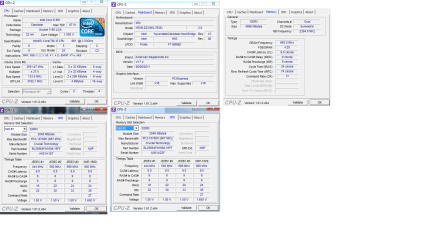
Can you download CPUZ and post a snip of the CPU, Mainboard, Memory, and SPD tabs.
For posting the information , enter 'Snipping tool' in the Start button > Search box, hit enter. Select the area you want to post and save to a convenient place.
How to Post a Screenshot in Seven Forums

A quick search comes up with only this one: Part Number: BLE2KIT2G3D1608CE1TX0
They do list this 1.65v RAM for your motherboard. When the i series CPUs came out there wasn't hardly any 1.50v RAM so 1.65v RAM was recommended. It is widely recommended to use 1.50v RAM now that it is available.
This is listed as an compatible upgrade for your motherboard: DDR3 Upgrade for the MSI (Micro Star) H55M-E23 Motherboard
Part Number: CT2KIT51264BA160B
Module Size: 8GB Kit (4GBx2)
Package: 240-pin DIMM
Feature: DDR3 PC3-12800
Specs: DDR3 PC3-12800 • CL=11 • Unbuffered • NON-ECC • DDR3-1600 • 1.5V • 512Meg x 64 •
Most of the RAM on crucials site is 1.50v.
 
Last edited:

My Computer

Computer type
PC/Desktop
Computer Manufacturer/Model Number
76~2.0
OS
Windows 7 Ult x64 - SP1/ Windows 8 Pro x64
CPU
Intel Core i5-3570K 4.6GHz
Motherboard
Gigabyte GA-Z77X UD3H, f18
Memory
8GB (2X4GB) DDR3 1600 Corsair Vengeance CL8 1.5v
Graphics Card(s)
Sapphire HD 7770 Vapor-X OC 1GB DDR5
Sound Card
Onboard VIA VT2021
Monitor(s) Displays
22" LCD Dell
Screen Resolution
1680x1050
Hard Drives
Samsung 840Pro 128GB SSD,
Seagate Barracuda 500GB SATA2 7200rpm 32MB cache, Seagate Barracuda 1TB SATA2 7200rpm 32MB cache,
PSU
Corsair HX650W
Case
Cooler Master Storm Scout
Cooling
Corsair H80 2x12cm Noctua NF P12 , 2x14cm case fans
Keyboard
Logitech Wave
Mouse
CM Sentinel
Internet Speed
Dismal
Antivirus
Avast
Browser
Opera Next
Other Info
Haswell laptop: HP Envy 17t-j, i7-4700MQ, GeForce 740M 2GB DDR3, 17.3" Full HD 1920x1080, 16GB RAM, Samsung 840 Pro 128GB, 1TB Hitachi 7200 HDD,
Desktop: eSATA ports,
External eSATA Seagate 500GB SATA2 7200rpm,
External WD USB 500GB
CPUID.png
Is the RAM also being clocked at 1333? That's what I've seen in the past few motherboards I've used. Setting the BIOS to use the XMP or manual settings were required to get higher frequencies.

Yes the RAM is being clocked at 1333 mhz. For some reason there is no XMP option in my BIOS.

If you worried about ram voltage look up your ram and see how far it can be overclocked and if your voltages are 1.9 then i would manualy set it might be a good idea to list full specs of what the ram is capable of

For some reason my RAM modules is not listed in the crucial site. So I am unable to get the info about overclocking that I need.

What CPU do you have,i3/i5/i7?
How many RAM cards and the capacity?
For example 2X4GB.

I have a Intel i5-661 at 3.33ghz I also have 2 ram sticks in dual channel 2x2gb.

A quick search comes up with only this one: Part Number: BLE2KIT2G3D1608CE1TX0

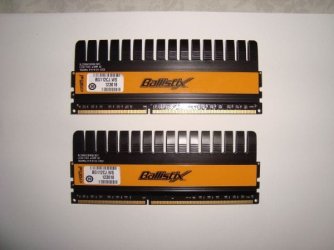
That is definitely not my RAM. For some reason I cannot find any trace of my model number. Its the BL25664FN1608.16FF. Actually it looks like the one you linked to but yellow. Here is a picture of em.

Lastly do you guys think that the Corsair Vengeance will work on my system? Amazon.com: Corsair Vengeance Blue 8 GB (2X4 GB) PC3-12800 1600mHz DDR3 240-Pin SDRAM Dual Channel Memory Kit CMZ8GX3M2A1600C9B: Electronics
 

Attachments

  • 5If5E85M93E93Ka3I3c7c159a32cb7fc51c50.jpg
    5If5E85M93E93Ka3I3c7c159a32cb7fc51c50.jpg
    26.8 KB · Views: 22

My Computer

OS
Windows 7 Ultimate x64
It depends on the BIOS if they support XMP for the RAM.

The Corsair Vengeance CMZ8GX3M2A1600C9B is 1.50v at 1600MHz, 9-9-9-24.
This RAM will work well in your system.
I have the same RAM but, C8.
 

My Computer

Computer type
PC/Desktop
Computer Manufacturer/Model Number
76~2.0
OS
Windows 7 Ult x64 - SP1/ Windows 8 Pro x64
CPU
Intel Core i5-3570K 4.6GHz
Motherboard
Gigabyte GA-Z77X UD3H, f18
Memory
8GB (2X4GB) DDR3 1600 Corsair Vengeance CL8 1.5v
Graphics Card(s)
Sapphire HD 7770 Vapor-X OC 1GB DDR5
Sound Card
Onboard VIA VT2021
Monitor(s) Displays
22" LCD Dell
Screen Resolution
1680x1050
Hard Drives
Samsung 840Pro 128GB SSD,
Seagate Barracuda 500GB SATA2 7200rpm 32MB cache, Seagate Barracuda 1TB SATA2 7200rpm 32MB cache,
PSU
Corsair HX650W
Case
Cooler Master Storm Scout
Cooling
Corsair H80 2x12cm Noctua NF P12 , 2x14cm case fans
Keyboard
Logitech Wave
Mouse
CM Sentinel
Internet Speed
Dismal
Antivirus
Avast
Browser
Opera Next
Other Info
Haswell laptop: HP Envy 17t-j, i7-4700MQ, GeForce 740M 2GB DDR3, 17.3" Full HD 1920x1080, 16GB RAM, Samsung 840 Pro 128GB, 1TB Hitachi 7200 HDD,
Desktop: eSATA ports,
External eSATA Seagate 500GB SATA2 7200rpm,
External WD USB 500GB
Thank you very much. I hope that changing the RAM will stop all of my system freezes that have been happening lately.
 

My Computer

OS
Windows 7 Ultimate x64
It depends on the BIOS if they support XMP for the RAM.

The Corsair Vengeance CMZ8GX3M2A1600C9B is 1.50v at 1600MHz, 9-9-9-24.
This RAM will work well in your system.
I have the same RAM but, C8.


Yes this Ram is great I have it too and has xmp profiles

You can even bump it to a higher frequency off stock voltage I pushed mine to 1800+ on stock voltage but didn't leave it there

it's round 1792 stable no Hicups next time you should go by the QVL so you won't go through this again not all Ram types work well with everyboard some get lucky some get horrible issues but sticking to the QVL is your best bet

All Corsairs Vengeance is on that list of QVL :geek:
 

My Computer

Computer type
PC/Desktop
Computer Manufacturer/Model Number
CoreI7-6700K MrFingerIII Special Builds
OS
Windows 10 Home Premium 64bit sp1
CPU
Intel I7-6700K @ 4.6 Ghz 1.344 volts everyday OC
Motherboard
Asrock Fatality K6 Z170 Socket 1151
Memory
32GB G-Skill TridentZ 3200mhz 16-18-18-38 DDR4
Graphics Card(s)
Sli Gigabyte Windforce GTX 980 G1
Sound Card
AC97 Creative Rage Tactic 3D Headphones Bluetooth
Monitor(s) Displays
27" Asus ROG Swift PG278Q G-Sync 48" Vizio Smart HD TV
Screen Resolution
2560x1440p 27"- 48" Currently Gaming at 2560x1440p Res 2K
Hard Drives
250GB Samsung Evo840SSD Seagate baracuda 500 GB WD Mybook 500Gb 1TB Seagate Barracuda
PSU
HX1050w Corsair Silver 80plus certified crosfire/sli
Case
Enthod Pro Full Tower
Cooling
Corsair H110i GT 280 mm High Performance WaterBlock
Keyboard
Logitech wireless keyboard
Mouse
Logitech wireless mouse
Internet Speed
Cox Cable 100+ mb
Antivirus
WebRoot Spysweeper with Antivirus
Browser
IE-10, Chrome, Opera
Other Info
My Other Rig is a AMD FX8320E @4.6Ghz 16GB Ballistic Sport Ram
Mobo Asrock Fatality 990FX 120GB OCZ SSD 1TB Seagate Barracuda Corsair H75 Cooling PSU Corsair CX750
GPU GTX Gigabyte 970G1
Back
Top